


In this workflow, I’ve built an intelligent ComfyUI setup that automatically improves user prompts to better suit the Flux1 Kontext-Dev editing system — a cutting-edge tool for image-to-image editing .
📘 Reference: Flux1 Kontext-Dev Official Guide
🎯 Goal
Flux1 Kontext-Dev relies heavily on clear, rich, and well-structured prompts to guide the editing process. However, many users provide short or vague prompts, leading to poor results.
This workflow solves that by integrating a local large language model (LLM) using Ollama, which rewrites simple prompts into descriptive, detailed prompts tailored for effective image editing.
⚙️ How the Workflow Works
User Inputs:
An image for editing.
A simple or vague text prompt describing the desired change.
Ollama Integration (LLM for Prompt Enhancement):
The prompt is passed to Gemma-3, a vision-enabled LLM running locally via Ollama.
The model rewrites the prompt into a more expressive and visually descriptive version.
Enhanced Prompt → Flux1:
The improved prompt is fed into the Flux1 Kontext-Dev nodes along with the input image.
Flux1 then performs context-aware image editing based on this high-quality prompt.
📦 Requirements
To run this workflow, you need the following components:
✅ 1. Ollama
A powerful local runtime for LLMs and vision models.
🔗 Download and install Ollama:
https://ollama.com/download
✅ 2. Vision Model: gemma3
Use a multimodal (vision + language) version of Gemma 3 depending on your system’s VRAM:
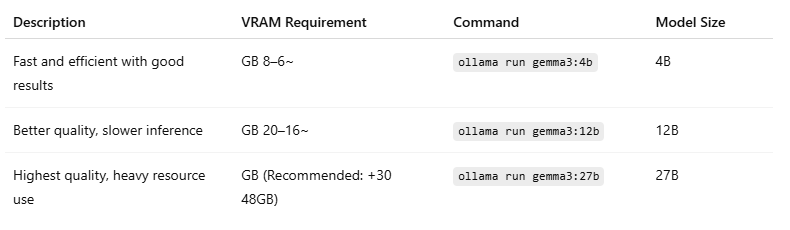
👉 Model Page:
https://ollama.com/library/gemma3
ollama run gemma3🔥Uncensored Model:
https://ollama.com/huihui_ai/gemma3-abliterated
ollama run huihui_ai/gemma3-abliterated⚠️ Make sure you're using the multimodal (vision) variant of Gemma 3 to ensure it can process image-based prompts in ComfyUI.
✅ Key Benefits
Improved editing accuracy from even simple input prompts.
Local-first, privacy-safe setup using Ollama and ComfyUI.
Flexible model choices depending on your hardware.
💡 Example
Input prompt:
"change the style to realistic"
Enhanced prompt via Gemma-3:
"Change the image to a photorealistic rendering, with accurate lighting, textures, and details, while preserving the subject’s facial features, pose, and the existing composition."
🌍 Multilingual Prompt Support
This workflow supports prompts in any language, including Arabic, and automatically translates them into expressive English prompts that Flux1 can interpret.
💬 Example:
Input (Arabic):
"حول الستايل إلى حقيقي"
Enhanced Output (English):
"Change the image to a photorealistic rendering, with accurate lighting, textures, and details, while preserving the subject’s facial features, pose, and the existing composition."
This makes the workflow highly accessible to non-English speakers while still benefiting from professional-grade prompt enhancement.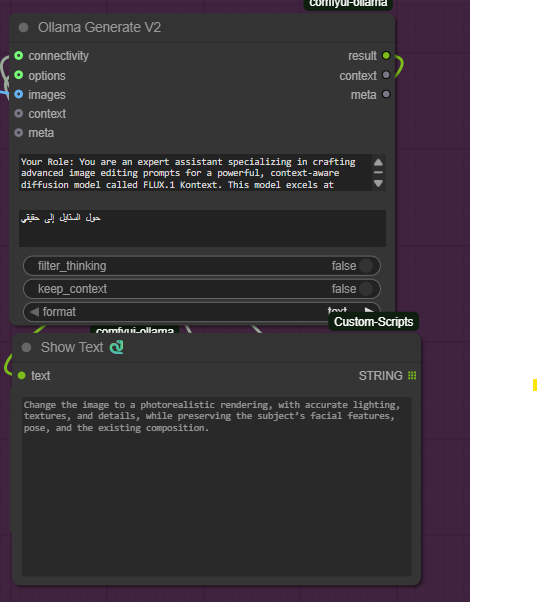
🧩 Workflow Versions
There are two versions of this workflow available:
🔹 Basic Version
Designed for ease of use.
Supports 1–2 input images.
🔸 Advanced Version
Supports up to 4 input images.
Includes upscaling at the end of the pipeline.
Built for professional-quality outputs.
Based on a modified version of this original workflow from Civitai:
👉 https://civarchive.com/models/618578?modelVersionId=1956938
Description
FAQ
Comments (8)
WO~COLL
Can you please upload the FP8 file to huggFACE or other storage locations for easy download? (Don't use NSFW name FOR MODEL, it may be reported by annoying guys)
This workflow is pretty cool, but I can't for the life of me see how to set a fixed or random seed. Am I crazy?
thank you, check this link:
https://jumpshare.com/s/Rt57cACHwwtlwyNnvoJd
jorgmikel76648 Thanks man, but the link appears to be broken.
BluesElwoo https://gifyu.com/image/bKXz3
BluesElwoo i reupload it:
https://gifyu.com/image/bKXz3
Thanks so much! I really appreciate it!
so i played around with your workflow a little. im not a pro or anything but JUST by setting the denoise in the upscaler around .5 gives way better skin. if you change upscaling the sampler and scheduler to res_2s/beta57 (res4lyf) EVEN MORE so.
love the idea of using the Detail Daemon Sampler just for the upscaler btw, stealing that. ^^