
How to Use the Batch Watermark Remover Workflow in ComfyUI (Flux Kontext)
Removing watermarks from a large set of images can be time-consuming if done manually. Thankfully, with ComfyUI and the powerful Flux Kontext model, this process can be fully automated using a Batch Watermark Remover workflow that I created.
In this post, I'll walk you through how to use the workflow step-by-step so you can quickly remove watermarks from a folder full of images with just a few clicks.
🛠 Step-by-Step Instructions
1. Set the Model Paths
Before running the workflow, make sure to adjust the model file paths according to where the models are stored on your machine.
Refer to the screenshot below to see where to make these changes in the workflow.
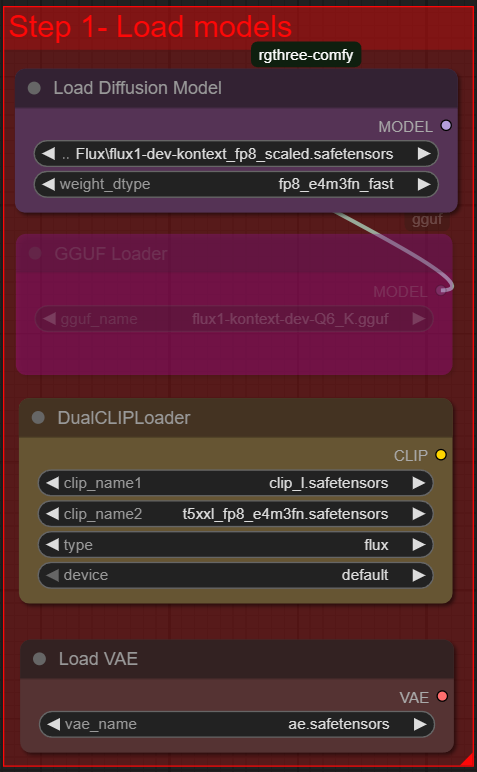
⚠️ If the paths are incorrect, the workflow will fail to load the models.
2. Enter the Folder Path of Your Images
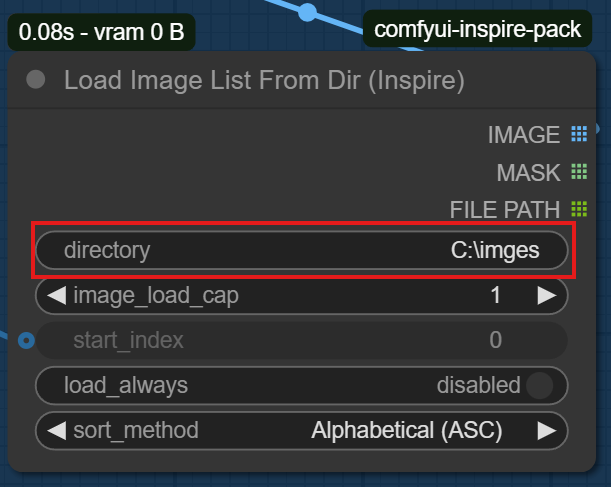
Locate the node where you need to provide the input folder path. This should point to the directory containing all the images you want to process.
Make sure the path is correctly entered as shown in the screenshot below.
3. Set start_index to 0
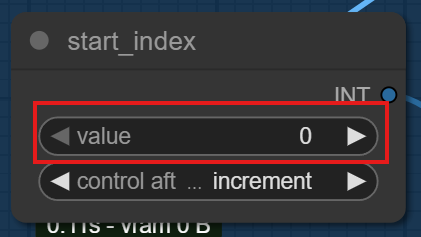
Next, update the start_index value to 0. This ensures that the processing starts from the first image in your folder.
Check the screenshot to confirm you are editing the correct node.
4. Set batch count to the Number of Images
Finally, change the batch count value to match the exact number of images in your input folder.
This tells the workflow how many images to process in one batch.
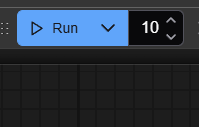
After setting this, simply click Run, and the watermark removal process will begin automatically.
Description
FAQ
Comments (3)
Still works great as of December 2025. Thank you so much!
For those that don't want the image to resize just disable/bypass "FluxKontextImageScale" node. However if you have low VRAM be aware of potential OOM, or long renders. That said, I'm just using a 3060 6VRAM and it took 17 minutes to render around half the resolution of 3000x4204, so it is possible.
Still insanely powerful in 2026 - used it to batch process images for one of my character LoRAs and it completely removes the text while maintaining character fidelity almost perfectly, thanks for this
I think this works on nvidia only, cant get some custom nodes on amd. but it looks great.