
WAN-L.O.V.E. is hybrid Wan Low Overhead VRAM Efficiency Image-to-Video Fast (4-step) All-In-One model (full checkpoint: UNET, CLIP and VAE). All you need to encode source images is this model and, optionally, CLIP Vision model for Wan. Use CFG 1 and Euler sampler and beta scheduler and model shift 8-12. Enjoy!
In ComfyUI just use usual default workflow with checkpoint loader, CLIP vision loader and sampler.
Note: If you look for Wan 2.2 14B all-in-one version, then try this checkpoint, the same 1-pass workflow as for Wan 2.1 will work pretty well.
Real 49 frames of 720p video generation with Wan 2.1 14B on i5-11400 with RTX 3050 4Gb and 32 Gb RAM via ComfyUI:
And the easy-peasy one-pass workflow (open this picture in a new tab):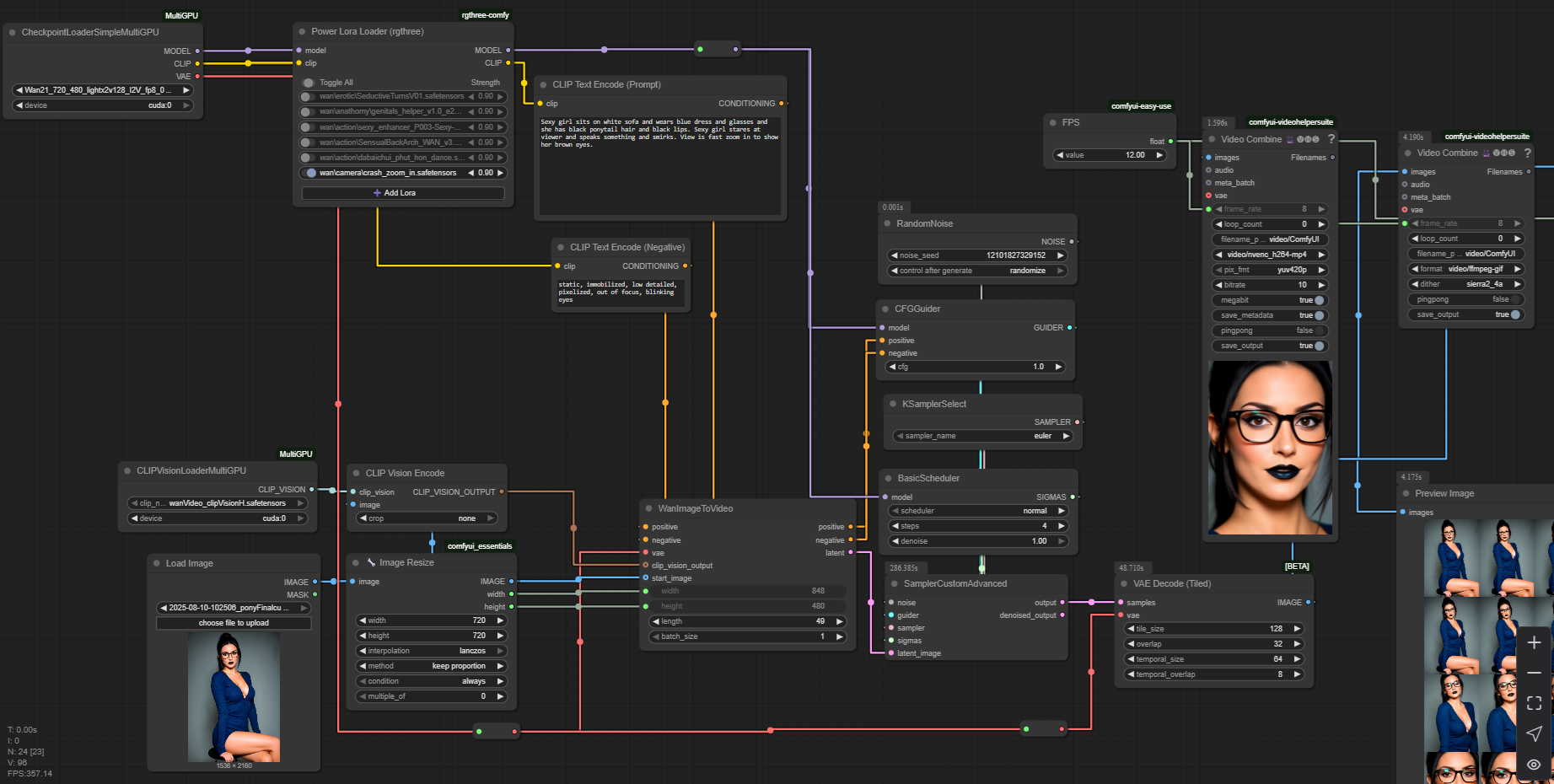
Description
Merge of 720p and 480p Wan 2.1 and a few specially selected speed-up LoRAs. Should be compatible with most of 720p and 480p LoRAs.
Simple workflow is available as "Training data" archive.
LoRAs for this model
FAQ
Comments (29)
link to the checkpoint pls?
just download model file on this page, it is full .safetensors checkpoint
you can share me the workflow please???
but i need to make the workflow???
u can share me one workflow to use with this
@mistporyvaev thanks
i like it 🔥🔥🔥
gguf plz
manual of how to achieve this pls
@schsch oh no
@schsch i don't want to do this 🤪
Well, all for science, lol
I'm new to comfyui. is there a tutorial that can help me set it up?
Install ComfyUI portable
https://docs.comfy.org/installation/comfyui_portable_windows
Then install ComfyUI Manager
https://github.com/Comfy-Org/ComfyUI-Manager#installation
Then Google for workflows (.json files) and try to run them in ComfyUI. Later you will understand how to create workflows by yourself. GLHF!
@mistporyvaev thank you so much. so any comfyui workflow will work with this wan model?
@dark_aromaa ComfyUI is platform for your workflows. Your workflow should be compatible with model you use. So if you have workflow for Wan 2.1 and workflow has checkpoint loader node then, yes, it will run my checkpoint successfully.
@mistporyvaev thank you so much for the help
WorkFlow here https://openart.ai/workflows/f1Mip1FaUQMTTyHQHqJi
The image provided does not have the .json for the workflow, it needs to be remade manually. It will be helpful if users can have the actual workflow file. :)
Prompt outputs failed validation: CLIPVisionLoader: - Value not in list: clip_name: 'clip_vision_h.safetensors' not in []
@letsoon733 Clip vision model is here: https://civitai.com/models/1329096?modelVersionId=1501088
why does the checkpoint loader lists image diffusion models, not video checkpoints?
link dead xd
@testerweed695 for 14B version simple workflow is available as "Training data" archive under the model download link
@mistporyvaev yeah but the ones asking like me want the one for 5b id guess if we keep askin and you saying there one only for the 14b? :/
@testerweed695 please don't cry, I've uploaded simple workflow as training data to 5b model page
https://civitai.com/api/download/models/2260597?type=Training%20Data
Details
Files
Available On (1 platform)
Same model published on other platforms. May have additional downloads or version variants.