
WAN-L.O.V.E. is hybrid Wan Low Overhead VRAM Efficiency Image-to-Video Fast (4-step) All-In-One model (full checkpoint: UNET, CLIP and VAE). All you need to encode source images is this model and, optionally, CLIP Vision model for Wan. Use CFG 1 and Euler sampler and beta scheduler and model shift 8-12. Enjoy!
In ComfyUI just use usual default workflow with checkpoint loader, CLIP vision loader and sampler.
Note: If you look for Wan 2.2 14B all-in-one version, then try this checkpoint, the same 1-pass workflow as for Wan 2.1 will work pretty well.
Real 49 frames of 720p video generation with Wan 2.1 14B on i5-11400 with RTX 3050 4Gb and 32 Gb RAM via ComfyUI:
And the easy-peasy one-pass workflow (open this picture in a new tab):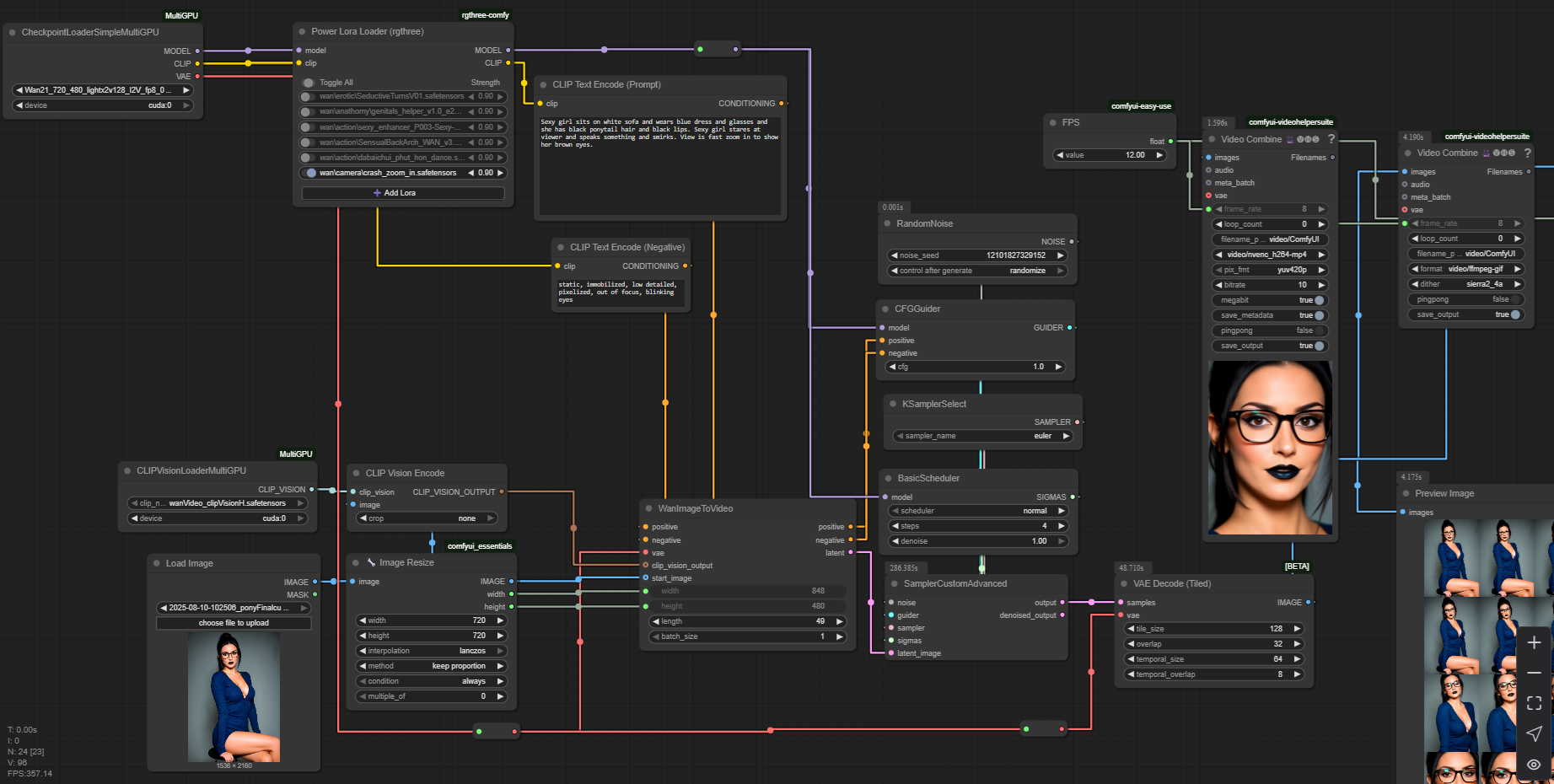
Description
fp16
model marked as "pruned" is just 1.3B with lightning LoRA
model marked as "full" is 1.3B with many improvements integrated
FAQ
Comments (18)
how is this low-vram ? am I missing something ? running this on Linux RTX 4080 and it crashes immediately because of VRAM
I run it on mobile rtx3050 with 4gb vram. Maybe you are using wrong tools. Use MultiGPU loaders in ComfyUI and everything will be ok.
I use a GTX 1060 6gb VRAM (potato card) and this workflow (picture) fails miserably. I tried to load everything on CPU (32g RAM + 32gb SWAP) and it crashes in the first second.
In <8gb GGUF WAN 2.2 around hugginface site, it works, provided you have set a SWAP file like 16gb or more in Windows. If you have 2 ssds, just put min 8000mb, max 8000mb in each of them and restart. If it doesnt work, then you have to check if you're using --lowvram parameter in comfyui BAT file, and you may need Crystools in order to monitor VRAM usage and the affected node.
@schsch on Windows I have 32Gb RAM and 96Gb swap-file
Minimum requirements? 12GB VRAM, perhaps? Nothing really works in 8gb or less VRAM, even putting every loader on CPU instead of CUDA.
As I sad, I run every of modern heavy models (such as Wan 14B, Hunyuan or Flux) on my low-end 4Gb 3050. I use manually installed ComfyUI (cloned from git repo), with such nodes as multi-GPU loaders (they have some magic inside, I don't know) and sampling method as presented on one of my model gallery images (guider, sigmas and so on, usual KSampler doesn'y work for me), and tiled VAE of course, straight non-tiled default VAE decoder is most deadly thing for low-end hardware.
I run it under Windows 11 Pro with 32Gb RAM.
That's all.
Hmmm, sigmas... Ok, gotta look that area, thanks!
on 12HB im using 16go models so why you cant using 12go on 8gb vram ? if you have 32gb
This works fine on my 8GB 3070 no issues yet using the workflow in the training data
Ich bekomme OOM sobald ich versuche ein 4 sec clip zu machen . habe eine RTX 3060 6Gb. Benutze auch den Workflow aus den Trainingsdaten. Weißt du woran es liegen könnte ?
@NoxxPlay How many usual RAM do you have? Try to significally increase swap file. Set it to 64Gb on your fastest disk drive just to check that OOM goes away.
@mistporyvaev ist alles gemacht . er lagert auf meine NVe und meine 32gb ram ab , sobald er aber beim ksampler ist haut er mein vram komplett über und dann kommt oom. und das bei ab 4 sek clips. auflösung etc habe ich schon runter gemacht. bringt nicht.
@NoxxPlay which node raises OOM error, KSampler or VAE Decode? Try lower resolution to 768x512 and video length to 49 frames.
Where did you get a 1.3 billion parameter i2v model? There is no official release of such a model and I couldn't find any source.
You should search for "Wan2.1-Fun-1.3B-InP" 🤐
Wan 2.1 1.3b model has been out for quite some time. How couldn't you find it?
@Amicia420 text-to-video and image-to-video models are different things 🫠