


NEW: version 1.3: Now including Qwen Hand-Fixer + Easy Simple Inpaint + Original Full Qwen Edit with Distortion Fixes.
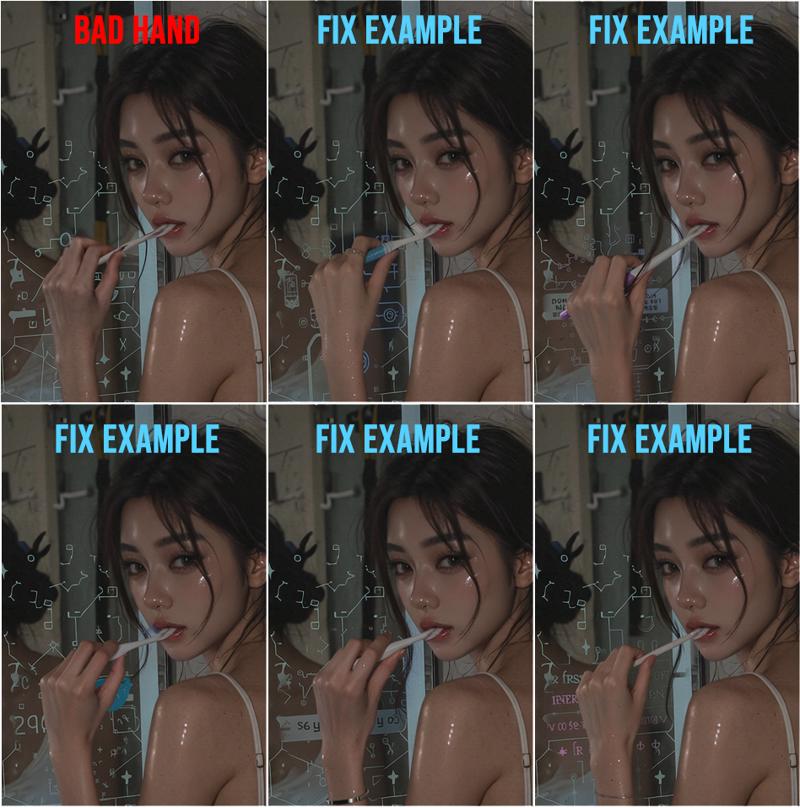
This workflow fixes the problem of Qwen Edit not fixing hands/fingers unless you change it significantly enough to trigger a change. This workflow's method will now consistently fix hands in one-shot while retaining whatever pose you want.
Update: v1.3a: I added further instructions and a save node. For the hand-fixer/simple inpaint top section, do not use instructions as prompt, just describe the masked area content you want.
note: You MUST mask something for workflow to work.
This workflow fixes the warp/blur/distortion problems with Qwen Edit. With this workflow, you can generate the main image in any image model you want, and then fix hands/feet/face/pose/whatever with this perfect qwen edit workflow.
Qwen Hand-Fixer + Simple Inpainter that just works
NO MORE BLUR / NO MORE DISTORT / NO MORE INPAINT MISALIGNMENT
KEEP IMAGE ORIGINAL PIXELS / USE ANY IMAGE SIZE
PRECISE EDITING / ADJUSTABLE POSE SIZE / ACCURATE COLORS
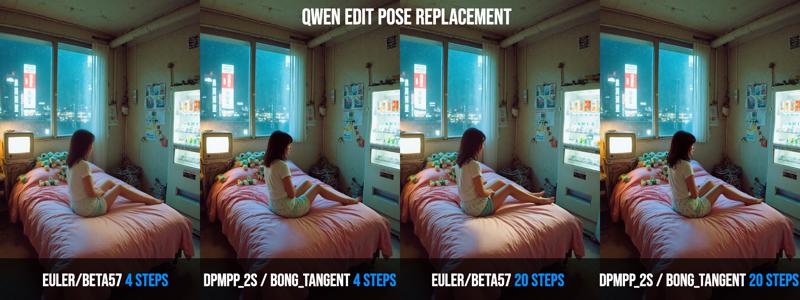
*Recommended Samplers:
Fastest = Euler/Simple
Steps: 8-12
CFG: 1
*Multiple-Objects Instructions:
There are toggles for optional Object 1, and Object 2.
You can input an image into Object 1 and Object 2 to be referenced/placed into the main image in various ways. The slot for Object 2 also have an optional POSE converter, which will convert the image slotted into Object 2 into a POSE skeleton image which you can prompt to change a character's pose to.
Tech details: The key is that Qwen will resize processing images to being divisible by 112. However this will cause inpaint misalignment, distortion, blur, ghosting. I also didn't want to resize/crop entire image to fit 112, because that will downgrade the details of your image as well.
So the idea here is to resize the MASKING area, to avoid resizing entire image, to be divisible by 112. In this workflow, I also used this technique for optional Object 1 and 2, so you just fill in the slots and it'll just work.
I use clownshark sampler in there, but it's not mandatory, I've also included the original basic sampler in there for you to use.
(Credit to GGardens' original Qwen inpaint workflow that I based the original inpaint functions on: https://civarchive.com/models/1996440/qwen-edit-2509-inpaint-anything )
Description
Major quality updates
FAQ
Comments (37)
hmm, is it possible to add a controlnet pose as well to make the pose more refined or desired pose? like overlapping on a character or at a place?
Ok, I can add that in for you. I'm testing various samplers now to give best recommendation for pose prompting and best samplers for color matching.
Qwen edit understand ( depth images, openpose images, depthmap images, densepose images ) just feed them to Qwen2.5-VL Text Encoder as input image in mode multi-images .
no need for controlnet or promting something like ( depthmap in picture 2 ) .. just feed them that's all you need.
https://imgur.com/VrLMfIi
@angelotheshredder For Pose, I've tried it with and without Pose preprocessing, and for me it worked better with it. You can toggle it anyways if you want it or not.
Version 1.3 of workflow have tons of improvements over v1.1, be sure to grab the latest!
Dropped by to say the creator of this workflow is a gigachad, thank you for helping me out )
I left nearly everything alone, as suggested. Uploaded my subject. Uploaded my reference pose photo. Made sure I used all the correct models. Yet, my output is just my input photo with 0 changes to it whatsoever. Am I missing something as to why it's not working correctly?
If you share your saved workflow I can take a look for you. Did it generate any error? Do you have the Samplers/schedulers that's currently selected in my workflow? Did you enter in the prompt for whatever change you wanted to make?
@aih220 I literally changed nothing other than put in the images for my character reference and my pose reference. Everything else was left exactly as it was when I opened it.
@grifflicious376 oh, you may need to tell it to "Change girl to use Image 2's pose, while maintaining exact hair, face, clothing, style of girl" something like that.
@aih220 Yeah, so I did that, still nothing. I'm including a link to the workflow. Let me know if anything stick out to you as being wrong. https://pastebin.com/Cr7XhBcn
@grifflicious376 I will do some test runs on your workflow after another test I'm doing with Qwen. Found some super exciting information that will boost Qwen image quality by 100x for everyone. Looking at your workflow so far, seems fine, prompt could be a bit more brief and exact though.
@grifflicious376 Ok I figured it out, you HAVE to mask something in the main image. even if you mask the whole thing. Try to use rectangular and soft edge brush as I commented on in the workflow.
@aih220 Yeah, sorry. Even after I did that, I never got it to work. Not sure what I'm doing wrong. I appreciate the effort and responses though. Maybe I'll give it another try one day.
@grifflicious376 be sure you have slotted all the models/clip/vae nodes, sometimes it is easy to miss. Change the values to something else and change it back to the file you are using for those 3 nodes. Then for the masking, after you used the mask editor to brush in a mask, did you see a grey area where it's masked? That confirms the mask is there. Also maybe update your Diffusers version?
@grifflicious376 I found that on some objects, DPMPP_2S didn't work but Euler does.
Does this work with qwen edit 2509?
yes I use the latest Qwen Edit for it.
❓I made this Workflow to focus specifically on perfect Qwen Inpaint, avoiding ALL-IN-ONE bloated workflows. But any interest in having AIO or separate image gen workflows for my cinematic/realism pics?
I'm very interested. I used the same model and LoRa as you, and also used RESLYF (this plugin is really good), but the generated image is still quite different from yours.
@410655652327 I've recently just been using the RES4LYF chained example workflow that comes with the node, the top row of nodes, using Euler and beta57. I like it way better than single node now because it's much more consistent, and about the same speed, but a lot more details in the background.
Could you please clarify the purpose of Obj 1 and Obj 2 a bit further?
You can place Object 1 reference, and Object 2 reference into the image. For example. Your main image could be a riderless horse in the middle of a grass field. Object 1 can be your picture, and Object 2 can be a cowboy hat. You can prompt it to place you wearing the cowboy hat onto the horse into the main image.
I also edited the description with some clarifications on this, thanks for asking about it!
Great workflow! BUT What if we just want to exchange the person in the pose image? Say, you have your character, then you have your reference image (where the pose is coming from) and we just want to inpaint/put the character in there? How it is setup now is that it does the generation on the character image, not the reference/pose image
Again, great work though, love it! <3
thank you! You just bypass the Pose conversion node with the toggle. and prompt properly to ask it to replace the red hair character, with the female panda character. (be specific to identify it easier for qwen edit)
@aih220 I did try that but the problem is the order of the images with the Inpaint/Crop tool. That is designated to be the character I am to inject, BUT it should be the character I want to REPLACE, or am I thinking about it wrongly? Meaning, the original character is cut out to keep the original background, then I give QWEN that cropped image of the original character and also the image of my character and when I tried to replace it like you said, it would do it, i just got my original character back again, I think because it is VAE Encoded as well as put into the TextEncodeQwenImageEditPlus. I couldn't get it to switch even when introducing CFG or putting the Lora higher, it just became a bit strange, like an Asian version of my character I want to inject! :D
@olivetty I mean all the images just gets sent to qwen, I'm not sure if the new node is restrictive with the main image being the background though. Also be sure to paint a mask on the original image otherwise it won't operate on it.
Tried out a bit but i cant get any good results in image repairing. Specially hand repair. Tried out different settings and both, ksampler and clownsampler, but he is changing nothing. After 1-3mins iam just getting the same picture than input. Maybe some pixels changed but nothing big. Any ideas?
I've actually had the most amount of trouble with hands. Anything else I can usually change well on first try, but hands... I'm going to look into this and come up with a better answer and solution for you, stay tuned =)
I tried sooooo many techniques to try to get you the best possible solution. I tried force-triggering the image edit by blurring or denoising, but that didn't work, it kept the noised or blurred image. I tried chaining samplers, I tried different samplers, I tried unsampling and resampling chain, I tried res4lyf and regular chains, low res, high res, manually covering image with paint, everything! The main problem is that if the change is too small, Qwen Image Edit thinks the current image is already "good enough" and doesn't change it.
After all that, I discovered the best way to handle it, is to create a new toggle in my workflow that will be specifically for regular inpaint, but with same models. So I'll get that updated into my workflow tonight/tomorrow for ya.
Posted 1.3 with hand-fixer feature, thank you for making the request =)
@luneva Hey mate, thanks for testing out that much! Appreciate it. Will try out the new version and let u know! :)
@MrSmith2025 yeah please let me know, and thanks for helping to test it out!
@luneva Sorry mate, it doesnt work out. It fixes nothing. Tested a lot of pictures. Here are three of them i've tested with so you can also try out if you want:
https://i.imgur.com/nBHF8BZ.png
https://i.imgur.com/P6PUWHJ.jpeg
https://i.imgur.com/kgEWs5q.jpeg


@MrSmith2025 hey I just tested your images, and it works great. However I did also update the workflow so you can download the latest one. For hand fixing, you want to use the toggler, and turn off the other toggles except turn ON the handfixer (top section). And in the prompt box, describe what's in the masked area instead of putting in "edit instructions" I also added a save node to the top section, oops! For your hands fix, I put this in the top prompt: "two beautiful female hands together on her knee" and of course I image masked that general hand area at the image upload node using "Open in MaskEditor"