



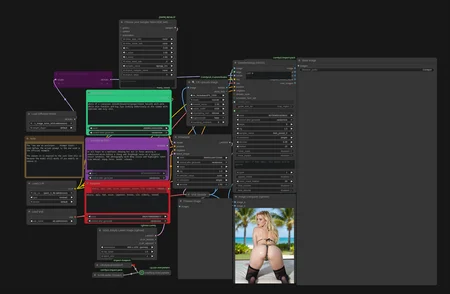
🍩 Donut Workflow V5
Krea2 • DonutNodes 3.0.23+
Generate, edit, inpaint and outpaint in one workflow—with organized panels, flexible references and previews for every finishing stage.
💬 Discord — help, artwork & updates · ☕ Support on Ko-fi · 🛠️ DonutNodes on GitHub
✨ V5 highlights
Cleaner layout — separate panels for setup, generation, upscaling and face detail.
Inpainting & outpainting — paint or draw a selection, invert it, adjust the seam, or expand with directional canvas presets. Outpainting stays within your megapixel budget.
Smart masks — describe what to select with SAM3.1, or use BiRefNet for foreground/background separation. Refine masks manually.
Independent A/B crops — frame each reference separately, with clipboard paste and optional reference guidance.
Flexible finishing — first and second upscales, Face Detailer and SeedVR2, with individual result previews.
Prompt variants — add, duplicate and reorder prompts; keep one active or cycle automatically. Includes autosizing editors and shared wildcard controls.
Searchable LoRAs — find models by typing, then adjust strengths and block weights.
🚀 Quick start
Install/update DonutNodes 3.0.23+. Restart ComfyUI and refresh your browser.
Open DonutWF_v5.json.
Use Manager → Install Missing Nodes, then restart.
Install the models using one of the options below.
Review your models, LoRAs, prompt and resolution. Leave Editing off for your first text-to-image run, then hit Run.
📦 GitHub installation: use Download missing for the supported model catalog.
📦 Registry/Manager installation: download the optional DonutNodes-model-installer.zip from this version’s files. Extract it, follow the included README and run the Windows or Linux/macOS launcher. It downloads catalog models into the appropriate ComfyUI folders and reuses matching existing files. Some downloads may require an access token.
The Registry package provides model links and the separate installer link instead of the built-in downloader.
🎨 Editing, masks & outpainting
Enable Editing, add your base image to A, and optionally place a second reference in B. Describe the change in the prompt.
Open Paint / outpaint… to edit a selected area or extend the canvas. Use Overlap to let generation reach into the original image and Seam width to soften the transition.
For B, choose Prompt selection to mask a named object, or Auto subject for the foreground. Use full-resolution references for better results.
Reference guidance is a separate option for borrowing visual elements during generation; it pauses while Editing is enabled.
💾 Saving & moving workflows
The supplied preset saves to output/Final with seed-based filenames. Saving supports PNG/WebP workflow metadata.
Keep your old workflow when upgrading, then copy your personal settings into V5. Reference images and wildcard files are stored separately—copy those too when moving installations.
🐛 Feedback
Found a bug? Share your workflow with private content removed, ComfyUI/DonutNodes versions, GPU/VRAM and the full error on Discord.
High-resolution editing with multiple references and NAG can be VRAM-heavy. Seam quality depends on the image, prompt and overlap settings.
Description
FAQ
Comments (35)
Thanks for sharing!
I can't get the workflow to work lol, but anyway, I managed to install everything without any problems and that's rare!
um 1.1 has no workflow... just a png..
You need to download it.
Drag it into your comfyui
@DrakulValmont666 I did dude and the contents is literally just a picture. Am I misunderstanding something??
@StellarFlower You then need to drag it onto your Comfyui interface, so that the workflow and the names of the missing nodes are displayed.
after installing missing custom nodes and running i get error
RuntimeError: Cannot use bleh_preset_0 - present not defined. Ensure BlehSetSamplerPreset runs before sampling.
fixed in newest version. a link was missing.
@DonutsDelivery Ah, great! I can't wait to test the new version then, because I managed to get 1.1 working last night, but by working around the bleh node and modifying the samplers. Thanks for the update!
yes workflow does not work
fixed in newest version. a link was missing.
Good workflow. Bit complicated, I had to re-organize it and replace a couple of missing nodes, download bbox models, but it works well. Thanks.
Version 1.2 works perfectly. Now I just need to get to grips with it and understand it better. Thank you.
Have fun! If the image it first generated isn't as good as the preview it is because I improved the prompt. The settings are the same.
There is no WF for 1.2?
I'll have to re-upload it when I get home in a few hours, sorry for the inconvenience.
Good framework for SDX/Z-Image work flow. Number of things hidden behind nodes that aren't needed like the BlehSetSamplerPreset. The third facedetailer for the nsfw fix doesn't work due to the default 'clip' input from the anywhere node which needs to be hard wired to the SDXL checkpoint. I would suggest for anyone to scrub through the logic and modify to your likening. Still a good starting point for a Z-Image/SDXL refinement workflow at least until the support ramps up for Z-Image.
Ive uploaded a new file with the sdxl clip hard Wired. Sorry for the inconvenience
Hello, since you seem so well-informed, why not collaborate with the creator of the process to publish the final version? This isn't a criticism, I should clarify, but a suggestion, as I'm eager to fully utilize Z's capabilities. Sincerely.
@DonutsDelivery Hi there I just tried to download this workflow again but i still have the same issue with the third facedetailer. Do I need to wait for the new download link to become available?
@madmannebruz813 strange, ill double check
@madmannebruz813 it should be fixed now. added download links for the models in a note above it.
@DrakulValmont666 I was actually thinking the same. I'll reach out...
@DonutsDelivery all working thanks man.
How can I generate a man’s penis”
use a penis lora and replace pussy detection model with a penis detection model.
@DonutsDelivery Where should I download penis lora? Its format is .pt. I'm a novice and it's very complicated.
@DonutsDelivery It has been solved. Your workflow is so easy to use. I love you. It would be better if there was an anal test.
Lacks everything, too complex to use, unsuitable for newbies
Newbies gen with chatgpt
@DonutsDelivery no newbie here, but your tiled upscale node doesn't seem to update. any ideas? I was thinking maybe a pip update or something. not sure tbh
@MysticMindAi strangely enough my comfy registry says the latest version is 1.0.35, but my manager says the latest is 1.0.29... altho im using nightly (since i make the node). a few options: make sure comfy is up to date. change to nightly if you can. if that dosent work, clone the repo directly into your custom nodes the old way. https://github.com/DonutsDelivery/ComfyUI-DonutNodes/tree/main
@DonutsDelivery Updating Comfy worked! Much thanks!