


BEST One-Click Consistent Character Dataset Creator for AI Influencer Workflow With NSFW Support
- Official Discord: https://discord.gg/RnUHPzTkXH
Sample Generation Result of this workflow (60 Images): https://dri.me/KJbcva5r7PZQCiLvpbiq1qRyp7qIMf
- View all the generated Image along with the reference image to get an idea of how the final result will look like.
- On this example out of 60 Images I got 3 broken images and 57 Images were perfectly fine to use for LoRA training.
Author: Coolstrad
Version: Latest (as of February 2026)
Purpose: This workflow simplifies the creation of high-quality, consistent character datasets for AI influencers using ComfyUI. It's designed for ease of use, allowing you to generate organized image sets with minimal input. Perfect for training LoRAs or building AI-generated content pipelines.
## Overview
This is a streamlined, one-click tool for generating consistent character datasets. Upload a reference image, provide a character name, and run the workflow. It handles everything from image generation to organization, outputting results directly into a dedicated folder.
The workflow supports both SFW and NSFW outputs, making it versatile for various AI influencer projects. It leverages advanced models like Flux, Qwen, and SDXL to ensure high fidelity and consistency.
## Key Features
- One-Click Simplicity: No complex setup—just upload, name, and run.
- Consistent Results: Maintains character likeness across generated images, with minor variations based on input quality.
- NSFW Support: Capable of producing adult-themed datasets automatically.
- Organized Output: All images are saved in ComfyUI/output/datasets/<character_name> for easy access and management.
- Performance: Processing time depends on your hardware; optimized for standard setups.
- LoRA Compatibility: Datasets produced are suitable for training LoRAs with acceptable quality.
## Usage Instructions
1. Install Dependencies: Ensure ComfyUI is installed and configured.
2. Download Models: See the "Required Models" section below and place them in the appropriate directories.
3. Run the Workflow:
- Upload your reference character image.
- Enter the character's name.
- Hit "Run" and wait for completion.
4. Output Location: Find your dataset in ComfyUI/output/datasets/<character_name>.
5. Tips: For best results, use high-quality reference images. NSFW results are automatically done.
## Community and Support
Join our growing Discord community for AI influencer workflows, general AI image/video generation tips, exclusive workflows, and direct support.
- Discord Server: [Join Here](https://discord.gg/RnUHPzTkXH)
A vibrant space for insights, troubleshooting, and collaboration. If you encounter any issues running this workflow, hop in—I'll personally help you out!
## Notes and Limitations
- Face Consistency: The workflow excels at maintaining character features, but slight deviations may occur depending on the initial image quality. These are usually subtle and not noticeable in final outputs.
- LoRA Training: Datasets generated here produce LoRAs of solid quality—test and iterate as needed.
- Hardware Requirements: Works on most setups, but for Qwen models, choose the variant based on your VRAM (e.g., lower-bit versions for limited memory).
- Ethical Use: Always respect guidelines for AI-generated content, especially NSFW.
## Required Models
Download and install these models into your ComfyUI directories as specified. Links point to official sources.
### Flux-Related Models
- Flux Model: [Download](https://huggingface.co/Comfy-Org/vae-text-encorder-for-flux-klein-4b/resolve/main/split_files/diffusion_models/flux-2-klein-4b.safetensors) ComfyUI/models/diffusion_models/
- Text Encoder: [Download](https://huggingface.co/Comfy-Org/vae-text-encorder-for-flux-klein-4b/resolve/main/split_files/text_encoders/qwen_3_4b.safetensors) ComfyUI/models/text_encoders/
- VAE: [Download](https://huggingface.co/Comfy-Org/vae-text-encorder-for-flux-klein-4b/resolve/main/split_files/vae/flux2-vae.safetensors) ComfyUI/models/vae/
### Qwen-Related Models
- Qwen (Select based on memory): [Download Options](https://huggingface.co/unsloth/Qwen-Image-Edit-2511-GGUF/tree/main) ComfyUI/models/unet/
- Qwen LoRA: [Download](https://huggingface.co/lightx2v/Qwen-Image-Edit-2511-Lightning/resolve/main/Qwen-Image-Edit-2511-Lightning-4steps-V1.0-bf16.safetensors) ComfyUI/models/loras/
- Qwen Text Encoder: [Download](https://huggingface.co/Comfy-Org/Qwen-Image_ComfyUI/resolve/main/split_files/text_encoders/qwen_2.5_vl_7b_fp8_scaled.safetensors) ComfyUI/models/text_encoders/
- Qwen VAE: [Download](https://huggingface.co/Comfy-Org/Qwen-Image_ComfyUI/resolve/main/split_files/vae/qwen_image_vae.safetensors) ComfyUI/models/vae/
### SDXL Model
- Recommended SDXL Porn Model (or any compatible SDXL): [Download](https://civarchive.com/models/82543?modelVersionId=2043971) ComfyUI/models/checkpoints/
### Ultralytics Models
Download both and place in ComfyUI/models/ultralytics/bbox/ folder.
- Female Breast Detection: https://huggingface.co/ashllay/YOLO_Models/resolve/e07b01219ff1807e1885015f439d788b038f49bd/bbox/female-breast-v4.0-fantasy.pt
- Female Body Detection: https://civarchive.com/models/1816953?modelVersionId=2056142
Credits
- Original Creator: This workflow was developed solely by Coolstrad
For updates, feedback, or custom requests, reach out via Discord. Happy creating! 🚀
V2.0 MASSIVE UPDATE
✨ Consistent Character Dataset Workflow
This workflow helps you create a dataset for consistent character generation.
It is fully modular — if you need more than 16 images, simply duplicate the image group and paste as many times as you want.
➡️ Just remember to add/adjust your prompts for each new group!
📌 How to Use This Workflow
Load the face you want to replicate.
Run the workflow normally.
After the Qwen generation finishes:
Check the note attached to the right side of the Qwen samplers.
You must enable the Z-Image samplers group.
Press the Run button again.
🎉 Once everything completes, you'll find all generated images inside your output folder.
 This is the reference face image that I have used, the final results are attached on this versions post.
V1.0
Using this ComfyUI Workflow you can generate base dataset for your consistent character. This is generated with [Z-Image-Turbo] Model. You need to add a face prompt and all the other things will be done by the workflow.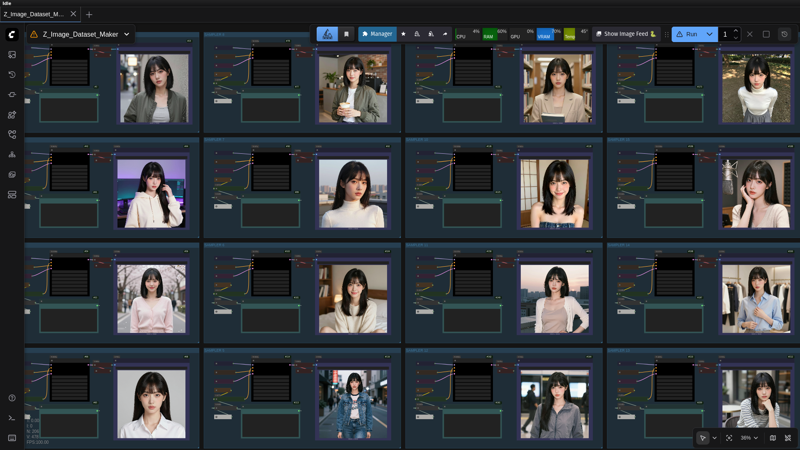
Description
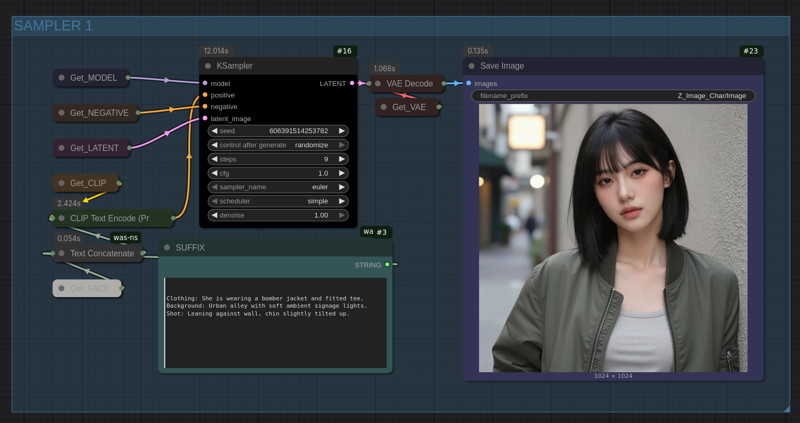
In this version, you can generate the dataset from a reference face which will be refined by Z-Image to make it photorealistic
FAQ
Comments (47)
Could you tell me why every image generated by Qwen is identical to the input face image? It doesn't seem to be generating new images based on the text prompt.
You have very high likely used the wrong model, you need to specifically use the qwen image edit 2509, if you use anything else then you’ll get the same face. You can easily check the exact names of the model I used just be seeing the name on the model when you load my workflow.
@coolstrad downloaded 2509 and it works perfectly now. Thanks a lot!
@LiDailin Welcome broo
I have such a problem. Prompt execution failed Cannot execute because a node is missing the class_type property.: Node ID '#9'
import failed COMFYUI_PROMTMODEL
@vupavezu865 It seems to be a native comfyui problem. Check the log why it failed, try asking ChatGPT on what’s the issue.
seems like the download link is invalid. I tried finding it in github and it gave 404error. Probably need to find another alternative to replace
I keep getting black images
I have the qwen 2509 q6gguf
thats an unusual issue, you can recheck the other things, it should be working fine? check the custom nodes or something i guess?
Turn off Sage Attention
amazing and simple. the Fast Groups Muter is blank on my workflow though, but that's minor
I have the same issue. How do you activate the samplers then ?
@iLikeSalad You can just select all of them and press control + b to enable or disable them it’s very easy. That node is basically just a one press of a button to make it more easy.
Very good workflow, it works well and it is so easy to use. Thanks for posting it!
welcome bro
The first part of the workflow QWEN is working great. But when I turn on the Z image part without refreshing, it gives an error. Do I have to off the Switches of Qwen and turn on my Z image switch?
Thats very weird, it should work, basically to make things easy what really happens is, after the qwen generation is done the image is kept on a constant so after turning on the z refiners when you run again, it takes the image and starts generating. Try checking your models and stuff if everything is loaded perfectly or not. If none of that works, you can just manually load images on a new workflow change the denoise to .20 and start generating that works as well. this workflow is just a modular version.
I will make a new separate workflow by adding Z image and refiners only. All models are exact same only the Q4 version of Qwen Edit 2509 is different. Also running on a 12GB 4070 super, 32 GB DDR5. Eagerly waiting for the Z Image Edit model to come out.
@saiyanvegeta15106 I think the 12gb vram may be the bottle neck I am not sure. But yeah when the edit model comes out I’ll be instantly making another workflow tuned to that.
@coolstrad It uses Ram when I switch to Z refiners. Qwen part uses GPU. 32GB Ram goes 100% and Comfyui freezes.
I more thing, I am generating a webtoon style character. Character face and body is consistent but the artstyle is not. Sometimes it's colors are like a 2D anime, sometimes it's 3D anime, sometimes it's water glossy, dry, semirealistic. I have added base prompt to all of the images. Telling exact style. Is this a common issue or just mine?
@saiyanvegeta15106 I am sorry for the issues, but I really didn’t design this for any anime or we toon characters. But I believe you can make it work somehow I guess, you may need to remake the whole prompts of qwen part manually. Regarding the ram issue, for low ram computers after the qwen generations are complete, right click and click clear vram doing so your ram and vram both clears up. Then enable the Z refiners and run again. Only the Z refiner will work qwen won’t start again.
@coolstrad I reduced thew batch size to 4 also cleared Vram now it somehow managed to work. The Quality is lower compared to QWEN but it is working. Thank you. For sharing the workflow and guiding throughout the process.
@saiyanvegeta15106 welcome bro, glad it worked at least. Stay tuned, when the z-image-edit comes out i will be remaking the best workflow for consistent character, and i will ensure so that people dont get into these issues anymore.
There is way to make it suitable for NSFW generation as well?
Yeah, change the prompt to NSFW types and you can also try giving a woman in upper body with no cloths that will help.
It is great but Z-Image kind of edits too much even at 0.2 denoise for me. Like turns the character asian, adds too many freckles and moles to the face also changes the face i will try 0.1 next time
Yeah, there are still some limitations. Hopefully I will update the workflow and make another better version.
@coolstrad It is great like this even with the limitations thanks a lot! I have a question tho if i wanted to add a lora to qwen or z-image how would i go about that? I'm kind of new to this but i think a few realism loras might make qwen shine or make z image better.
@Notmymainsda674 It’s super easy, on the left side you will see the model panel of qwen and Z image, if you are willing to add a Lora, go to the nodes panel searching for “loraloadermodelonly” node, get that and put it on the middle of the auraflow node and the model node and connect the model string and every single image module will use the Lora to generate the the image.
@coolstrad I see thank you! I will try realism loras with both!
@Notmymainsda674 welcome bro
What are the requirements? I'm running with 16GB VRAM and 32 RAM but it breaks every time when I run the second time with ZIT
I have 16GB vram and 32GB ram as well but it ran perfectly on my computer. I am guessing you are on windows? if you are on linux like me, then increase the swap memory to 32GB as well, that can help.
If you dont want that you can create a new workflow and just copy a single module of the z img refiner part and load individual images manually, that can help as well.
@coolstrad You mean, you can copy parts of the workflow and make a new workflow out of it for dataset creation?
@0ground Yeah, its modular so you can copy a single sampler and paste as much as you like with custom different settings and get as much images you want
I got the Qwen Sampler to work and it's great!
But, no matter what I do, I can't get the second half of the WF to work. Do need to copy images to the input folder?
Explicit step-by-step instructions?
@jasonpinaster249 try using the new workflow, you can achieve much better results with it.
Getting some great stuff from this workflow! I don't have enough RAM to be making loras just yet.. Any recommendations on outsourcing the lora with these datasets? Tensor.art , Runpod, etc..
Great workflow, it works amazing for datasets. I have an issue where non-Asian people are turned Asian. Is this a Qwen bias, or is there a fix? Also, characters look too haggard in ZIT. I tried looking for the CFG or Denoise nodes to adjust them, but I can't find them. Any advice?
@Rio__ Use the V3, the new workflow is much better, you can get better results and its easy to use
after update comfy ui the node "TextEncodeQwenImageEditPlus" is broken cannot be use, anyone how to fix it?
@yeeann0923 Use the latest workflow, I have updated, its much better and easy to use.
I will be updating this workflow in a day or so that one is much better than this one. Stay tuned guys. Please save this.
Hi, so I used your ZIT model workflow when you released that and had some pretty good results. This new version looks far improved but does not rely on ZIT as model base? I'm asking instead of just loading it because I'm in the middle of other projects right now. Thanks for these workflows!
@BoneMech Nope this workflow does not use Z image anymore. It uses Flux, Qwen and SDXL, but the results are much better. Check the link on description, I have included the full datasets there
@coolstrad Right on. The new example images look great! Excited to use this