


BEST One-Click Consistent Character Dataset Creator for AI Influencer Workflow With NSFW Support
- Official Discord: https://discord.gg/RnUHPzTkXH
Sample Generation Result of this workflow (60 Images): https://dri.me/KJbcva5r7PZQCiLvpbiq1qRyp7qIMf
- View all the generated Image along with the reference image to get an idea of how the final result will look like.
- On this example out of 60 Images I got 3 broken images and 57 Images were perfectly fine to use for LoRA training.
Author: Coolstrad
Version: Latest (as of February 2026)
Purpose: This workflow simplifies the creation of high-quality, consistent character datasets for AI influencers using ComfyUI. It's designed for ease of use, allowing you to generate organized image sets with minimal input. Perfect for training LoRAs or building AI-generated content pipelines.
## Overview
This is a streamlined, one-click tool for generating consistent character datasets. Upload a reference image, provide a character name, and run the workflow. It handles everything from image generation to organization, outputting results directly into a dedicated folder.
The workflow supports both SFW and NSFW outputs, making it versatile for various AI influencer projects. It leverages advanced models like Flux, Qwen, and SDXL to ensure high fidelity and consistency.
## Key Features
- One-Click Simplicity: No complex setup—just upload, name, and run.
- Consistent Results: Maintains character likeness across generated images, with minor variations based on input quality.
- NSFW Support: Capable of producing adult-themed datasets automatically.
- Organized Output: All images are saved in ComfyUI/output/datasets/<character_name> for easy access and management.
- Performance: Processing time depends on your hardware; optimized for standard setups.
- LoRA Compatibility: Datasets produced are suitable for training LoRAs with acceptable quality.
## Usage Instructions
1. Install Dependencies: Ensure ComfyUI is installed and configured.
2. Download Models: See the "Required Models" section below and place them in the appropriate directories.
3. Run the Workflow:
- Upload your reference character image.
- Enter the character's name.
- Hit "Run" and wait for completion.
4. Output Location: Find your dataset in ComfyUI/output/datasets/<character_name>.
5. Tips: For best results, use high-quality reference images. NSFW results are automatically done.
## Community and Support
Join our growing Discord community for AI influencer workflows, general AI image/video generation tips, exclusive workflows, and direct support.
- Discord Server: [Join Here](https://discord.gg/RnUHPzTkXH)
A vibrant space for insights, troubleshooting, and collaboration. If you encounter any issues running this workflow, hop in—I'll personally help you out!
## Notes and Limitations
- Face Consistency: The workflow excels at maintaining character features, but slight deviations may occur depending on the initial image quality. These are usually subtle and not noticeable in final outputs.
- LoRA Training: Datasets generated here produce LoRAs of solid quality—test and iterate as needed.
- Hardware Requirements: Works on most setups, but for Qwen models, choose the variant based on your VRAM (e.g., lower-bit versions for limited memory).
- Ethical Use: Always respect guidelines for AI-generated content, especially NSFW.
## Required Models
Download and install these models into your ComfyUI directories as specified. Links point to official sources.
### Flux-Related Models
- Flux Model: [Download](https://huggingface.co/Comfy-Org/vae-text-encorder-for-flux-klein-4b/resolve/main/split_files/diffusion_models/flux-2-klein-4b.safetensors) ComfyUI/models/diffusion_models/
- Text Encoder: [Download](https://huggingface.co/Comfy-Org/vae-text-encorder-for-flux-klein-4b/resolve/main/split_files/text_encoders/qwen_3_4b.safetensors) ComfyUI/models/text_encoders/
- VAE: [Download](https://huggingface.co/Comfy-Org/vae-text-encorder-for-flux-klein-4b/resolve/main/split_files/vae/flux2-vae.safetensors) ComfyUI/models/vae/
### Qwen-Related Models
- Qwen (Select based on memory): [Download Options](https://huggingface.co/unsloth/Qwen-Image-Edit-2511-GGUF/tree/main) ComfyUI/models/unet/
- Qwen LoRA: [Download](https://huggingface.co/lightx2v/Qwen-Image-Edit-2511-Lightning/resolve/main/Qwen-Image-Edit-2511-Lightning-4steps-V1.0-bf16.safetensors) ComfyUI/models/loras/
- Qwen Text Encoder: [Download](https://huggingface.co/Comfy-Org/Qwen-Image_ComfyUI/resolve/main/split_files/text_encoders/qwen_2.5_vl_7b_fp8_scaled.safetensors) ComfyUI/models/text_encoders/
- Qwen VAE: [Download](https://huggingface.co/Comfy-Org/Qwen-Image_ComfyUI/resolve/main/split_files/vae/qwen_image_vae.safetensors) ComfyUI/models/vae/
### SDXL Model
- Recommended SDXL Porn Model (or any compatible SDXL): [Download](https://civarchive.com/models/82543?modelVersionId=2043971) ComfyUI/models/checkpoints/
### Ultralytics Models
Download both and place in ComfyUI/models/ultralytics/bbox/ folder.
- Female Breast Detection: https://huggingface.co/ashllay/YOLO_Models/resolve/e07b01219ff1807e1885015f439d788b038f49bd/bbox/female-breast-v4.0-fantasy.pt
- Female Body Detection: https://civarchive.com/models/1816953?modelVersionId=2056142
Credits
- Original Creator: This workflow was developed solely by Coolstrad
For updates, feedback, or custom requests, reach out via Discord. Happy creating! 🚀
V2.0 MASSIVE UPDATE
✨ Consistent Character Dataset Workflow
This workflow helps you create a dataset for consistent character generation.
It is fully modular — if you need more than 16 images, simply duplicate the image group and paste as many times as you want.
➡️ Just remember to add/adjust your prompts for each new group!
📌 How to Use This Workflow
Load the face you want to replicate.
Run the workflow normally.
After the Qwen generation finishes:
Check the note attached to the right side of the Qwen samplers.
You must enable the Z-Image samplers group.
Press the Run button again.
🎉 Once everything completes, you'll find all generated images inside your output folder.
 This is the reference face image that I have used, the final results are attached on this versions post.
V1.0
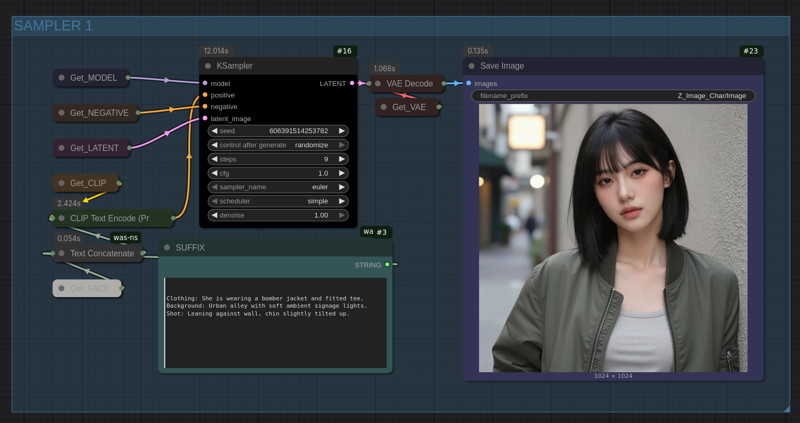
Using this ComfyUI Workflow you can generate base dataset for your consistent character. This is generated with [Z-Image-Turbo] Model. You need to add a face prompt and all the other things will be done by the workflow.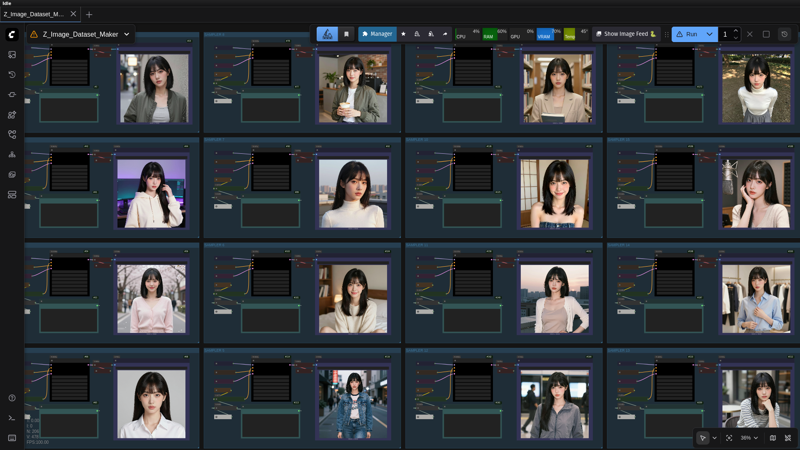
Description
Uses Flux, Qwen and SDXL to make 60 Images of a character which can be used to train a LoRA. This will automatically make NSFW images. All of this possible in just a click.
FAQ
Comments (48)
Looked at the new flux2klein latent controllers and enchancer nodes yet? Some really interesting ways to control latent image and text prompts separately. I'm still tinkering with it but they could fit into this workflow perfectly. https://github.com/capitan01R/ComfyUI-Flux2Klein-Enhancer/tree/main
Thanks for the suggestions, I will be adding this to the final version, the current one is the beta version, I am still working on it, will implement this in the future.
@coolstrad Sounds great! Love the workflow so far, thanks for all your excellent work.
I tried this very nice workflow the only thing it doesn't produce the dataset NSFW
It does produce NSFW datasets. I am 100% sure you are using the wrong qwen model. Double check the qwen model or ask support on the discord server. We will help you out.
For people saying nsfw doesnt work, double check if you are using the correct model, some guys are using the wrong model and getting bad nsfw results.
Which one is the correct model for this sir?
@pastalokri81410 just read the readme note.
I would like to discuss this with you. I didn't use the exact models you specified in order to get a better result at higher resolutions. I need to run several generations to get the hang of it. My specs are: 5800x3d, 3090 (24GB vram), 128GB DDR4 system ram. What's your discord?
You list multiple models...can I use just Klein or do i need qwen also?
You need to install all of the models for the workflow to work.
Impressive. Much better than my own workflow for dataset prep. Finished in 9 minutes on 5090
Thanks bro, glad it it working. Feel free to join out discord for more fun stuff.
great workflow! Thank you so much
I have a question though. When i try to generate nsfw images i get a "105 KSampler
too many values to unpack (expected 4)". Any idea how to fix this?
wow very impresive ! GG
beta v3 works great for me I switched klein 4b with 9b and it works just fine...
Yep it will work fine, I used flux 4b as it has the apache 2 license
Does v3 work on ZIT still?
No it no longer uses Z image.
Hello, I found that it is not very good at restoring anime characters. Is there any way to optimize it? I tried VAE and found that it didn’t work well either.
Hey @zic508420233 join the official discord and tell on the technical-help channel with detail, I and the community will help you out.
My output images don't even come close to yours shown in the decription! Please tell me the stats you're using like resolution, sampler, scheduler, steps, ... PLEASE!
did update of ComfyUI last night so LTX 2.3 could be used and it broke beta V3 WF, It works ok with SFW images and produces all sets but NSFW sets are black images, any ideas what could cause it? Other than comfy update nothing else was done or changed.
Damn, this is really fucking good.
Does it support input images? I allready have a few images of my character.
how do I do this "You must enable the Z-Image samplers group"? I couldn't find this group
Okay: Now I've got both sides working--thanks!
Two questions:
1. How can I distinguish between version 1 and version 2? I think I've got one on my Mac and the other on my PC...
2.The refined skin is more nuanced but not always nice and smooth. Can I disable some of the models/refiners on the back end (so long as I check 'yes' for the 'Enable Z Refiners' beside the white in-pointing dashed arrow?
How do I customize the physical appearance, i tried adding more context about the body in the conditioning nodes that are available in the main screen of the workflow but it seems it doesn't work
What is the NSFW section for? I just want to create a dataset for a nude female. I already have a sample image at 832x1216 a simple front facing profile pic. Do I just feed the image into the workflow (expert version)? Or do I need to adjust settings in the NSFW section?
Also, what output resolution should I set it for if the plan is to make a video using LTX-2.3? Because I feel your standard settings is more for AI influencer smartphone type videos.
Is there a way I can manually write in all of the prompt areas so I can add specific descriptions for how the model should be generated? I would need to be able to affect the prompts in all areas including the backend V1, V2, Angular sections as well as the NSFW sections.
Great workflow! Thanks.
My hardware: RTX 4070 Ti (12GB VRAM).
I got an Out of Memory (OOM) at the end of the Angular section or at the beginning of the NSFW section. However, I was able to continue by restarting. The workflow then ran completely (about 25 minutes).
It makes no difference whether I use qwen-image-edit-2511-Q2_K.gguf or qwen-image-edit-2511-Q3_K_M.gguf; I get an OOME error before the NSW SECTION. As I said, it continues running when I click RUN again.
Memory info: RAM 72%, VRAM 72%, GPU usually 100%, CPU 5%
NSFW group only gives black images, anyone know the fix for this.
Love this flow! This was exactly what I was looking for! I had trouble getting the output to look 'exactly' like the subject in the initial image so I made my own personal tweaks, modifications, and additions.
I haven't published it, or anything, but I wanted to be honest and transparent as I hate the thought of taking someone else's work.
Thanks again for your hard work, I learned a LOT with this flow. :)
Hi. This seems interesting but I need a MAN dataset. Whithout breast control and so on. I don't see any switch to generate a man dataset in your workflow. Quite strange. You never produce men datasets ?
Guys stay tuned, the new V4 workflow is coming out, and man this one is gonna be exciting. ETA is hopefully within the next 1 or 2 weeks.
Hello! Where I can found your pro workflows ?
RIP brotha. May you rest in peace 😢😢😢
8th June 2026
9:24 AM, Arizona Time
Amazing work, thanks a lot! Looking forward to V4. :)
This is currently the best workflow for a complete dataset of a character that I have been able to find. Great job! However, I have a hard time making a male character on this workflow, especially for the nsfw. Changing prompts is not enough. Any ideas?
How can i write in the prompt areas? I don't get it.
Just tested the v3.0(Beta) and it works perfectly. The best dataset workflow I had found so far. Will test also the older 2.0 version to see if there is difference.
Thank you for the amazing workflow :)
clip loader giving error: - Exception Message: AttributeError: 'NoneType' object has no attribute 'Params'
good workflow
Need to create own prompts if you font wanna same expression in all 60 images. Wf includes mainly neutral and slight smile expression and same mid-shot front poses. So create youre all own prompts