[edit:
12.10.2026 Short update notes
Hi, everyone - just some short update notes:
First, please understand, I do not support these "outdated" LTX workflow anymore, cause actually we are on Minimax H3.... 😉 But as I can see, there are still some folks loving these old stuff.
The good news is - it is still working with a small fix provided by @crashpurr - please look here. I just tested it with a completely new comfyui system (Comfyui-Easy-Install, comfyui version 0.39.0).
And last but not least: many thanks to all users for testing and using my workflows and for the great feedback 🙂
13.05.2026: Update version 4.4 (see version description).
Small fixes to get back fast generations.
Attention:
If you struggle with node conflicts or you get errors while running the workflow, please have a look at my short Trouble Shooting Guide note in the wokflow first. Most importent is to update all components sucsessfully! ]
Special thanks to:
@ArcleinSK for investigation and solving the FLF issue, as well as forcing the First-Mid-Last Frame option and last but not least for charing fantastic knowlage.
@boinobin730 for initialising, forcing and supporting this project in all kinds of matter, like providing links, running tests, sharing knowlage and inspiring diskussions.
@Urabewe for publishing the original, perfectly running 12 GB VRAM LTX-2.3 workflows mainly used here in this workflow.
Features:
Simple to use all-In-One LTX-2 workflow with options for:
Text to Video
Image to Video
First/Last Frame to Video
Fisrt/Mid/Last Frame to Video
Video to Video
Text + Audio to Video
Image + Audio to Video
First/Last Frame + Audio to Video
First/Mid/Last Frame + Audio to Video
easy switching between all options,
all steps highly automated: no manual frame or width/hight calculations necessary,
easy to set inputs by predefined sliders and aspeckt ratio inputs (no risk to set wrong frame counts or wrong width/hight values),
completely automated resizing and cropping (if necessary) of your input images/videos.
brilliant audio generation (speech/sound) with LTX-2.3.
LTX-2.3 specifications:
Workflow version v4.3 consistently follows the LTX-2.3 specifications for 16:9/9:16 aspect ratios, including automatic width/hight calculations, as well as automatic input image/video resizing/cropping.
In addition you can simply choose now any other aspect ratios according to your needs while still getting the right values calculated for width/hight and automatic image/video resize/crop.
Requirements:
GPU with 12 GB VRAM (some users reported they got it running with 8 GB too),
32 GB VRAM,
Swap file size: 64 - 128 GB.
Speed and video length:
Runs very fast: 5 second (1280 x 864) Video: < 10 minutes.
Generation of long high quality videos in one run possible: 10 - 20 seconds without any issues,
Testrun: 30 second video (1024 x 704) tooks around 40 minutes without any OOM errors. Longer videos might be possible, but not tested yet.
Important:
This workflow is intended for advanced comfyui users who know how to install and operate the system and are able to resolve basic system errors themselves, like as node conflicts, or general system issues.
About this workflow:
This workflow is mainly based on the fantastic LTX-2.3 workflows of @Urabewe.
As far as I know, those were the first workflows running LTX-2 with 12 GB VRAM. All credits goes to the original creator.
My job was only to combine and organise the different workflows in a simple to use all-in-one design.
Description
Added First-Mid-Last Frame to Video option.
Fixed recent Fisrt/Last Frame issues.
Completely re-designed input "interface" to easy choose the best LTX-2.3 aspect ratios or other standard aspect ratios as well as any custom aspect ratios or automatic aspect ratio calculations according to your input images or videos.
Completely re-designed Widh/Hight calculation under the hood. All values are strictly devisible by 32 for any aspect ratios now.
I did a lot of pre-tests. All options should work as intended.
As allways: please let me know if you find any "bugs" - and of course, let me know if you have any ideas to improve this workflow.
FAQ
Comments (164)
@arkinson 4.0 Workflow looks clean. A couple of things I noticed though:
1) Inside the aspect ratio subgraph, you may want to promote the "aspect_ratio" widget on the LayerUtility node. It's fixed to 16:9 and will crop anything to fit that ratio. Promoting it will allow the user to select the aspect ratio they prefer on the outside of the subgraph in the main workflow page.
2) Having the second AddGuideMulti for the [[P:Mid Frame input]] seems to get ignored in the processing subgraph. It will just use the AddGuideMulti for the [[P: Last Frame input]] which ignores the middle frame input. I think it would need some sort of conditional mute to disable the [[P:Last Frame input]] only if the Last AND middle options are enabled.
I don't know if there's a lot of use for a middle frame in the community right now and it does tend to increase generation times and RAM requirements the more keyframes are added. I've tried up to 4 so far and my generation times have gone up from 175s/it up to 700+s/it on the second pass with 4 keyframes.
Might be worth considering disabling that middle frame option for now until there's a better way to implement it. But it definitely seems to be fixed in terms of that weird image flip at the end and the addition of an adjustable aspect ratio seems to address most people's concerns with the last one.
Just browsing some documentation it seems the orchestrator node appears to have some settings:
ComfyUI_Custom_Switch/README.md at main · tritant/ComfyUI_Custom_Switch · GitHub
Might need to restructure the groups to take advantage of it, but you can enable "Exclusive" node mode in the muter which only allows one toggle at a time to be active.
Looks possible to create a new switch group with two options. One for "first and last" and one for "first last and middle" That way if one is enabled, the other will be muted accordingly.
@ArcleinSK Thank you for your fast testing 👍
Not shown aspect ratio widget: Comfyui drives me crazy 😣 My local version is ok (I promoted the "aspect ratio" widget of course). But after your hint I re-downloaded my exported json file and the widget is really not shown. This is frustrating. I struggled with several bugs with subgraphs over the last days: subgraphs inside subgraphs just changed their connections after first execution, etc. Ok, I will try to fix the json export. Hopfully my workflow is not corrupted...
AddGuideMulti for the [[P:Mid Frame input]] seems to get ignored: During my tests it worked properly. Did you activated all 3 options (I2V + Last + Mid frame) as discribed? Both AddGuide nodes are active (FLF and FMLF), but only the outputs from the right node (FMLF) going foreward, cause the following "Any Swich" nodes using the first "active" signal only for further processing.
The swich logic is pretty complicated in comfyui. I deeply tested all possebillities of the Orchestra nodes (and much more nodes). The main problem with the Orchestra nodes is, you have to decide whether you want to swich singe nodes OR groups. If you want to use both, you get two or more seperate swich panels wich gets quickly confusing for most users. Another problem is: you can`t combine Titel Tags for "higer" logics like "tag1" AND "tag2" -> node on/off for example.
Ok, first, I’ll try to export the JSON successfully. Then I’ll test it again using the re-imported JSON file, just to be sure.
@ArcleinSK Yes, the missing widget is a reproducible bug during export. I use an outside combo node instead now. I will test the json export now for FLF and FMLF.....
@ArcleinSK Just tested: FLF and FMLF works as desired, even after re-import of the exported json file. I have published v4.1 now and would be glad if you could have a look at it again.
@arkinson I think Civitai is messing with your workflow uploads. Lol. I was running a high res picture as one of my keyframes and apparently the scaling node was set to "Scale to side: none" I stepped away for 30 minutes and when I came back I was still on step 1/8 at 420.26s/it in the first sampler. Lol. I knew something was odd so I stopped and and checked it. Looks like it lost the "scale to side: longest." Not sure if it's just my workflow or the one you uploaded - may want to confirm.
@ArcleinSK Version 4.2 is out 🙃 Thank you so much for your quick tests.
You are right. I completely renewed the subgraph for export testing several times and finally forgot to adjust the settings in the LayerUtillity node. Round to multiple was also wrong (8 instead of 32).
OK, it’s not Civitai’s fault this time 😅
@arkinson Finally got a render I was happy enough with. LTX still is a little iffy on assigning character voices, but it definitely does better on close-ups. The keyframes and camera moves are definitely fun though. Fixes to the workflow seemed to work for the three keyframes but rendering at 1280 takes quite some time #RTX3060strugglebus. Lol
@ArcleinSK I’ve just worked my way step by step through all the user enquiries and I think you’re the last one I’ll be replying for today. After releasing 3 updates at the same time it is a bit tricky to keep track of all the comments here....🙂 Good to know that the FLF/FLMF logic seems to work now. Yes, I definitely need some time to play around with the frames for myself....
RandomAIUser gave some good suggestions I will have a look too. An early audio preview makes sense.
I've noticed that it changes the original image. Tried with FF and FFLF. Resolution up to 3k. Strength on node for I2V set to 1, compression 0, detailer lora on/off. At the same time there is no such effect in wan2gp with distilled gguf. Is it because of distilled lora or something else?
@Gavr728 At first - please sorry, I oversaw your last comment in the other comment line 7 days ago. I published workflow updates v4.0 and v4.1 today.
Please update to the last version. What do you mean with original image changes? Slightly changes, some artefacts, minor defects in faces for example I see very often - mainly depending from start image and prompting and sometimes more randomly too.
We use a very downgraded/optimized workflow here with low models, low steps by using the destilled Lora and upscaling.
If I remember right, you have more potential hardware. If possible you should try the template workflows with the full models and without all the low vram optimisations - just to get a comparison.
@arkinson I mean that image is squeezed horizontally. And I believe it is connected to the fact that I can't get a proper 2560x1440, it is always 2560x1408, despite the fact that 1440 is divisible by 32. Spent a whole day trying to debug this. Changed nodes, tried to scale by height, manually cropped image to 2560x1440. On all seeds there is this horizontal "squeez". Tried different workflow for FFLF, there wasn't this defect but it was much slower and quality is subpar. I can't figure out why this is happening, everything seems pretty much the same to other workflows logic.
@Gavr728 Uhh - that`s very strange. Just to be sure we talk about the same thing. Please do the following steps:
1. re-download version 4.2 (just to be sure there are no mismatches by previous edits you
made),
2. Edit the max. value of slider "Longer Edge" to 2560 (right click -> properties).
Definitely do no other changes on the workflow!
3. set aspect ratio to 16:9,
4. run a simple short T2V generation.
That should output a video resolution of 2560 x 1440 out of the box. Let me know if this works on your side.
@arkinson T2V gave the same result 2560x1408. Also this "squeez' effect is only visible with the last frame. I tried to find the place where the image gets downsized, but all I can say is that it is somewhere between vae encode and vae decode.
@Gavr728 Please don`t get me wrong, but to help you or to solve an issue I need clearly understandable informations what you have done. I do not like to spent time with guessing here and guessing there.
So once again: did you really executed every single step I suggested? Only if yes, do the following:
Add a "Show Any" node at the width and hight output of the "Aspect Ratio" subgraph for debugging the output. Start a generation and let me know the outputs you get from the nodes.
@arkinson I did all of this, including putting "show any" node everywhere where nodes have image output. And as I mentioned everywhere I checked , the height was 1440. Before that I also assumed that there might be something wrong Layer style node in this subgraph, so I tried replacing it with a simple image resize node
@Gavr728 Sorry, this way I can`t help you. I asked you to do 4 very simple steps to systematically narrow down the fault but all I get back seems to be some random try-and-error on your side.
Cause it is simple: The widh/hight calulations should work properly 100%, if you do what I asked you for: using a fresh re-downloaded workflow and only do the slider edit.
So, unless you give me clear confirmation at every single step, I won’t go any further with this.
@arkinson Yes, I did all of your steps as you wrote them
@Gavr728 I really don`t know what you are doing. I get 2560 x 1440 - look here. If this calculation do not work, check your comfyui installation, check for node conflicts, create a simple workflow only with the LayerUtillity node and check manually if it calculates the right values on your machine, etc.
@arkinson Did you actually generate the video or just check the Aspect ratio output? As I said I get 2560x1440 from this graph too, the problem somewhere else
@Gavr728 I really try to help you. Maybe that`s a language problem, but some of your answers were pretty unspecific - to say it in a humorous way 😉
Keep in mind: here are all kind of users, from "newbies" to very skilled ones and most of the "issues" are simple user mistakes or missunderstandings.
You might not believe what I saw here over the time: users asking question why my workflow don`t work, but using completely other workflows or other models or there own edits and so on.
Ok, according to your last anwer the output of the Aspect Ratio" subgraph is right, but you still get a wrong sized video output if you use T2V for example.
As you know I can`t test 2k resolution on my machine of course. But I will have a look if I find any possible issues in the following image/video processing tasks.
@Gavr728 Ok, I cheked the t2v line. There might be one point wich could be wrong for "extreme" high resolutions. Do the following:
1. open the main subgraph and go to the right end to the "VAE Decode (tiled)" node,
2. you might play around with "temporal_size" value, like 2560 instead of 2048 or even better:
change the node to the simple VAE Decode node (the node without any otions).
If you still get a wrong output size I would do the following (always in the t2v line):
Add "Get Latent Size" nodes at every latent output and debug width/hight to narrow, where the size swap happens.
@arkinson I found out what the reason was. EmptyLTXVLatentVideo values must be dividable by 32, but 720 is not (1440/2=720),so it get automatically set to 704
That also means that the image size should be rounded to 64. With that my problems with FFLF seem to be resolved
@Gavr728 Yes and use the right longer edge values for true 16:9 of course.
Wow, fastest WF fixes on Civitai! Nice.
Thank you 😉 Yeah - I was forced to publish v4.1, cause comfyui produced an anoying bug during the json file export - so the aspect ratio input was not visible 😖 ArcleinSK was wondering about, what stupid stuff I published 😅
May I ask you and all other to run some tests with the First-Last Frame and First-Mid-Last Frame options? The comfyui swich logic is quite tricky and I`m not 100% sure if these options really work under all conditions.
@yajukun Version 4.2 is out 🙃🙂 We apologise for any inconvenience caused 😅
The 4.1 wf with 1:1 ratio (1024x1024 resolution) ran for about 25 minutes and crashed because of OOM. 12GB VRAM and 128GB RAM. The same clip takes about 5-6 minutes on the LTX2 v1.2 workflow while using about 75%-80% of RAM.
@creatorjulie743 Yes - sorry. Please download version 4.2.
Thanks. But no need to be sorry.
I have been using the 3.0 workflows and quite liking them. I'll try 4.2 now.
Suggestions:
-Turn the sample preview rate up to 24 instead of 8 so it matches the final output instead of slo-moing.
-I decode the audio latent after the first stage and output that from the subgraph to an Audio Preview node. That way I can preview the audio after the first stage and abort the whole run if it doesn't match what I want. That has save a LOT of time that would have been wasted on bad takes.
@RandomAIUser Hi - thank you for your suggestions. That`s interesting. I spent more time with the calculation and logic stuff then playing around with the main worklfow yet 🙄 I will test this soon. Just one question about increasing the preview sample rate: did you saw significant vram usage or longer generation times in your tests?
@arkinson No, it didn't take any longer to use the 24fps preview rate. I don't know for sure about vram, but I doubt it. I only have 12g and it works fine.
The audio preview does add a few seconds to the whole workflow, but I figure that is worth it if it allows me to abort something earlier.
@RandomAIUser Thank you, this sounds good and it seems I have to update to v4.3 quickly 😂 No, I was quite busy with answering all the questions here and didn't even find the time to play with the workflow for myself....
First of all, thank you so much for the great workflow. It's one of the best I've tried so far. It creates videos of excellent quality.
Now for what I've noticed (v4.2).
As others have already mentioned, I also think the "Mid Frame" can be removed.
Custom Resolution: I can only access the custom resolution setting via the subgraph, which doesn't bother me too much. Direct input would be preferable. But no matter what resolution I enter, e.g., 832x1216, the output video is always square (1216x1216). Even the "scale_to_side" setting (longest, shortest, width, etc.) doesn't change this.
@angomania Thank you so much 😋
Uhh - that`s strange. Maybe you mismatched something. Please re-download version v4.2 to be sure you have the right settings.
In version 4.2 you have the brown input node "Aspect Ratio" outside the subgraph. There is no need to touch the subgraph anymore, exceot the very special case you choose "custom" aspect ratio in the brown input node.
@arkinson Yes, I was actually referring to the special case "Custom aspect ratio" (brown node). Under this node is a gray node "Aspect Ratio", where I had entered my own values divisible by 32 (832x1216).
@angomania Sorry - I misunderstood your first comment.
As I see now, you try to feed the LayerUtillity node with a resolution instead with your desired aspect ratio. This is wrong of course.
Use the following settings as an example for an custom aspect ratio of 7:5 witch works out of the box:
Longer Edge = 1024,
Aspect Ratio = custom,
proportional_width = 5,
proportional_hight = 7,
1024 * 5 / 7 = 731.43 -> rounded for divisible by 32 -> 1024 x 736
If you want to generate a higher resolution for this aspect ratio, just increase Longer Edge.
As mentioned, re-download the workflow and don`t touch any other values of the LayerUtillity node.
Btw. you simply can make proportional_width/hight visible by editing the subgraphs widges (right click the subgraph).
@angomania Oh - and thank you so much for all your buzzing 😋
@arkinson Thanks for the clarification. Now I understand.
@angomania Just some additional hints for practical use:
Don`t use "custom" aspect ratio and do not touch the subgraph unless you have really compelling reasons.
T2V option: Use 16:9 aspect ratios primarily - or, if really necessary, one of the selectable standard aspect ratios like 1:1 etc.
All I2V and V2V options:
- use 16:9 primarily if your input image/video is mostly rectrangle,
- use 1:1 if your input is square format,
- use "original" if you like to generate in the aspect ratio of your input image/video without
heavy cropping.
Set the desired resolution only via "Longer Edge".
Hope this might help you and others too.
Hey, Bro! Tnxh! Awesome workflow! The final frame have faces inconsistencies. I even tried to connect the 3 images directly to the "Processing" Node. I noticed that a chinese made a workflow that maintained the facial expressions. I'll keep looking in the subgraph inside "Processing node to see if I can find if some node is upscaling or filtering the original images"
@lidianeporto9248 Thank you. You are on version v4.2?
For FLF and FLMF the swich logic should work properly with v4.2 - so no need to change connections, except you are really know what you are doing.
But it seems there are some quality issues with both options. On the other hand I have got simillar issues even with the template workflows. To be honest, I have not run much generations with these options yet, to have serious experiances so far. And I really don`t know what the Chinese did 😂
Боже, как же ты ультра хорош
Yeah mate - I`ll do my best 😉
Bro can you add or make a workflow for motion transfer! (I mean like wan animate)
Have a look in the ltx tamplates - it is called canny to video or depth to video. If I remember right I had it allready running with 12 gb vram using lower models.
Yes, this is very interesting and I have it in mind to implement it some day - but it might be more later than sooner.
@arkinson please add soon
@deditz111802 I found my old workflow in the meantime. It works pretty well so far, but there are some optimizations needed. I will see if I get it implemented finally, cause the swich logic is pretty tricky.
@arkinson then just make a separate one please
I had some success with the LTXV Spatio Temporal Tiled VAE Decode, it seems to use half the VRAM and came out quicker on my 3060 12gb +32gb RAM setup. Is the VAE decode (tiled) used in this workflow for stability reasons? For my particular setup my settings were st:2, so:8, ttl:128, to:8, lff:true - auto,auto
@wackawacka The used vae decode node is just from the templates, no special reason.
But I run a side by side test with your suggestion and the following result: the LTXV Spatio node needs slightly more vram and 3x more time on my (Windows) machine. Are you on Linus??
@arkinson no just win11. I wonder if it depends on something else. It definitely seems to be better at longer videos. (for me)
@wackawacka Windows - Ok. You can run simple tests by yourself. Create a very simple workflow: Load Video -> VAE Encode -> VAE Decode (all decoder you like to test) -> Video combine. This way you get the exact execution times without any other influences.
Works like a charm with RTX3060 6GB VRAM+ 32GB RAM
t2v standard example in 502.85 seconds
Salut and well done, boss
small remark:
1. models list is not accurate and is missing:
ltx-2-19b-lora-detailer.safetensors
2. ltx-2-3-22b-dev-Q4_K_M.gguf should be under Unet not Diffusion_Model
3. both:
gemma_3_12B_it_fp4_mixed.safetensors
and
ltx-2.3_text_projection_bf16.safetensors
should be under text_encoders
Thank you so much - I`m glad you enjoy it 🙂.
The model path informations are not wrong, cause the loaders find them in both paths 😉
Additional Loras: The detailer Lora is not crucial for execution, it is just an example for an additional Lora. You may load whatever you like and for every use case you might want another Lora.
This would work for a RTX3060 of 12gb and 16gb of ram?
Generally it works this way: vram -> ram -> swap file usage. With a large swap file on a fast SSD it should work (see my min "specifications" for swap file size).
Simoly start with short T2V clips and low resolution. During generation have an eye at your vram, ram and swap file usage.
Let my know if it works for you.
Sorry for dumb question. But how implement V2V pattern?
I mean - what it can do with video? I tried video with different prompts no change at all.
For example
"Transform into highly realistic cinematic footage. Add fine skin texture and natural fabric details. Enhance lighting with soft, natural daylight. Smooth out all motion to be fluid and natural, without any AI jitter. Increase overall sharpness and add subtle film grain."
Or
"Transform into a hand-drawn pencil sketch. Black and white only. Rough graphite texture on paper. Visible sketch lines and shading. No colors. Cross-hatching for shadows. Keep the original motion and composition but render everything as pencil art. Loose, artistic drawing style."
@GFrost No, you are simply on the wrong way here 😉 V2V did not change your input video. It just takes the "style" from your input video and extends the video. Just have a look at my "Input Help Subgroup "P" note for a short description how it works.
@arkinson Oh silly me. As always, reading instructions after trying everything else.
@GFrost Yeah - "trying else" is the most fun part - and we usually all do it that way 😂
Another question.
Are you planning to make a WF where the first step uses the DEV model with CFG > 1 (without distillation), and the second step uses a distilled LoRA for finalization — in order to have better control over generation, for example by using a negative prompt?
@GFrost I got what you mean and I did a lot of tests with the older Wan workflows this way, even with 3 pass generation - but all without satisfying results.
For LTX I haven`t tested it yet and I did not have the recources nor the motivation to start more serious side-by-side test again.
So my simple question is: Do you have own experiances? Did you allready test runs with simple T2V and/or I2V workflows with true side-by-side comparisons? What`s about generation time? To get serious test results this is all a lot of work.
In theory it will work of course, but it would be interesting whether it is actually worthwhile under real-world conditions.
I have this kind of workflow (not mine), but it can only do I2V and T2V. I took one that used a distilled checkpoint and modified it to split it as I mentioned before. Instead of sigmas, there is a KSampler. I will try to test it in my spare time, but I can’t promise it will be soon... Anyway, thank you for your response. Really good workflow.
@GFrost If you like, post a link to your workflow and I will have a look at it if I`ll find some time too. And let me know, if you get some results at your side.
I would love to see a video inpainting workflow in there for future versions. Nice work.
@jrazon302 What is video inpinting. Never heard about.
LTX2.3 10Eros - Beta | LTX Video Checkpoint | Civitai Would it be possible to implement this model in your workflow? Is this model good for generating NSFW from it?
I still using v3.0 in the moment.
Is it possible to change the V2V Mode somehow so i can use the Video as reference for a picture ? I saw some YT-Videos where they show thats possible with LTX.
Yeah - the YT stuff 😂 No, serious - I don`t got what you want. A video as a reference for an image??? No idea. Just link me this magic YT video.
And you should try v4.2 🙂
I mean something like that:
https://www.youtube.com/watch?v=cSUrfUHeOYo
https://www.youtube.com/watch?v=o7Qlf70XAi8&
Maybe its somehow I2V, but as it use the motion from Video A as motion reference for a picture which will transform into Video B i used V2V as term.
For 4.2 let me test this when Anthropic resets my weekly limit :D I use a vibe coded telegram bot to remote control my local comfy and adapting your v3 and testing everything trough took a weekend, as all the new nodes works fine locally, but not if you export this as API Workflow :D
@SheyMo Thank you for the links. Uhh - I got your first question completely wrong 🙂
If I get the videos right, they use the IC Lora workflows: Your input here is a reference image (as a character) and a "guiding" video for the motion. Finally you get a video with your character doing the motion of the guiding video.
This stuff is really interesting. I believe the template workflows (search for "ltx canny" or "ltx depth" do the same. And if I remember right, I allready had a simillar workflow running with 12 gb vram some times ago. But my little problem is, I did not found it anymore 😕
I have this in mind, but as I've already told another user: it might be more later then sooner, or never. I`m actually not sure if this would be simply integratable here in the workflow.
What? Running comfyui via a telegram bot??? For heaven’s sake - that`s a game in another world 🤣🙂
I had a lot of issues with the old LTX—sometimes a video took 3 minutes, other times 20! With this new workflow, it’s a consistent 3 minutes for 20 seconds of video. Unfortunately, I have to manually clear the cache after the 6th or 8th video or even restart comfyui because the generation starts slowing down again . Increasing the pagefile didn't help. Do you have any other ideas? I’m using a 5070 Ti with 16GB VRAM and 32GB of RAM. Thanks in advance for your help.
@Hasenbein There are several "clear cash" and "unload model" nodes in comfyui (or custom nodes). You can try to set one of them or both at the end of the workflow - for example at: "Processing" subgraph -> images output. But you should check that execution time will not increase too much.
@arkinson Thank you for your reply I will give it a try this weekend.
@Hasenbein Let me know if it works.
I just see - you have 32 gb ram only. Did you set your pagefile at least to 64 - 128 gb?
@arkinson yes I set it to 90000.
@Hasenbein I would try: min. 64 max. 128 gb pagefile or even more (with your 16 gb vram, high resolution and long clips in mind). It is completely wired, but I saw pagefile usage > 100 gb on my sytem. I know, that`s all are pretty "stupid" workarounds only.
I have no experiances for myself, but some users reported, that they upgraded their RAM to min. 64 GB.
Btw. I remember we played "Larry - in the Land of the Lounge Lizards" around 1990 on a high end graphic computer we hijacked from my father`s office. This super expensive machine had a harddisk of 40 MB (right MB not GB, not TB) 🤣🙂 The fun started allways by cracking the age verification question system - even we where old enough to play it 🙂
@arkinson at least it had a hard drive. My first computer had some sort of compact cassette drive to load the games and I was glad when I got my first floppy drive. And at that time the disks were floppy! When I got my first pc the only Sierra adventure I played was Space quest.
I’ve had another issue. Yesterday, I tried the video from your 'spicy collection'—the one with the woman coming out of the shower—using the same prompt for a 50-second clip. It took 24 minutes and looked great. However, when I added LoRAs for female anatomy, the upscaling steps kept getting slower and slower. I eventually canceled after 60 minutes. There wasn't an Out of Memory (OOM) error, but I noticed from the low GPU temperature that the data is being fed too slowly. Is there a memory clean node between the first 8 steps and the 3 upscaling steps, or is it possible to insert one? Thanks for your help!
@Hasenbein Oh my - the first 5.25" FDD! 40 MB HDD were more than a box full of 100 single FDD - unbelievable disk space 🤣 Today we buy 1TB SSD. And what is after 3 weeks? Sure, it is full! Thanks to comfyui 🙂
Oh, oh - extreme long clip length + high resolution + Lora`s. I believe you are completely out of the limits. I would reduce clip length significantly first and try to use lower resolution (longer edge) in addition. And keep in mind: LTX-2.3 specifications say max. 20 seconds (if I remember right).
Anyway, you can use the clear/unload nodes on any node output - one node before the uspscaler node for example. But I don`t know how the upscaler really works (ram or vram usage). And finally, to use the clear/unload nodes is a lot of try and error too. I never got verifiable results - some time it worked perfectly, some times not. But I did a few tests only.
@arkinson Thank you again! Using a clear cache and clear vram node at the start of each workflow solved my problem with increasing generation lengths in the 20 second clips after the sixth clip in a row. The 50 second video clip was just a tryout. If there's no simple answer I will stay with my normal length clips.
@arkinson Who is Pia Zadora?
nice workflow, fully functional on 5060ti16+32+swap
So, what I am to))):
Can you advice some solution:
Is it true that with ChunkFF prompt adherence goes to hell?
If I want 20sec with complex prompt I2V should I choose Q4 or nvfp4?
Or maybe fp8 and just raise ChunkFF?
Do you use dev (not-distilled) models?
If yes, could you please share the workflow?
I'm noob and got drawned in those steps, sigmas, etc (they are hardcoded in your WF), ttrying to rework for the full model.
For anyone else having problems with Comfy never recognizing that the JWinteger etc. nodes for this workflow are installed: assuming you've already cloned the repo, go into ComfyUI\custom_nodes\comfyui-various, copy the file comfyui_primitive_ops.py, and paste it directly on its own into the custom_nodes folder one layer up.
This worked! Thanks!
@zeuss194 Thank you for buzzing :-)
Thanks for your workflow! very nice feature set and organization/layout! your efforts are greatly apprechiated! 👍
Two questions:
- Any idea what could be wrong with my Q4_K_M model or guff loader? im getting a very long list of "Error(s) in loading state_dict for LTXAVModel" when i try to use that? I have the latest node packages and stuff, Comfy 0.18.1 (SwarmUI embedded version with manually installed manager) and it works fine with "ltx-2.3-22b-dev-fp8.safetensors", do i simply need that 0.18.2 update for proper LTX .guff support or is there something else i need?
- I cant seem to change the "Clip Length (In Seconds)" value? its just an empty node? what am i supposed to do/click/change? 🤭 Same for "Longer Edge"? (i mean, i can obviously just jump into the subgraph to do whatever i want but id rather have your intended workflow fully working, including these 2 input fields)
Its noticably faster on my setup (4070S 12GB VRAM + 32GB Ram (6400 MT/s) + i7-12700KF) even without the Q4 model, so yeah, thanks a lot for this workflow! 👍❤️
@baconmessenger Thank you so much for your feedback 🙂
gguf models: Mmh, hard to say what is wrong on your side. I´m still on comfyui 0.18.1 too. The workflow should work out of the box.
Sliders not right visible: That`s a common node conflict with mxtoolkit. Please use the github page for help or try to find the solution here in the comments (there are several discussions about it - but I can not find them quickly for myself now).
@arkinson Gotcha, i'll look into mxtoolkit, thanks for the response! 😁
@baconmessenger just replace those two pretty sliders (which are empty) with simple INT nodes and type values via keyboard.
For the gguf, please post the full sample of the error.
Maybe you forgot one of text encoders or VAE?
When you use gguf, you should load all encoders from separate nodes despite of checkpoint which has embedded encoders.
Swap file...
Rename this to SSD Destroyer workflow.
Yes - or simply keep your hands off from generating videos with a low power computer 🤣🙂
Just wondering what model would you increase if you had a RTX 5080? The GGUF from k4m to something higher or the gemma from fp4 to fp8? Or maybe both?
You have to test it by yourself, cause I havn`t a rtx5080 😉 But first I would increase resolution.
Edit :) , nevermind . It's because I've made a minor adjustement to the wf so I could use more step and i set "terminal" value in LTXV schedueler to low by mistake which killed the following steps
nope; still constant oom errors with rtx 5060 ti 16 gb and 48 gb ram. Lowest possible resolution.
fp8 distilled, 4loras, ChunkFF 4, 5060ti16gb, 32gb ram, pcie4 ssd for swap, 1024x576, 20sec ~6min stable no oom
try this setup
As well I've deleted the section with preview generation to save some vram
@Elestrin thank you my friend; i'll give it a try :)
Hehe, thanks a lot again! :)
@grbear750611 It`s always a pleasure 🙂
The "LTXVAddGuideMulti" put all key frames in the end. Is this intended? Can't manage to respect the key frames, it starts from first, but then the result is very similar to First-To-Vid.
No, it should work out of the box in the right order. Mid frame position is calculated exactly at half frame count, as you can see in the subgraph.
Please re-download the workflow to exclude any other sources of error, check twice if you really selected the right options, then run a simple test: choose three very different images for first, mid last frame. Let me know if these "marker" frames come out at the right positions.
I did notice that on the version I downloaded, the indices for both images was set to 0 by default. Clearly a different version, but this is exactly the result you would get if both were set like this. 0 is always frame 1 and -1 is always the last frame. Easy fix if that is the problem. Already fixed in latest version I'm sure.
@Ponder_Stibbons Yes, it is allready fixed in version v4.2: first frame = 0, mid frame = frame_count/2 and last frame = -1.
@Ponder_Stibbons So - math should be right for all use cases. With very different "marker" images I got outputs in the right order. But to generate usefull videos it can be very tricky sometimes. According to my few not really serious tests I would say it depents significantly from prompting and the used images.
I'm getting an odd issue. Workflow as downloaded (Comfy Manager and nodes updated, models used in workflow downloaded and used) runs but the resulting video is very "snowy". I change the unet loader model to a distilled gguf version from the dev gguf version (for example from dev-q4 to distilled q8 or distilled 1.1 q8) then it runs but no snow on the video. Any ideas why?
The workflow should run out of the box, without to change any model. As often repeated here, at first step please check twice if you SELECTED the right models in EVERY loader node, including the Lora Loader. Then run a simple T2V geration with a simple test prompt. Blurry or strange outputs are mostly caused by wrong models, accidently changed settings, like Lora wights or additional Loras in use.
@arkinson I figured it out. for whatever reason your distilled lora had a dir of video/ in front of it in the node. I honestly cannot tell you if it came that way or if I accidentally switched it to that somehow. In any event. That made the workflow not able to find the lora. I didn't catch it because it didn't spit out a error in ComyUI. It was only when I looked at the terminal that I noticed ComyUI saying it couldn't find the lora and was bypassing. (I'm in Linux if that makes a difference). I corrected the node to point to the correct lora location and it works with the regular dev gguf model just fine (no snow in the output). However, I did learn that it will also work just fine if you use the distilled gguf model without the lora - at least it did for me.
@piehound0101723 I´m glad you got it running 🙂
Just a hint to spare you any future hassle: for every workflow you downloaded you allways have to select YOUR LOCAL model files in the loader nodes, cause workflow creators (like me too) often use their own more complex model directories with lots of subdirectories.
Or simply spoken - if you don`t select YOUR models, comfyui simply tries to find MY models on YOUR machine 😉
How would I be able to add more mid frames in the switcher node?
Caused by the pretty complex swich logic there is no easy way to add more mid frames for this workflow. Use the standard workflows instead, if you really need this feature.
I consistently get a preview video but when the final output (Video Combine node) finishes, all i get is noise. Any idea why? The preview looks promising lol, I haven't changed any settings or prompt from the default.
@goosejsf301 Seems, you don`t selected your local models in every loader node - look here first.
I can't use versions 4.x, because "comfyui custom switch" does not exist in ComfyUI (desktop app)
It is independent from the comfyui version. You have to solve the node conflicts on your system (use my short Trouble Shooting Guide in the workflow). All the nodes I use in my workflows are installable via the manager on a properly working system.
Run CMD in your comfy root folder with environment. activate environment. cd custom_nodes. git clone https://github.com/tritant/ComfyUI_Custom_Switch . Restart comfy.
Has anybody been able to get a midframe working?
I keep getting the error:
LTXVAddGuideMulti [[P:Mid Frame input]]
AttributeError: 'NoneType' object has no attribute 'shape'
That would happen if an image is not connected to a guide node. Look in the subgraph for LTXVAddGuideMulti node. I did not see a mid frame option in the version I downloaded, but this is easy to fix. You can add as many as you like. For example (assuming starting from 2 images, F and L) you just change the number of guides to 3, then set the index (its position along the timeline) and the strength. The more high-strength guides you add, the more restricted the model will be, in case you're getting very little motion. Both were 1 by default as I remember. Turn them down if you want the model to go wild.
For what it's worth, I like to use four myself- duplicates of first and last though. High strength 1.0 to low 0.5 of the same image for 6 - 12 frames maybe, to lock in a solid anchor, and the reverse at the end. But I need my frames to match. It's fun to play around with - the architecture of this model is really intuitive. All of the preceding nodes are just automation, they can be duplicated for adding guides if they don't exist already.
I tried it, to put money in the mouth. This is a bit different from how I do it- the WF cuts a user-set number of frames to reduce the slop that I fix with anchors - but that doesn't matter for a middle frame. Only node you need to duplicate is the Resize node for the last frame - copy it, ctl+shift+v will preserve the incoming preset connections. Give it your middle frame and connect it like I said, set the index to somewhere in the middle, you can use an expression- Get_clip length will give you the count, use (length) / 2, oh that might give you a non-int... round(length / 4) * 2 that's better. I just stuck in an estimate to test it. Works just fine. Keep in mind that you'll get very little movement or a complete mess if the duration is too short. Frames are needed in between. I posted a workflow that uses a transition lora. Use that link and try it. It's great. The LoRA, not my WF.
@goosejsf301 Stupid question: Did you selected the right options according to the table??? Did you uploaded all three images in the loader nodes??? Cause FMLF2V should work out of the box. Your error message just means there is a missing input.
@Ponder_Stibbons You should use version v4.2 😉
@arkinson I figured out that you need a mid and final frame. I thought if i had a first and mid frame, it would generate from there.
@goosejsf301 Yes I know, we all don`t read manuals😉😂
Excellent continuation implementation. You've managed to make the upscaler not suck mightily, as it is wont to do. Haven't used it in forever, only really use it to fix up old stuff. You don't seem to have done anything special... huh, probably just good scaling. LTX is awesome, but it spanks you hard when you don't follow the rules, compounded when you tile. Nice work, it does look like you've idiot-proofed each pipeline. Super clean. Only alteration I would suggest to LTX users in general is to not use audio from the upscale pass, or at least try bypassing it if it causes issues. I've always found it to mangle the initial audio, which is always great if strengths are set properly imo. I pipe it directly to the combine.
@Ponder_Stibbons Hi - thank you so much for your feedback 🙂 Good idea to bypass the audio flow. I will test this soon.
There are still some minor "bugs", like "round-to-multiple" (inside the aspect ratio subgraph) should be 64 instead of 32 to cover all use cases, as well as some other user suggestions to improve the workflow. So, hopfully I will publish a small update soon....
My original intention was to automate all the necessary "stupid" pre calculations for frame counts, width/hight for all the options and "every" use case - and yes, finally I ended up to make it "foolproof", cause the math looks simple at the first view, but could be pretty tricky in detail to handle all options.
Btw. I did not changed anything on the upscaler side, but I believe, there is much improvement just by generationg with the right width/hight values.
@arkinson Yeah LTX is neurotic with dimensions, it does behave like WAN, where you can pretty much force what you like, and the artifacts you get from odd latent size/sampler/tiling combinations is not at all intuitive. And as is always the case with this stuff there is dead opposite advice everywhere. For the most part I have been sticking with 64, which is technically the most appropriate, but 32 can be found all over official workflows, along with standard HD resolutions. Which is all very confusing until you find out that resizing is happening, it's just hidden. But I'm still not totally sure where it is happening in certain scenarios where I've already ruled out explicit scaling nodes. Very annoying. Best that can be done is to take good notes, guess and call it stochastic because it sounds like you know what that means, and then be consistent.
I took a look at the latest version, I see you addressed some scaling issues I found with the continuation logic... oh no I see what you did, you've locked the slider to conform with multiples. Whenever I try out a new WF I typically just isolate the pipe that I want to look at and throw in my own templates. Not exactly a fair analysis. Working with a 1280x704 clip, I was forcing 1280 as the longest side logic , forgetting that that will only work once - a * 0.5625 obviously won't yield the correct ratio for a clip that's already been scaled to obey the rules. End result is a 1280x704 output but one that's actually 1280x720 and cropped to 1280x704, so it's zoomed in. Which is why you locked the slider. So that was clearly my fault.
I see why you've forced 24fps as well. Makes sense, keeps the audio synced. And if everything is done inside this WF, it all plays nice together.
None of this matters to the average slop farmer of course. At all. The way these models work, if you have very specific requirements, you have to build the exact setup you need, tailored to what your machine can handle. And you can't go wrong with a starting point like this. I do hope people realize that they can make insanely long output with this WF straight out of the box. A ~1 minute clip in 15 second chunks is nothing for LTX. Hell, I've spit out 8K before. By mistake, a typo in scaling, but it didn't OOM. Hm, perhaps RAM could be a problem for extended continuation for some people, but that could be remedied by saving frames instead of combining each time. Which would avoid repeated reencoding too. But that's another thing I bet most people don't want to bother with. Let them figure it out themselves. Honestly, I learned nothing until I started building what I needed. Clearly haven't learned much to be fair, but, it's fun. Beats working.
@Ponder_Stibbons Uhh - much to talk about 🙂
Dimensions divisible by 64: I needet some time to "get it" for myself. The trigger was a user who tried to generate with higher resolutions, but got strange distorted outputs. After some systematic tests we destilled the reason why:
The empty latent node internally resizes every input width/hight to divisible by 32 without any warning. You simply can test this behaviour by adding a get latent size node behind it. So, if the inputs are wrong here, you get an unkown/unwanted change of the aspect ratio just in the beginning of the pipeline. No problem for T2V so far. But with I2V you will feed in two slightly different aspect ratios for the latent image and the input images wich will result in distortions.
From a user point of view the selectable input dimensions should be equal to the final output dimensions (even if we use a 2x upscaler). That`s the "stupid" reason why the input dimensions getting simply divided by 2 right in front of the empty latent node - and the input dimensions have to be divisible by 64 😉
Slider steps: Yes, "common" users (including me) did`t care much about aspect ratios and dimensions 🙂 - I never undetstood before, why on earth there are standard video formats 🙄
And yes, it would be hard to tell a user, why he get out mysteriously rounded dimensions instead of an exact aspect ratio 😂 I hope the slider steps pointing in the right direction for most use cases.
You are right - debugging given workflows to the basics and adopting and editing to own needs is a main way to getting knowlage here, cause useful descriptions or manuals are completely rare or absent in this crazy world....
By creating these workflows I learnd a lot for myself and finally I believe, I scratched the limits of the tricky comfyui switch logic actually. Comfyui has developed very fast, but it is still very limited for more complex options.
It works well generating 30 second video in 10 minutes,but I have a question, the videos always look waxy,with alittle different color.
Is it because if the distilled lora or am I doing something wrong?
@zukservices75597 Hi - thank you. The workflow should work out of the box.
1. Make sure, all comfyui components are up to date.
2. Re-download the latest workflow version to exclude all unintended changes.
3. Check you have SELECTED the right models in every loader node!!! Strange outputs are mostly model mismatches.
4. Run some simple tests: T2V generations (just 5 seconds long, longer edge = 1024, 16:9). Use simple prompts. The outputs should look like all the examples here.
Let me know if it work for you.
yes I noticed the same thing with distilled gguf models
loading fails at Unet Loader (GGUF) with shape mismatch errors such as:
https://tadaup.jp/4EATSvfF.jpg
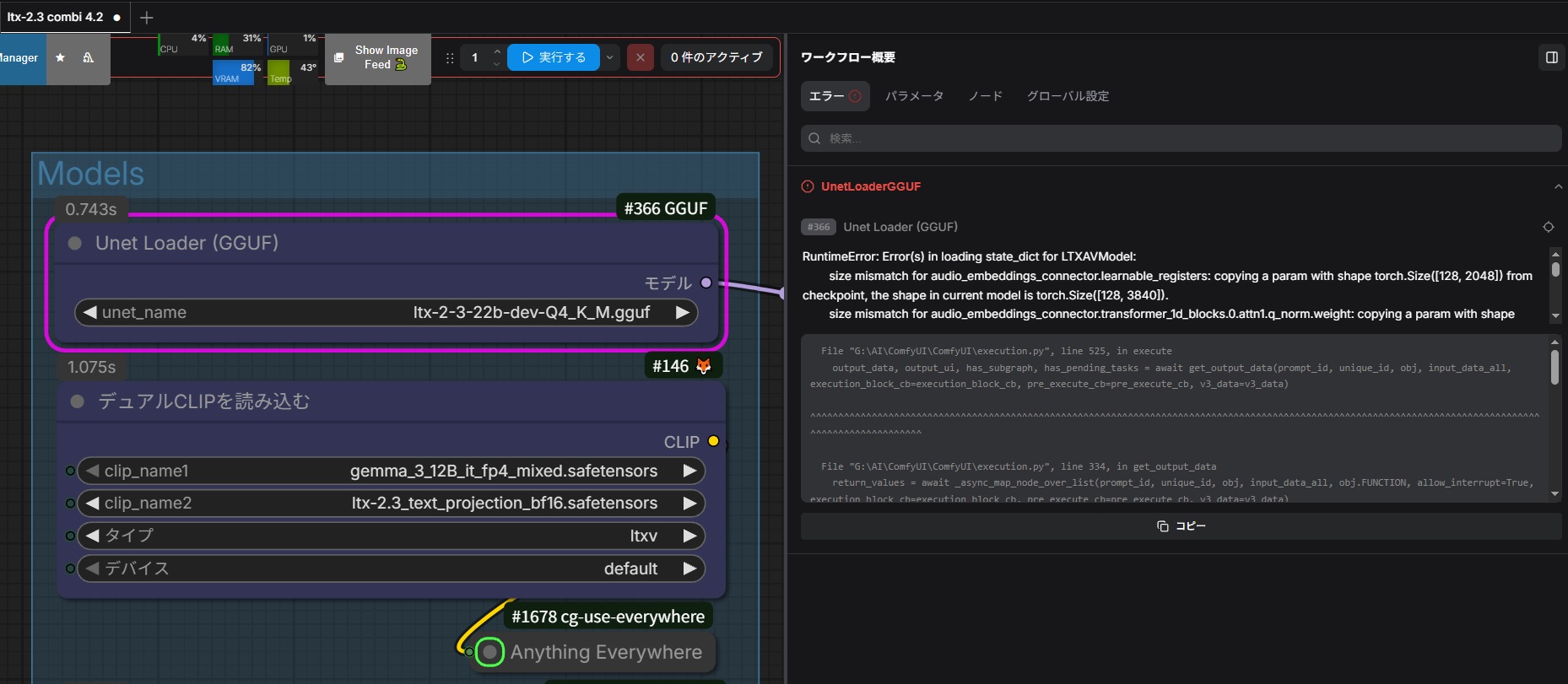
- audio_embeddings_connector.learnable_registers: [128, 2048] vs [128, 3840]
- video_embeddings_connector.learnable_registers: [128, 4096] vs [128, 3840]
- transformer_blocks.*.scale_shift_table: [9, 4096] vs [6, 4096]
- transformer_blocks.*.audio_scale_shift_table: [9, 2048] vs [6, 2048]
trying your LTX-2.3 workflow.
I resolved all missing custom node errors and placed all required model files.
Also, in diffusion_models I kept only one LTX GGUF file, and I selected exactly:
ltx-2-3-22b-dev-Q4_K_M.gguf
Main setup:
- workflow: ltx-2.3 combi 4.2
- model: ltx-2-3-22b-dev-Q4_K_M.gguf
- clip: gemma_3_12B_it_fp4_mixed.safetensors
- clip2: ltx-2.3_text_projection_bf16.safetensors
- VAE: LTX23_audio_vae_bf16.safetensors / LTX23_video_vae_bf16.safetensors
- loader: UnetLoaderGGUF
My question:
Is this workflow expected to work as-is with current ComfyUI-GGUF / KJNodes versions?
Or does it require specific versions of ComfyUI / ComfyUI-GGUF / KJNodes?
Also, could you confirm whether the currently available vantagewithai file
ltx-2-3-22b-dev-Q4_K_M.gguf
is the exact GGUF you tested with?
@rito3ritomasu975 The workflow works out of the box with the linked models with any properly working comfyui system. No need to change models/loader etc. But first of all: all your system components are up to date? You SELECTED the right models in every loader node???? Look here too.
@arkinson
Thank you for checking this for me.
I already tried the following:
- Updated ComfyUI
- Updated ComfyUI-KJNodes
- Updated ComfyUI-GGUF
- Verified that the GGUF SHA256 matches the Hugging Face file
- Reselected every loader node manually from my local files (UNet, dual CLIP, audio VAE, video VAE, preview VAE, upscaler, LoRA)
- Corrected the first distilled LoRA path to my actual local file
- Disabled the undocumented second LoRA (ltx-2-19b-ic-lora-detailer.safetensors)
- Temporarily removed comfyui-lora-manager and tested again
- Kept only the target LTX GGUF file in diffusion_models
Even after all of that, the workflow still fails in UnetLoaderGGUF with the same mismatch:
audio_embeddings_connector.learnable_registers [128, 2048] vs [128, 3840].
At this point, I think I will reluctantly give up on this workflow for now.
Thank you very much for your time and help.
@rito3ritomasu975 No - never give up to fast 😉 Thank you so much for your detailed informations.
As I see from other comments here, comfyui has rolled up new updates wich actually causes audio errors too (see here). Cause I`m still on an older version I have to update for myself first. Please be patiant - I will come back if my own system is up to date.
Just a short question: please let my know your OS system and the version and release of your comfyui system.
@rito3ritomasu975 Arg - it seems my last comment was not saved.
OK, I updated to last comfyui 0.19.3. and everything works as usual on my side. If you still need help, please let my know for more systematic tests.
Anyone else getting this error after the last comfyui update?
Exception: An error occured in the ffmpeg subprocess: [aac @ 000001994745ca00] Input contains (near) NaN/+-Inf
I think it has to do with the ltx 2.3 audio generation but for the life of me cant figure out how to fix it.
I've started experiencing issues with the final outputting process too and now I get only the audio-less video since I updated ComfyUI
even after updating the node, ive been getting this as well when generating from I2V as well.
yep; same here. bummer :(
Same error after updating ComfyUI
it's definitely a comfy bug; i did a reinstall to version 0.19.3 and audio works again.
[edit: no need to do it anymore just update to v0.19.3]
@haymaker @SnapRYRY89 @mjh02111964582 @blackmailing324 @Squirrelz Sorry guys, I have not the time to update yet (I`m still on comfyui v0.18.1).
Please do a simple test to exclude a possible problem:
1. Open the subgraph and go to the first LTXVSeparateAVLatent node (the left one),
2. Delete the existing audio_latent connection,
3. Connect the audio_latent output with the LTXV Audio VAE Decode node (at far right),
4. Disable the LTXVConcatAVLatent node (left from the second sampler).
This will simply bypass the audio flow via the upscaling process. Please let me know, if this "workaround" might help you.
@mjh02111964582 You are right. V0.19.3 is working again. Anyway - I will publish a minor update with some enhancements and a bug fix soon.
@mjh02111964582 Workflow version 4.3 is out now 🙂
@arkinson Thanks Boss!!! :D
@arkinson thanks again for the troubleshooting steps. updating to v0.19.3 fixed my audio issues as well
I thought it should be possible to use a wan 2.2 file as video input and extend the video and add audio only by prompting it. I get an error saying missing audio input. Do i really need a separate audio file?
Thanks in advance.
@Hasenbein OK - I got what you try to do. Unfortunately the V2V option needs a video (with audio) as input and it works slightly different from what you are expecting.
V2V only EXTENDS your input video with the given prompt. Stupid example:
You have a 5 scond video of your dog looking into the camera (with some audio). Now you create a 15 second video with your dog "looking 5 seconds into the camera" + 10 seconds "with your dog telling a joke". Or with other words: you can`t manipulate your input video - your promt just has to describe how the story goes on after the input video.
@arkinson oh thank you. I didn't know the model needs the audio too.
I have hacked the 3.x version of these workflows to extend a video that had no audio by setting the input audio to be 1 sec of silence even though the video was 5 sec long. The final video was 15 sec and LTX created audio for the whole thing, even the 4 seconds of the first part of the video. Very rarely it would even change the lips a little to match dialog I provided.
Edit. I also set the audio_start_time to 0, in the LTXAudioVideoMask in the VideoToVideo sub graph. I just tested again an it works as I remembered. LTX fills in the missing audio from the Wan 2.2 5 sec clip that starts the video. Again this is with the 3.x worflows and has probably changed in the 4.x versions. I haven't tested.
@RandomAIUser thanks a lot for your help. I tried what you suggested with version 3.0 and set the audio_start_time to 0 after unlinking the input and got the same error message as before. Maybe it was not the only node in the wf you edited? Perhaps you could post your edited workflow?
@RandomAIUser thanks for your help. I edited the v3 workflow by editing the audio_start_time to 0 after unlinking the input but I got the same error message. I think that you've changed more settings. Perhaps you can upload your workflow?
@Hasenbein Sure. I uploaded a video that I extended this way. NOTE. the workflow isn't in the video due to a bug with comfy. So I uploaded a PNG file that has the workflow used to create the video. Here is the post:
https://civitai.com/posts/28200204
And the original video:
https://civitai.com/images/128344256
Edit: I added a second example.
@arkinson @Hasenbein I added a third video (Cookie Knight) that uses a modified version of the 4.3 workflow. See the RED nodes near the Load Video node "P" section and the Processing subgraph for my changes.
https://civitai.com/images/128760663
@RandomAIUser thank you very much. It still doesn´t work with my video but it worked flawlessly with yours. must be an aspect ratio problem in my video or the way I used to interpolate the 16fps wan to 24 fps to match ltx. At the moment I don´t have the time to play around with it but I am sure I will use your workaround in the future. Thank you for your efforts!
Continuation with LTX is just the best. This WF should be the comfy template. I've one mod for anyone going really long/large. Since the pipeline uses the entire video and stitches cumulatively, even a shoebox full of memory will OOM pretty quickly. For example, first run 10 seconds at 1920x1088 24fps. Next run 20 seconds, the following 30 seconds. PC will get angry and start slapping you.
What I done did was this. Added INT for context seconds, with an expression that uses this with FPS to give a cap - this goes to VHS frame load cap. Duh. Second INT needs to be the total frame count of the loaded video. This goes to an expression that subtracts the cap from the total frames. The result goes to VHS skip first frames.
So net result is selecting how many seconds of continuation context you want from the end of the loaded clip. Instead of the length slider being (loaded clip duration + new generation), it is set to context seconds (from the first INT) + new generation.
For example if I'm generating 10 seconds at a time, I only have to use 12 or 13 seconds as total duration, depending on what I've chosen as the context window. And of course it's not cumulative any more, you just keep snipping from the end of the previous run. Line them up in an editor, or automate in comfy, takes no time at all (load all clips, drag extensions back 2 seconds (if context was 2), export - done.
*You can also add a second loader and load the input clip twice, capping the first loader at 1 and only using it as the source for a 'VHS video info' node- that will automate snatching the total frame count, instead of having to right click on the loaded clip to find the count and enter it manually. I've done this in a bunch of WFs, it's a bit annoying, but it does work. Don't try this with just one loader - it is a recursive loop and will error out before you've even started.
There are other ways to do this - eg using the range index in the subgraph, but this way definitely keeps whatever you're not using from needing to be purged, which is not always reliable, and it's easy to debug and switch on the main graph.
@Ponder_Stibbons Hi again. Arg, I did not really got what you are doing. It seems you talk about V2V???
Ok, you set the extension time as input instead of the total time. But I don`t get what you are doing to reduce computing time/power - or maybe be I got you complete wrong.
If you have a working workflow, please sent me a link and I would have a look at it.
Btw. workflow version v4.3 is out now 🙂
@arkinson Sorry, I seem to be spamming your comments. Just thought that might be helpful for anyone running into OOM when doing serial extension. I don't want to snipe your WF by posting a tiny mod, it's just two INTs with an expression for each, and they could be entered manually into the loader anyway. As far as memory goes, you certainly don't need 10 seconds to get temporal context (in my experience) so there is no need to load the whole thing into VRAM, or RAM for that matter. I started running into trouble at around the 45 second point- disabling previews could save a little, but it will happen eventually. Even if they are not denoised, the latent frames are still there. So If you start with a 15 second I2V then continue with V2V, 361 frames will always be the maximum for each run, you're just capping the overall frame count to what your system can handle, and if more context is needed you can just set the loader cap higher and sacrifice new frames. Eg. 361, then 361 (48 old + 313 new) for each successive run. Without it, it will be 361, then 361 +361, then 361 +361 +361, etc. All of that needs to live somewhere. Aside from writing to disk, that has to be RAM, of both flavors.
Without capping the input duration when continuing a 45 second clip, comfy usually tells me "Memory summary: |====33952 MiB? You idiot. You don't know what you are doing, do you? Leave me alone, I'm hot.====| To pick one line from the chart at random.
I've been doing my testing at 24fps 1920x1088, 15 seconds at a time with an cap of 2 seconds. I haven't had degradation (to the point of needing a loop or FLF recovery) until well past 1 minute. Of course lower resolutions will degrade a lot faster, and fast motion or just bad luck with messy endings can affect this, but overall I've found it to be great.
Probably would get much lower spikes with 1024, 1288, etc, but my experience with LTX is the bigger, the better. The much better.
I don't know, does this make sense? I'm trying to make sense, but I cannot tell if the above contains sense or just rambling. Point is that I had memory issues before capping input, but doing so makes output only limited by degradation. So output is the same- it requires the extra step of merging the outputs but extension becomes theoretically infinite. And even if my understanding of the cause of the spike is incorrect, it still fixes the problem if it rears its pugly head.
Full of errors all the way. Much simpler workflows out there. Skip this one. Totally not worth it. LTX2.3 isn't that complicated as this workflow would make you think.
Yes of course, you might use the simple template workflows for example. Just choose the right models, calculate the right inputs for every geneartion by yourself and run lots of tests to optimize it to your hardware. And don`t forget - do it for every single option you would like to use.
Yes indeed, this way you will learn a lot about comfyui in general and LTX-2.3 video generation in particular 😉
@arkinson Buddy no one is here for your sarcasm. We get it you're a weirdo basement dweller who sits in your chair all day. The dude is simply saying you're over complicated a problem that doesn't exist. Flaunting the fact that you have knowledge about the model isn't the big boy play you think it is. But congratulations on your virginity.
I think your statement lacks consideration. I've used a lot of LTX 2.3 workflows. The author's workflow demonstrates a strong understanding of cue word adherence compared to other workflows. The same cue words and LoRa weights, paired with almost identical settings, yielded unsatisfactory results and poor dynamics in other workflows. However, the author's workflow is significantly more dynamic than others. I suggest you compare several different workflows to see the difference, instead of giving up immediately after seeing many nodes and complaining.