


🌐 Main & Site-Generation | ⚡️ Ligthning/Hyper | 🌀 Alt version | 🖌 Inpaint | 📦 Old
 ✨v2.3 ULTRA is a distinct variant of the standard v2.3.
While it technically improves overall output, my intention is to treat this version as experimental, exploring potential directions for future updates.
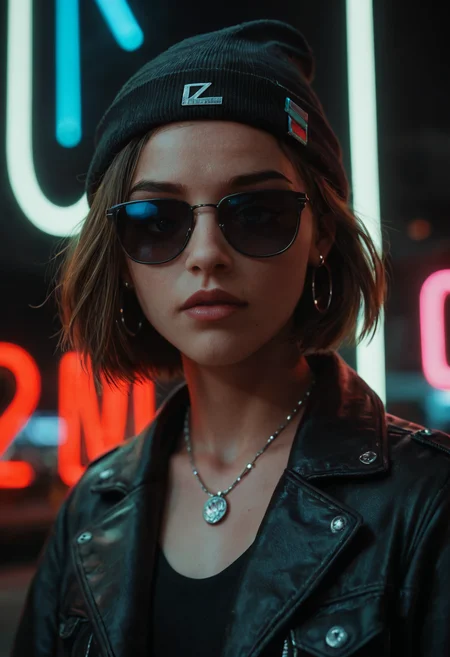
This release brings more natural and balanced lighting (also darkness), enhanced skin detail and an increased realism.
If you're using this model for Furry or Fur-based prompts, make sure to use the "Furry" trigger, or pair it with my Fur Enhancer LoRA for best results.

v2.3: (Latest) ✨
v2.2:
 I have written an article that explains and provides some useful resources to help you achieve great generation results. You can check it out for detailed insights and recommendations.
 🔁 Samplers
DPM++ 2M SDE Karras
DPM++ 2S a Karras
DPM++ SDE Karras
DPM++ 2M SDE Exponential
DPM2 a
DPM++ 2S a
DPM++ 3M *
Euler A
⚙️ Generation Settings
Steps: 30 or more
CFG Scale: 6–7
Clip Skip: 2
Resolution: Greater than 1024px
🗒️ Notes
Use Danbooru tags
Keep individual prompt weights ≤ 1.5
Use "female/male" instead of "woman/man" for better tagging compatibility
🖋️ Prompt Style
Positive Prompt Tags:
score_9,score_8_up,score_7_up,BREAKNegative Prompt Tags:
score_4,score_5,score_6
 ⚠️ Avoid DPM++ 2M Karras (Not recommended for generation)
✅ Recommended Samplers
Euler A
DPM2 A (Best for detail)

 Read the following article for tips and my training preset
⚡️ Buzz for the Best Images ⚡️
Description
Improved lighting
Better performance in dark/night scenes
Improved hands and feet
More refined colors
Cleaner overall image quality
Slightly better face shapes from different perspectives
Subtle improvements to skin
Enhanced outputs with Euler A
Improved prompt comprehension
Slightly finer details
Updated VAE
FAQ
Comments (121)
Wait is finally over! 🔥🔥🔥
Love the adition of Euler A for Local generations, can't wait to try it out on Forge! X3
Only wish we had an option to be able to output nice pics without them having to be landscape or portrait, but just the idea of having Euler A on local and the better footsies on this version already makes me super happy! ^w^
If you're referring to the resolution recommended in the model description, don't worry, I forgot to update that part. As long as the minimum resolution is 1024 (SDXL), you can output any format you want.
Thanks for reminding me about that! :)
https://civitai.com/images/32433740
@ZyloO Oh, nice hehe :3
do you recommend train loras on 2.2 or stay on 2.1?
I will start training mine on v2.2.
It’s the same model with improvements.
LoRAs from version 2.1 will work fine on 2.2, and vice versa.
https://civitai.com/images/32440828
@ZyloO I'm glad to hear it, i was on a doubt for a sec :D
@ZyloO Thank you!
By the way I've been looking at the prompts of the new images, will you update your model guide to reflect the changes of V2.2?
I noticed that you use some “quality tags” at the end of the prompt and the negative prompt is much simpler than the ones in the guide.
@Zenpand Yep, I’ll be making some changes to the guide.
Ohh, so it was happening 😆, Gotta try it and get Ready for the rain of finetunes after this xD
The legend returns! Thank you for the update.
You sir are a king of the pony realistic models. Happy to see you back and can't wait to try 2.2
I don't think i'll make it to the end of the year, but i can guarantee you that Christmas is cuming hard.... bro you will be the end of me, your models are just too good
I'm really sorry to hear that. I'm glad the models are bringing you some joy. Take care ❤️
@ZyloO hahaha, Thank you, wish you the best!
From my brief testing, Pony Realism v2.2 performs well when combined with an 8-step Hyper LoRA, using a CFG of 1.5, 8 steps, and Euler A SGM Uniform. Version 2.2 seems to produce better results with Hyper LoRA rather than Lightning LoRA. Lightning tends to generate subpar images unless Hi-res is enabled. DPM++ 2M only works effectively when using Hi-res. I tested with a Hi-res setting of 1280x1856 at 0.4 denoise (40% strength).
When using with Hyper LoRA at a CFG of 1:
At 832x1216 use Eular A SGM Uniform
At 1280x1856 use Eular A SGM Uniform or DPM++ 2M SGM Uniform
where do i get this hyper lora from?
@seath1337 https://civitai.com/models/800496/lightninghyper-8step?modelVersionId=918028
It allows you to generate an image in fewer steps.
@QH96 aha, thank you! my images are coming out way better!
I’m going to try this and see if it’s worth switching from the incoming Lightning versions to Hyper.
Thanks for the feedback :)
@ZyloO Happy to help :)
Good checkpoint, but still a lot of potential. Much of the same face. Strong negativ on pony models to get less 3D look is : Forest and Flower, only negativ I use.
For me, this model makes everything a bit darker than 2.1. Has anyone else experienced this?
I've always loved this checkpoint and looking forward to this update .
I will be trying it out immediately....
will we be able to see version 2.2 on SeaArt?
Unlikely, the only additional service that will be available on is ShakkerAI
what's the name on seart of v2.1?
I really impressed with the high quality pose and photorealism of this model! Definitely gonna try out v2.2!
One question guys, which setting should I use for IP Adapter faceid plusv2 sdxl with this model (v2.1 and 2.2) to achieve the best result? Please share your experience <3 I really appreciate it
Does this need to go into the checkpoint folder or vae folder?
Checkpoint. The VAE is baked in
I am finding that this version also has better age control instead of everyone gravitating towards looking like they are 25 years old. Great stuff.
The issue with the high contrast images was solved, now if you get dim lighting on your images just prompt some illumination, god rays, volumetric lighting, dramatic lighting, spotlight, studio lighting, etc.
The dark/low contrast is a natural result of photo realistic data set.
I like to use it to make a lot of 2d images, 2d loras work really great because it skips all the "bad stuff" from a regular 2d pony checkpoint, just limit the 3d, photo, photorealistic and you will jump straight to the best quality of pony 2d.
I got the best results with 3d using the 4x_NMKD upscaler with 10 steps, 3~4 scale and 1.5x.
For 2d i like remacri or smoothremacri, they tend to "polish" textures, use it with 1.5x~2x, 5~10 steps(i have tried 10,15,20,25, and there is little difference), i usually go for 1~5 steps with 3~5 scale to let the upscaler do the hard work since i dont really like impainting.
And i am really sorry for the misuse of your great work. xD
This is the best!
this is like xmas. i'm so excited to test this
everything is unchanged, he doesn’t understand age, he doesn’t understand nationality, and it’s also become darker. a damp model, alas.
Do you have suggestions on other pony models has better understanding on age / ethnicity, the depth of field in general?
@Mockman according to my observations, there are no such yet
@pht001 And there probably won't be one; Pony wasn't trained with specific ages and ethnicities in mind. You need to use Danbooru tags or find age slider Loras. I have a few tips on ethnicities in my guide if that helps
Tags and LoRA help push specific age, middle age, describe age etc. LoRA def help.
The only thing that bothers me is the lack of sharpness in the images. As if the object is out of focus. I will say right away that upscaling does not eliminate this. Maybe someone knows how to improve sharpness in photos. Real Dream is better in this regard. Although I like the lighting better in this model.
Try this upscaler https://huggingface.co/gemasai/4x_NMKD-Superscale-SP_178000_G
What are some words that can consistently generate multi-panel movie shots within a single image?
What are some words that can consistently generate multi-panel movie shots within a single image?
2koma, 3koma,,etc. Better use Lora, or use seeds that from other images with multiple frames some seeds are very good at Multi frames I think
Great pony model, has Pony flaws, but does everything a pony does extremely well. Thank you for creating and sharing.
10/10
Thanks a lot ! V2.2 is a fantastic pony realism model and apparently it can .... do inpaint !
(In fooocus: With in the advanced option Debug tools, switch Forced Overwrite of Refiner Step to 1 instead of -1, in inpaint options, let to V2.6 inpaint model and others stuffs and play only with "Inpaint Respective Field") Euler_a sampler . It begins with large colored spots as usual with pont model, but with only 30 steps the job is done... ) . I would like to know if others notice the same thing. For "Improve details" it works also but it is not new.
"Forced Overwrite of Refiner Step to 1" was a game changer ! THANK YOU !
How to describe a tall, slender girl with long legs.
How you just did.
score_9, score_8_up, score_7_up, score_6_up, score_5_up, score_4_up, best quality, detailed, detailed body, detailed face, extremely detailed, ultra detailed, masterpiece, photorealistic, cinematic, BREAK 1girl, tall, skinny, slender body, long legs, BREAK lying on bed, modern bedroom
Absolutely stunning model. My go-to currently for just about everything. Love the versatility, responsiveness and quality. Thanks so much for this gem.
All hail! The return of the king of Pony realistic models. We are not worthy.
beautiful work. Could you please share your workflow?
My images has a workflow for ComfyUI. If you interested.
Still the benchmark as far as I'm concerned. Good realism while barely sacrificing any pony flexibility.
Backgrounds and bodies are good, but my works still have empty, lifeless and low detailed faces. Why?
Are you using adetailer? And when you do, use seperate prompts related only to the face for best results (altough it will work when blank too).
I noticed it's biased with light source from the back, making the subject darker.
Personally, I don't like it so much.
Every model is biased to something, just prompt for what you want or use a lora if that fails. There may be a few pony models that do realism slightly better, but none of them retain nearly the flexibility that this one does.
Good
Help! Can anyone tell me how to run this model? I'm using SD locally and it just doesn't load,. Is there any software requirement to run it? Like what do I need?
probably best shot for new user is to use forge (check on youtube how to install forge, add image generation or sdxl as another key word so you don't end up installing random software named forge...) if not automatic1111 also easy to use, but limited in some aspect (forge is a better version of it I think) and if you fell more adventurous, try ComfyUI same thing search on YT easy find
@NoArtifact I've got Automatic1111 v1.10.1, which is the newest
@particlesbob984a then put the model in \stable-diffusion-webui-master\models\Stable-diffusion sub folder, check if you don't accidentally run a sampling method that you don't have, or a upscaler that you don't have, to make sure for a first try put euler a (from the drop down list) as sampling method (you can try DPM++ SDE too usually safe option) , and disable high res fix (so no upscale just to test if it run), and obviously don't forget to select the model :) mught need to refresh
@NoArtifact okay forget about it, I had to add xformers, so it runs with it, thanks for the help tho!
@particlesbob984a cool
@particlesbob984a I'd still suggest checking out Forge or reForge
Best resolutions? 1360v1360 is viable?
Just try? My guess is it will work just fine, it's not absurdly bigger than standard xl resolutions.
it's better for any model not to enlarge initial render resolution too much. some models can pull 1360px per bigger side with aspect ratio 2:3 0.666 904px*1360px, but some proportions changes will be inevitable. actually I found the most safe aspect ratio for most human situations and poses it 5:6 and resolution 944px*1120px
woof,so good!
anybody knows, how to make image of a man with x shaped hands?
This is not a nice question. Now I tried like 50 images to get this going. At first I was like" pff I just make a few pics and upload them" now I am more like " who needs crossed hands anyway" In short: If you find out a reproducable way please let me know
@Pandaofd00m my task was to depict a man who crossed his arms in a sign of prohibition, as if he were saying "forbidden", "no". But alas, no model has coped with this. The only option left is with ControlNet and OpenPose
@civitai_ac I got a few guys crossing their arms like they were hugging themselves but that was the closest I could get them to follow the prompt
Can we get a v2.2 "alternative" that works with non-stochastic/ancestral samplers?
Thanks <3 great work as always!
Wow. I can see why you feel like this is a complete work with no more required additions. You've really taken it to the next level. Masterclass work. I think these are literally the first perfect realistic images I have ever created using SD and they are all perfect so far.
Why don't my images show up when I try to post them here?
On site we have some delay between posting and images appear. About 5 minutes. All images posted here appear in this galley and in main site gallery simultaneously.
This checkpoint makes the best realistic footjobs by far! thanks for making this mate!
does increasing the steps count result in a much more detailed image? I know there are samplers like Euler A that won't benefit from higher step counts as they don't converge. But I'm not sure if non-ancestral samplers with higher steps (>50) with a pony model actually does result in a detailed image
Model's great for girls but can't seem to get dick in it. I'm using the basic workflow with provided settings on comfyui. Not using adetailer it the moment.
May I suggest downloading an image you like from this checkpoint? Make sure it contains the generational data. Gather the dependencies required for creating said image and use it as a template. Take care. /bow
Friends, tell me how to make normal lighting, sunny day. What tags to use. Different lighting options did not give the desired result. Photos are dark.
This can be caused by using overly complicated prompts or even miswording things. I am a master of both. (wink) Download an image that someone has posted for this checkpoint, use it as a template, and see if that fixes your problem. :) Take care. /bow
@KelevraQuakenstein There is no such problem when using another checkpoint with the same promt. This is not the first day I write promts.
In the negative: (oil painting, illustration:1.5), backlighting, . Idk why it works but it works well.
@Socash it works
The new version a worse at inpainting to be honest.
how a model can be worst in inpainting? why it's even some times different model for inpainting??
the Checkpoint make real hentai so good👍👍
This new version makes the images very dark, the previous one is better.
can i do Flux with this VAE?,... has anyone tried?
this model is crazy good
Very flexible
Goated
excellent model
After testing v2.2 a lot, i come to conclusion that v2.1 still remains the best for me. I used v2.1 trained loras on v2.2 and the results were not that nice. I even trained couple of loras for v2.2 still got pretty bad results somehow meanwhile all my v2.1 trained loras are works very good and gives me great results in v2.1. Still v2.2 is good and fast, hands are bit better, also works good with euler a.
Yes. v2.1 is far better at least for my usage. I also prefer the first version of the amateur Lora in many cases. But I'm sure v2.2 is better for some :) gotta pick what's best for you.
Same here. The Loras that I trained on the 2.1 version perform nicely on the other pony models. The 2.1 version is my Lora of choice for training.
@mykeehu Same. Don't train on v2.2, It seems produce really poor results.
What problems are you having when training with version 2.2? In my tests, the LoRAs trained in 2.1 work well in 2.2, and the results from training in v2.2 are really good.
My latest characters are trained in v2.2 and have the same quality or better than in v2.1.
Context:
@ZyloO I see, they are looks great. As for my problem, i have no idea tbh :/ I used my usual settings (same settings i used for 2.1) and getting poor likeness in the 2.2. Trained some character for 2.2 and still also poor results, same training settings too. Guess i'm sticking with 2.1 for now.
Another big advantage of 2.1 is that it has been mixed in many other models. So what I train on the 2.1 version will probably show up well (weaker or stronger) on the other models. So for that reason I'll stick with the 2.1 training for now.
@mykeehu Indeed
like other products, the new model will get its own traction, like the new windows os, keep up the amazing work
so good
Works very well it’s recommended to try
newest version works like a charm on mage.space. Nearly divided gen time by more than half. Amazeeng.
Great model
Very powerful model. Thanks for making this.
What are some recommended ADetailer settings and prompts setup if any?
EDIT: I saw the brief mention in the compendium. Any notes beyond that
I was also seeking advice on during when exactly to do adteiler. During original gen or during Upscale process (usdu/Hiresfix)
If you do it during original gen it will just get retouched during denoising process of upscale so...
During USDU it definitely gets retouched sadly
ty
Ok
I am having trouble with it, using it as a refiner @ 0.7 with ponyDiffusionV6XL_v6, seems to not coupe well with other detail loras or something?
Where 2.1 worked just fine.
Very good model, thank you!
Details
Files
ponyRealism_V22.safetensors
Mirrors
ponyRealism_v22MainVAE.safetensors
ponyRealism_v22MainVAE.safetensors
ponyRealism_v22MainVAE.safetensors
ponyRealism_V22MainVAE.safetensors
ponyRealism_V22.safetensors
ponyRealism_v22MainVAE.safetensors
ponyRealism_V22MainVAE.safetensors
ponyRealism_V22.safetensors
ponyRealism_V22MainVAE.safetensors
ponyRealism_V22MainVAE.safetensors
ponyRealism_V22MainVAE.safetensors
ponyRealism_V22MainVAE.safetensors
ponyRealism_V22MainVAE.safetensors
ponyRealism_V22MainVAE_822476.safetensors
ponyRealism_V22.safetensors
ponyRealism_V22MainVAE.safetensors
ponyRealism_V22MainVAE.safetensors
ponyRealism_V22MainVAE.safetensors
ponyRealism_v22MainVAE.safetensors
ponyRealism_v22MainVAE.safetensors
ponyRealism_v22MainVAE.safetensors
ponyRealism_v22MainVAE.safetensors
ponyRealism_v22MainVAE.safetensors
ponyRealism_v22MainVAE.safetensors
ponyRealism_v22MainVAE.safetensors
ponyRealism_V22MainVAE.safetensors
ponyRealism_v22MainVAE.safetensors
ponyRealism_V22MainVAE.safetensors
ponyRealism_V22.safetensors
PonyRealism_v2.2.safetensors
Pony_Realism_V2.3.safetensors
Pony_Realism_V2.3_Ultra.safetensors
Pony_Realism_v23_ULTRA.safetensors
ponyRealism_V22.safetensors
ponyRealism_v22MainVAE.safetensors
ponyRealism_V22.safetensors
ponyRealism_v22MainVAE.safetensors
ponyRealism_V22.safetensors
ponyRealism_V22MainVAE.safetensors
ponyRealism_V22MainVAE.safetensors
ponyRealism_V22MainVAE.safetensors
PonyRealism_v2.2.safetensors
Pony_Realism_V2.3.safetensors
Pony_Realism_V2.3_Ultra.safetensors
Pony_Realism_v23_ULTRA.safetensors
ponyRealism_v22MainVAE.safetensors
ponyRealism_V22.safetensors
ponyRealism_V22.safetensors
ponyRealism_V22.safetensors
Available On (1 platform)
Same model published on other platforms. May have additional downloads or version variants.