
Update June 28th, added V3+VAE, pruned and fp16 versions also added.
V3
More training added to supplement some things I feel are missing in current models. Skin textures, darker lighting and more variety in race in people.
V2
After weeks in the making, I have a much improved model. No longer a merge, but additional training added to supplement some things I feel are missing in current models. Lots of new training for skin textures, lighting and non-asian faces to balance out the asian dominance in models. If you create a generic prompt, you'll get a greater variety of races and faces now. Skin textures are increased by a large amount, if that's not your thing, you can put detailed skin in the negative prompt and get back that airbrushed look if you like.
A photorealistic model I've been using for a little bit. I hate smooth airbrushed skin so I refined this model to be very realistic with great skin texture and details. There are 2 models, a standard and an ultra.
The Ultra model is nearly 3 times as large, but it's not 3 times as good. It is better though with a broader knowledge. You can even generate 1024x1024 in many cases. The config file is required for the Ultra model, be sure to download that too.
So I recommend using the normal version unless you have the need or vram to run the Ultra model. If you'd like to run the Ultra model with modest vram, try --medvram or --lowvram in your auto1111 startup script.
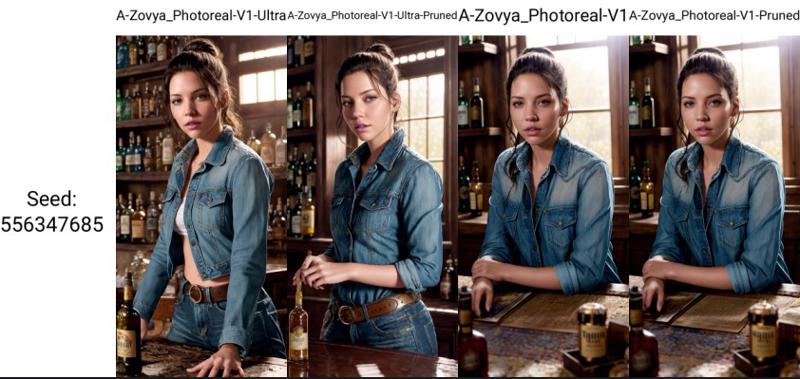
A side-by-side comparison. Link to see full-size samples with metadata. Like I said, the Ultra model isn't 3 times as good, but it is better across multiple subjects, not all. The pruned version of the Ultra model is debatable, might be better to use the normal V1 model in some cases. But all have been provided so you can make the choice yourself. For me, I use the Ultra model in every case.
Do you have requests? I've been putting in many more hours lately with this. That's my problem, not yours. But if you'd like to tip me, buy me a beer. Beer encourages me to ignore work and make AI models instead. Tip and make a request. I'll give it a shot if I can. Here at Ko-Fi
Description
Stable Diffusion 1.5 (512 x 512)
A-Zovya Photoreal V1 Inpainting
VAE recommended vae-ft-mse-840000-ema-pruned.ckpt
FAQ
Comments (17)
I'm confused about where to download the config file? All I see are options to download the ultra or pruned.
yeah, it's a little confusing. if you have the version you want selected at the top. to the right below the big blue download button there's a "files" section, expand that. The config file is only needed for the ultra non-pruned version.
ah i see, i was in the wrong tab for the model type, thanks
Keep up the good work - I too am getting annoyed with smooth skin - prefer imperfections.
Hello there, i'm using stable diffusion deforum local version and am getting an error when trying to use this model. I seem to have issues with all models from this website. Anyone have any ideas??
I don't know about diffusion deforum specifically. but it may use diffuser models. If that's true, none on this site would work unless you converted them. It's not something I've done myself, but you may want to check those two things.
@Zovya thank's!! I'll look into that!
I'm curious where to find some of the embeddings(?) used on many of your sample images. Clutter-Home looks the most interesting but I also see Lighting-Gold and Style-Interact. Are they available somewhere or private?
those are some I've been working on. I'll release them soonish.
Just downloaded all versions of the model. The large 'Ultra' one does work well with my humble 2gb GPU without any performance difference.
Images look amazing, thanks for making this model :-)
thanks
Thats amazing! 1) How are you running it on a 2gb card? 2) what card is it? 3) what configuration do you use?
@Igobywork it's a GTX-750 TI. I'm using auto1111 and the setup was quite hard with a lot of errors, and me being a bit of a newbie in all things python.
The optimal settings for me (commandline args in the webui-user.bat file) are:
--lowvram --no-half-vae --xformers --upcast-sampling --opt-split-attention --skip-version-check --use-cpu interrogate --autolaunch
A few more details and stuff i've tested:
- using --upcast-sampling is a bit faster than --no-half (and i think using them together isn't doing anything)
- xformers was super hard to install and it didn't give me more speed, but a tiny bit more capacity.
- controlnet works using the pruned models you can find here on civitai. Even some of the originals, but forget depth map and a few others (still testing). oh and lower the preprocessor resolution to 256px.
- openpose works nicely up to 512px.
- The new controlnet reference only preprocessor works great.
- I can generate up to 544x544 px before geting a cuda out of memory error, but can't do img2img or load loras at this resolution, just text prompt.
- at 512x512 i can load up to 3/4 of loras depending on model size.
- gen speed depends a lot on the sampler, i get around 20s/it with euler a, or 12.5s/it with DDIM or UniPC
- Clip interrogate won't work on GPU so i just load it into system ram and it uses the CPU to process (slow but it works)
- using the --always-batch-cond-uncond parameter lowers the vram usage significantly at the cost of some speed but has vram peaks when loading. Might enable higher controlnet resolution or load more lora's simultaneously. A bit hit and miss as it will often error out when there's a peak in vram demand.
- Can't use hires-fix so i use the 'ultimate SD upscaler' extension (extremely slow! but works)
- can't wait to get myself a newer GPU so i can forget about all of this and get images in seconds instead of 4~5 minutes
Bro wtf 2gb GPU
I have a 2015 toaster, with 16Gb RAM, and a GTX960 4Gb RAM. I installed "Easy diffusion" to save myself the headache of installing Git and configuring everything.
With the minimum settings I can create 512x768 images, although a single image takes 2 or 3 minutes.
I immediately discarded it and continued using cloud computing services. I've tried Google Colab, Kaggle, Paperspace and Sagemaker Studio Lab; all on their free plans.
I'll definitely stick with Paperspace, which although I can't load more than 2 models at a time due to the little virtual disk space they give, it saves all the configuration changes and files between sessions, and it's exactly 8 hours of session every 24 hours with an Nvidia Tesla T4.
Regarding the notebooks that load and configure everything I use the ones from Camenduru, on GitHUB, which updates automatic1111 every so often and fixes bugs, and comes with added extensions and model, etc.
Almost as convenient as using Stable Diffusion locally for those of us with a potato-level computer like me xD
@merodeador Remember that the next Intel generation will have AI chips. I have no idea how they can be used, but it might be worth considering for any future upgrades.
@merodeador Thank you so much for the info. Sorry I didn’t respond sooner. Much appreciated. I’m going to try it on my 2gb card!!