


Update June 28th, added V3+VAE, pruned and fp16 versions also added.
V3
More training added to supplement some things I feel are missing in current models. Skin textures, darker lighting and more variety in race in people.
V2
After weeks in the making, I have a much improved model. No longer a merge, but additional training added to supplement some things I feel are missing in current models. Lots of new training for skin textures, lighting and non-asian faces to balance out the asian dominance in models. If you create a generic prompt, you'll get a greater variety of races and faces now. Skin textures are increased by a large amount, if that's not your thing, you can put detailed skin in the negative prompt and get back that airbrushed look if you like.
A photorealistic model I've been using for a little bit. I hate smooth airbrushed skin so I refined this model to be very realistic with great skin texture and details. There are 2 models, a standard and an ultra.
The Ultra model is nearly 3 times as large, but it's not 3 times as good. It is better though with a broader knowledge. You can even generate 1024x1024 in many cases. The config file is required for the Ultra model, be sure to download that too.
So I recommend using the normal version unless you have the need or vram to run the Ultra model. If you'd like to run the Ultra model with modest vram, try --medvram or --lowvram in your auto1111 startup script.
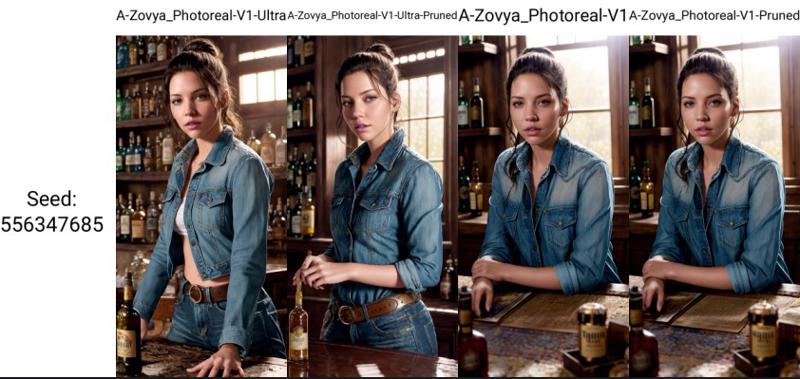
A side-by-side comparison. Link to see full-size samples with metadata. Like I said, the Ultra model isn't 3 times as good, but it is better across multiple subjects, not all. The pruned version of the Ultra model is debatable, might be better to use the normal V1 model in some cases. But all have been provided so you can make the choice yourself. For me, I use the Ultra model in every case.
Do you have requests? I've been putting in many more hours lately with this. That's my problem, not yours. But if you'd like to tip me, buy me a beer. Beer encourages me to ignore work and make AI models instead. Tip and make a request. I'll give it a shot if I can. Here at Ko-Fi
Description
Stable Diffusion 1.5 (512 x 512)
A-Zovya Photoreal V1 vae
Set VAE to "automatic" in settings
FAQ
Comments (23)
Dude the preview images looks great, but the posts people are posting here are shit dude, gonna give it a try, let's see
that's why I include the prompts if you want to try those.
Maybe some post more than a perfect illusion they cant reproduce (data missing) ;)
and rather like to play with the base data layer and see how adaptable (flexible) it is, this includes often not so perfect seeds and what you can do with them and you will see a wild variety of results depending on it's flexibility and it's main target point.
just give it time so far it looks good and await a lot of crazy results :)
and you can already see that the difference between ultra/and this is not so big and some ultra results even not really ultra at all
also going to extensively compare the ultra pruned
some ultra promising results already in non ultra that also will need indeepth compare with other models
im still not so sure if it is a good idea to have noise offset baked in
For the v1 non-vae, which is the recommended external VAE ?
at the moment it is the best model for realism
is this a 2.x model? i cant use any of the normal negative embedding (bad hands, bad artists , ...) with the ultra version, with the other version things work fine, but with ultra i dont get any good results, eventho i just copy pasted prompt and settings ... 🤷
this is what happens with pretty much any prompt: https://civitai.com/posts/272853
so i actually added the yaml file now, and i reran the same prompt and now things are looking good, updated the post 2x xy plots without yaml and with ;)
maybe make the config yaml file info in your description bold with arrows around it :D
yeah, there's lots of voodoo going on in the ultra model. Have to have the yaml for it to work right
I find myself returning to this Model when others just aren't quite good enough. Very versatile, very good quality. Not 3X better, but still really great!
haha. thanks!
Zovya, you're a god with models! I find myself always getting back to this photoreal or the zovya 3 RPG artist (along with inpainting versions) models for almost everything. Your models and Lykon's (for dreamshaper) are my favorites. Keep up the good work! <3 Made a small donation.
Thank you so much!! <3
Getting this error when using this model: mat1 and mat2 shapes cannot be multiplied. Any suggestions?
what version are you using. Also what program are you using? I've not seen that message before.
@Zovya I got same error with other vector painting model, rendering with other model solved the issue, the log is fill of trash So I didnt bother to work it aroung, probably some combination of someting in the checkpoint + specifiec extension
I am sorry, wrong report. Issue was trying to use controlnets with a sd20-based model (which I didn't know was 20) in an xy plot. Your model was the default and the sequence in the log was misleading (throwing the error after actually breaking and loading the default model). Please disregard
V1+VAE seems to be to big, or it is unpruned
where is config? ". The config file is required for the Ultra model, be sure to download that too."
if you're on the Ultra Version tab at the top. under the download button there's a big blue text area telling you to download the config
If you use the Ultra PRUNED version, then it looks like you don't need the .yaml.
Just to make a 100% sure I just tested it by renaming the .yaml with the pruned version's filename, and even though the yaml is loaded when you select the pruned model in A1111, it doesn't change anything to the output, as far as I can tell.
@AugmentedRealityCat true, you only need the .yaml file for the full sized Ultra model
When I choose the Ultra model, an Error message appears and the connection is lost.