
Update the Florence version:Many people encounter dependency errors when using the Joy Caption plugin. I use Florence as a replacement—it’s easier for beginners to avoid these issues.
Not an upgraded version of the previous one.
By using an LLM to write prompts for CogVideoX-v1.5-5B I2V, it helps those who don't know how to write prompts or are too lazy to do so make better use of CogVideoX v1.5. It also allows users to choose to add guiding prompts or turn off the LLM feature and write prompts entirely on their own.
Although the v1.5 version supports any resolution, there are still differences in quality depending on the resolution. You can test multiple resolutions to find the best one.
For low VRAM users, please keep the following features enabled.
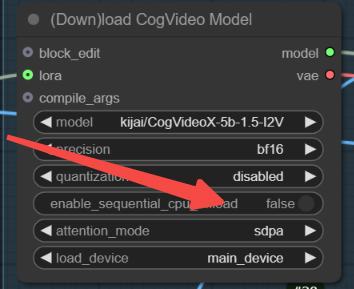
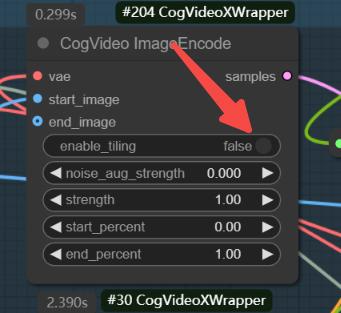
The GGUF version doesn't perform that well based on my tests, but v1.5 is still being updated, so we can expect better results in future versions.
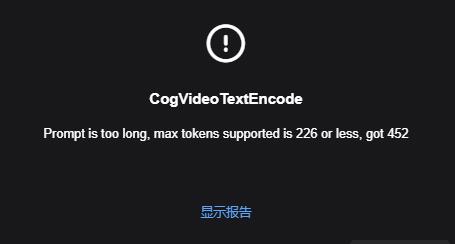
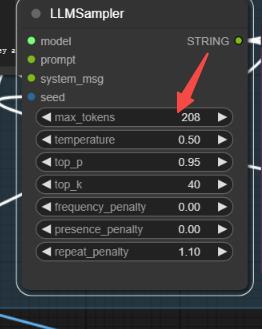
If this happens, it's because the LLM prompt is too long. You can change the random seed to regenerate, or modify the values below to reduce the tokens.
Description
FAQ
Comments (16)
Love this workflow, esp the prompts being driven by LLMs and producing the best eye candy animations I've seen from this. WD!
In this set up you have it set to 6sec (num_frame 49) at 8fps. One thing you might want to play with is this 1.5 model has been trained at 5sec (num_frame 81) or 10sec (num_frame 161) and at 16fps.
Thank you for posting this, it opened up a lot of things I didn't understand.
what folder do i put the Meta-Llama-3-8B-Instruct-Q4_K_S.gguf. file?
models\LLavacheckpoints
Joy Caption seems to expect there is a Folder named "Joy_caption/image_adapter.pt" in the models folder of comfyui. But there is not, do you know how to fix?
models/Joy_caption, You should create this folder yourself.
@Charine But there is still no image_adapter.pt file. And odd that the node installation doesn't create the folder! And when I create the folder and download image_adapter.pt from joy caption alpha2, I get this error: Error(s) in loading state_dict for ImageAdapter: Unexpected key(s) in state_dict: "other_tokens.weight"
@Charine same error
@starmanj I haven’t encountered this issue, so I’m not sure where the error is. However, you can use the Florence node as a replacement for this one.
@lemniscatainfini3561 I haven’t encountered this issue, so I’m not sure where the error is. However, you can use the Florence node as a replacement for this one.
@starmanj I’ve shared a Florence version that avoids dependency issues.
@lemniscatainfini3561 I’ve shared a Florence version that avoids dependency issues.
@Charine Thank you!
You should be able to use this:
https://huggingface.co/spaces/fancyfeast/joy-caption-pre-alpha/blob/main/wpkklhc6/image_adapter.pt
download and put in the folder.
Then likely you'll be met with a new error Joy_caption Expected device_type of type str, got: <class 'torch.device'>
What you can do is to
Open the file C:\ComfyUI_windows_portable\ComfyUI\custom_nodes\ComfyUI_HF_Servelress_Inference\nodes\Joy_Caption.py with a text editor and change line 171 from
to
with torch.amp.autocast_mode.autocast('cuda', enabled=True):After a restart of ComfyUI the problem should be solved.
Credits to original post I found here:
https://www.reddit.com/r/comfyui/comments/1f0amyp/deleted_by_user/
Is there a way to make this video loop seamlessly ?