


Hey guys,
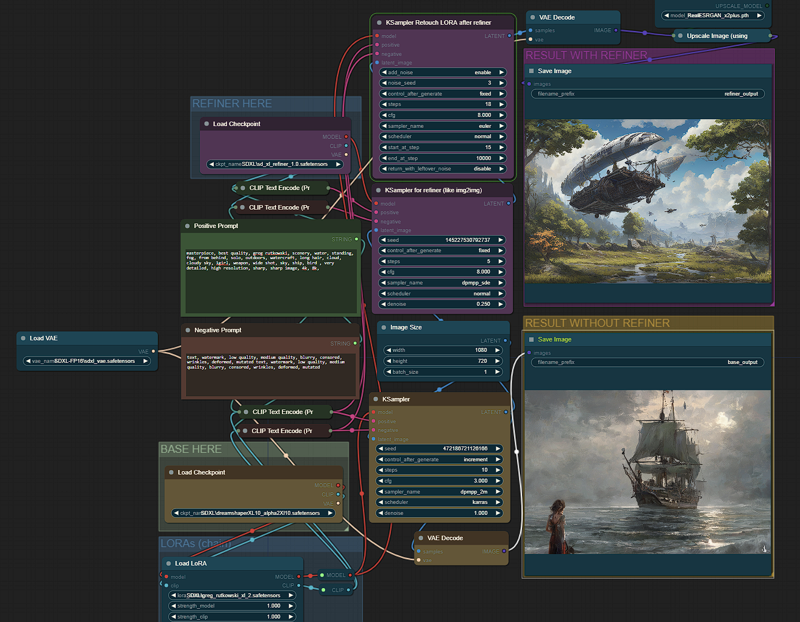
I was trying SDXL 1.0 but my laptop with a RTX 3050 Laptop 4GB vRAM was not able to generate in less than 3 minutes, so I spent some time to get a good configuration in ComfyUI, now I get can generate in 55s (batch images) - 70s (new prompt detected) getting a great images after the refiner kicks in.
Is the best balanced I could find between image size (1024x720), models, steps (10+5 refiner), samplers/schedulers, so we can use SDXL on our laptops without those expensive/bulky desktop GPUs.
I wanted to share my configuration for ComfyUI, since many of us are using our laptops most of the time. I think this is the best balanced I could find.
Add params in "run_nvidia_gpu.bat" --normalvram --fp16-vae
Face fix fast version?:
SDXL has many problems for faces when the face is away from the "camera" (small faces), so this version fixes faces detected and takes 5 extra steps only for the face.
Face fix no fast version?:
For fix face (no fast version), faces will be fixed after the upscaler, better results, specially for very small faces, but adds 20 seconds compared to fast version.
If the face fix output does not generate a different image (maybe you are using a 4x upscaler), and console prints "segment skip [determined upscale factor=0.9875809267424535]" , in module "FaceDetailer" increase "guide_size" from 1280 to 1408 or more until it activates the FaceDetailer.
Difference between LORA and LORA fast?:
If you choose LORA fast, you can save 20-30 seconds.
The LORA fast does not have 3 extra steps after refiner to retouch the LORA effect, refiner dims the effect of the LORAs, in some cases for LORA with custom styles is needed the last 3 steps to add again the effect. Not needed in most cases, recommended for LORAs with custom styles were styles changes a lot the image.
Generation time (after first image):
No LORA: 55-60 seconds
With LORA: 85-115 seconds
With LORA Fast: 75-80 seconds
With face fix: 80 seconds (fix faces FAST) - 110 seconds (Fix faces slow version)
Files to Download:
Refiner SDXL 1.0: https://huggingface.co/stabilityai/stable-diffusion-xl-refiner-1.0
Model Dreamshaper SDXL 1.0 (or any other): https://civarchive.com/models/112902/dreamshaper-xl10
Fixed SDXL VAE 16FP: https://huggingface.co/madebyollin/sdxl-vae-fp16-fix (config.json, diffusion_pytorch_model.safetensors and sdxl_vae.safetensors files inside the same folder under VAE/<NEW_FOLDER>).
Upscale model (RealESRGAN or Swin2SR):
https://github.com/xinntao/Real-ESRGAN/releases/download/v0.2.1/RealESRGAN_x2plus.pth
https://github.com/mv-lab/swin2sr/releases/download/v0.0.1/Swin2SR_Lightweight_X2_64.pthFor the LORA version: https://civarchive.com/models/117635/greg-rutkowski-style-lora-sdxl
For face fix version (FaceDetailer):
ComfyUI/models/sams: https://dl.fbaipublicfiles.com/segment_anything/sam_vit_b_01ec64.pth
Description
v4 Added SD Ultimate Upscale for tiled upscaling. Make sure to install "ComfyUI_UltimateSDUpscale".
Tile upscale will use 6 Tiles (2x3).
FAQ
Comments (15)
It said missing nodes. Which one should I download?
I downloaded V4 and still get the FC Integer error. How do I resolve this?
found any solution?
same here.
To remove FCInteger error - install https://github.com/fitCorder/fcSuite
put fcSuite.py from repository to the \custom_nodes (without any inner folders)
Hi, i have fixed all missing dependency errors but last one is missing "workflowFix plastic textures"
Where to get this node, help please.
@Pechista I've installed it,
ComfyUI-Detail-Daemon
nightly [1.1.0]
It still has the same error
please add all link custom node in description , i can't search all missing and i install all in comment not work.
Add params in "run_nvidia_gpu.bat" --normalvram --fp16-vae
Anybody can explain more ?
Thanks a lot !
Right click on run_nvidia_gpu.bat then open in text editor, add "--normalvram --fp16-vae", without quotation marks, to the first line in the text file and they will be used by the file as opening arguments
After installing all mentioned nodes, I still get an error:
This workflow uses custom nodes you haven't installed yet.
fcInteger
workflowFix plastic textures
Even though I think both are installed. Do I need some other version?