


Hey guys,
I was trying SDXL 1.0 but my laptop with a RTX 3050 Laptop 4GB vRAM was not able to generate in less than 3 minutes, so I spent some time to get a good configuration in ComfyUI, now I get can generate in 55s (batch images) - 70s (new prompt detected) getting a great images after the refiner kicks in.
Is the best balanced I could find between image size (1024x720), models, steps (10+5 refiner), samplers/schedulers, so we can use SDXL on our laptops without those expensive/bulky desktop GPUs.
I wanted to share my configuration for ComfyUI, since many of us are using our laptops most of the time. I think this is the best balanced I could find.
Add params in "run_nvidia_gpu.bat" --normalvram --fp16-vae
Face fix fast version?:
SDXL has many problems for faces when the face is away from the "camera" (small faces), so this version fixes faces detected and takes 5 extra steps only for the face.
Face fix no fast version?:
For fix face (no fast version), faces will be fixed after the upscaler, better results, specially for very small faces, but adds 20 seconds compared to fast version.
If the face fix output does not generate a different image (maybe you are using a 4x upscaler), and console prints "segment skip [determined upscale factor=0.9875809267424535]" , in module "FaceDetailer" increase "guide_size" from 1280 to 1408 or more until it activates the FaceDetailer.
Difference between LORA and LORA fast?:
If you choose LORA fast, you can save 20-30 seconds.
The LORA fast does not have 3 extra steps after refiner to retouch the LORA effect, refiner dims the effect of the LORAs, in some cases for LORA with custom styles is needed the last 3 steps to add again the effect. Not needed in most cases, recommended for LORAs with custom styles were styles changes a lot the image.
Generation time (after first image):
No LORA: 55-60 seconds
With LORA: 85-115 seconds
With LORA Fast: 75-80 seconds
With face fix: 80 seconds (fix faces FAST) - 110 seconds (Fix faces slow version)
Files to Download:
Refiner SDXL 1.0: https://huggingface.co/stabilityai/stable-diffusion-xl-refiner-1.0
Model Dreamshaper SDXL 1.0 (or any other): https://civarchive.com/models/112902/dreamshaper-xl10
Fixed SDXL VAE 16FP: https://huggingface.co/madebyollin/sdxl-vae-fp16-fix (config.json, diffusion_pytorch_model.safetensors and sdxl_vae.safetensors files inside the same folder under VAE/<NEW_FOLDER>).
Upscale model (RealESRGAN or Swin2SR):
https://github.com/xinntao/Real-ESRGAN/releases/download/v0.2.1/RealESRGAN_x2plus.pth
https://github.com/mv-lab/swin2sr/releases/download/v0.0.1/Swin2SR_Lightweight_X2_64.pthFor the LORA version: https://civarchive.com/models/117635/greg-rutkowski-style-lora-sdxl
For face fix version (FaceDetailer):
ComfyUI/models/sams: https://dl.fbaipublicfiles.com/segment_anything/sam_vit_b_01ec64.pth
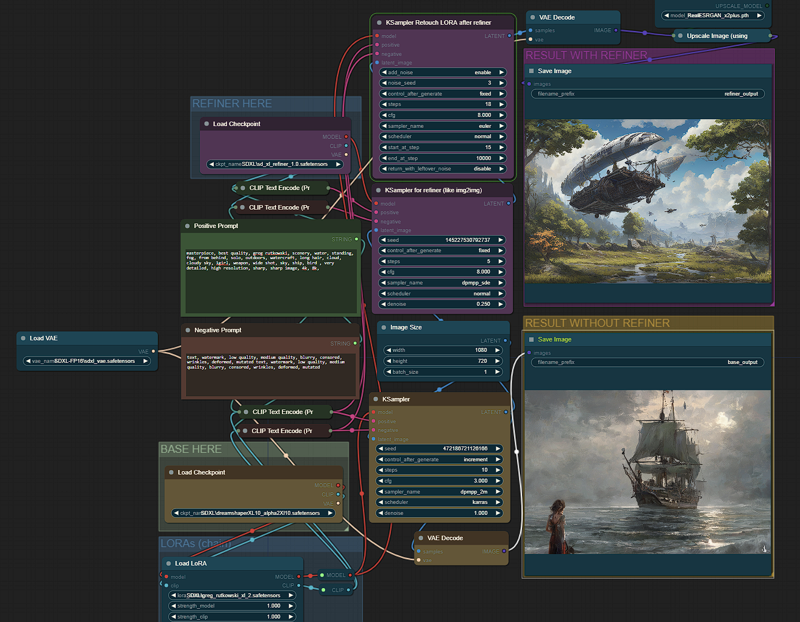
Description
Supports LORA,
To add more LORAs, just chain more below fist LORA.
Adding the LORA adds 15 seconds to the generation time from 55s to 70s.
FAQ
Comments (14)
What about adding a version with Lora's?
Yes you can added between base model and the Clip Text Encoder, but since SDXL is very new, and we have not much content yet, I only tried this basic configuration, great for beginners with a 4GBvRAM laptop, I think is the best balanced I could find.
For sure in a future update I will add a new version.
Added LORA version
@Pechista Thanks
I've tested this, works ok, a couple of comments:
1 - It uses few VRAM, but a lot of RAM, it maxes out my 16GB RAM, so ideally 24-32GB RAM.
2 - Dreamshaper XL author said that you DON'T NEED the refiner, upscaling and i2i is fine. So I wonder if you modify that it will run faster or with fewer nodes... just an i2i upscaler.
1 - Yes it uses a lot of RAM, but I have no problem using it with my 16 RAM laptop with some programs running in the background (Chrome, Music player, VLC, VS Code).
2 - Refiner is not needed for Dreamshaper XL, they ask for the hires fix instead (slow and uses more vRAM), but since this config has the minimum amount of steps 10 (base model) + 5 refiner, the first image has some flaws in many situations, the refiners helps a lot to improve the image. Is the best balanced I could find between image size (1024x720), models, steps (10+5), sampler/scheduler.
感谢大佬分享,的确是低配电脑的福音~但是我希望能加入Adetailer等有用的插件,不知道如何设置( ̄▽ ̄")
Thanks for sharing, it’s indeed a good news for low-end computers~ But I hope to add useful plug-ins such as Adetailer, but I don’t know how to set it up ( ̄▽ ̄")
Added LORA version
Much obliged for this - I'm new to SD, more of an IT guy exploring the tech than a dedicated gfx guy - what you ppl have done here is incredible all of you :D The struggle is definitely real with a 4GB 3050 in the laptop which I'm currently stuck with - I've thrown ram and ssd at it and it does it's best. Curious if anyone has managed to get SD to do anything useful with the Intel Iris chispet, which this machine also has on-board - I read in passing that it was possible to run torch on it using OpenVino (I think it was) - it's on my todolist to experiment with.
since you are an IT guy, you could make use of google colab and try there. no need to torture your laptop ;D
Runs out of system Ram.. seems to use the more than VRAM
It was reported to ComfyUI github:
https://github.com/comfyanonymous/ComfyUI/issues/1021