


Hey guys,
I was trying SDXL 1.0 but my laptop with a RTX 3050 Laptop 4GB vRAM was not able to generate in less than 3 minutes, so I spent some time to get a good configuration in ComfyUI, now I get can generate in 55s (batch images) - 70s (new prompt detected) getting a great images after the refiner kicks in.
Is the best balanced I could find between image size (1024x720), models, steps (10+5 refiner), samplers/schedulers, so we can use SDXL on our laptops without those expensive/bulky desktop GPUs.
I wanted to share my configuration for ComfyUI, since many of us are using our laptops most of the time. I think this is the best balanced I could find.
Add params in "run_nvidia_gpu.bat" --normalvram --fp16-vae
Face fix fast version?:
SDXL has many problems for faces when the face is away from the "camera" (small faces), so this version fixes faces detected and takes 5 extra steps only for the face.
Face fix no fast version?:
For fix face (no fast version), faces will be fixed after the upscaler, better results, specially for very small faces, but adds 20 seconds compared to fast version.
If the face fix output does not generate a different image (maybe you are using a 4x upscaler), and console prints "segment skip [determined upscale factor=0.9875809267424535]" , in module "FaceDetailer" increase "guide_size" from 1280 to 1408 or more until it activates the FaceDetailer.
Difference between LORA and LORA fast?:
If you choose LORA fast, you can save 20-30 seconds.
The LORA fast does not have 3 extra steps after refiner to retouch the LORA effect, refiner dims the effect of the LORAs, in some cases for LORA with custom styles is needed the last 3 steps to add again the effect. Not needed in most cases, recommended for LORAs with custom styles were styles changes a lot the image.
Generation time (after first image):
No LORA: 55-60 seconds
With LORA: 85-115 seconds
With LORA Fast: 75-80 seconds
With face fix: 80 seconds (fix faces FAST) - 110 seconds (Fix faces slow version)
Files to Download:
Refiner SDXL 1.0: https://huggingface.co/stabilityai/stable-diffusion-xl-refiner-1.0
Model Dreamshaper SDXL 1.0 (or any other): https://civarchive.com/models/112902/dreamshaper-xl10
Fixed SDXL VAE 16FP: https://huggingface.co/madebyollin/sdxl-vae-fp16-fix (config.json, diffusion_pytorch_model.safetensors and sdxl_vae.safetensors files inside the same folder under VAE/<NEW_FOLDER>).
Upscale model (RealESRGAN or Swin2SR):
https://github.com/xinntao/Real-ESRGAN/releases/download/v0.2.1/RealESRGAN_x2plus.pth
https://github.com/mv-lab/swin2sr/releases/download/v0.0.1/Swin2SR_Lightweight_X2_64.pthFor the LORA version: https://civarchive.com/models/117635/greg-rutkowski-style-lora-sdxl
For face fix version (FaceDetailer):
ComfyUI/models/sams: https://dl.fbaipublicfiles.com/segment_anything/sam_vit_b_01ec64.pth
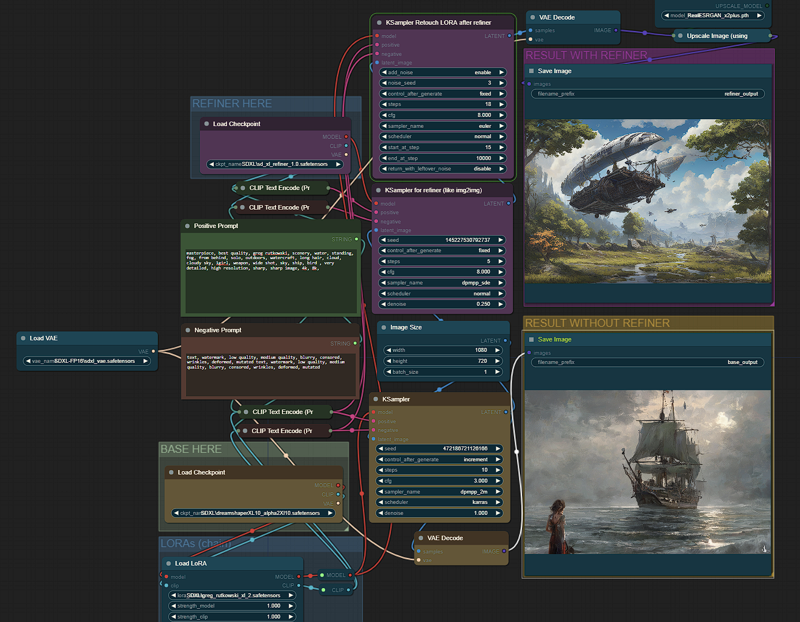
Description
This version is faster, fixes faces before upscale.
FAQ
Comments (25)
thank you for sharing your work
You're welcome, enjoy :D
Do you have any workflows for img to img?
for face fix, I am getting force inpaint. idk why, how do I get rid of it?
same issue for me, hopefully we get a response
It's amazing! Thank you so much
I add loras and inpaint
Now it's fantastic setup
can you share inpainting workflow. plzzzz
I recently just installed ComfyUI since Automatic1111 won't run SDXL on 4gb vram, but I'm not seeing a bat file for it. Just the main.py. Am I missing something?
ComfyUI or many other UIs does not interfere between each other.
You can create a bat file, make it automatically activate Auto1111's virtual environment and run main.py, and also optionally a git pull.
I think you probably downloaded the COmfyUI masters. Instead download the releases-Portable version.
you can install it as an extension, and run within the diffusion gui
Is there an img2img version
With better prompts, you wouldn't need the face fix.
Suggestions?
it's working, thanks!
Where is it installed please
You do not need to install this config, just load config from ComfyUI interfaces and select json file.
Although I've been only using ComfyUI for the last 48 hours, this has been the most outstanding workflow for speed that I've encountered. Thank you so much for posting this workflow!
Bro we also need image2image & image 2 inpainting & image 3 outpainting workflow. Can you share above three type workflow.
please we need that.
Have you tried tweaking this workflow with LCM and SSD-1B?
There you go, v3 has support for LCM using the LORA, all SDXL models compatible.
SSD-1B???
@camoway Distilled version of SDXL https://civitai.com/models/188863/segmind-ssd-1b I personally don't use it (I'm using mainly Fooocus for SDXL these days), but I think it's a good option for those wanting to get the most out of a lowend hardware.
@Pechista Thank you!