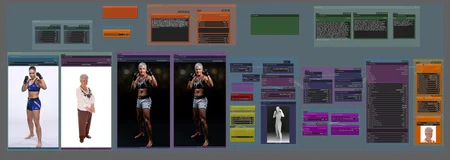
The workflow uses depth to transfer the pose and redux to transfer the style. Dependning on what image you are creating, the style transfer strength should be between medium-highest.
NOTE: I have been using Gemini Flash 2.0 Experimental node with the Gemini 2.0 Flash model, but anyone who wants to try other models with this node can follow these steps:
Find out which models are available from Google
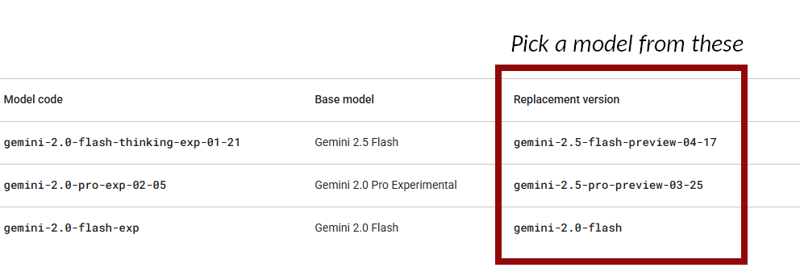
In Gemini directory: \ComfyUI\custom_nodes\ComfyUI-Gemini_Flash_2\nodes\ open the config.json file. Change the name of the model in "MODEL_NAME"
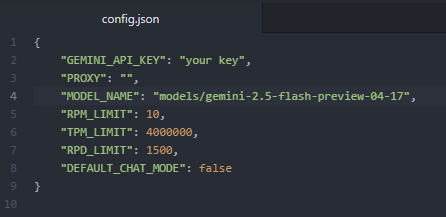
Restart ComfyUI
Quick instructions for those who need it.
NOTE: If you have an issue loading the Gemini node, try to pip install sounddevice
For version 2.1 and later, you will have to install the Creepy_nodes pack. Find it on github and in CumfyUI manager.
For best result, make sure that the input images are the same size.
Reactor can be turned on and off easily with a switch.
The detailer part can be done with either Flux or Shuttle 3.1
I have used Flux.1 dev 20 steps, euler and sgi_uniform for the main sampling, and 10 step euler normal for the face detailer. I'm sure other setting work as well though.
Description
FAQ
Comments (11)
This is very difficult to get working.
Are there any instructions anywhere?
@hugme2142 Stop lying. I prove that you are lying in the yotube link. Just because you don't know what to do, doesn't make it fake or "paid".
Then stop hiding your links between the nodes. When there is a problem I had to move all the windows around until could find what connects where and where the problem actually is. The hard link was coming from the right side, I found that, which you don't go over in your video or the description. And considering the types of links you're using I don't know why it would need to be inputted twice. 2 of your Lora's won't download off of. This is literally hours of work to get this going because of the way it's set up.
@hugme2142 That you dont know how anything works is not my fault. I spend a lot of time on this, for my own sake and my own projects.
I don't have to share anything with anyone, and definitely don't need to be lied about by people with an IQ less than their shoe size.
Drop your bullshit now, or i will block you from downloading anything at all from me.
Don't like how I and probably 95% of everyone building our workflows? Then build your own.
@hugme2142 Hiding nodes is not unusual. Several builders of complicated workflows do that. The result is a more elegant look.
@hannahthorn And expecially it's less chaotic when building the workflow. Most people aren't particulary interesting in the exact nodes and their names either, as long as the workflow works.
This is not a real working workflow. They are using paid loras. They are hiding jump nodes under the nodes making everything impossible to troubleshoot. They have put in hard links to images which don't exist. You will spend a lot of time on this workflow trying to get it to work only to find out they are trolling you.
Maybe you just need to learn the basics of Comfy. There are no "paid loras" or "hard links to images". Sure, some nodes are behind others to make the workflow clean and easy to follow. That's about 99% of all workflows.
Load image nodes will always point to the image on the PC that was used when the workflow was saved. Any Comfy workflow that has some form of image loader will be like that. Only one who seems to be trolling here is you.