

The workflow uses depth to transfer the pose and redux to transfer the style. Dependning on what image you are creating, the style transfer strength should be between medium-highest.
NOTE: I have been using Gemini Flash 2.0 Experimental node with the Gemini 2.0 Flash model, but anyone who wants to try other models with this node can follow these steps:
Find out which models are available from Google
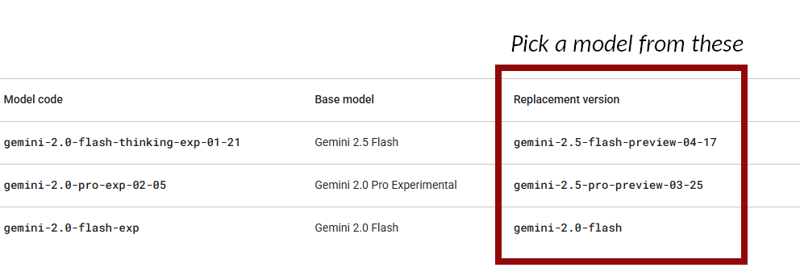
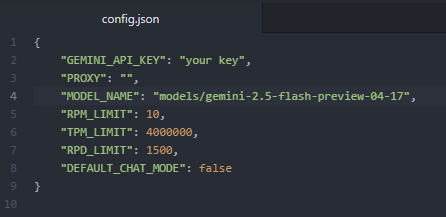
In Gemini directory: \ComfyUI\custom_nodes\ComfyUI-Gemini_Flash_2\nodes\ open the config.json file. Change the name of the model in "MODEL_NAME"
Restart ComfyUI
Quick instructions for those who need it.
NOTE: If you have an issue loading the Gemini node, try to pip install sounddevice
For version 2.1 and later, you will have to install the Creepy_nodes pack. Find it on github and in CumfyUI manager.
For best result, make sure that the input images are the same size.
Reactor can be turned on and off easily with a switch.
The detailer part can be done with either Flux or Shuttle 3.1
I have used Flux.1 dev 20 steps, euler and sgi_uniform for the main sampling, and 10 step euler normal for the face detailer. I'm sure other setting work as well though.
Description
Added System Prompt Node
FAQ
Comments (23)
How to connect so that GEMINI recognizes the image, diagnoses and writes the prompt
I'm not entirely sure what you mean. But in order for Gemini to work, you have to install the Gemini node as well as getting your API from Google. Instructions can be found in the Gemini repository on Github. https://github.com/ShmuelRonen/ComfyUI-Gemini_Flash_2.0_Exp
name 'os' is not defined
I've updated the Creepy Nodes several times the past days. You might need to update your version to the latest. https://github.com/Creepybits/ComfyUI-Creepy_nodes
@Creepybit i updated it 3 times in a row not working
@Santaonholidays I downloaded the workflow from this website just now, and ran it "as it is", and didn't not manage to replicate your error.
When updating the node, did you do it through manager or the github repo? If you did it through manager, try to do a git pull from inside the creepy_nodes folder instead.
@Creepybit I just did that
@Santaonholidays And still don't work? Since it's working on my end, and I can't replicate your error, I don't know what more I can do.
@Creepybit Dont you change some settings in the Gemini 2.0 Experimental?
@Santaonholidays No, I use the setting that are in the workflow you download.
Why do you use Gemini 2.0 and not Gemini 2.5 with Gemini API for example? After overworking the Gemini section I had no problems with this workflow.
Did you have issues with 2.0 Flash? The reason I've been using the 2.0 is that the node isn't mine and I haven't been bothered with updating the config since I haven't had any issues with it.
But I'll add instructions how to change models in the description anyway.
@Creepybit I had issues in so far as ComfyUI didn't find it anymore after the latest update. Strange. Anyway I integrated the pose part into my workflow. Thank you.
@hannahthorn I just created a node where you can choose between Gemini 2.0 Flash, 2.5 Flash and 2.5 Pro. https://github.com/Creepybits/ComfyUI-Creepy_nodes
@Creepybit Thank you, that's great, but I can't install your nodes because of conflicts:
ERROR: pip's dependency resolver does not currently take into account all the packages that are installed. This behaviour is the source of the following dependency conflicts.
blendmodes 2022 requires numpy<2,>=1.22.1, but you have numpy 2.0.0 which is incompatible.
blendmodes 2022 requires Pillow<10,>=9.0.0, but you have pillow 11.0.0 which is incompatible.
gradio 3.41.2 requires numpy~=1.0, but you have numpy 2.0.0 which is incompatible.
gradio 3.41.2 requires pillow<11.0,>=8.0, but you have pillow 11.0.0 which is incompatible.
inference 0.40.0 requires numpy<=1.26.4, but you have numpy 2.0.0 which is incompatible.
inference 0.40.0 requires pillow<11.0, but you have pillow 11.0.0 which is incompatible.
inference 0.40.0 requires pillow<11.0,>=9.0.0, but you have pillow 11.0.0 which is incompatible.
mediapipe 0.10.14 requires protobuf<5,>=4.25.3, but you have protobuf 5.28.1 which is incompatible.
onnxruntime-gpu 1.18.1 requires numpy<2.0,>=1.21.6, but you have numpy 2.0.0 which is incompatible.
transformers 4.30.2 requires tokenizers!=0.11.3,<0.14,>=0.11.1, but you have tokenizers 0.20.3 which is incompatible.
@hannahthorn I'll check the dependencies later today. Someone else had issues as well 😅
@hannahthorn I have removed the version restriction on most requirements, and tried the nodes in a completely new Comfy installation to check if it works. It works for me now at least, and I hope the issues are solved for everyone.
@Creepybit Thank you so much. But it seems I have to install comfyUI completely new, because the latest updates mixed it all up. :(
@hannahthorn Put --front-end-version Comfy-Org/[email protected] in your .bat file
@Creepybit Thank you, but it works now. :)
@hannahthorn Great! And does the Gemini node work now as well?
@Creepybit Yes, it works!!!! Thank you!
@hannahthorn Great!