
The workflow uses depth to transfer the pose and redux to transfer the style. Dependning on what image you are creating, the style transfer strength should be between medium-highest.
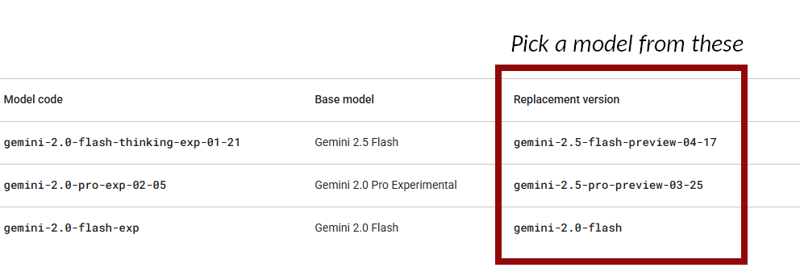
NOTE: I have been using Gemini Flash 2.0 Experimental node with the Gemini 2.0 Flash model, but anyone who wants to try other models with this node can follow these steps:
Find out which models are available from Google
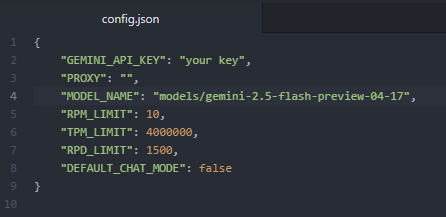
In Gemini directory: \ComfyUI\custom_nodes\ComfyUI-Gemini_Flash_2\nodes\ open the config.json file. Change the name of the model in "MODEL_NAME"
Restart ComfyUI
Quick instructions for those who need it.
NOTE: If you have an issue loading the Gemini node, try to pip install sounddevice
For version 2.1 and later, you will have to install the Creepy_nodes pack. Find it on github and in CumfyUI manager.
For best result, make sure that the input images are the same size.
Reactor can be turned on and off easily with a switch.
The detailer part can be done with either Flux or Shuttle 3.1
I have used Flux.1 dev 20 steps, euler and sgi_uniform for the main sampling, and 10 step euler normal for the face detailer. I'm sure other setting work as well though.
Description
Added some text to the system prompt to make the result more accurate.