

Hello there and thanks for checking out this workflow!
What's new in v12? : Fixes and SubGraphs compatible with the latest ComfyUI Updates!
—Purpose—
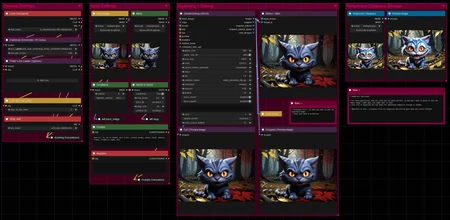
This workflow provides a simple, solid and reliable way to efficiently inpaint images to perfection!
I hope this proves to be a useful tool to you!
—Features—
LoRA support
Batch Processing
Flexible Before/After Preview for any batch size and mask amount
Image Filter to cherry pick
Tutorial guide for nodes and settings in dedicated ►INFO boxes
—Common Issues—
ValueError: Width and height must be >= 0
→ Make sure you masked an area on the node named "Mask"
—Custom Nodes—
All of which can be installed through the ComfyUI-Manager
—Troubleshooting—
If nodes show up red (failing to load), check the 'Install Missing Custom Nodes' tab of the ComfyUI Manager for the missing node packs and install them.
Please check if all custom node packs load properly after installing, i.e. no
(IMPORT FAILED)messages next to any of them in the console upon ComfyUI startup.Always reload/drag'n'drop the original, downloaded workflow file into ComfyUI to reload an intact version of the workflow.
→ The last opened workflow that appears on startup shows a cached version of the workflow, "remembering" group nodes that failed due to missing nodes as failed, keeping them broken even after having everything installed correctly.
—Thanks—
The workflow would not be possible as is without these custom node packs. If you want to support the custom node creators, give them a ⭐ on their github repos! Thank you!
Feel free to ask any questions, share improvements or suggestions in the comment section!
Also let me know if you encounter any confusing points I can elaborate on and focus on improving for the next update!
Description
v3
— minor structural changes
— various edits in notes and node names
— added accelerator LoRA recommendation
FAQ
Comments (11)
Will the multiple images output be implemented? This is the only flaw of otherwise perfect workflow.
Thank you very much for the compliment! What exactly do you mean by multiple images output? If you could describe the feature, I'll make it happen!
@redpinkretro I actually had the same idea. So, for example, I'm inpainting hands. It takes luck to get a good result and usually I have to manually click on each new gen and verify the result. Now if we could just make it so you can queue up a batch of 6 images for example and then just compare them in a window and pick the right one, that would prolly save up a ton of time. At least that's what I assume the OP meant.
@Aexetan yeah, exactly. I would prefer to choose from a huge batch than clicking generate over and over again.
I see, that sounds good. I'll look into it! Thanks for the suggestion!
@akvofpl Now you can! I had to rebuild the workflow though, as the 'detailer' node I used does not like batch inputs, so it was a bit of an odyssee to find the right tools to replace that with while improving everything and keeping it still legible. Thank you for your suggestion!
@redpinkretro oh wow, thank you so much for doing it! I'll make sure to check it as soon as I get home
@redpinkretro Thanks, it is way more convenient now!
@akvofpl Glad to hear that! I like it better this way as well. just having it run a batch and cherry picking then also makes using an actual inpainting model without acceleration much more viable, while increasing quality. Allround better that way imo :)
@Aexetan Hope you'll like it better this way as well! Suggestions like this help me make better workflows for everyone!
If you are searching for an easy and ready to go inpainting workflow - this is it. I barely understand what I'm doing and it worked for me from the start :D