
SVI Extend
https://github.com/vita-epfl/Stable-Video-Infinity/tree/svi_wan22
Create videos and extend them seemlessly using SVI.
Following SVI LoRAs are mandatory:
switch between default behaviour, anchor_samples and end_frames within the same subgraphs
connect an image to a part and enable the respective toggles to use end_frames or anchor_samples
NEW! v3
Extend existing videos using https://github.com/wallen0322/ComfyUI-Wan22FMLF
enable "video extension" toggle inside the settings
uses source video resolution by default
rescale video using the megapixel slider by enabling "video rescale" toggle
use included version of the nodes from inside .zip or download the latest version straight from the git if issues arise
More info inside the workflow.
AIO i2v+t2v
All in One workflow for for basic WAN 2.2 video generation.
Following features included:
Switch seemlessly between 2 and 3 sampler solutions
Toggle between i2v or t2v
Postprod
Facedetailer
uses t2v Model + LoRA for inpainting - resources needed included in workflow
Toggle between GIMM VFI and RIFE VFI Interpolation
Upscale
Tensorrt Upscale with Model
Basic Video Upscale with Model
RTX Video Super Resolution Upscale (insanely fast for decent quality)
Frame Clipper
Seamless Loops using custom RIFE nodes https://github.com/Artificial-Sweetener/comfyui-WhiteRabbit
Upscale + Interpolate
I recommend using this workflow instead of upscaling with the generating workflows, since you never really know what kind of results you get, ending up upscaling a bad video and wasting time. I included toggles so you can't use multiple interpolation or upscale nodes at once by mistake.
This includes:
WAN Facedetailer
use any WAN 2.2 T2V low model + the following T2V LoRA:
lower resolution from 768 to 512 if you have VRAM issues
Put the following file into "ComfyUI\models\ultralytics\bbox":
WAN Refiner (massive VRAM cost)
increase denoise if you want more inpainting
Sharpen, Gamma, Brightness and Contrast control
Frame clipper (remove unwanted frames at the start and/or end)
GIMM VFI + RIFE VFI interpolation (I recommend GIMM VFI, much higher quality but also much slower)
Tensorrt Upscale + Basic Video Upscale
both use basic image upscaling models
Tensorrt (faster than Basic Video Upscale) with AnimeSharp4x is recommended for anime
RTX Video Super Resolution Upscale
insanely fast
decent quality
FlashSVR + SeedVR2
experimental
Video upscale models that are more intricate than basic image upscaling models
haven't had great results for anime yet
takes a LOT longer
Saving last frame for manual extensions
mmaudio
added Audio combine node
combine audio from an existing video with the generated audio on top
generate nsfw audio with the nsfw model and then combine that video with another generated audio track from the base model for background noises
removed interpolation for easier and faster audio generation - you have the following options:
upload raw unupscaled video to MMAudio Video node and upscaled video to Combine video node
upload upscaled video to both nodes but lower custom_width and custom_height of the MMAudio video node to about half for faster generation and to prevent VRAM issues
upload raw video to both nodes and upscale afterwards
Inspired by https://civarchive.com/models/2137833
Following resources necessary (ComfyUI\models\mmaudio):
https://huggingface.co/Kijai/MMAudio_safetensors/resolve/main/mmaudio_synchformer_fp16.safetensors
Description
simplified subgraphs
switch between default behaviour, anchor_samples and end_frames within the same subgraphs
connect the image to a part and enable the respective toggles to use end_frames or anchor_samples
extend existing Videos using https://github.com/wallen0322/ComfyUI-Wan22FMLF
enable "video extension" toggle inside the settings
uses source video resolution by default
rescale video using the megapixel slider by enabling "video rescale" toggle
Added working version of the nodes into the .zip file in case of issues
FAQ
Comments (7)
For everyone who downloaded my SVI v3 right after release, I uploaded a fix to the annoying FrameBus bullshit. Found some nodes to make it easier to use. If you find any bugs with the switching logic then please tell me, it was a quick rework so I may have missed something.
Hello, in version v3, I haven’t enabled the new video extension or video scaling features you added, but when running the workflow, the system prompts me to upload an extended video; otherwise, it cannot generate a video from the image. I tried skipping this video upload node directly, but then many other nodes in the data bus stopped working properly because they lost their input source.
@1443269636621 same here
@dh1d @1443269636621 I just uploaded a quick fix, you can redownload v3 to get the fixed version. It should work even without bypassing the video node. I'll clean it up for the next version.
AIO-v2.1 Workflow,These nodes turn red when I use facedetailer.Then I realized that the sam2.1_hiera_large.pt model was missing. After downloading it, I put it in ComfyUI/models/sams/ The node will still turn red.
https://p.inari.site/guest/26-03/29/69c8eed687c67.jpg
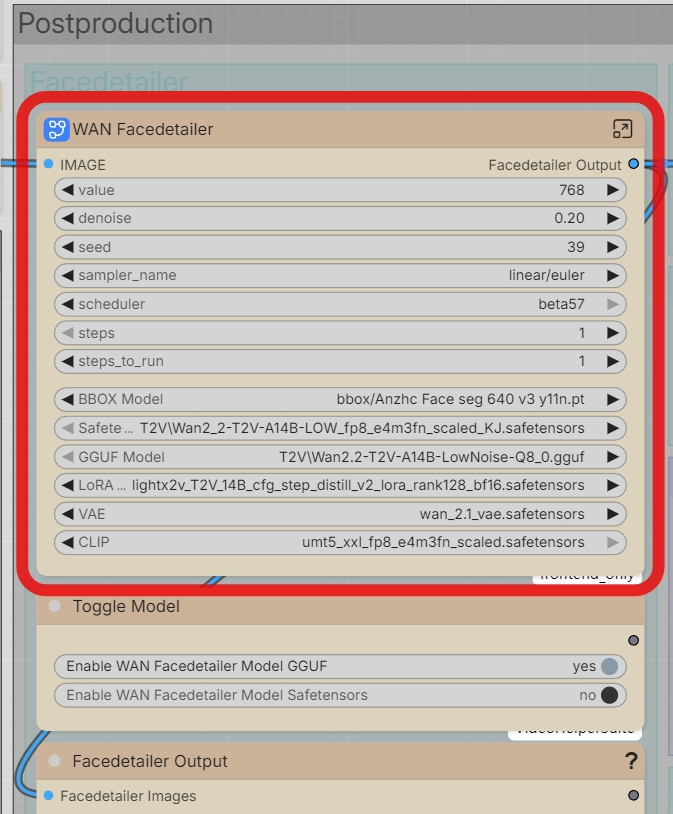
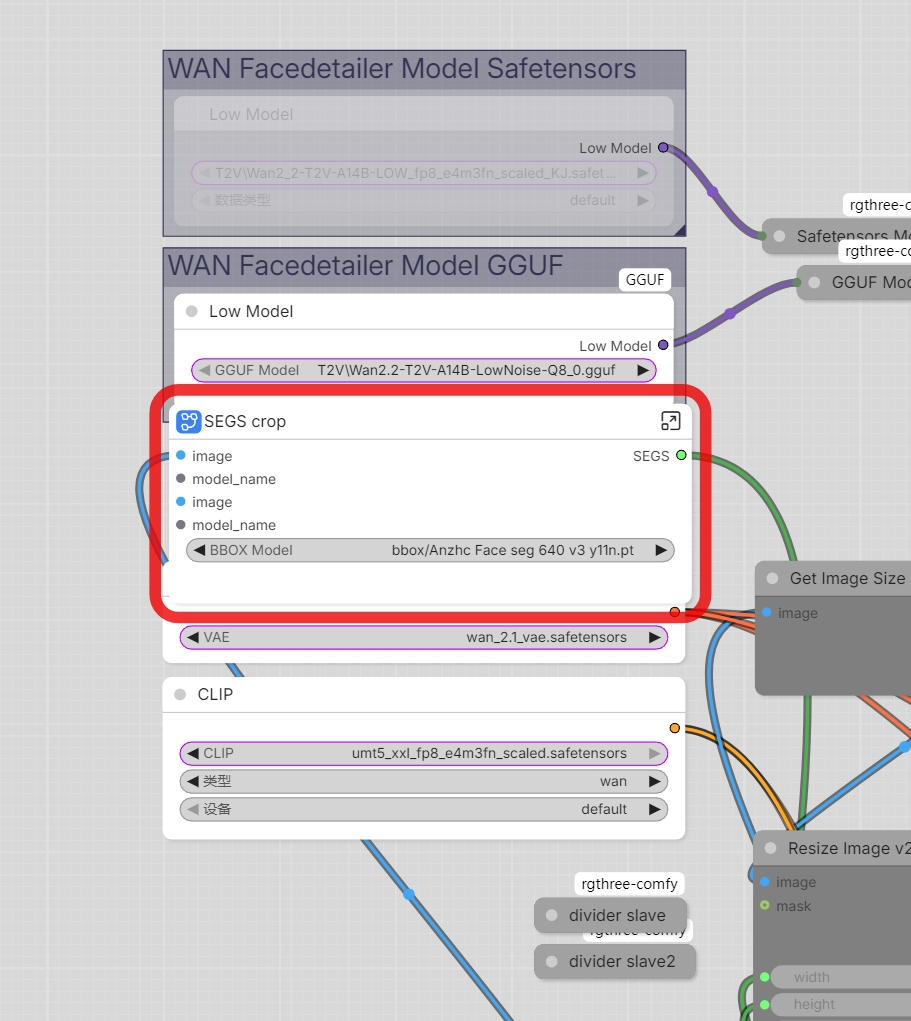
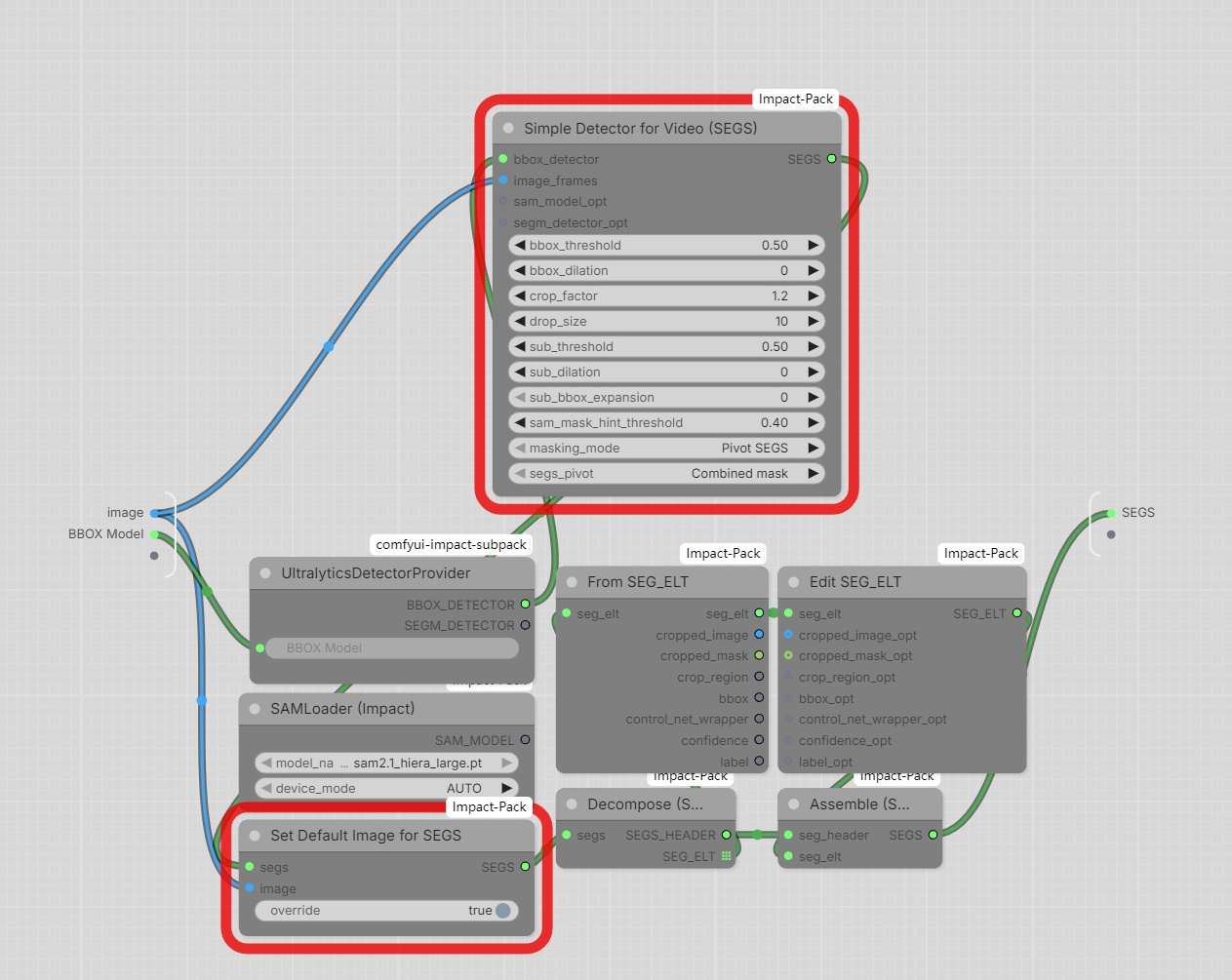
Did the facedetailer work before? Because that part is identical and didn't change between my workflow versions. The impact-pack is notorious for breaking on ComfyUI version changes so that may be an issue.
The input connection also shouldn't look like that, definitely some newer ComfyUI version bullshit that breaks subgraphs. You can try connecting the image to all the outside connections on the SEGS crop subgraph.
@LastAssignment Thank you! following your instructions,and it’s working normally now