


Check my exclusive models on Mage: ParagonXL / NovaXL / NovaXL Lightning / NovaXL V2 / NovaXL Pony / NovaXL Pony Lightning / RealDreamXL / RealDreamXL Lightning
If you are using Hires.Fix with V5 Lightning, then use my recommended settings for Hires.Fix (3 Sampling Steps, Denoising strength: 0.5 and CFG Scale 1.0 - 2.0) or other settings you find better for you.
Use Turbo models with DPM++ SDE Karras sampler, 4-10 steps and CFG Scale 1-2.5
Use Lightning models with DPM++ SDE Karras / DPM++ SDE sampler, 4-6 steps and CFG Scale 1-2
Please pay attention to the model file name, the part of the name after the underscore is the true version of the model.
The model is already available on Mage.Space (main sponsor)
You can also support me directly on Boosty.
RealVisXL Hugging Face Full Collection
The model is aimed at photorealism. Can produce sfw and nsfw images of decent quality.
ᅠ
Recommended Negative Prompt:
(worst quality, low quality, illustration, 3d, 2d, painting, cartoons, sketch), open mouth
or another negative prompt
ᅠ
Recommended Generation Parameters:
Sampling Method: DPM++ SDE Karras (30+ Sampling Steps) or DPM++ 2M Karras (50+ Sampling Steps)
ᅠ
Hires Fix Parameters:
Upscaler: 4x-NMKD-Superscale-SP_178000_G / 4x-UltraSharp upscaler / or another
Denoising strength: 0.1-0.3
Upscale by: 1.1-1.5
ᅠ
Optional Parameters:
ENSD: 31337
ᅠ
This model is:
ᅠ
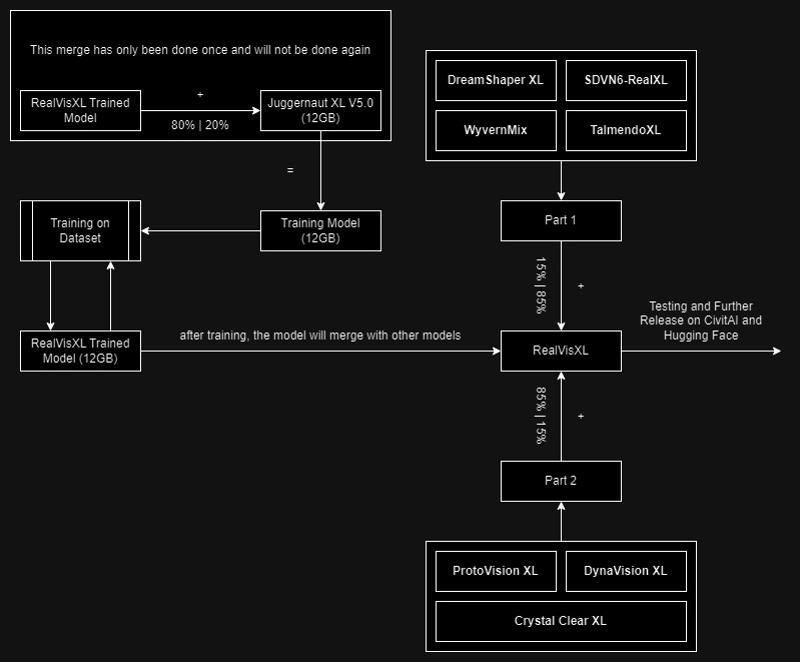
Huge thanks to the creators of these great models that were used in the merge.
SDVN6-RealXL by StableDiffusionVN
TalmendoXL - SDXL Uncensored Full Model by talmendo
ProtoVision XL and DynaVision XL by socalguitarist
Cinemax Alpha | SDXL | Cinema | Filmic | NSFW by viakole
Description
slightly improved anatomy;
better overall model quality;
more details.
FAQ
Comments (46)
Hello, would it be possible for you to share the unpruned version? Even if it's on HF, I've been searching in the repositories but I can't find it (or I just don't know where to look haha). Thank you so much
Is this the turbo model of 4.0? When using sde karras 10step cfg 2, the image is much unfinished and blurry compared to 3.0 turbo.
Hi. No, it's a regular model.
Many thanks! I’ve been following your work since the beginning. It’s my favorite model
Thank You! :)
Hi, when using the V4 as main checkpoint it generates only disturbed and confused pixels....
Hi. This problem may be due to an incorrect VAE. Make sure that the VAE settings are set to "Automatic" or "sdxl_vae.safetensors".
@SG_161222 Thanks for the reply, but I'm using the same config used with V3. Running on fooocus, I can't find VAE setting
I’m getting the same thing. Settings/prompts that work fine with v3 come out with completely broken images (just very dark unrecognisable textures instead of anything relating to the prompt). Changing the VAE didn’t work (and it’s marked as having the VAE baked in anyway, so VAE should be "none", shouldn't it?).
I can reproduce your sample image fairly well, but when I try anything else it breaks. I haven't had time to narrow down where the difference lies, but this doesn't seem to be a VAE issue.
@maerospace @jbboncemore2 I will try to use Fooocus to try to solve this problem.
@maerospace @jbboncemore2 Can you share the parameters you used to generate the images?
@SG_161222
dpmpp_2m_sde_gpu, karras, no refiner, 896x1152, CFG 7, no lora
I also use Fooocus, but cannot confirm these issues. The images from v4 are not broken for me, and very similar to v3.
https://imgur.com/a/4ey3mq0
Update: changed CFG value to 2, now it works!
Update: changed CFG to 2, now it works!
What is the optimal first pass resolution for RealVis XL v3.0 Turbo?
Even though Base SDXL Turbo is derived of Base XL, it prefers a different standard resolution according to the documentation of stability AI (512x512, check links below). I wonder how this affects the optimal resolution of Hybrid Turbo merges such as RealVis XL v3.0 Turbo?
The reason I am asking is that if I use first pass resolutions similar to those for standard XL models (1024x1024 or 896x1152), I get quite a high proportion of images with distorted bodies.
References:
Source: https://huggingface.co/stabilityai/sdxl-turbo
Stability AI Base XL Turbo Model Card:
"Preferably, the model generates images of size 512x512"
Source: https://huggingface.co/docs/diffusers/en/using-diffusers/sdxl_turbo
"By default, SDXL Turbo generates a 512x512 image, and that resolution gives the best results. You can try setting the height and width parameters to 768x768 or 1024x1024, but you should expect quality degradations when doing so.
Make sure to set guidance_scale to 0.0 to disable, as the model was trained without it. A single inference step is enough to generate high quality images. Increasing the number of steps to 2, 3 or 4 should improve image quality."
Thank you!
And please also upload the inpainting version
Thanks for your amazing work!
Do you plan to publish a v4.0 Turbo version in the future?
one of the best models for SDXL turbo hands down fast generations at great quality way better then other models will have to check out v4 soon!
Thank You!
I really appreciate your continued updates on this, and I especially like that your negatives are getting shorter and shorter. You'd be surprised how much constriction a long negative has on a good prompt.
Why does this often put weird patches like a sticker, or a blob of paint or piece of paper on the person? Often they are orange or red.
could be an issue with color leaking from other tokens. like, if you put "green hair" in your prompt, it sometimes tends to leak out to other objects in the image. i only really get this when i prompt for a specific eye color, it really likes to do all sorts of body paint with that color then. but it only happens in 1-2 out of 10 images, so i just run a couple of batches and i'm fine, not sure if there's a better fix.
Choose sampler_name to dpmpp_sde_gpu and it'll be fixed
If you increase the step count a little bit on that image, it'll almost always resolve the issue.
Your model structure Diagram is not updated, right ?
Because why merging 20% of Jugg V5 when the V8 is out (and a lot better)
Im guessing you must likely have re-trained your latest V4 with all the latest version of the other models your merging ?
Hi. This is an outdated diagram that refers to V2.0, V3.0 already uses Juggernaut V7 and RealVisXL V4.0 uses V8.
So far there has been no re-training. Now I need to prepare for further V5.0 training. Stats will start updating as soon as I start training.
@SG_161222 you are the best!
I absolutely love this model, it performs beyond imagination.
Hi! Thank you :)
inpainting model fails to load. Am I doing something wrong?
Me too.
@heebiejeebies @mihuo Hi! There is no inpainting support in Automatic1111, so you will have to download additional files to make inpainting models work.
This should help you.
"light-and-ray commented:
Works well even with merges. To install you need to download patch of this pr: https://github.com/AUTOMATIC1111/stable-diffusion-webui/pull/14390.diff
Then open command line in your webui directory. And run: git apply <path_to_the_diff_file>"
@SG_161222 Perfect solution, thank you very much!
the best model!!!!
Do you have any plans about
SDXL-Lightning ?
i hope not. getting tired of all these speed-up fads for SDXL that keep wrecking quality and distracting from real improvements
@shapeshifter83 These "fads" are the only thing keeping XL alive and usable.. There's a reason why despite the modest improvements, all these XL models have like 30x less downloads than 1.5 versions of the same model..
This version is one of the best XL models I've seen at making unusual/non-doll-like faces. Great job.
This is an excellent model for photorealism.
when i use the model my images have a lot of images noices. Any ideas to fix this?
I use the recommended settings but still...
me too. i've returned to turbo version
just keep CFG at 1, make it simple, no need for complicated and fancy words in prompt
@ddamir247931 same shit (
Details
Files
realvisxlV50_v40Bakedvae.safetensors
Mirrors
realvisxlV40_v40Bakedvae.safetensors
realvisxlV50_v40Bakedvae.safetensors
realvisxlV40_v40Bakedvae.safetensors
realvis_xl_v4.0.safetensors
realvisxlV40_v40Bakedvae.safetensors
realvisxlV50_v40Bakedvae.safetensors
RealVisXL_V4.0.safetensors
realvisXL_v5.safetensors
RealVisXL_V4.0.safetensors
RealvisXLv40_v40Bakedvae.safetensors
MyBack_SDXL_RealVis_XL_VAE_V4.0.safetensors
RealVisXLV4.0.safetensors
RealVisXL_V4.0.safetensors
realvisxlV40_v40Bakedvae.safetensors
realvisxlV40_v40Bakedvae.safetensors
realvisxlV40_v40Bakedvae.safetensors
RealVisXL_V4.0.safetensors
RealVisXL_V4.0.safetensors
RealVisXL_V4.0.safetensors
realvisxlV40_v40Bakedvae.safetensors
realvisxlV40_v40Bakedvae.safetensors
realvisxlV40_v40Bakedvae.safetensors
rvxl4.safetensors
RealVisXL_V4.0.safetensors
RealVisXL_V4.safetensors
UltraEpicAi_Realism.safetensors
RealVisXL_V4.0.safetensors
realvisxlV40_v40Bakedvae.safetensors
realvisxlV40_v40Bakedvae.safetensors
sdXL_v10VAEFix.safetensors
realvisxlV50_v40Bakedvae.safetensors
RealVisXL_V4.0.safetensors
RealVisXL_V4.safetensors
UltraEpicAi_Realism.safetensors
realvisxlV50_v40Bakedvae.safetensors
RealVisXL_V4.0.safetensors
RealVisXL_V4.0.safetensors
RealVisXL_V4.0.safetensors
RealVisXLTurbo_V40.safetensors
Available On (1 platform)
Same model published on other platforms. May have additional downloads or version variants.