

Check my exclusive models on Mage: ParagonXL / NovaXL / NovaXL Lightning / NovaXL V2 / NovaXL Pony / NovaXL Pony Lightning / RealDreamXL / RealDreamXL Lightning
If you are using Hires.Fix with V5 Lightning, then use my recommended settings for Hires.Fix (3 Sampling Steps, Denoising strength: 0.5 and CFG Scale 1.0 - 2.0) or other settings you find better for you.
Use Turbo models with DPM++ SDE Karras sampler, 4-10 steps and CFG Scale 1-2.5
Use Lightning models with DPM++ SDE Karras / DPM++ SDE sampler, 4-6 steps and CFG Scale 1-2
Please pay attention to the model file name, the part of the name after the underscore is the true version of the model.
The model is already available on Mage.Space (main sponsor)
You can also support me directly on Boosty.
RealVisXL Hugging Face Full Collection
The model is aimed at photorealism. Can produce sfw and nsfw images of decent quality.
ᅠ
Recommended Negative Prompt:
(worst quality, low quality, illustration, 3d, 2d, painting, cartoons, sketch), open mouth
or another negative prompt
ᅠ
Recommended Generation Parameters:
Sampling Method: DPM++ SDE Karras (30+ Sampling Steps) or DPM++ 2M Karras (50+ Sampling Steps)
ᅠ
Hires Fix Parameters:
Upscaler: 4x-NMKD-Superscale-SP_178000_G / 4x-UltraSharp upscaler / or another
Denoising strength: 0.1-0.3
Upscale by: 1.1-1.5
ᅠ
Optional Parameters:
ENSD: 31337
ᅠ
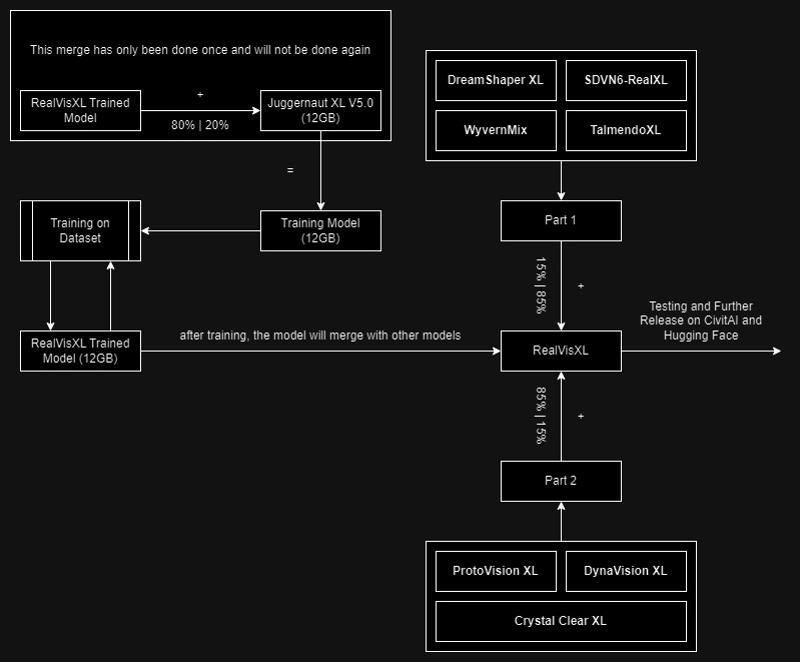
This model is:
ᅠ
Huge thanks to the creators of these great models that were used in the merge.
SDVN6-RealXL by StableDiffusionVN
TalmendoXL - SDXL Uncensored Full Model by talmendo
ProtoVision XL and DynaVision XL by socalguitarist
Cinemax Alpha | SDXL | Cinema | Filmic | NSFW by viakole
Description
FAQ
Comments (83)
is your inpainting model any different from the inpainting RealVis-3 model i already made for myself? Did you just run the basic inpainting merge or did you spice it up at all?
Hi! It's a regular merge.
That is not a turbo model.
Turbo model is using 1-4 steps.
nice take, plz enjoy this downvote.
5 to 10 steps is still plenty turbo, that's like a 75-90 percent reduction from what is typical.
1 step in a Turbo model is = to 5 steps in a regular model. So your "1-4" is only equivalent to 5-20 steps. If you cant deal with running 6+ steps to get 30+ step equivalents, then perhaps you are playing with the wrong toys and need to seek another hobby.
inpaint model has an error:
\system\python\lib\site-packages\torch\nn\modules\module.py", line 2041, in load_state_dict
raise RuntimeError('Error(s) in loading state_dict for {}:\n\t{}'.format(
RuntimeError: Error(s) in loading state_dict for DiffusionEngine:
size mismatch for model.diffusion_model.input_blocks.0.0.weight: copying a param with shape torch.Size([320, 9, 3, 3]) from checkpoint, the shape in current model is torch.Size([320, 4, 3, 3]).
anyone know what i am doing wrong?
same here
Hi! There is no inpainting support in Automatic1111, so you will have to download additional files to make inpainting models work.
This should help you.
"light-and-ray commented 2 weeks ago
Works well even with merges. To install you need to download patch of this pr: https://github.com/AUTOMATIC1111/stable-diffusion-webui/pull/14390.diff
Then open command line in your webui directory. And run: git apply <path_to_the_diff_file>"
@SG_161222 That PR has already been merged into dev, so it might be easier for most people to just run the dev branch rather than manually merge diffs. Or just wait for the next release.
@SG_161222 can you explain how to download this? it links to a raw txt file
@plim23 Hi. Follow the link I provided in the comment above, then save this page, but pay attention to the file extension, it should be .diff not .txt. Save this file to your webui folder. Then open command line in your webui directory and run: git apply <path_to_the_diff_file>" (i.e. git apply 14390.diff).
@SG_161222 thank you!
You have turbo on both Baked and Turbo. I had to get the V3 non Turbo from Huggingface.
From my own tests, it's just a name thing.
@Kyra31 It looks like the file sizes are different between the non-turbo version on huggingface and this one. 6.5 GB here and 6.94 on Huggingface
We don't need Turbo, the image quality it produces is very poor!
Well, no, not really. I rather like it :-)
Turbo is for fast inference ... some need quality, some need speed. Don't dictate others needs.
If you're getting "very poor" quality, this is almost certainly due to operator error. I've used this model to produce images of such good quality that people thought they were real photos (even with my sad AMD setup). This is not to say they were perfect, but if they can fool a lot people, the quality is definitely not "very poor." Check your settings: Make sure you're using the right sampler, proper SDXL resolutions/aspect ratios, low CFG and low step count, and turn on hiresfix. Good luck.
@Kyra31 I understand this. I need to download the 'non-Turbo' version, but no matter which download link I use, I end up with the Turbo version.
@epzer No, that's not it! When I say 'the image quality produced is very poor,' I am comparing it to the original version. The image quality generated by the Turbo version is indeed much worse than the original. Unfortunately, I am now unable to download the original version! No matter which download link I choose, I end up with the Turbo version.
@hazc138405 "Please pay attention to the model file name, the part of the name after the underscore is the true version of the model."
@hazc138405 there was already another reply to you explaining that you need to look at the end of the file names to know which model you're getting. They are all labeled "turbo" at the beginning because that's the main title on the model card. I know it's confusing, but this has already been explained. I am getting great images and there are a ton of high quality images generated with the turbo model shown below it. What is more likely, that you're making some sort of mistake or experiencing some technical issue unique to you, or that we are all hallucinating? Chill and find somewhere to ask for help instead of complaining at the creator.
That's you my dude, i have tested it with many different prompts and the quality is good.
I thought the same but look at the black porche example , the settings, if you adhere to them, the results are very impressive and FAST!
Can I just use the inpainting version to generate images or do I have to use the normal version for that and save the inpaint version for inpainting?
I found this model to work very well. I am using the Turbo and it looks great and is fast. On my computer, with an RTX3060 I can render 1024x1024 in about 6 seconds, at CFG 1 and 5 steps. It looks great too. Below is an image I made for a DnD game. Not sure if it will show the image or just the link...:
I did put this model into test, and it looks working very well.
veryconfusing model to download. is it only 1 model that has turbo? why the other model has the name 'turbo' as well when download. It seems like after the confusion, you just name it (1) for non turbo.
The mouth and teeth are sometimes badly rendered. Otherwise, I like the look.
I'm getting same face in fooocus. is this trained on a single girl face?
You need to be more specific in your prompting, default will be an average
Same seed?
same problem here. random seed. is there no prompt to generate random pictures? or at least get more variation? i tried (brown or black hair) but it always brings back brown hair... :(
I have problems with this model to make medium body portraits and I don't want to use Controlnet. The prompt "Medium shot" or "upper body" doesn't work for me even if I give them a lot of weight like "(Medium shot:1.7)". Any solution? Thanks
Same here, but it happens to me with all SDXL models: always shows a very close portrait. The only thing I can do is ask for a "full body portrait" and put "torso" in the prompt.
Do I need to refine this model? My pictures are all blurred and have terrible focus. Any help?
I think you downloaded the turbo version, try with the other one
Download the turbo model, use CFG 2 and steps 6 or something around those values. Check out the latest prompts in the reviews or my account, model needs some refinement, but already pretty good.
Using Dpm++ SDE works best. That said, its randomly blurry. I can only assume its a turbo thing, some things are very sharp, but most is soft, unusable.
Awesome 10s image generations high fidelity and works on all kinds of stuff. Thanks!
How to use the inpainting one in A1111? It produces all kinds of errors. If it is not meant to be used with A1111, what is the recommended way?
Hi! There is no inpainting support in Automatic1111, so you will have to download additional files to make inpainting models work.
This should help you.
"light-and-ray commented 2 weeks ago
Works well even with merges. To install you need to download patch of this pr: https://github.com/AUTOMATIC1111/stable-diffusion-webui/pull/14390.diff
Then open command line in your webui directory. And run: git apply <path_to_the_diff_file>"
Should i use sdxl refiner? do most models on here not recommend the sdxl refiner?
how do I use inpainting version? I try to select it and it tells me: SafetensorError: Error while deserializing header: HeaderTooSmall.
Error(s) in loading state_dict for DiffusionEngine:
size mismatch for model.diffusion_model.input_blocks.0.0.weight: copying a param with shape torch.Size([320, 9, 3, 3]) from checkpoint, the shape in current model is torch.Size([320, 4, 3, 3]).
Hi! There is no inpainting support in Automatic1111, so you will have to download additional files to make inpainting models work.
This should help you.
"light-and-ray commented 2 weeks ago
Works well even with merges. To install you need to download patch of this pr: https://github.com/AUTOMATIC1111/stable-diffusion-webui/pull/14390.diff
Then open command line in your webui directory. And run: git apply <path_to_the_diff_file>"
@SG_161222 oh right! thanks. I had no idea
When I import this on Draw Things it doesn't work, how I can fix it?
It works for me, but I created the 8-bit model (via Manage models)
If all you are going to tell people about your problem is "doesn't work" you are very unlikely to get any help. Do you get an error message? What is it? Are you expecting something to happen that doesn't? What? Is something happening that you aren't expecting? What?
@jbboncemore2 Nothing happens when it finishes importing it
@Eloyse thx, Imma try that later
@ImWion step by step how i did it:
1) download the model to icloud, not in the app since civitai doesn't allow direct dl no more
2) import the model via 'Select from File ...'
3) confirm import
4) test the model, it worked in my case but I prefer the 8-bit version for better memory management
5) convert the model to 8-bit
6) test and compare, the results are comparable, just a tiny bit different
7) delete the original (bigger) model
why all the versions has a word turbo included? that's a bit confusing.
Yeah I'm also confused. I already downloaded the turbo version, now I wanted the "normal" version with baked vae but the filename still says turbo?
Please pay attention to the model file name, the part of the name after the underscore is the true version of the model.
@SG_161222 Perhaps the "V3.0 (BakedVAE)" checkpoint shouldn't contain the word "Turbo" in the filename. Just a thought.
While I was using inpainting version. I got the tensor shape error. I install and applied the diff file as mentioned. But got another error-
File "/content/stable-diffusion-webui/extensions/sd-webui-controlnet/scripts/controlnet_lora.py", line 114, in forward weight = original_weight.to(x) + torch.mm(self.up.flatten(start_dim=1), self.down.flatten(start_dim=1)).reshape(original_weight.shape).to(x) RuntimeError: shape '[320, 9, 3, 3]' is invalid for input of size 11520
It's fantastic except for one thing - I'm constantly getting a goofy-looking slightly open mouth.
I know you suggest "open mouth" in the negative prompt, but it doesn't help. I've tried positive terms like "closed mouth", "smirk", "shy/small/wry smile", "pursed lips", "mute", "silent", etc. and negative terms like "open mouth", "teeth", "speaking", "gasping" but very little effect.
Everything comes out with slightly parted lips, sometimes showing teeth, often getting confused between the top lip and teeth where they get blended together a little.
I've tried inpainting the mouth afterwards but that generally gives really awful results
Is this a problem with the training data? Do all the images you are training on have people speaking, pouting, etc? Is there any trick for fixing this?
Same here, I'v put (open mouth:2.0) three times in the negative prompts, and (mouth closed:2.0) in the positive, and every image generates with lips parted. How do others get closed mouth images?
Got the same at first, what helped me was "Teeth XL" Lora here on Civitai- I use it with 0.4 weight, helps somewhat :-)
I'm hoping that v4 (if it comes) addresses face and hands as first priority - but we'll just have to wait and see, because baby has first priority!!!!! (rightly so)
Link:-
I didn't try it with this model but you can try "parted lips, teeth visible" in negative. At least it works with other models
Hi! Anyone else having bad results using the diffusers library? I had amazing outputs on A1111 and now that I'm trying to integrate it in my code with the diffusers lib, it's all grainy :/
Are you using the right sampler? For Turbo, you need to use DPM++ SDE Karras.
Hi there, so far having astonishing results, 100% perfect realistic nsfw pictures, awesome!
But one thing is bothering me, i can't reliably produce pubic hair. Sometimes, it's working all of sudden, but as soon as i change anything on the prompt it's mostly gone again.
Last time it worked, i added (unshaved pubic hair:1.5), but that doesn't work now :(
What's your recommended prompt to create pubic hair?
Interestingly enough, after messing around for quite some time now i found out that, when i use hires upscaling, it does reliably add pubic hair to both images, before and after hires. If i don't use it, it's hit and miss, and miss for the most part. The wierd ways of AI i guess.
It is much easier to add pubic hair with inpaint, especially in a full body pic
I'd go with these approaches:
- pick a photo you already have and like, use tagger/captioner like BLIP to see what keywords you might be missing
- if you find a photo that was generated by someone else, just check their generation info
- try to find a relevant LoRA or, if there isn't any, try to train one yourself
I'm sorry in advance if this is a dumb question but I guess I'm not savvy enough: is the turbo version faster at the expense of something? Is there any compromise when compared to the non-turbo version? If there are no downsides to the turbo version, why should I choose the regular version?
thanks
It's not a dumb question. But you will get different answers from different people. Some people think turbo is just as good as non-turbo others think its not. Personally, I much prefer non-turbo - it suits the way I work better. But no doubt, someone who loves turbo will come on here and say, turbo's better if you do it right. I would suggest you try both and see which works for you. Sorry if this is a crap answer!!
@Raken cosign
Turbo is faster, but somehow loses some quality, but is better for people with worse GPUs. So people who pursue quality will not choose Turbo, but both versions have their reasonable existence value. For example, I pursue a few seconds to get 2~4 results, Turbo is just needed for me
https://civitai.com/images/6571901 (Example)
Anyway what it means, but my experience the last hours is, that civitai servers seem to prefer RealVisXL V3.0 + Turbo image creating requests.
________ i'm very happy i (more or less) stumbled across this! ^^
Is it recommended to use this ckpt to train on top of in kohya? I am looking to create realistic images of me and my friends and looking for a checkpoint to use as base. Do you think doing this will yield better results in terms of realism than using SDXL as base?
No, the recommendation is always to use SDXL Base as the base for a LoRA training. For inference later on you would use this checkpoint as a base then.
So your LoRA stays universal and will work with other checkpoints (e.g. V5 in the future) as well
Have you tried baking this in? :)
https://civitai.com/models/242825/dpo-direct-preference-optimization-lora-for-xl-and-15-openrail
Details
Files
Available On (1 platform)
Same model published on other platforms. May have additional downloads or version variants.