


Check my exclusive models on Mage: ParagonXL / NovaXL / NovaXL Lightning / NovaXL V2 / NovaXL Pony / NovaXL Pony Lightning / RealDreamXL / RealDreamXL Lightning
If you are using Hires.Fix with V5 Lightning, then use my recommended settings for Hires.Fix (3 Sampling Steps, Denoising strength: 0.5 and CFG Scale 1.0 - 2.0) or other settings you find better for you.
Use Turbo models with DPM++ SDE Karras sampler, 4-10 steps and CFG Scale 1-2.5
Use Lightning models with DPM++ SDE Karras / DPM++ SDE sampler, 4-6 steps and CFG Scale 1-2
Please pay attention to the model file name, the part of the name after the underscore is the true version of the model.
The model is already available on Mage.Space (main sponsor)
You can also support me directly on Boosty.
RealVisXL Hugging Face Full Collection
The model is aimed at photorealism. Can produce sfw and nsfw images of decent quality.
ᅠ
Recommended Negative Prompt:
(worst quality, low quality, illustration, 3d, 2d, painting, cartoons, sketch), open mouth
or another negative prompt
ᅠ
Recommended Generation Parameters:
Sampling Method: DPM++ SDE Karras (30+ Sampling Steps) or DPM++ 2M Karras (50+ Sampling Steps)
ᅠ
Hires Fix Parameters:
Upscaler: 4x-NMKD-Superscale-SP_178000_G / 4x-UltraSharp upscaler / or another
Denoising strength: 0.1-0.3
Upscale by: 1.1-1.5
ᅠ
Optional Parameters:
ENSD: 31337
ᅠ
This model is:
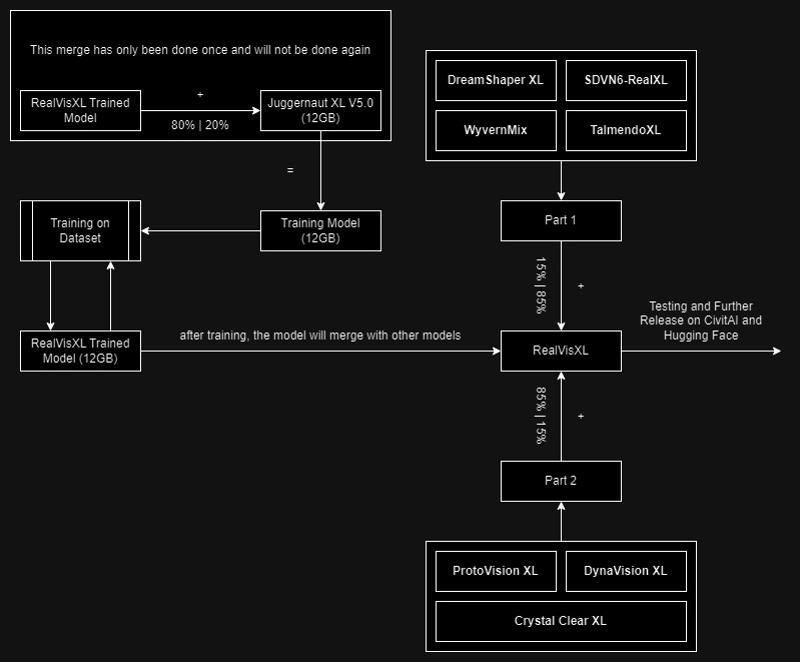
ᅠ
Huge thanks to the creators of these great models that were used in the merge.
SDVN6-RealXL by StableDiffusionVN
TalmendoXL - SDXL Uncensored Full Model by talmendo
ProtoVision XL and DynaVision XL by socalguitarist
Cinemax Alpha | SDXL | Cinema | Filmic | NSFW by viakole
Description
FAQ
Comments (172)
FLux?
I am already working on the Flux model.
@SG_161222 I hope you also can make Flux GGUF version for lower VRAM
Flux? Bruv can you articulate a question?
Nice one! I put some pictures for it ;). Happy for the lightning version. Now I can run it on my potato laptop. Hyper maybe? And thanks for the buzz too!
Main sponsor is mage.space and it says its already available there but version 5 can be found on a lot of sites all except at mage.space??
Thank you, waited for this a long time <3
32bit lighting version?
32 bit version of 5.0 produces better results for me than the 16 version so I am wondering if there will be 32 bit version of lighting as well. Is that possible?
I will upload within 15 hours.
@SG_161222 could you also share the optimal Sampling methods, steps, cfg and upscaler information for the latest 5.0 Lightning version as well please : )
@makaveli_313 Hi!
Sampler - DPM++ SDE Karras with 5 Sampling Steps;
CFG Scale - 1.0 - 2.0;
Upscaler - 4x-NMKD-Superscale-SP_178000_G.
Other parameters are indicated in red font at the beginning of the model description.
@SG_161222 Thank you!
and Clip Skip and such set to anything specific you would recommend?, currently I have it at 2
@SG_161222 just adding the lightning lora with workflow isn't be the same ?
Hello everyone!
You can find the status of the Flux model training here [ RealFlux_1.0b ]
The start of training on the new dataset will begin within 24 hours.
Have a great day!
The lord has answered our prayers!
The Goat!! Thank you for your big work sir.
So this will be a long process till point of release(months?) something to be done from scratch?, or is it more shorter and straight forward... similar to 'port' how they do video games cross platform etc.
@makaveli_313 The training is being conducted on the Flux-Dev base and will not take too much time. I currently have successful results, but there is one issue with anatomy that I am now trying to fix. The release of the RealFlux model can be expected this month.
Please friend, don't forget to port GGUF versions of your model, this will make it more accessible to a greater number of people.
after release your flux model don't forget to add a gguf q8 unet of it please.
@SG_161222 I'm sure you have much more training experience than me. But just a little observation from me training Flux LoRAs: after the first steps and epochs the anatomy seems to get bad, but with further training it's getting good again.
I guess it's like repairing a car - it's getting messy in the middle but the end is better than the beginning.
@StableLlama lora and chekpoint training are different,i think
Great, The Unique Checkpoint for me..!
how is the FLUX model training so much faster than SDXL version 5 was I mean its been only a few days and its apparently 70% done already meanwhile v5 even after the training had begun took forever is the dataset your using just smaller I assumed you would use the same dataset for FLUX as with XL or at least the same images the captions are probably different because FLUX is more conversational type language anyway regardless impressive stuff and I'm very excited for the FLUX model
I think your boosty account is banned or wrong URL
As always what an awesome work.
My favorite model so far. Are you open for comission ? I'd love to discuss a few things with you ans potentialy hire you for a job !
Hope you will see this comment ! 🙃
Can I install it in ComfyUI's Lora directory to be able to use it ? Thanks.
No,put it in "checkpoints"
Hello SG_161222!
So I was wondering, are there any specific 'Styles prompt' you would recommend over others to use with v5.0?
I noticed with the latest update to Forge that they have this long drop down list to the side which feeds preset prompts before and after your own prompt to achieve a certain style, say natural or cinematic, polaroid etc. etc.
If there's any style or prompt you would advise for best results with RealVisXL v5.0?
Thank you : )
Hi, I was just wondering what the main advantages of upgrading from V4 to V5 are? What is it better at and worse at? Do you think V5 is better across the board?
To be honest for me the impression is that 4.0 is better than 5.0. But I am only focused on photo-realistic generations. I tried (and compared) all 4.0 and 5.0 models with same prompt and same seed and that brought me to my result to go on with 4.0.
you say your collecting new images to make into a dataset because the first model was unsuccessful but I'm confused why you don't just use the exact same dataset used for v5? also can you detail more about what specifically was unsuccessful about the first realflux
Hi!
I decided to almost completely rebuild the dataset specifically for training the Flux model. Some parts of the dataset from RVXL V5.0 are still present in my Flux dataset; I just decided to clean it up by removing images I don't like and supplementing it with higher-quality images. This process won't take very long, and the new dataset is about 70% ready.
The first version of the model became unsuccessful due to issues with anatomy.
Training on the new dataset will begin in the coming days.
Olivio Sarikas on YouTube just shouted you out
https://www.youtube.com/watch?v=lEgbGftVyw8
That's precisely why I'm here.
@Phraxas @Phraxas Thats why im here.
@cdosrunwild513 me too. 😂
Same, influencers be influencing
Perfect SDXL model! It should be mixed with PonyXL tokens and that would be the top.
Thank you!
You could try CyberRealistic Pony
@NikPureSilver Thank you for tip, perfect model!
XL
What's the difference between fp16 and fp32 verions?
Bit precision obviously))
fp32 is model's full weight and fp16 is quantized ( compressed ) to reduce weight size ( hint the smaller file ) , if you have GPU with 12 GB VRAM or more , you can try to play with FP32 but fp16 is great and fast on NVIDIA Cards
@kpopsen ok, got it; Thanks.
@kpopsen would you think you can get better results on comfy or a1111?
@P_Universe comfy or forge ui .
@kpopsen @naughtyskynet My VGA is 3080 10GB Vram, and I can run the FP32 model without any issues.
@kpopsen works really well with AMD cards too(7800xt).
My understanding, fp32 is preferred when merging with other models.
What's the best model here for inpainting? I see there's a v3 one, but that's almost a year old now.
Good model; no color bleeding, the only lightning model i´ve tried that actually gives a damn what you prompt, can handle multiple persons, and most of all, it´s fast...very fast with great results. Thank you.
Your model is great, but I found a problem when reproducing your sample. The portraits copied with the same parameters are not as clear as your sample, such as eyelashes, eyes, hair, skin, etc. The scenes and animals have no problem and are the same as the sample. Do you know how to solve this problem?
You would need to do a second pass/refiner to the face. Close ups are really good on this model but futher you go away the detail gets worse. You can run another ksampler on the face and add it back on.
excellent and much better of juggernoutx x and dreamshaper xl. the only problem is they eye like Jouggernout, fo the rest its absolutly perfect and has excellent compatibility with loras
Hello everyone!
The RealFlux 1.0b Schnell model will be available on Hugging Face within a few hours and on CivitAI shortly after. This model currently has some limitations, information about which you can read on the model's main page on Hugging Face.
The Dev version of the model with support for basic NSFW is currently in testing and will be released on Hugging Face and CivitAI after successful tests.
Thank you all and have a great day!
Looking forward to it! Thank you!
just in your personal opinion do you think real flux is much better than realvizxl?
@pigeon_ Hello! Currently, the Schnell model cannot generate NSFW content (the Dev version of the model can do this, but some minor adjustments through training are needed). It does not have a variety of styles, but in terms of realism, anatomy, text generation, and the amount of detail, it may be better than RealVisXL.
I see the compact version is 21GBs and the transformers is 11.9 GB.
Does this mean the compact version is just better?, that we'll get more realism and variety with the 21GBs version?
Thanks.
@makaveli_313 Hello! No, these are absolutely identical models in terms of capabilities. The Compact version includes VAE, Clip-L, and T5XXL, and this model can be easily used in Forge and ComfyUI. The Transformer version (also known as Unet) is a part of the model that will not work on its own without using VAE, Clip-L, and T5XXL, which need to be loaded separately from the model. The Transformer version will help you save disk space, as you can have multiple Transformer (Unet) models and a single instance of VAE, Clip-L, and T5XXL.
@SG_161222 Thanks for the clarification SG.
Could you also please provide the optimal settings for your new model?, such as Steps, Distilled CFG Scale, CFG scale etc.
Thank you : )
@makaveli_313 Optimal Settings:
Sampling Method and Schedule Type: Euler Beta
Sampling Steps: 4-6
Distilled CFG Scale: 3.5
CFG Scale: 1.0
@SG_161222 Thanks, and anything specific for hires.fix or Upscaler choice you would recommend over others?
@makaveli_313 Currently, I am not using Hires.Fix and upscalers.
@SG_161222 Thanks for this. I will do some extensive testing later today with the provided settings and give you feedback : )
@makaveli_313 Thank you, I will be waiting for your feedback! :)
Does realflux do a better job of generating faces than the original flux, such as avoiding butt chins and overly tanned skin?
@jbbjaau Hello! The issue with butt chins can still occur, but it is less frequent than in the base model. There are no problems with overly tanned skin. However, the quality of faces still needs to be improved in future versions of the model.
[ RealFlux Schnell Images ]
@SG_161222 So in my initial testing I did notice the pictures all come out very airbrushed looking. the level of detail seems to be off as well. basically not real looking as RealVisxl5.0, currently anyways.
Also, I can't seem to prompt two humans of two different races in a single picture. Example, a white person(male or female doesn't matter) with a black person, or indian person, it will make both human subjects the same race.
@makaveli_313 Detail and quality will improve with each update, as was the case with RealVisXL. It's also worth noting that there are some limitations with the Schnell model; the detail in the Dev model is much better than in Schnell. I still have a lot of work to do to bring the model to its final form.
@SG_161222 I understand. Looking forward to future updates then : )
@jbbjaau To fix the butt chin you need the face detailer. The images I have has a chin but not the butt chin... Dirty Cellphone - v1.0 | Flux LoRA | Civitai
I am seeing if I use your model with FLUX (to add details in ultimate upscale) it comes back with noise. Just a heads up.
I probably know the answer to this but thought I'd just confirm.
This will be the end of development for RealVisXL right? from now on it will only be Flux that you will be working on :) ?
Thanks.
Version V5 (regular) is available for free on Mage.
What is the difference between the two?
in green text, you have said: 4-10 Steps.
In the generation parameter section, you have said: 30+ steps.
Could you please explain?
Hi! "30+ steps" refers to the regular version of the model, meaning it does not apply to the Turbo and Lightning versions of the model.
Loving v5! Can you please make an updated inpaint model as well, or does it have inpainting built in? Thanks!
Seconding this. Does v5 support inpainting or not? I'll test it out and try v3 inpainting, too, but it'd be real nice if this info was stated in the description.
When clicking download for the realvis v5, there are two options, an FP16 and an FP32, what's the difference between the two? Is one higher quality than the other?
my guess is the fp32 version is trained on more models, please correct me if I am wrong
lower precission uses less ram and space (fp8. fp16, fp32), higher precission matters when training. personally i prefer fp8 if available (can't see difference in result quality, but definitely faster processing). pick full model if you wish to train it further (i have no idea how its done, not in my scope yet)
"Can produce sfw and nsfw images of decent quality."
How do I make sure I only get SFW content?
Use negatives
There are sfw filter nodes if I remember correctly
I would rather use your v5 non-Lightning model and add the Lightning LoRA myself instead of using your v5 Lightning model, for flexibility in my workflows. But I'm getting worse results when I do this. What settings should I use with non-Lightning + LoRA to get the equivalent of 5 step / DPM++ SDE Karras with Lightning?
Try the full model with the DMD2 lora, its so fast and good. I deleted all my lightning models!
@GitarooMan Thanks - it's nice and fast but suffers from the same problem. The quality is nowhere near as good as Lightning baked into RealVis directly, especially skin, faces and eyes. I've tried v4 and v5, with a bunch of different samplers, steps and strengths. What settings are you using?
@GitarooMan Can you share your workflow pls? I tried full model with DMD2 lora, but it image is sketchy and undercooked.
great model! would there be a version where inpaint is possible?
inpaint model can use with turbo ?
what's the difference between v5.0 and v5.0 lightning
Lightning goes vroom vroom! : )
Sorry serious answer you will sacrifice quality for speed at which generations are done Ishan.
just like SDXL 1.0 is different from SDXL Lightning.
Sorry a very late question : P, but could you tell me what portrait/vertical resolutions does v4.0 Lighting support please : ) ?
Great work!! May I ask how did you train the lighting model, since the SDXL-lighting is not open source yet?
Hi, this checkpoint is amazing. Can the V5 version (not turbo or lightning) be used commercially?
Whats the recommended CFG for V5 non-lightning? Only see ones for turbo and lightning.
Really good checkpoint, incredible results
it is not sdxl, it's Flux.
Struggling to get any decent results with this
how can i train an sdxl modell with good results??
What is the difference between fp16 and fp32? fp32 is double the size
Basically, fp16 uses 16-bit floating point precision and 32, well, 32-bit version. It's similar to videogame color palettes, 16-bit is smaller but can perform faster and uses less memory but the output isn't precise while 32-bit has more variety and color combination but it's twice the size and uses more memory but you will get a better output.
If you have low VRAM, get the fp16 and if you want the best the model can offer, fp32.
@themuffledman115 thanks bro
Simply GOAT
Any recommendations on CFG range?
How can I train my own LoRa of a natural person with the model?
You can use the trainer on here, and select "personalized checkpoint or something like that"
does fp32 provide better prompt adherence?
Sadly no
Is it just me or is there a sudden change in output quality? It got a lot worse
I tried a remix of a prompt I had last week and the output is completely different
just you
Don't know why, but I sometimes just get random garbage results, like just blurred colors, or just completely black result, they do happen rarely, but they never happened in Juggernaut.
I also find myself having a hard time controlling the lighting, the shadows sometimes seem very strong, and overexpose the image.
Would someone give me some advices?
Issue with trashy results:
That happens mostly if you're stuffing your prompt with lots of tags - most of them doing nothing.
Lighting:
Stick to simple concepts and use negatives to tweak.
If you got any examples... would be easier to offer specific help.
Did you ever find out what the problem is? If the image looks like "plasma clouds" it might be the wrong setting for the Emphasis mode (try "no norm" instead of "original").
Does anyone know what is the difference between the RealVisXL model and RealVisXL Lightning model? Does the Lightning version use the SDXL Lightning LoRA or is it somehow merged with the SDXL-Lightning model?
Lightening model uses the sdxl lightening architecture, which makes it possible to generate images with only 1 step, which makes it very fast usually less than 1 second but a bit of quality loss.
Even until now, this model hasn't been available for on-site generator. Despite having high likes, downloads, saves, and buzz tips
It used to be
Because you need to pay in the auctions to have your checkpoint listed. Pay again and again on a weekly basis
Has something changed with this model or SD A1111? It's impossible to recreate older photos that were made only a few months ago, giving far worse results and slight deformities consistently. I used to be able to recreate the sample photos as well just by putting them in via PNG info, but now it's never identical, giving a worse variation instead. What could have changed?
Just fed some samples into my Forge on Windows and could very well recreate them (e.g. the mushroom forest, the parrot, the woman in the forest). Not pixel by pixel because right now I'm on my AMD PC, but so close that it doesn't matter. Can you post an example on your page of a failed recreation?
Do you have the same issue in Forge as well?
i had in forge... i think the issue was that in the latest version it put it in the default 'all' tab and not the XL one, thus selecting Flux sliders which werent meant for sdxl
@makaveli_313 No issues in Forge, I just drop the example image (e.g. the woman in the forest) into the positive prompt box, press the small blue arrow apply button and even if I had the "all" preset with 512x512 resolution etc. it applies the correct parameters to reolution, sampler etc. Right now I have no idea what could cause the problem. Only thing that comes to mind is "Disregard fields from pasted infotext" setting where you can define what NOT to apply from png info.
Old thread, but had a suggestion. In A1111 settings there is a toggle for "Use old emphasis implementation. Can be useful to reproduce old seeds." If this is selected, it uses an older legacy version of applying weights in prompts, and that can definitely change the final output. The effect can be subtle or drastic depending on how many and what kind of weights you used. The default is to have this option unchecked because the old way was not parsing and applying weights correctly.
What happened to the inpainting version of this model? A tile shows up in the search results, but if you click it you get a 404. Was it euthanized? :-)
same question
Has anyone managed to make the light version work? Here on mine the images always come out with blown out colors and deformed faces. I tried to follow the user's tips, but it didn't work. Using dpmpp_2m + karras, it seems that everything gets worse!
use euler and kl_optimal, works for me
lower your cfg, blown out colors and deformed faces (sometimes followed by confetty or colorful sprinkles) are all signs of too high cfg. you may even need to get as low as 0.5 to make some model work (low steps model)
@nafario @nafario How many steps? and how many CFG?
@bic99 generally cfg 1, steps 6-7, but depending on image genre cfg 1.5-1.8 max and steps 12-15
@bic99 also check for: LCM, eul_ancestral, dpm_2_ancestral, dpmpp_2s_ancestral, dpmpp_sde. try karras first, then ays_sdxl if available, exponential, beta, and sgm_uniform. (i've arranged the sampler from the softest, scheduler from the more aggresive)
can't i use karras with the lightning model?
karras is the scheduler. lighning model usually prefer stochastic and fast sampler like euler_A, dpmpp_2s_A, dpmpp_sde, LCM, ddmp. if karras don't work or produces artifacts, try AYS_SDXL (there are sd1,5 and svd variant, depending on the checkpoint you use), then exponential, sgm_uniform,beta. ddim with ddim_uniform usually works too (make sure to use low cfg when working with "fast" model). if i have to give advice tho, better get normal fp16 model, then download dmd2 4 steps lora from huggingface. (4-8 steps, LCM or EUL_A with karras, lora strength at >0.6, or dpmpp_sde, dpmpp_2s_A, dpmpp_2m_sde and karras at <0.4 all cfg 1)
Realvis 6.0 wen?
Greetings to the Author! The model is certainly not Flux, but it is very close, in terms of quality at the same level. It solves ALL my problems. Thank you so much, long life to you, the Author!)))
V5 Lightning
I don’t know what’s wrong.
The dataset seems good — I used 40 images, cropped them 1:1, and also tried training again without cropping.
Same results in both cases.
The output doesn’t look like me at all.
There might be a slight resemblance…
But for example, if I generate an image of myself in Paris with a wide frame, the person in the image looks nothing like me.
In close-ups, some facial features are somewhat similar, but still not accurate — definitely not like the samples I’ve seen online.
I’m using Automatic1111.
The base model I trained on is the original SDXL.
I also tried fine-tuning, but I’m still getting the same issue.
What can I do to get more accurate results?
Are there any Loras that add interactions between people?
See also the comment to @eneruwho's question below: The CFG and steps are too high for the lightning model, which requires different sampler settings. Try getting the normal variant (not lightning) for the CFG/steps you are using, or follow the advice in the other comment (use normal variant, add the DMD2 LoRA, then use LCM scheduler, CFG 1 and low step count around 8-10).
edit: see description for lightning
Use Lightning models with DPM++ SDE Karras / DPM++ SDE sampler, 4-6 steps and CFG Scale 1-2
Haven't used lightning in a while, really suggest to try the normal 5.0 (non-lightning) and adding the DMD2 lora.
Trying to download. It will not download. Any help appreciated.
Really good checkpoint, incredible results!!!
I have a RTX 3050 6Gb will it work on my system?
it works fine on mine 😊
it works on mi RTX 2060 Max-q 6Gb 💪
No, throw it out of the window
Yeah use 768 x 512 for a fast image generation prototyping with regular models. With lightning or DMD2 types, it's much faster so you can do bigger sizes fast.
SureSureSure
Does this work with SDXL based lora and controlnet etc?
So is the non-lightning V5.0 a Turbo model? Doesn't say Turbo in the file name.
it will show SDXL Turbo. and Turbo model usually required less steps
how do i get a long shot, feet - head? i barely get from head to hips
you mean for head to toe pic?
@ukjames007 yes
@fg410660641 use a good prompt and image size
try wide angle? I mean your test on your phone... you need wide angle for such shots...
My favourite model ever
Job finishes in 0.01 seconds with no output. How fix?
Something wrong in WF. Check if something is not connected (VAE,...)
Can use with SDXL 1.0 Lora?
yes, of course
is it good for inpainting and is it nsfw checkpoint
Details
Files
realvisxlV50_v50LightningBakedvae_full_fp16.safetensors
Mirrors
realvisxlV50_v50LightningBakedvae.safetensors
realvisxlV50_v50LightningBakedvae.safetensors
RealVisXL_V5.0_Lightning_fp16.safetensors
realvisxlV50_v50LightningBakedvae.safetensors
realvisxlV50_v50LightningBakedvae.safetensors
realvisxlV50_v50LightningBakedvae.safetensors
realvisxlV50_v50LightningBakedvae.safetensors
RealVisXL_V5.0_Lightning.safetensors
realvisxlV50_v50LightningBakedvae.safetensors
Realistic_Vision.safetensors
RealVisXL_V5.0_Lightning_fp16.safetensors
realvisxlV50_v50LightningBakedvae.safetensors
sdxl-realvisxlV50_v50LightningBakedvae.safetensors
checkpoint14.safetensors
realvisxlV50_v50LightningBakedvae.safetensors
【快速模型】【SDXL】realvisxlV50_v50LightningBakedvae.safetensors
realvisxlV50_v50LightningBakedvae.safetensors
realvisxlV50_v50LightningBakedvae.safetensors
RealVisXL_V5.0_Lightning_fp16.safetensors
realvisxlV50_v50LightningBakedvae.safetensors
RealVisXL_V5.0_Lightning_fp16.safetensors
realvisxlV50_v50LightningBakedvae.safetensors
realvisxlV50_v50LightningBakedvae_fp16.safetensors
sdXL_v10VAEFix.safetensors
realvisxlV50.safetensors
realvisxlV50_v50LightningBakedvae.safetensors
realvisxlV50_v50LightningBakedvae.safetensors
realvisxlV50_v50LightningBakedvae.safetensors
realvisxlV50_v50LightningBakedvae.safetensors
realvisxlV50_v50LightningBakedvae.safetensors
realvisxlV50_v50LightningBakedvae.safetensors
realvisxlV50_v50LightningBakedvae.safetensors
realvisxlV50_v50LightningBakedvae.safetensors
realvisxlV50_v50LightningBakedvae.safetensors
Available On (3 platforms)
Same model published on other platforms. May have additional downloads or version variants.