


ComfyUI Detailer/ADetailer Workflow
If you're having ANY issues with this workflow, please include the error log from your console when writing a comment here on this page. Chances are 99.98% i can help you with your issue - but i need the error log. And me not having to ask for it first will save you potentially hours. Chances are also high the solution to your problem is already documented in the FAQ here.
You can now support me on my Ko-Fi if you have too much money (✿◡‿◡)
Requirements for each version are listed below or can be found inside a Note in the Workflow itself.
Because of the many connections among the nodes, I highly recommend turning off the link visibility by clicking the "Toggle Link visibility" (Eye icon) in the bottom right of ComfyUI.

Description
I originally came from A1111 WebUI to ComfyUI and, honestly, a lot of things felt way more complicated than they needed to be. I couldn’t find workflows that were both visually pleasing and showed me all the important options without requiring a deep understanding of every little thing in ComfyUI.
Over a few months I learned the ins and outs of Comfy and built my own very barebones, simple workflow (v1) with one main goal: streamline the process and make it visually understandable. I released it here thinking it might help others who also want to make the jump from A1111 to Comfy.
Over the last year I’ve kept adding more and more features as people started using the workflow and requesting things. The workflow has grown a lot, but I’m still trying to keep the same ease-of-use that this whole journey started with. The main goal is still the same: give you a lot of powerful options in a layout that’s as clean, readable, and as user-friendly as ComfyUI will allow.
At this point I feel like I have a pretty solid understanding of how Comfy works, and I’ve even created my own custom nodes to add missing functionality so this workflow could match the ideas I had for it. I try to hide as much of the technical complexity as possible — but if you’re ever curious or confused about anything, please feel free to ask!
Thanks to all of your suggestions, the workflow now includes features like:
Single-image and batch generation
Automatic detailers for specific body parts
Upscaling
v-pred models
LoRAs
ControlNet
IPAdapter
Hires fix / refiner
Manual inpainting
Thank you to every single person who uses this workflow, donates Buzz, or shares images on this page.
I really appreciate you taking those extra steps to support and promote the project. ♥️
Requirements
v4.4 and above require ComfyUI version 0.3.51 or above and also need the frontend to be AT LEAST 1.24.3 or later.
v5.1 - Full List
v5.0 - Full List
v4.4 - Additions to v4.3 (IMG2IMG Only)
Otherwise same as v4-4.3 below
v4.2-4.3 - Additions to v4.1
Otherwise same as v4.1 (incl. v4) below
v4.1 - Additions to v4 (IMG2IMG Only)
Otherwise same as v4 below
v4 - Full List
v3 - v3.2 - Full List
v2.2 - Additions to v2
Otherwise same Custom-Nodes as v2 but you can remove Comfyui-ergouzi-Nodes
v2 - Full List
v1 - Full List
How to use
Since all of the different versions work differently, you should check the "How to use" Node inside of the Workflow itself.
I promise that once you read the explanation of the workflow itself, it'll click and it will be a simple plug and play experience.
It's the simplest I could've made it coming from someone who's only started using ComfyUI 4-5 months ago and had been exclusively an A1111WebUI user before.
When were what functionalitys added?
Starting from v3, ControlNet is included.
Starting from v4, IPAdapter is included.
Starting from v4.3, HiRes Fix and Dynamic prompts(wildcards) is included.
Starting from v4.4, Refiner is included.
Starting from v5.0, Manual Inpainting is included.
Any errors during execution?
If you're running into any errors during the execution of the workflow, please check the FAQ of my Guide first. The guide is written for the IMG2IMG Workflow but when issues arise that people run into frequently i'll add the solutions and what's hapenning to that FAQ section.
If you can't find the problem you're running into there - feel free to write me a comment on the model page so that i can help you and other people might benefit from it as well.
Feedback
I'd love to see your feedback or opinion on the workflow.
This is the first workflow I have ever created myself from scratch and I'd love to hear what you think of it.
If you want to do me a huge favor, you can post your results on this Model page.
I'll make sure to send some buzz your way!
Description
Implementation of IPAdapter for Style & Concept (Optional)
CFG, Sampler, Scheduler & Steps now directly affect detailer settings as well
Body parts now have their own denoise slider for better detailing
low denoise value = keep form, inpaint area according to original but with prompt as guide (ideal for most detailing, i'd recommend 0.2-0.5 as values)
mid-high denoise value = overwrite form, inpaint area according to prompt while ignoring original content
Manual & Recommendations + Requirements overhaul
Reorganization of Backend Logic for better state handling
Compact Group Nodes for ControlNet & IPAdapter Models
Fixed clip inheritance amongst optional Detailer LoRA's & Optional Detailer prompts
Debug section now shows full prompt preview at all times
FAQ
Comments (43)
Hello again. I am having trouble with the "workflowIPadapter Models" node. I downloaded the IP adapter model, but the "ipadapter" folder was not there. I created a folder with the same name. I downloaded the custom nodes as well, and the clip model. "workflowIPadapter Models" is the only one that doesn't work for me, and I don't see any missing nodes in my comfyui manager. Do you know which custom node it belongs to, or is the issue resulting from the missing ipadapter folder? Thank you!
Oh man sry @scottegg472795,
i didn't get any notifications once again -.-
You don't really need the folder if you don't want to use the function.
As long as you don't activate the IP adapter you don't even have to add a model for it.
The "workflowIPAdapter Models"-name comes from the group i've created.
Have you installed all the dependencies that are in the description?
If you have the https://github.com/cubiq/ComfyUI_IPAdapter_plus Node installed all you have to do is refresh your browser page once for it to work. Check your console if you have any "(IMPORT FAILED)" statements before the custom_node packages, you might have to update some of your current nodes.
@vslinx Huh, my apologies. I just opened the workflow right now and the problem no longer persists. I find it strange because of how many times I refreshed comfyui and my computer a few days ago only for it not to work. No need to apologize, I know you are very kind.
@scottegg472795 ComfyUI can sometimes be weird 😂
I've had the same issue some times but it's usually resolved after closing the workflow once (so it's not stored in cache anymore), restarting comfyui and then refreshing the browser before opening the wanted workflow again.
I think sometimes comfyui stores things in the cache which result in issues if you don't close the workflow :/
But i'm glad it works now! and seriously no need to apologize :D always here to help!
(i didn't get a notification here again, but i got one for the other convo! thanks civitai :D)
I was using the ver 4.0 TXT2IMG and got into a problem when trying adetailer.
The generating part is fine, but when I try adetailer, only the top most one works on the image.
I checked the console, it also only have two pass, one for generating the original pic, and another one for one detailer pass.
I turned 3 detailer on, but only whichever one on the top would work.
Hey @Akasa,
hmmmm that sounds weird.
I have not heard of anyone having this problem yet, do you have a detailer model selected for every detailer?
Can you tell me what you can see in the Debug section of the Workflow?
It should be right under the image preview. You can click on the rectangle of the body parts and a preview should show.
There's 3 possible things that can appear there.
- The detailed body part (means something has been found and inpainted)
- A black box (means that the detailer ran but the ultralytics model you've been using for it has not found the thing it's been trained on)
- The full image (means that the detailer was bypassed and no attempts at detailing or finding an area has been made)
If you can you could also save the workflow and upload it to mediafire or something so i can run it on my machine and see if it's maybe something that happened with the workflow during importing it into your comfyui instance or maybe even during packing. I always test these in a completely new naked instance that i set up so it shouldn't have happened during saving, but maybe something happened during the import.
@vslinx It worked, I don't know why, but it just worked. It didn't yesterday but working today.
And I just found that maybe you put the Denoise Penis and Denoise Vagina Slider in the wrong order?
You put penis slider on top of vagina prompt, and vagina slider on top of penis prompt. It confused me when I was adjusting the denoising strength for each part.
@vslinx By the way, do you know what might be the cause of this?
Could not find full path to checkpoint "prompt: [none].safetensors"
Could not find full path to checkpoint "example: [none].safetensors"
Could not find full path to checkpoint "ckpt_name: chromayumeNoobaiXLNAI_v40.safetensors"
It doesn't actually hurt anything, it is just "I want to keep my console clean" reason.
Hey @Akasa,
that's weird. Maybe something in your ComfyUI Instance wasn't working correctly and that's why some of the detailers were skipped.
And you're right! Thanks for that, nice catch!
Somehow i have swapped the order of the prompts resulting in the Vagina prompt to be under the penis denoiser, i have fixed this and uploaded a new version. Since the nodes were all still correctly named i have just replaced the downloadable file instead of releasing a new 4.1 version since it's such a minor thing.
Thanks for noticing! ♥️🫡
Is there a node number attached to these error logs? To understand if it comes from the saving node or from the checkpoint loader node. I have set up a new ComfyUI Instance and neither in my main nor the new instance could i replicate this :/
It may be something from your pyssss configuration or maybe that you have an older version of the plugin.
You could try updating your pyssss plugin to the newest version, otherwise i don't think i can help with that :/ It could possibly also be an issue with how/where you have comfy installed, maybe the path is very long or has special characters and that's why the url to the model can't be displayed or something.
@vslinx The error happened in Modelname for save node, my pyssss custom script was in nightly,
I tried using node title and even change where I put the model, but none of them worked.
So, I decided to make it work manually, I just put the model name into Image Saver, It worked this way, and told me ComfyUI-Image-Saver: Calculating sha256 for 'chromayumeNoobaiXLNAI_v40'.
So, I don't know what's wrong exactly, but fixed it in another way around the problem.
I don't change model regularly, maybe once in a few month when something new and fancy comes out, so this is my solution.
@Akasa hmm since you had it in nightly it might just be that it's also displaying warnings in the console and not just errors. With the change to the order of the denoise slider i also pushed a little fix for the modelname saver that accidentally returned "all" before and now only returns the ckpt_name.
You could try downloading the new version from 2 days ago, this might have fixed the issue so that it'll work dynamically and you don't have to worry about changing that in a few weeks or months.
The image saver is there to save all metadata for prompt readers or if you want to publish your posts on civitai. Then it'll already have all info on prompts and modelname etc.
If you don't need any of this you can delete the modelname node completely and unplug the input from the Image saver node. Then i'tll just default to an undefined and you won't get an error message or anything alike :)
Hey!, i just installed all the modules and got the workflow to actually show up, but can't seem to generate anything, VAE box gets a red outline and nothing ever generates, any idea why?, theres also red crosses on the detection models!, im pretty new on ComfyUI and i dont really know how to fix it myself, since reassigning the vae connections doesn't work either.
Hey @vhsk2005560,
you can ignore the red crosses on the detection models.
It basically just means that the detection model you use does not use a segm_detector.
If you have a red outline on the vae box that usually means that you have not selected a vae.
The default VAE for sdxl is usually included in most comfyui installations. If you have the Comfy manager installed you can just open the "Model Manager" and search for "sdxl vae" and download it.
Otherwise you can also download the sdxl_vae here: https://huggingface.co/stabilityai/sdxl-vae/blob/main/sdxl_vae.safetensors
just throw it into your /models/vae folder and you should be ready to generate!
@vslinx Thank you so much!, and sorry for the late reply, but now i have a new problem... workflowPAdapter Models and WorkflowControlNet Models have a red outline! When i try to generate this pops up: Cannot execute because a node is missing the class_type property.: Node ID '#253'
@vhsk2005560 no need to thank me!
Hmmm that sounds like you have a missing custom_node.
Have you installed all of the custom nodes? Refresh your page again and check if a popup comes up prompting you that you have missing custom nodes.
Since it's these two specific ones it'd be "Advanced-ControlNet", "comfyui-controlnet_aux" and "IPAdapter_plus" that could be missing
@vslinx where should i put those?, i installed all of them, one by one when i couldnt use the manager
@vhsk2005560
You either have to use the comfy manager or you go into your custom_nodes folder inside the comfy folder and use "git clone URL" in the command line at that folder.
If you already have them installed and you're using comfy manager, go into the console (where comfy started) and check if any of the nodes have "IMPORT FAILED" in front of them. If they do you can go to comfy manager > custom nodes manager > Filter(top left) > Import failed" and then click "try fix"
@vslinx command line at the folder?? wha???
@vhsk2005560 if you don't know what that is you should rather use the comfy manager (if you have it installed) otherwise there's a tutorial here on how to install custom nodes with both comfy manager or manually:
@vslinx I reinstalled ComfyUI since i started having some issues, now i'll try to reinstall all nodes again, though when i try to this pops up: Failed to find the following ComfyRegistry list. The cache may be outdated, or the nodes may have been removed from ComfyRegistry.
comfyroll
comfyui-crystools
comfyui-crystools
comfyui-crystools
@vhsk2005560 This looks weird.
It seems you have the same plugin installed multiple times?
I think you should re-install comfy or completely remove your custom nodes and update comfy.
It could also be that your comfy instance is outdated.
If you have an nvidia graphics card and you're using windows you can also use my installation script here:
https://www.mediafire.com/file/tucaluomhovm2zp/windows-nvidia.bat/file
All you have to do is drag it where you want to install comfyui to and then execute it.
It's still in beta but it's the same thing i'm using to always test my workflows in clean instances.
This downloads and installs everything you need for this workflow
@vslinx https://files.catbox.moe/c2lsbt.png this is the only missing one i have, im really close

@vhsk2005560 for that you'll need Advanced-ControlNet and comfyui-controlnet_aux like mentioned above.
Once you install a new node you have to restart comfyui (close it and re open it) and then refresh the browser (very important)
@vslinx nvm it works now!!! thx u so much ;;
@vhsk2005560 nice! happy to hear that!
Enjoy generating 🫡🥳
@vslinx I just have one more question!, every time i generate something with the detailer it makes separate images of ONLY the faces with more detail, nothing else. Is this normal?, how can i make so it generates the full image?
@vhsk2005560 that is not how it should work.
You prompt what you want to generate and depending on the detailers you‘ve picked it‘ll inpaint these areas again. And then they‘ll be placed back into the picture. The full image overview is in the upper area under „Before & After“.
@vslinx maybe i need to set up something first?, tune or download different detailers?
@vslinx https://files.catbox.moe/tfm57i.png this is what i get!, when the detailing finishes the whole process does too

@vhsk2005560 What you're looking at at the left side is the "History" which shows you ALL generated images during the process, even the detailing. This is NOT what you should be looking at.
The only generated image that is actually saved on your PC is the one where it says "Preview after Detailing" on the Workflow.
I think you have done some changes to the workflow itself since on the top it says "Unsaved Workflow".
I recommend closing your 7 open workflows and only opening the one you have downloaded.
You can also go into your comfyui folder and then into the "output" folder, that's where all the images are being saved.
@vslinx well, im pleasingly generating right now! (this thing is amazing), my only problem is that images dont download to output:(
@vhsk2005560
are you using the workflow after reimporting it? i recommend closing any tabs of workflows you currently have and doing it again, from your screenshot it looks like you must have severed a connection to the save image node-group.
Thanks for the workflow, choom, greatly appreciate it (especially for someone who used Comfy just for Wan until now). Out of curiosity: is there a way to make Comfy save the image when the generation's done without me checking them manually with the 4 outputs preview? Or at least to remove the "timer".
Heya @The_rule_of_Thetra,
i'm glad you enjoy the workflow! 🥰
Depends on what you want to do! The 4 images you see in the output preview is the image before upscaling and detailing etc.
If you do not want to have the decision process at all and simply want to forward all of the generated images into the upscaler/detailer or whatever else you have selected you can scroll down into the "Backend - Model preperation"-Group Node and open the "Image Filter"-Node there.
Then you can set the timeout to 1 second (or to a trillion if you don't want the countdown) and set the "ontimeout"-action to "send all" like this. This will always send all images in the batch directly to the next process after 1 sec of waiting, which is basically instantly. If you just want to save those previews you can obviously just turn off upscaling and the detailer's and then you'll save the previews right away.
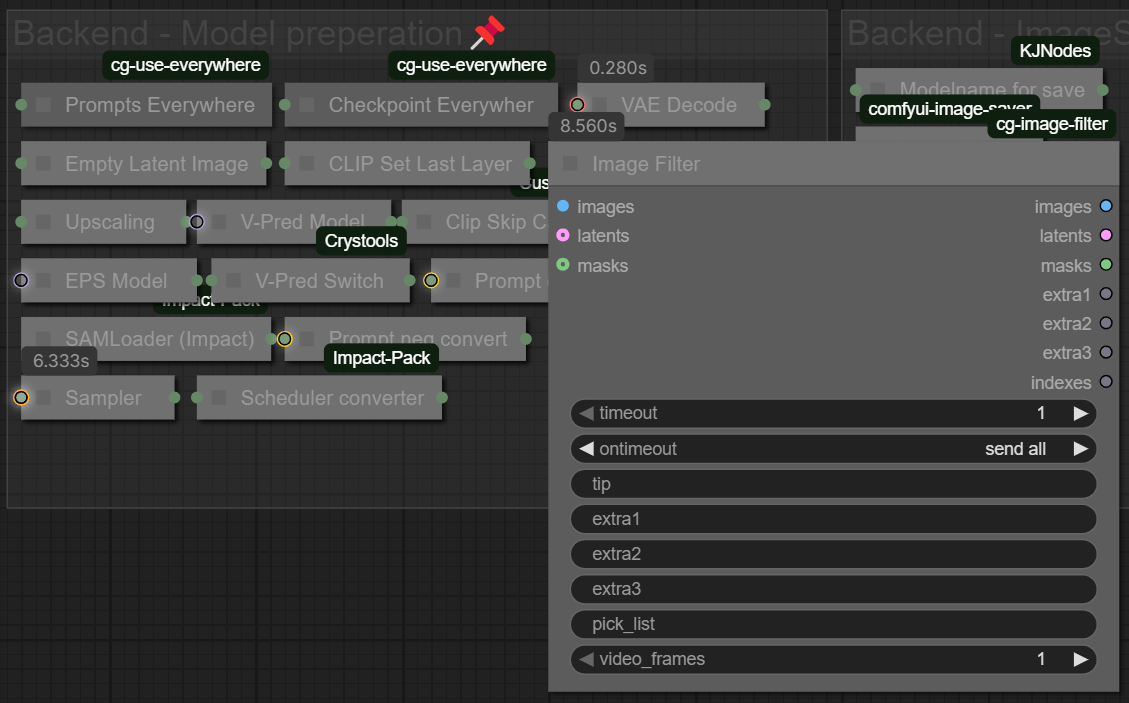
If you only want to generate 1 image anyways and want to get rid of the whole selection process because of it you can set the Batch Size to 1 in the Sampler Settings, go to your Settings from ComfyUI(Cogwheel symbol bottom right) and then click on "Image Filter" on the left-side menu.
If you select "If all images are identical, autosend one" while you only have a batch size of 1 the image will automatically be forwarded to the next node's without ever showing the dialog.
If you dislike the whole concept of selecting which images to detail etc. you can also just delete the "Image filter" node from the screenshot of the first solution and the "VAE Decode"-Node will automatically connect to the upscaling node and with that the image-filter function will be completely removed! :D
I hope this helps 🫡♥️
Where can I find
workflowControlNet Models
workflowEnd quality prompt (Optional)
workflowStart quality prompt (Optional)
I downloaded all the nodes from the links in the workflow.
Hey @GesugaoDVA,
i know i have answered your comment before but i don't know if it either got deleted by civitai or got removed by a rollback when the site went into maintenance.
But this problem is usually resolved by making sure you have all the nodes installed, none of their imports are failed and by making sure you refresh the browser afterwards.
Some other users had this problem too and you can see the fix here:
https://civitai.com/models/1297813?dialog=commentThread&commentId=801058
Hi sir. I am noob in comfyUI. I have downloaded your workflow and installed all the custom nodes, but it still warn me missing Node Type "workflowEnd quality prompt (Optional)" and "workflowStart quality prompt (Optional)". How can i fix that? I'll really appreciate for your help!
heya @GigaRed,
The "workflowIPAdapter Models"-name comes from the group i've created.
Have you installed all the dependencies that are in the description?
If you have all the nodes installed all you have to do is refresh your browser page once for it to work. Check your console if you have any "(IMPORT FAILED)" statements before the custom_node packages, you might have to update some of your current nodes.
I really like this workflow and I wanna use it, but for some reason when I click run it just finishes in like 3 seconds and no image comes out...I've installed all the custom nodes and no red boxes are showing up so it's not like it gets stuck on a certain node. I don't even know what's going on with it at this point
hey @jirAIkei,
Sometimes comfyui is not throwing an error when the issue is a missing model, i've had that issue in the past and then the only solution is checking your console why nothing is happening.
From experience i'd say it's probably a Detailer model that you have not selected, please check if any of the node's in the "Detection Models"-Group have a red border, sadly comfyui doesn't throw an error message if only a model is missing. If that's not the case can you tell me what your console is saying where you've started comfyui?
@vslinx Nevermind I fixed it now ^^ sorry for taking up your time!
Leaving the solution here in case anyone else has this problem:
It was the image filter node that for some reason had pick_list_start set to 0. Now the workflow works as long as I set it to an actual number.
@jirAIkei thanks for providing the solution! :D
It might be an issue that's new because of updates comfyui components, i'll check it later and see if i can reproduce it and maybe release a new minor version then, thank you! ^^
@jirAIkei yeah like expected the issue was caused by a new update to the image-filter node that was released last week ^^
The solution is to actually right click the node and do "Fix node (recreate)" to fix the problem introduced with new variables for videos. With this you'll also get back the selection of images like intended.
I'll be pushing an update in a few minutes, thanks for bringing this to my attention.