


ComfyUI Detailer/ADetailer Workflow
If you're having ANY issues with this workflow, please include the error log from your console when writing a comment here on this page. Chances are 99.98% i can help you with your issue - but i need the error log. And me not having to ask for it first will save you potentially hours. Chances are also high the solution to your problem is already documented in the FAQ here.
You can now support me on my Ko-Fi if you have too much money (✿◡‿◡)
Requirements for each version are listed below or can be found inside a Note in the Workflow itself.
Because of the many connections among the nodes, I highly recommend turning off the link visibility by clicking the "Toggle Link visibility" (Eye icon) in the bottom right of ComfyUI.

Description
I originally came from A1111 WebUI to ComfyUI and, honestly, a lot of things felt way more complicated than they needed to be. I couldn’t find workflows that were both visually pleasing and showed me all the important options without requiring a deep understanding of every little thing in ComfyUI.
Over a few months I learned the ins and outs of Comfy and built my own very barebones, simple workflow (v1) with one main goal: streamline the process and make it visually understandable. I released it here thinking it might help others who also want to make the jump from A1111 to Comfy.
Over the last year I’ve kept adding more and more features as people started using the workflow and requesting things. The workflow has grown a lot, but I’m still trying to keep the same ease-of-use that this whole journey started with. The main goal is still the same: give you a lot of powerful options in a layout that’s as clean, readable, and as user-friendly as ComfyUI will allow.
At this point I feel like I have a pretty solid understanding of how Comfy works, and I’ve even created my own custom nodes to add missing functionality so this workflow could match the ideas I had for it. I try to hide as much of the technical complexity as possible — but if you’re ever curious or confused about anything, please feel free to ask!
Thanks to all of your suggestions, the workflow now includes features like:
Single-image and batch generation
Automatic detailers for specific body parts
Upscaling
v-pred models
LoRAs
ControlNet
IPAdapter
Hires fix / refiner
Manual inpainting
Thank you to every single person who uses this workflow, donates Buzz, or shares images on this page.
I really appreciate you taking those extra steps to support and promote the project. ♥️
Requirements
v4.4 and above require ComfyUI version 0.3.51 or above and also need the frontend to be AT LEAST 1.24.3 or later.
v5.1 - Full List
v5.0 - Full List
v4.4 - Additions to v4.3 (IMG2IMG Only)
Otherwise same as v4-4.3 below
v4.2-4.3 - Additions to v4.1
Otherwise same as v4.1 (incl. v4) below
v4.1 - Additions to v4 (IMG2IMG Only)
Otherwise same as v4 below
v4 - Full List
v3 - v3.2 - Full List
v2.2 - Additions to v2
Otherwise same Custom-Nodes as v2 but you can remove Comfyui-ergouzi-Nodes
v2 - Full List
v1 - Full List
How to use
Since all of the different versions work differently, you should check the "How to use" Node inside of the Workflow itself.
I promise that once you read the explanation of the workflow itself, it'll click and it will be a simple plug and play experience.
It's the simplest I could've made it coming from someone who's only started using ComfyUI 4-5 months ago and had been exclusively an A1111WebUI user before.
When were what functionalitys added?
Starting from v3, ControlNet is included.
Starting from v4, IPAdapter is included.
Starting from v4.3, HiRes Fix and Dynamic prompts(wildcards) is included.
Starting from v4.4, Refiner is included.
Starting from v5.0, Manual Inpainting is included.
Any errors during execution?
If you're running into any errors during the execution of the workflow, please check the FAQ of my Guide first. The guide is written for the IMG2IMG Workflow but when issues arise that people run into frequently i'll add the solutions and what's hapenning to that FAQ section.
If you can't find the problem you're running into there - feel free to write me a comment on the model page so that i can help you and other people might benefit from it as well.
Feedback
I'd love to see your feedback or opinion on the workflow.
This is the first workflow I have ever created myself from scratch and I'd love to hear what you think of it.
If you want to do me a huge favor, you can post your results on this Model page.
I'll make sure to send some buzz your way!
Description
Implementation of Manual inpainting
fixed refiner/normal sampler issue when activating/deactivating img2img transfer
more lazy switches implemented so workflow only runs nodes required for final result(better performance)
changed hires fix steps calculation to use the same step count if steps below 10 (lightning/dmd2 loras for low vram)
saves lora information now from all activated loras in general lora power loader
fixed a bug that saved your exclusion tags as positive prompt when not using img2img transfer
removed Anything Anywhere nodes due to repeating problems after comfy updates since introduction of subgraphs
added a slider for the color fix strength
FAQ
Comments (120)
i have a problem with de nympy version needed for ComfyUI-WD14-Tagger, any advice? i don't want to downgrade numpy cause it could break other files
Hey @elmejor9369,
this is the first time i have someone running into this issue :O What is your error log showing?
does the workflow work for colab hosting?
@BalmoAI if you're using google colab and install comfyui with the necessary nodes it should work just as if you're using it locally! 🫡♥️
@vslinx im having a issue where the generator is making 12 temp copies and the input image is just being copied without actual generation happening
@BalmoAI you‘re probably checking the image feed and not the actual output. In comfy workflows every „preview image“ node creates an image in the feed. You can turn this off in the settings of comfy to only show images from „save image“ nodes.
The previews are always done for every detailer as well as the previews for the pre hires fix and the controlnets, even if none of them are in use. This is so you can debug if anything isn‘t to your liking in the generation so you can see what to change.
The actual final image is the one that‘ll be saved in the output folder and which will also appear in the two big preview image nodes of the workflow. If there are no images there it‘d mean that the workflow didn‘t actually run and execute, if that is the case you‘ll have an error in your console, where comfy is running, that shows what went wrong. If you can provide this error i can help you if you don‘t understand what the issue could be :)
@vslinx yeah the output is just saving one image, so if there isnt much that can be done to stop it then it's fine. no image was appearing on the two preview nodes, and basically the image just passes trough the workflow and comes out unchanged no matter the denoise scale, and now im having a this error suddenly:
vsLinx_LoadSelectedImagesList
Load (Multiple) Images (List): No valid images found. They may have been moved or deleted from the input folder.
im using the images on the input folder and, whatever image i try to input also arent being previewed anymore after this error happens, and just small detail because idk it could help you diagnose ig, when the preview would appear, it doesnt show the dimensions details of the picture under it.
not sure if it's because of the hosting method not being compatible, but if it is im just gonna link it since it could help you plan next versions to be cloud compatible IF that is the case: civitai.com/articles/21835/keep-generating-anything-no-yellow-buzz-no-strong-gpu-no-limits-for-free.
And sorry if im not making a lot of sense lol, im very much a amateur at this method of generation so take everything im saying with the biggest spoon of salt.
Hey @BalmoAI,
sadly i think there's not much that i can do to fix this :/
This is a problem exclusively with collab since your container get's thrown out once your time runs out and you have to set it up again.
The error you're seeing is because the file it's referencing is no longer in the input folder.
In ComfyUI the "select image" process works that way that you select images and these images upon selecting are being copied to your input folder inside comfyui.
Obviously if your image is deleted, removed or renamed the reference doesn't exist anymore. The preview might still show since the preview is loaded into the cache - but once you start the actual workflow the image isn't there so the error is being thrown.
In these cases dimensions are then also not being shown anymore since the information cannot be called on these files anymore.
It's also somewhat counter-intuitive but when you open a new colab/installation of ComfyUI, you always have to refresh the window where you have it open once by pressing F5 or clicking the refresh button.
Even across different url's and installations your browser persists all cached comfy data, so you might see a preview that's not there anymore and some nodes may not work because the shown nodes are still pointing towards your old colab/installation.
The workflow is already colab compatible and tested, the problem with colab is that you basically have to throw away the container after a few hours again once the free time runs out and then have to set it up again. Then most people don't clear the comfy cache and work on half cached versions that mismatch what's present on the hard drive of the colab :/
@vslinx sorry for the late response, thanks for helping me with so many tips. i will keep it in mind when dealing with colab comfy from now on.👍
@BalmoAI no worries, hope it helps! ♥️
Inpainting in IMG2IMG works well. There is a small suggestion, maybe the default setting of "seperate vae" and the node "load vae" could be off and muted initially. Anyway, thank you so much !
Hey @coxsirius766,
i'm glad the inpainting works well!
I'm mostly using checkpoints without a inbuilt VAE so i usually leave the option on since i mostly release it in the way the images i've created as examples were created ^^
So i hope that with the option to turn off the seperate VAE in the Model section it's understandable for most people :D
Thank you for your feedback!
@vslinx Hi! Thanks for replying, Would you consider to develop a new version for multiple different prompts combined with different resolution generation? I know it's not a hard work for myself to add it base on your works. But i'm bad at doing layout,lol just an advice. (´。• ᵕ •。`)
@coxsirius766 do you mean generating multiple different images with multiple different resolutions in one go? I think i'm not quite understanding the request :D
85% of the workflow are hiding in subgraphs so it won't be too big, so it's gotten very complicated - therefore since it's such a niche feature i think it'd be easier for you to build it from scratch and make it do what you want rather than implementing it in this workflow ^^
@vslinx HHA, It is a lazy method: using pre-prepared prompts to generate many images at once (e.g., character in different poses), saving the time of changing prompts and clicking "run" multiple times. I will try to make it on my own, if it is completed, i will post pics under your workflow (if I hadn't make a mess XD)
aaaaah @coxsirius766 that makes sense :D
You can already do that with wildcards if you want. You can prepare prompts in a text file and seperate them by line, then load them in like __path/name__ into the promptfield and just increase the amount of tasks comfyui runs at once by increasing the number next to the play button.
@vslinx Yeah, I already made a simple edition of it. Later I will post it, love you (^▽^)
With a pony model, I am getting an error in the Sampling process in v5:
- Return type mismatch between linked nodes: scheduler, received_type(['simple', 'sgm_uniform', 'karras', 'exponential', 'ddim_uniform', 'beta', 'normal', 'linear_quadratic', 'kl_optimal', 'bong_tangent']) mismatch input_type(['simple', 'sgm_uniform', 'karras', 'exponential', 'ddim_uniform', 'beta', 'normal', 'linear_quadratic', 'kl_optimal', 'bong_tangent', 'beta57'])I am using dpmpp_sde with normal scheduler.
Does anyone know how I can fix this?
Many thanks!
Fixed it.. the Sampling Process Node does not support beta, so I have removed the link to the scheduler selection and selected "normal" directly inside the Sampling Process.
Hey @clawsofdeath,
removing any links will result in you not being able to use some functions of the workflow.
By disconnecting the links to the sampling process you won't be able to use a global scheduler since the setting will not be passed down to other nodes anymore.
The reason you're getting this error can be found here and has to do with a custom_node you have installed that breaks the scheduler selection with any form of node that expects a scheduler list that is not the same as the one provided by the RES4LYF node.
Sadly the developer of this node stupidly overwrites the schedulers globally but doesn't do so for (some) other custom-nodes.
In practicality that means if you remove these connections you won't be able to control large aspects of the workflow anymore, mainly the detailers. Unless you remove the connection in the detailers too and manually change your scheduler there, you won't be able to use them correctly.
The easiest solution would be to deactivate/uninstall the RES4LYF node or ask the developer of the custom node to fix this problem by globally overwriting the scheduler selection for all other loaded nodes.
@vslinx Thank you so much for your detailed reply, appreciate your work :) I didn't notice the issue you are mentioning yet, because so far, I am working without the detailers. But I will try your suggestion as soon as I am going to enable more steps in the workflow, thanks again!
no problem @clawsofdeath :D
If you're not intending to use the detailers you can probably just continue generating like this ^^
I'll see if i can move the node developer of either the RES4LYF node or the Detailer node to implement a change to fix this in the near future! 🫡
Btw, learned today there's a second plugin that causes this error. ComfyUI-ppm causes the exact same error as RES4LYF, though with a different scheduler list. Same reason, it appears.
Figured I'd mention that here, in case someone got stuck and didn't have RES4LYF installed!
@LemurT You have no idea how your comment helped me. I cant thank you enough
Got a really stupid question for you...is there a way to turn off the ding at the end? I thought it'd be in the save node, but doesn't appear to be.
TL;DR: My dog is a freak and goes nuts when he thinks there's someone at the door...which this ding triggers, every time a pic finishes. :D Currently, I'm just trying to remember to turn off the speakers, but figured I should ask if there's an easy fix for me forgetting.
(PS, like I said...stupid question)
Heya @LemurT,
It's not a stupid question and i also have it disabled since it also annoys me 😂
To not further trigger your poor dog you can go into the settings in comfyui -> Image Filter(left sidebar) and then deactivate "Play sound when activating".
The sound is triggered by the image filter that lets you choose which image to continue the process with when you're doing a batch of higher than 1 ^^
You can either disable the sound like i mentioned above or simply disable the "Image Selection" in the Process-Control Group if you don't want to use that functionality altogether!
@vslinx Thanks so much! My dog will appreciate it!
Thank you for your workflows. I'm running TXT2IMG and IMG2IMG 5.0, and they are so packed with features. It's great how you explain everything, you're doing a huge service for the community.
I was wondering what your recommendation would be for incorporating face swap into your workflow? I typically use InstantID or ReActor when I want to capture a particular likeness, but I'm not sure they would be compatible with your workflow or perhaps even necessary. Might the inpainting in IMG2IMG 5.0 work for this?
Hey @kitblasters339,
thank you for the kind words! I'm glad you're enjoying the workflows and the work that goes into them 🥰
You can definitely solve this issue with either the Face Detailer or the Manual Inpainting, but only if your checkpoint knows the face. Then you can simply mask the face, prompt what character you want to replace it by and then play around with the denoise to get it right.
You can also load a lora in for the character to help along the way.
But currently there is sadly no intention to implement InstantID or ReActor as of right now :/
Mostly because of their NSFW restrictions and because of some dependency meddling that can lead to many problems to most users. Also most users don't really know how to create the face models and it's not really an easy thing to do in a one-step workflow like this :/
So sadly right now and in the forseeable future the only way to achieve these results would be with a checkpoint and/or lora that is trained on the subject you want to display the face of.
You can also use the facedetailer to automatically mask the face area and use the txt2img workflow just to detail the face and prompt which face to display instead of the original 🫡
Thanks for your reply, @vslinx. I can understand why you're hesitant to implement InstantID or ReActor. Since I'm working with custom characters, I'll have to look into what it would take to train a LORA and/or a model to know their faces. Always something more to learn 🙂 In the meantime, I may try to figure out how to extract some of your facedetailing nodes and incorporate them into my InstantID workflow.
I'll definitely be following your work!
Hey @vslinx, I have a follow-up question for you if you'd be so kind to lend me your thoughts: how do you maintain likeness across scenes when you are not working with well-known characters? For example, say you generate an image of a fictional character you like using your workflow, and then you want to put that exact same character into a different pose and/or environment (like to set them up for a FTLF video)? Do you rely entirely on your prompt and seed to maintain that likeness? Might "IPAdapter PLUS FACE" help with this, and would that be compatible with your workflow?
@kitblasters339 i have tried IPAdapter with Face in the past and for me at least it has not worked well. As long as the character's facial position and expression are the same it usually works okay'ish but as soon as that changes it's over.
I usually just rely on the prompts to be honest.
SDXL based checkpoints like illustrious, pony and noobai aren't really great at keeping the likeness of not well known fictional characters.
With what you're describing i'd usually try to use a lora for the character and if one doesn't exist for it i'd train it. With increased learning rate you can push down on the steps required in total and already achieve very high likeness with barely 1000 steps of training. On my 4090 that'd take around 40 minutes, which i'd be willing to sacrifice if i want to generate that character regularly.
It also helps that you can "overtrain" the character a bit since you'd only use it for inpainting in this case which is easy if the lora is only trained on the character and no other concept.
If you really want to implement instantid to the workflow it shouldn't be super complicated, just follow this node setup and put it before the model/prompts. You can do that by folding out the "Sampling Process"-Node in the "Sampling"-Group at the bottom of the workflow.
This one.

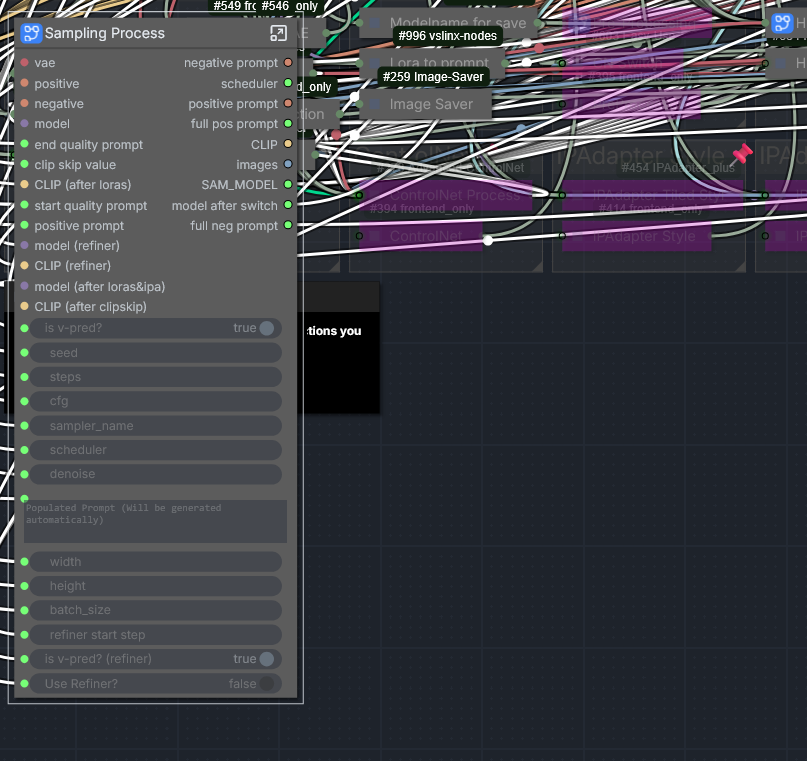
From the ingoing connections you remove the "model (after loras&ipa)" connection and put it in the "Apply InstantID"-Node as the model. Then you'll put the output of the "Apply InstantID" Model output back into the "Sampling Process"-Subgraph as the model(after loras & ipa).
From the outgoing connections you take the positive prompt & negative prompt and put them into the "Apply InstantID". Then put the output positive & negative from the "Apply InstantID"-Node into the "Sampling Process" as the positive and negative.
With this you'll have implemented InstantID to the workflow the same way you'd do it normally.
Yo @vslinx!! Thank you so much for your expert thoughts! This will take me many days to experiment with, but it sounds like it will work.
As for the LORA training, do you have a favorite training workflow? I'm considering trying this one: https://github.com/Nerogar/OneTrainer
@kitblasters339 no worries my friend :)
I hope you can do it! i would've done it myself but i was too lazy to install the instantid nodes :D
I usually always train my loras with kohya-ss, but it's somewhat complicated and not really necessarily in a good way. I have heard great things from OneTrainer so you should definitely give it a try if you want to start trying to train a lora.
It definitely does a better job at end-user experience for beginners!
Hey @vslinx, just an update that I did get InstantID working in your workflow using your instructions above. It slows things down quite a bit, but it works! Thanks again.
Now moving on to learning OneTrainer :) I think you are right that it'll be better because it'll overcome the slowdowns and image_kps limitations of InstantID.
@kitblasters339 i'm glad you got it to work!
Yeah like i mentioned earlier, putting instantid into a workflow like this, depending on the amount of actions, will take quite a bit of time - especially on the higher end of the resolutions.
If you regularly try to use that character, creating a lora is definitely the easiest way!
I'm using ComfyUI 7.0, front end 1.35.9. Received this error: invalid prompt: {'type': 'invalid_prompt', 'message': 'Cannot execute because a node is missing the class_type property.', 'details': "Node ID '#133'", 'extra_info': {}}
Hey @bruceflee,
can you check if you have all custom nodes up-to-date and then refresh your browser once and tell me if the error still occurs?
Node #133 in particular would be the steps selector in the "Sampler Settings"-Group.
If you're having an issue, rightlicking and selecting "Fix node (recreate)" might fix the problem.
Even though I have RGThree I get the following error:
This workflow uses custom nodes you haven't installed yet.
Label (rgthree)
Mute / Bypass Repeater (rgthree)
Fast Bypasser (rgthree)
Install these nodes to run this workflow, or replace them with installed alternatives. Missing nodes are highlighted in red on the canvas.
And now it is working despite not changing anything... god I hate technology sometimes, lol.
@Persson yeah sometimes comfyui is a very unique piece of software... 😂
Always make sure to refresh your browser after installing any nodes, a hard refresh can also always help to reset the cache by pressing CTRL+Shift+R in most browsers 🫡
@vslinx Ah yeah, I restarted several times, even uninstalled and reinstalled rgthree a couple times to see if that would work, nope. Got busy with something else for a few hours, came back and suddenly those nodes were working.
@Persson been there 🥲
Hope you'll enjoy the workflow and that the struggle was worth it! 😂
@vslinx Yeah the workflow works well once I actually got it running, though I had to figure out where the workflow actually ended to plug in a play sound node so I can get a notification when it ends.
Though I do have a question, how do you get the recommended nsfw all in one detection working? Cause I was playing around with those last night since I've never used ADetailer stuff before, and the all in one detection doesn't seem to work right. For example when detecting nipples it also detects the vagina and applies nipple detailing to that as well, and when doing vagina detection it also detects nipples and applies vagina detailing to the nipples as well. I know I could just download individual detection models for each part but I'm still curious what the issue there is.
@Persson happy to hear :)
It's easiest to place the notification sound node before/after the save image node, since that's the last step no matter what options you choose.
I'd recommend the individual detailers over the all in one, the all in one detailers are great for very simple workfows but not so much for stuff like this ^^
If you want to use the all in one detailer you have to know the keywords this detailer was trained on, for example "nipple", "pussy" etc.
And then wenn you use the all in one model you have to open the detailer itself and at the bottom of the node it says "wildcard spec" which is a text input, there you'll have to write the objects it's supposed to find.
For example:
pussy, nipple
This way it'll mask every pussy and nipple it can find from the image - but obviously it'd still output them as one batch, so you'd still have to chain these :D
@vslinx Yeah that's where I put it, just took a minute to figure out where the image link for the image saver node was connecting to since I initially didn't notice the link looped back into itself and went behind the node over to the inpainting section. Of course then I realized I was being dumb and could've just dragged the node to move the link somewhere less... crowded so I could actually follow it.
Ah, I had those trigger words in the detailer prompts but I didn't touch the detailer nodes themselves. Like I said I've never used these detectors/detailers before, my workflows are usually just image generation with optional ControlNet into upscaling, so I had no clue where to even begin with the detailer nodes to try fixing it lol. That said thanks for the explanation, but I think I'll just use the individual ones like you recommended to keep things simpler.
I'm testing the most basic generation and I got * KSampler 82:
- Required input is missing: negative
- Required input is missing: positive
Currently, the inputs of KSampler's positive and negative conditioning are from Controlnet process.
There is a node called Anything everywhere prompts which shows Deprecated.
And If i convert all UEs to real links.
The outputs of both positive and negative prompts are empty. I have to connect them myself.
I see. The latest CG Anywhere. The Prompt everywhere node got replaced/non-functional. I rolled back to several previous versions. Now everything works
hey @dennyma2012961,
are you using the latest version? In the version 5.0 i have removed anything anywhere from the workflow because of issues it caused with newer comfy versions.
Hi. Unfortunately, I couldn't start the workflow. I get an error.
KSampler 546:82:
- Return type mismatch between linked nodes: scheduler, received_type(['simple', 'sgm_uniform', 'karras', 'exponential', 'ddim_uniform', 'beta', 'normal', 'linear_quadratic', 'kl_optimal', 'bong_tangent']) mismatch input_type(['simple', 'sgm_uniform', 'karras', 'exponential', 'ddim_uniform', 'beta', 'normal', 'linear_quadratic', 'kl_optimal', 'bong_tangent', 'beta57'])
* KSamplerAdvanced 546:576:
- Return type mismatch between linked nodes: scheduler, received_type(['simple', 'sgm_uniform', 'karras', 'exponential', 'ddim_uniform', 'beta', 'normal', 'linear_quadratic', 'kl_optimal', 'bong_tangent']) mismatch input_type(['simple', 'sgm_uniform', 'karras', 'exponential', 'ddim_uniform', 'beta', 'normal', 'linear_quadratic', 'kl_optimal', 'bong_tangent', 'beta57'])
* KSamplerAdvanced 546:575:
- Return type mismatch between linked nodes: scheduler, received_type(['simple', 'sgm_uniform', 'karras', 'exponential', 'ddim_uniform', 'beta', 'normal', 'linear_quadratic', 'kl_optimal', 'bong_tangent']) mismatch input_type(['simple', 'sgm_uniform', 'karras', 'exponential', 'ddim_uniform', 'beta', 'normal', 'linear_quadratic', 'kl_optimal', 'bong_tangent', 'beta57'])
* KSampler 604:537:
- Return type mismatch between linked nodes: scheduler, received_type(['simple', 'sgm_uniform', 'karras', 'exponential', 'ddim_uniform', 'beta', 'normal', 'linear_quadratic', 'kl_optimal', 'bong_tangent']) mismatch input_type(['simple', 'sgm_uniform', 'karras', 'exponential', 'ddim_uniform', 'beta', 'normal', 'linear_quadratic', 'kl_optimal', 'bong_tangent', 'beta57'])
I saw your FAQ about RES4LYF and ComfyUI-ppm, but I don't have those nodes installed. Furthermore, I disabled all my nodes that aren't in your workflow — the result is the same. Any ideas?
hey @generator1337,
have you refreshed your browser once after doing all of that? Maybe also try a hard refresh by doing : CTRL+Shift+R
from the list of the input type i can see that you have the beta57 scheduler which is part of either of the nodes you mentioned. So it seems that something is still persisting these schedulers in your comfy installation.
I'd check the custom_nodes folder and make sure that they are a 100% gone and delete them otherwise, sometimes Comfy Manager can be a bit buggy and not correctly show all installed nodes. Make sure to turn off comfy afterwards and start it again and then try hard refreshing with the key combination mentioned above.
@vslinx
I think I've solved the problem. What I did:
1. I didn't disable it, but deleted all the nodes that weren't related to this workflow.
2. I checked the custom nodes folder and saw that there was a RES4LYF folder there. LOL. It wasn't showing up in the manager, but it was inside the folder. I deleted it.
I restarted it a few times, and it worked. Thanks, I'll give it a try ;)
@generator1337 glad that worked!
The RES4LYF node can be a real pain in the ass :'D
Is there an install guide for this? The 4700 custom nodes it installs break absolutely everything, in many different ways when manager tries to grab everything.
Hey @eadespoker735,
haven't had anyone having this problem so far 😂
It's "only" 17 and a lot of them are nodes basically everyone has installed like KJNodes, Impact-Pack, Custom-Scripts and rgthree. But i'm currently working on reducing the custom nodes needed since in the last year comfy itself delivered some of the functionalities itself! :)
Are there any specific custom nodes you're having issues with? Maybe there are incompatibilities with custom-nodes you already have installed.
Is your comfy version on the newest current version?
I do not have a script to only install the custom nodes, but i do have a script to do a fresh clean install of comfyui with all required custom nodes that are needed for the workflow + the newest version of the workflow itself.
You can find it here(the windows-nvidia.bat):
https://huggingface.co/vslinx/ComfyUIDetailerWorkflow-vslinx/tree/main
@vslinx Manual install fixed it, thanks :), For some reason importing the workflow before installing requirements creates a dependency cascade in ComfyUI manager
@MiddlingMaker Ah that sucks :/
Usually you can fix it by doing a hard cache refresh (CTRL+Shift+R) and then reloading the workflow by dragging the file into comfy again. But yeah, comfy caching is hard and aggressive (should automatically refresh after custom node installation imo, but whatever 🫣)
@vslinx thx for your help, love the workflow! Is it possible to use LORAs on the manual inpaint mode?
@MiddlingMaker happy to hear! ♥️
Yes - the manual inpainting uses the whole model structure of the default workflow.
So you can change the model, loras and inject IPAdapter by activating their functionality's and selecting the models in the left part of the workflow.
This is done so you have one streamlined process where you might generate an image that you're happy with apart from a few details and then simply pop on the "Manual Inpainting", draw a mask and can edit the image straight away without having to add/edit the models, loras and/or ipadapter manually in the inpainting area again.
So every lora you add on the left side in the "LoRA's"-Group will be used for the whole process including the Manual Inpainting part! Hope that helps 🥰
Hi, thank you for making this! It was a bit overwhelming at first but I'm starting to get the hang of it. Just have a quick question about prompts. I know I could test this out myself but it would save a lot of time as it takes me a while to get an output. For example, if I added "blue eyes" as a prompt, should I add it to the main prompt, face and eye detailer prompts? Hope it make sense.
Hey @OrchidAI,
i know it can be a bit overwhelming at first - i tried delivering all the options and knobs you might want to use during image generation with the intent to delivering everything A1111 had to offer for image generation in a single workflow.
If you want to prompt a character with blue eyes you should put it in the main prompt, only that is used during image generation.
If you do want to use the detailers for face and eyes you can also add it there as it'll help the detailer to guide the eye color. It's not really required or necessary when you're using low denoise values like 0.1 or 0.3, but if you use a higher denoise value it might change the eye color by itself and then it can help to explicitly prompt it in the detailer prompts.
You can also use it to change the eye color later on when using the img2img workflow for example. The order is always: Positive Prompt > Generates Image > Detailer > Uses Detailer prompts as help for generation of the masked area (if activated)
Hope that helps! :)
Ridiculously good. Somehow blazingly fast with a lot of steps and customizability that make the end result consistently amazing. The batch preview with image filter into additional steps is genius. Thanks for sharing! My new go-to :)
Thank you so much for your kind words @Valyria! ♥️
Always super happy to know people use the workflow and are enjoying it 🥰
Incredible work flow, excellent directions on the workflow itself. Surprisingly easy to use!
Thanks a lot @MiddlingMaker! ♥️🫡
Wow, this is the best workflow i used. Its perfect. Great job.
Everyone, who have a problem, try in terminal:
cd custom_nodes\comfyui_controlnet_aux
pip install -r requirements.txt
and like this on other custom nodes
Thank you @MoHaXkm,
I'm very happy to hear that! ♥️
If you don't want to go through the hassle of hopping into your venv and doing all that manually, you can also go to Comfy Manager and find the node there and click "Try fix", that'll queue the installation of dependencys for your next start so you can simply click "restart" afterwards and upon restarting comfy will install necessary requirements automatically!
Probably the best workflow ive tried. Its easy to setup via batchfile and thanks to the comments, easy to understand. 5/5
For some reason all my openpose skeletons are applied backward... Someone suggested inverting R and B channels with a channel shuffler node, but I cant figure out where in the img2img workflow to plug it in.
Manually inverting them and uploading the R > B and B > R inverted image works on the txt2img
Hey @MiddlingMaker,
the IMG2IMG Workflow does not support using outside/your own ControlNet skeletons.
You do not not have to invert, shuffle or manually do anything.
If you're talking about the IMG2IMG workflow and the IMG2IMG Transfer-Functionality you can find the subgraph here at the bottom and in there you can find the ControlNet-Node.
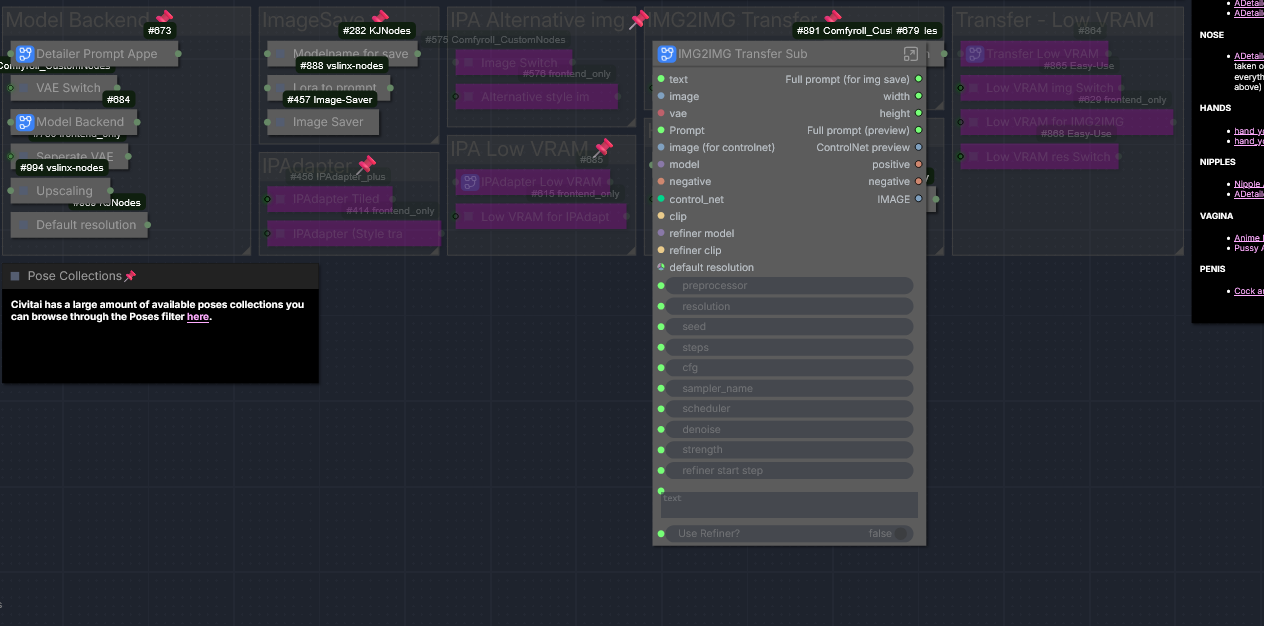
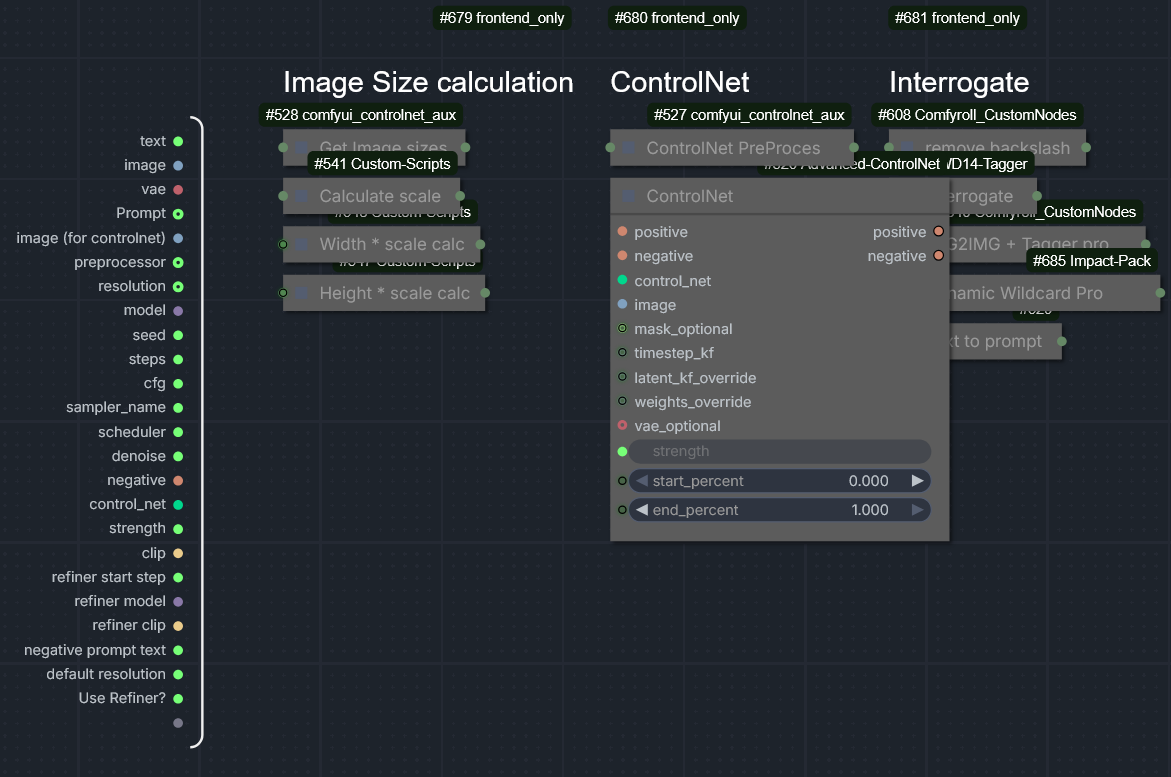
The Pre-Processor right before that is what creates the pose image.
I have never heard of someone having to invert the Red and Blue channels of OpenPose Skeletons for the ControlNet to work. Have you tried simply increasing the strength(accuracy)?
If your prompt heavily contradicts your controlnet, with a default strength of 0.55 you will face problems locking that pose in. Prompts heavily matter which is why it has an inbuilt interrogation.
You also shouldn't have to invert the R&B Channels of your OpenPose Skeletons for the TXT2IMG either - are you sure you're using all the correct nodes and have all of them up-to-date with their dependencys installed?
Hello, I am encountering a UI rendering issue with several Mixlab nodes (e.g., "Size", "Steps", "Sampler Settings") in the latest version of ComfyUI (v0.9.2 / Frontend v1.36.14).
The Issue:
Upon loading the workflow, these nodes appear completely empty/blank. The expected sliders and input fields are missing.
logs are in the comment
[START] Security scan
[DONE] Security scan
## ComfyUI-Manager: installing dependencies done.
** ComfyUI startup time: 2026-01-16 17:46:33.474
** Platform: Windows
** Python version: 3.12.10 (tags/v3.12.10:0cc8128, Apr 8 2025, 12:21:36) [MSC v.1943 64 bit (AMD64)]
** Python executable: D:\AIsoftware\ComfyUI-aki\python\python.exe
** ComfyUI Path: D:\AIsoftware\ComfyUI-aki\ComfyUI
** ComfyUI Base Folder Path: D:\AIsoftware\ComfyUI-aki\ComfyUI
** User directory: D:\AIsoftware\ComfyUI-aki\ComfyUI\user
** ComfyUI-Manager config path: D:\AIsoftware\ComfyUI-aki\ComfyUI\user\__manager\config.ini
** Log path: D:\AIsoftware\ComfyUI-aki\ComfyUI\user\comfyui.log
Prestartup times for custom nodes:
0.0 seconds: D:\AIsoftware\ComfyUI-aki\ComfyUI\custom_nodes\comfyui-easy-use
0.0 seconds: D:\AIsoftware\ComfyUI-aki\ComfyUI\custom_nodes\rgthree-comfy
8.2 seconds: D:\AIsoftware\ComfyUI-aki\ComfyUI\custom_nodes\ComfyUI-Manager
Checkpoint files will always be loaded safely.
Total VRAM 16311 MB, total RAM 48618 MB
pytorch version: 2.7.0+cu128
xformers version: 0.0.30
Enabled fp16 accumulation.
Set vram state to: NORMAL_VRAM
Device: cuda:0 NVIDIA GeForce RTX 5060 Ti : cudaMallocAsync
Using async weight offloading with 2 streams
Enabled pinned memory 21878.0
WARNING: You need pytorch with cu130 or higher to use optimized CUDA operations.
Found comfy_kitchen backend eager: {'available': True, 'disabled': False, 'unavailable_reason': None, 'capabilities': ['apply_rope', 'apply_rope1', 'dequantize_nvfp4', 'dequantize_per_tensor_fp8', 'quantize_nvfp4', 'quantize_per_tensor_fp8', 'scaled_mm_nvfp4']}
Found comfy_kitchen backend triton: {'available': True, 'disabled': True, 'unavailable_reason': None, 'capabilities': ['apply_rope', 'apply_rope1', 'dequantize_nvfp4', 'dequantize_per_tensor_fp8', 'quantize_nvfp4', 'quantize_per_tensor_fp8']}
Found comfy_kitchen backend cuda: {'available': True, 'disabled': True, 'unavailable_reason': None, 'capabilities': ['apply_rope', 'apply_rope1', 'dequantize_nvfp4', 'dequantize_per_tensor_fp8', 'quantize_nvfp4', 'quantize_per_tensor_fp8', 'scaled_mm_nvfp4']}
Using xformers attention
Python version: 3.12.10 (tags/v3.12.10:0cc8128, Apr 8 2025, 12:21:36) [MSC v.1943 64 bit (AMD64)]
ComfyUI version: 0.9.2
ComfyUI frontend version: 1.36.14
[Prompt Server] web root: D:\AIsoftware\ComfyUI-aki\python\Lib\site-packages\comfyui_frontend_package\static
[Crystools INFO] Crystools version: 1.27.4
[Crystools INFO] Platform release: 11
[Crystools INFO] JETSON: Not detected.
[Crystools INFO] CPU: Intel(R) Core(TM) Ultra 7 265K - Arch: AMD64 - OS: Windows 11
[Crystools INFO] pynvml (NVIDIA) initialized.
[Crystools INFO] GPU/s:
[Crystools INFO] 0) NVIDIA GeForce RTX 5060 Ti
[Crystools INFO] NVIDIA Driver: 591.74
Exception in thread Thread-10 (_readerthread):
Traceback (most recent call last):
File "D:\AIsoftware\ComfyUI-aki\python\Lib\threading.py", line 1075, in bootstrapinner
self.run()
File "<enhanced_experience vendors.sentry_sdk.integrations.threading>", line 99, in run
File "<enhanced_experience vendors.sentry_sdk.integrations.threading>", line 94, in runold_run_func
File "<enhanced_experience vendors.sentry_sdk.utils>", line 1649, in reraise
File "<enhanced_experience vendors.sentry_sdk.integrations.threading>", line 92, in runold_run_func
File "D:\AIsoftware\ComfyUI-aki\python\Lib\threading.py", line 1012, in run
self._target(*self._args, **self._kwargs)
File "D:\AIsoftware\ComfyUI-aki\python\Lib\subprocess.py", line 1599, in _readerthread
buffer.append(fh.read())
^^^^^^^^^
File "<frozen codecs>", line 322, in decode
UnicodeDecodeError: 'utf-8' codec can't decode byte 0xb2 in position 7: invalid start byte
[ComfyUI-Easy-Use] server: v1.3.4 Loaded
[ComfyUI-Easy-Use] web root: D:\AIsoftware\ComfyUI-aki\ComfyUI\custom_nodes\comfyui-easy-use\web_version/v2 Loaded
ComfyUI-GGUF: Partial torch compile only, consider updating pytorch
### Loading: ComfyUI-Impact-Pack (V8.28.2)
[Impact Pack] Wildcard total size (0.00 MB) is within cache limit (50.00 MB). Using full cache mode.
[Impact Pack] Wildcards loading done.
### Loading: ComfyUI-Impact-Subpack (V1.3.5)
[Impact Pack/Subpack] Using folder_paths to determine whitelist path: D:\AIsoftware\ComfyUI-aki\ComfyUI\user\default\ComfyUI-Impact-Subpack\model-whitelist.txt
[Impact Pack/Subpack] Ensured whitelist directory exists: D:\AIsoftware\ComfyUI-aki\ComfyUI\user\default\ComfyUI-Impact-Subpack
[Impact Pack/Subpack] Loaded 0 model(s) from whitelist: D:\AIsoftware\ComfyUI-aki\ComfyUI\user\default\ComfyUI-Impact-Subpack\model-whitelist.txt
[Impact Subpack] ultralytics_bbox: D:\AIsoftware\ComfyUI-aki\ComfyUI\models\ultralytics\bbox
[Impact Subpack] ultralytics_segm: D:\AIsoftware\ComfyUI-aki\ComfyUI\models\ultralytics\segm
### Loading: ComfyUI-Inspire-Pack (V1.23)
Found LoRA roots:
- D:/AIsoftware/ComfyUI-aki/ComfyUI/models/loras
Found checkpoint roots:
- D:/AIsoftware/ComfyUI-aki/ComfyUI/models/checkpoints
- D:/AIsoftware/ComfyUI-aki/ComfyUI/models/diffusion_models
- D:/AIsoftware/ComfyUI-aki/ComfyUI/models/unet
Found embedding roots:
- D:/AIsoftware/ComfyUI-aki/ComfyUI/models/embeddings
Updated 'comfyui' library with current folder paths
Detected async ComfyUI execution, installing async metadata hooks
Metadata collection hooks installed for runtime values
ComfyUI Metadata Collector initialized
Example images path:
Added static route for locales: /locales -> D:\AIsoftware\ComfyUI-aki\ComfyUI\custom_nodes\comfyui-lora-manager\locales
Registered model type 'lora' with service LoraService and routes LoraRoutes
Registered model type 'checkpoint' with service CheckpointService and routes CheckpointRoutes
Registered model type 'embedding' with service EmbeddingService and routes EmbeddingRoutes
Registered default model types: lora, checkpoint, embedding
Setting up routes for 3 registered model types
Successfully set up routes for lora
Successfully set up routes for checkpoint
Successfully set up routes for embedding
LoRA Manager: Set up routes for 3 model types: lora, checkpoint, embedding
### Loading: ComfyUI-Manager (V3.39.2)
[ComfyUI-Manager] network_mode: public
[ComfyUI-Manager] ComfyUI per-queue preview override detected (PR #11261). Manager's preview method feature is disabled. Use ComfyUI's --preview-method CLI option or 'Settings > Execution > Live preview method'.
### ComfyUI Revision: 4551 [8f40b43e] *DETACHED | Released on '2026-01-15'
[ComfyUI-Manager] default cache updated: https://raw.githubusercontent.com/ltdrdata/ComfyUI-Manager/main/alter-list.json
[ComfyUI-Manager] default cache updated: https://raw.githubusercontent.com/ltdrdata/ComfyUI-Manager/main/model-list.json
--------------
### Mixlab Nodes: Loaded
json_repair## OK
ChatGPT.available True
edit_mask.available True
[ComfyUI-Manager] default cache updated: https://raw.githubusercontent.com/ltdrdata/ComfyUI-Manager/main/github-stats.json
[ComfyUI-Manager] default cache updated: https://raw.githubusercontent.com/ltdrdata/ComfyUI-Manager/main/extension-node-map.json
[ComfyUI-Manager] default cache updated: https://raw.githubusercontent.com/ltdrdata/ComfyUI-Manager/main/custom-node-list.json
## clip_interrogator_model not found: D:\AIsoftware\ComfyUI-aki\ComfyUI\models\clip_interrogator\Salesforce\blip-image-captioning-base, pls download from https://huggingface.co/Salesforce/blip-image-captioning-base
ClipInterrogator.available True
## text_generator_model not found: D:\AIsoftware\ComfyUI-aki\ComfyUI\models\prompt_generator\text2image-prompt-generator, pls download from https://huggingface.co/succinctly/text2image-prompt-generator/tree/main
## zh_en_model not found: D:\AIsoftware\ComfyUI-aki\ComfyUI\models\prompt_generator\opus-mt-zh-en, pls download from https://huggingface.co/Helsinki-NLP/opus-mt-zh-en/tree/main
PromptGenerate.available True
ChinesePrompt.available True
RembgNode_.available True
TripoSR.available
MiniCPMNode.available
Scenedetect.available
FishSpeech.available
SenseVoice.available
D:\AIsoftware\ComfyUI-aki\python\Lib\site-packages\ctranslate2\__init__.py:8: UserWarning: pkg_resources is deprecated as an API. See https://setuptools.pypa.io/en/latest/pkg_resources.html. The pkg_resources package is slated for removal as early as 2025-11-30. Refrain from using this package or pin to Setuptools<81.
import pkg_resources
Whisper.available False
fal-client## OK
FalVideo.available
--------------
(pysssss:WD14Tagger) [DEBUG] Available ORT providers: TensorrtExecutionProvider, CUDAExecutionProvider, CPUExecutionProvider
(pysssss:WD14Tagger) [DEBUG] Using ORT providers: CUDAExecutionProvider, CPUExecutionProvider
警告: 无法导入 nunchaku.lora.flux.to_diffusers。ZML_名称加载lora(nunchaku) 节点将无法使用,请确保 nunchaku 库已安装(不使用nunchaku的用户可忽略)。
==================================================
💡 [ComfyUI-ZML-Image] 注册节点总数为: 142!
==================================================
D:\AIsoftware\ComfyUI-aki\ComfyUI\custom_nodes\ComfyUI_Comfyroll_CustomNodes\nodes\nodes_list.py:383: SyntaxWarning: invalid escape sequence '\W'
"optional": {"folder_path": ("STRING", {"default": "C:\Windows\Fonts", "multiline": False}),
D:\AIsoftware\ComfyUI-aki\ComfyUI\custom_nodes\ComfyUI_Comfyroll_CustomNodes\nodes\nodes_list.py:393: SyntaxWarning: invalid escape sequence '\W'
def make_list(self, source_folder, start_index, max_rows, folder_path="C:\Windows\Fonts"):
D:\AIsoftware\ComfyUI-aki\ComfyUI\custom_nodes\ComfyUI_Comfyroll_CustomNodes\nodes\nodes_xygrid.py:256: SyntaxWarning: invalid escape sequence '\R'
resolved_font_path = os.path.join(os.path.dirname(os.path.dirname(os.path.realpath(__file__))), "fonts\Roboto-Regular.ttf")
------------------------------------------
Comfyroll Studio v1.76 : 175 Nodes Loaded
------------------------------------------
** For changes, please see patch notes at https://github.com/Suzie1/ComfyUI_Comfyroll_CustomNodes/blob/main/Patch_Notes.md
** For help, please see the wiki at https://github.com/Suzie1/ComfyUI_Comfyroll_CustomNodes/wiki
------------------------------------------
[D:\AIsoftware\ComfyUI-aki\ComfyUI\custom_nodes\comfyui_controlnet_aux] | INFO -> Using ckpts path: D:\AIsoftware\ComfyUI-aki\ComfyUI\custom_nodes\comfyui_controlnet_aux\ckpts
[D:\AIsoftware\ComfyUI-aki\ComfyUI\custom_nodes\comfyui_controlnet_aux] | INFO -> Using symlinks: False
[D:\AIsoftware\ComfyUI-aki\ComfyUI\custom_nodes\comfyui_controlnet_aux] | INFO -> Using ort providers: ['CUDAExecutionProvider', 'DirectMLExecutionProvider', 'OpenVINOExecutionProvider', 'ROCMExecutionProvider', 'MIGraphXExecutionProvider', 'CPUExecutionProvider', 'CoreMLExecutionProvider']
DWPose: Onnxruntime with acceleration providers detected
Efficiency Nodes: Attempting to add Control Net options to the 'HiRes-Fix Script' Node (comfyui_controlnet_aux add-on)...Success!
[rgthree-comfy] Loaded 48 fantastic nodes. 🎉
[rgthree-comfy] ComfyUI's new Node 2.0 rendering may be incompatible with some rgthree-comfy nodes and features, breaking some rendering as well as losing the ability to access a node's properties (a vital part of many nodes). It also appears to run MUCH more slowly spiking CPU usage and causing jankiness and unresponsiveness, especially with large workflows. Personally I am not planning to use the new Nodes 2.0 and, unfortunately, am not able to invest the time to investigate and overhaul rgthree-comfy where needed. If you have issues when Nodes 2.0 is enabled, I'd urge you to switch it off as well and join me in hoping ComfyUI is not planning to deprecate the existing, stable canvas rendering all together.
Import times for custom nodes:
0.0 seconds: D:\AIsoftware\ComfyUI-aki\ComfyUI\custom_nodes\websocket_image_save.py
0.0 seconds: D:\AIsoftware\ComfyUI-aki\ComfyUI\custom_nodes\comfyui_memory_cleanup
0.0 seconds: D:\AIsoftware\ComfyUI-aki\ComfyUI\custom_nodes\ComfyUI_Text_Translation
0.0 seconds: D:\AIsoftware\ComfyUI-aki\ComfyUI\custom_nodes\comfyui-mxtoolkit
0.0 seconds: D:\AIsoftware\ComfyUI-aki\ComfyUI\custom_nodes\ComfyUI-Text-Translation
0.0 seconds: D:\AIsoftware\ComfyUI-aki\ComfyUI\custom_nodes\reservedvram
0.0 seconds: D:\AIsoftware\ComfyUI-aki\ComfyUI\custom_nodes\ComfyUI-WD14-Tagger
0.0 seconds: D:\AIsoftware\ComfyUI-aki\ComfyUI\custom_nodes\ComfyUI-GGUF
0.0 seconds: D:\AIsoftware\ComfyUI-aki\ComfyUI\custom_nodes\ComfyUI_IPAdapter_plus
0.0 seconds: D:\AIsoftware\ComfyUI-aki\ComfyUI\custom_nodes\cg-image-filter
0.0 seconds: D:\AIsoftware\ComfyUI-aki\ComfyUI\custom_nodes\comfyui-vslinx-nodes
0.0 seconds: D:\AIsoftware\ComfyUI-aki\ComfyUI\custom_nodes\comfyui_essentials
0.0 seconds: D:\AIsoftware\ComfyUI-aki\ComfyUI\custom_nodes\ComfyUI_Qwen3-VL-Instruct
0.0 seconds: D:\AIsoftware\ComfyUI-aki\ComfyUI\custom_nodes\comfyui-advanced-controlnet
0.0 seconds: D:\AIsoftware\ComfyUI-aki\ComfyUI\custom_nodes\ComfyUI-ZML-Image
0.0 seconds: D:\AIsoftware\ComfyUI-aki\ComfyUI\custom_nodes\rgthree-comfy
0.0 seconds: D:\AIsoftware\ComfyUI-aki\ComfyUI\custom_nodes\comfyui-inpaint-cropandstitch
0.0 seconds: D:\AIsoftware\ComfyUI-aki\ComfyUI\custom_nodes\wlsh_nodes
0.0 seconds: D:\AIsoftware\ComfyUI-aki\ComfyUI\custom_nodes\ComfyUI-KJNodes
0.0 seconds: D:\AIsoftware\ComfyUI-aki\ComfyUI\custom_nodes\comfyui_controlnet_aux
0.0 seconds: D:\AIsoftware\ComfyUI-aki\ComfyUI\custom_nodes\ComfyUI-QwenVL
0.0 seconds: D:\AIsoftware\ComfyUI-aki\ComfyUI\custom_nodes\comfyui-image-saver
0.0 seconds: D:\AIsoftware\ComfyUI-aki\ComfyUI\custom_nodes\comfyui-custom-scripts
0.0 seconds: D:\AIsoftware\ComfyUI-aki\ComfyUI\custom_nodes\ComfyUI-Inspire-Pack
0.0 seconds: D:\AIsoftware\ComfyUI-aki\ComfyUI\custom_nodes\efficiency-nodes-comfyui
0.1 seconds: D:\AIsoftware\ComfyUI-aki\ComfyUI\custom_nodes\comfyui-impact-subpack
0.1 seconds: D:\AIsoftware\ComfyUI-aki\ComfyUI\custom_nodes\ComfyUI_Comfyroll_CustomNodes
0.1 seconds: D:\AIsoftware\ComfyUI-aki\ComfyUI\custom_nodes\ComfyUI-Impact-Pack
0.1 seconds: D:\AIsoftware\ComfyUI-aki\ComfyUI\custom_nodes\comfyui-lora-manager
0.2 seconds: D:\AIsoftware\ComfyUI-aki\ComfyUI\custom_nodes\comfyui-florence2
0.3 seconds: D:\AIsoftware\ComfyUI-aki\ComfyUI\custom_nodes\ComfyUI-Crystools
0.4 seconds: D:\AIsoftware\ComfyUI-aki\ComfyUI\custom_nodes\ComfyUI-WanVideoWrapper
0.7 seconds: D:\AIsoftware\ComfyUI-aki\ComfyUI\custom_nodes\ComfyUI-Manager
2.4 seconds: D:\AIsoftware\ComfyUI-aki\ComfyUI\custom_nodes\comfyui-easy-use
2.4 seconds: D:\AIsoftware\ComfyUI-aki\ComfyUI\custom_nodes\comfyui-mixlab-nodes
Context impl SQLiteImpl.
Will assume non-transactional DDL.
Assets scan(roots=['models']) completed in 0.033s (created=0, skipped_existing=161, total_seen=165)
Starting server
To see the GUI go to: http://127.0.0.1:8188
Recipe cache initialized in 0.00 seconds. Found 0 recipes
Lora cache hydrated from persisted snapshot with 73 models
Checkpoint cache hydrated from persisted snapshot with 21 models
Embedding cache hydrated from persisted snapshot with 16 models
[DEPRECATION WARNING] Detected import of deprecated legacy API: /scripts/ui.js. This is likely caused by a custom node extension using outdated APIs. Please update your extensions or contact the extension author for an updated version.
[DEPRECATION WARNING] Detected import of deprecated legacy API: /scripts/ui/components/buttonGroup.js. This is likely caused by a custom node extension using outdated APIs. Please update your extensions or contact the extension author for an updated version.
[DEPRECATION WARNING] Detected import of deprecated legacy API: /extensions/core/clipspace.js. This is likely caused by a custom node extension using outdated APIs. Please update your extensions or contact the extension author for an updated version.
[DEPRECATION WARNING] Detected import of deprecated legacy API: /scripts/ui/components/button.js. This is likely caused by a custom node extension using outdated APIs. Please update your extensions or contact the extension author for an updated version.
[DEPRECATION WARNING] Detected import of deprecated legacy API: /extensions/core/groupNode.js. This is likely caused by a custom node extension using outdated APIs. Please update your extensions or contact the extension author for an updated version.
D:\AIsoftware\ComfyUI-aki\ComfyUI\custom_nodes\comfyui-mixlab-nodes\webApp\lib/photoswipe-lightbox.esm.min.js
[DEPRECATION WARNING] Detected import of deprecated legacy API: /extensions/core/widgetInputs.js. This is likely caused by a custom node extension using outdated APIs. Please update your extensions or contact the extension author for an updated version.
D:\AIsoftware\ComfyUI-aki\ComfyUI\custom_nodes\comfyui-mixlab-nodes\webApp\lib/photoswipe.min.css
D:\AIsoftware\ComfyUI-aki\ComfyUI\custom_nodes\comfyui-mixlab-nodes\webApp\lib/pickr.min.js
D:\AIsoftware\ComfyUI-aki\ComfyUI\custom_nodes\comfyui-mixlab-nodes\webApp\lib/classic.min.css
D:\AIsoftware\ComfyUI-aki\ComfyUI\custom_nodes\comfyui-mixlab-nodes\webApp\lib/juxtapose.css
D:\AIsoftware\ComfyUI-aki\ComfyUI\custom_nodes\comfyui-mixlab-nodes\webApp\lib/model-viewer.min.js
D:\AIsoftware\ComfyUI-aki\ComfyUI\custom_nodes\comfyui-mixlab-nodes\webApp\lib/juxtapose.min.js
FETCH ComfyRegistry Data: 5/119
FETCH ComfyRegistry Data: 10/119
FETCH ComfyRegistry Data: 15/119
FETCH ComfyRegistry Data: 20/119
data_path: D:\AIsoftware\ComfyUI-aki\ComfyUI\custom_nodes\comfyui-mixlab-nodes\data
FETCH ComfyRegistry Data: 25/119
[ComfyUI-Manager] The ComfyRegistry cache update is still in progress, so an outdated cache is being used.
FETCH DATA from: D:\AIsoftware\ComfyUI-aki\ComfyUI\custom_nodes\ComfyUI-Manager\custom-node-list.json [DONE]
FETCH DATA from: D:\AIsoftware\ComfyUI-aki\ComfyUI\custom_nodes\ComfyUI-Manager\github-stats.json [DONE]
FETCH DATA from: D:\AIsoftware\ComfyUI-aki\ComfyUI\custom_nodes\ComfyUI-Manager\extras.json [DONE]
FETCH DATA from: D:\AIsoftware\ComfyUI-aki\ComfyUI\custom_nodes\ComfyUI-Manager\extension-node-map.json [DONE]
FETCH ComfyRegistry Data: 30/119
Extracted zip file to D:\AIsoftware\ComfyUI-aki\ComfyUI\custom_nodes\comfyui-videohelpersuite
Install: pip packages
FETCH ComfyRegistry Data: 35/119
[ComfyUI-Manager] Queued works are completed.
{'install': 1}
After restarting ComfyUI, please refresh the browser.
FETCH ComfyRegistry Data: 40/119
FETCH ComfyRegistry Data: 45/119
FETCH ComfyRegistry Data: 50/119
FETCH ComfyRegistry Data: 55/119
FETCH ComfyRegistry Data: 60/119
FETCH ComfyRegistry Data: 65/119
FETCH ComfyRegistry Data: 70/119
D:\AIsoftware\ComfyUI-aki\ComfyUI\custom_nodes\comfyui-mixlab-nodes\webApp\lib/photoswipe-lightbox.esm.min.js
D:\AIsoftware\ComfyUI-aki\ComfyUI\custom_nodes\comfyui-mixlab-nodes\webApp\lib/photoswipe.min.css
D:\AIsoftware\ComfyUI-aki\ComfyUI\custom_nodes\comfyui-mixlab-nodes\webApp\lib/pickr.min.js
D:\AIsoftware\ComfyUI-aki\ComfyUI\custom_nodes\comfyui-mixlab-nodes\webApp\lib/classic.min.css
D:\AIsoftware\ComfyUI-aki\ComfyUI\custom_nodes\comfyui-mixlab-nodes\webApp\lib/juxtapose.css
D:\AIsoftware\ComfyUI-aki\ComfyUI\custom_nodes\comfyui-mixlab-nodes\webApp\lib/model-viewer.min.js
D:\AIsoftware\ComfyUI-aki\ComfyUI\custom_nodes\comfyui-mixlab-nodes\webApp\lib/juxtapose.min.js
FETCH ComfyRegistry Data: 75/119
FETCH ComfyRegistry Data: 80/119
FETCH ComfyRegistry Data: 85/119
FETCH ComfyRegistry Data: 90/119
FETCH ComfyRegistry Data: 95/119
FETCH ComfyRegistry Data: 100/119
FETCH ComfyRegistry Data: 105/119
FETCH ComfyRegistry Data: 110/119
FETCH ComfyRegistry Data: 115/119
FETCH ComfyRegistry Data [DONE]
[ComfyUI-Manager] default cache updated: https://api.comfy.org/nodes
FETCH DATA from: https://raw.githubusercontent.com/ltdrdata/ComfyUI-Manager/main/custom-node-list.json [DONE]
Hey @Linpeak,
you do seem to be having issues with the mixlab node as seen here:
"D:\AIsoftware\ComfyUI-aki\ComfyUI\custom_nodes\comfyui-mixlab-nodes\webApp\lib/photoswipe-lightbox.esm.min.js
D:\AIsoftware\ComfyUI-aki\ComfyUI\custom_nodes\comfyui-mixlab-nodes\webApp\lib/photoswipe.min.css
D:\AIsoftware\ComfyUI-aki\ComfyUI\custom_nodes\comfyui-mixlab-nodes\webApp\lib/pickr.min.js
D:\AIsoftware\ComfyUI-aki\ComfyUI\custom_nodes\comfyui-mixlab-nodes\webApp\lib/classic.min.css
D:\AIsoftware\ComfyUI-aki\ComfyUI\custom_nodes\comfyui-mixlab-nodes\webApp\lib/juxtapose.css
D:\AIsoftware\ComfyUI-aki\ComfyUI\custom_nodes\comfyui-mixlab-nodes\webApp\lib/model-viewer.min.js
D:\AIsoftware\ComfyUI-aki\ComfyUI\custom_nodes\comfyui-mixlab-nodes\webApp\lib/juxtapose.min.js"
But that node-pack is not part of the workflow.
It might be that it has simply broke the javascript of your comfyui after updating and that's why some of the other nodes are having issues displaying their javascript.
I'd recommend uninstalling the mixlab-nodes if you don't need them for anything else.
You might have mistaken the mixlab-nodes for the actual nodepack that is required for this workflow:
https://github.com/Smirnov75/ComfyUI-mxToolkit
Make sure you have the correct one installed.
@vslinx The ComfyUI issue from yesterday has been resolved. Thanks a lot for your help!
V5 T2I seems to be broken?
Loop Detected 890,911,546,278,
890 is the HiRes Fix inpaint node,
278 is ControlNet Process
Normally I'd fix it myself but I'm not touching that rats nest of wires.
RGThree also detects it as corrupt and attempts to fix in place, but obviously doesn't succeed, even though it says it does.
No one else getting this?
Hey @boz255,
sadly having this many functions in one workflow result in a lot of wires 😂
Not much i can do about that sadly.
I have just set up a clean instance with the newest comfyui and all custom nodes required completely up-to-date and cannot reproduce this error at all.
Could you tell me which functionalitys you have activated?
My guess is that the "Detect Corrupt Workflows" functionality of rgthree did not fix anything but instead destroyed it.
These "auto-find" functions to check if workflows have issues simply don't work very well with subgraphs and bypassed nodes. It'll mark nodes as missing their input or having loops because their predecessors are bypassed, even if that simply means that they'd forward their input.
My recommendation would be to open the rgthree settings and deactivate "Deactivate corrupt workflows".
You can also deactivate the "Validate workflows" function in the comfy settings if you're bothered by the toast message that there are missing links.
Again - the workflow works perfectly fine with the newest comfy and plugin versions, these tools are simply not meant for workflows of this size and don't do a good job beyond simple relations of a few nodes.
edit: just checked and did the "Fix in place" myself and it still worked afterswards, might depend on the functions you have activated though. If you let me know which functions you tried to use i can check if the fixed version broke something that works in the non-fixed version.
@vslinx thanks, I did try to open the workflow from scratch again, this time without running fix in place, and just ran the workflow exactly as it is out of the zip file (didn't even load the models, but it didn't get as far as telling me they were missing). It's just the standard text2vid, no other functions enabled or disabled. It could be an out of date node perhaps. I'll isolate those 4 nodes and try and unpick the spaghetti to see if I can find where it's looping back. Will report back.
EDIT: So ControlNet Process was sending its positive and negative prompt to Sampling Process, and it was receiving positive and negative prompts from there, thus causing a loop.
After disconnecting that it threw up even more loops. I traced the next loop back to the Pre-Processing node, which was sending image data to the ControlNet node, and was in turn receiving an image wire from there in another loop. After disconnecting that it threw up yet another loop error, which said it was between the Sampling Process and the Lora Loader, but I couldn't see immediately where that was coming from. I've grown weary of looking at all the wires, there are thousands of them, and having not made them myself it's difficult to know what does what so I've given up on it for now.
Not sure why it just seems to be happening for me though. I'm on Comfy desktop, latest build if that makes any difference.
@boz255 Yeah i totally get it, working through other peoples workflows is already a pain in the ass, going through one this big is diabolical. Hard to figured out what‘s needed for what.
It‘s fine if the output comes out of a subgraph, into a node and back into the subgraph - since the subgraph itself doesn‘t count as a single node entity. So this shouldn‘t cause a loop error unless something is broken. Have you installed the missing nodes through the comfy „install missing nodes“ function?
I had someone today who ran into an issue because the comfy functionality actually downloaded another custom node called Comfy_Dummy_Nodes that overwrote another node from advanced controlnet and therefore causing an issue. If you can make sure you don‘t have that one installed.
Lastly you could try using the 5.1 that i‘m currently working on. You can find it here even if it‘s not done yet, it already has some improvements including fixes that should not cause the „fix workflow“ errors anymore. There are still 1-2 todo‘s before i‘ll publish it on civitai but it‘s already good to use. Make sure that all the required custom nodes are up to date through the comfy manager and let me know if the 5.1 works for you.
Thanks for the update! Last time I used your workflow was a few months ago.
The FAQ and guide are so helpful, I wanted to suggest, after using so many adetailer models, some are a little old or have trouble detecting (especially the face ones) I found these to work incredibly good
https://huggingface.co/Anzhc/Anzhcs_YOLOs#face-segmentation
Hey @OliverAntheia,
glad to have you back using the workflow! :D
I'm still working on an update for the guide since the 5.0 which now includes inpainting has added a lot of extra content ^^
Once that's done i'll include the recommendation for the face detector models, i have already used them myself and i think they are the best ones out there! Ty for the recommendation :>
Hi! I just moved to the portable ComfyUI and now I'm running into this problem:
Cannot execute because a node is missing the class_type property.: Node ID '#527'.
I figured it's that 'upscale by factor' node from your node pack. I've tried reinstalling it - both via the manager and manually - several times. I even tried replacing and remapping the node manually, but nothing works.
Here's a log https://pastebin.com/W2qdCX18
Thanks in advance!
Hey @RTSMT,
the portable version is usually more prone to having some issues - this seems like a usual "can't find the node" problem.
It might be that the upscale by factor node is hard cached somehow in your comfyui.
I'd recommend going into your custom_nodes folder and manually deleting the whole vslinx-nodes folder.
Then pull the node through git here instead of using the comfy manager with this:
git pull https://github.com/vslinx/ComfyUI-vslinx-nodes.git
this garantuees you have the most recent version 100%
Then you restart your comfyui and then do a hard refresh by pressing CTRL+Shift+R in your browser where you have comfy open - this will reset comfy's cache.
If that doesn't work please try the 5.1 of the workflow that is currently still work in progress to see if that works. You can get it here:
https://huggingface.co/vslinx/ComfyUIDetailerWorkflow-vslinx/blob/main/workflows/TXT2IMG/v5.1/TXT2IMG-ADetailer-v5.1-vslinx.json
@vslinx Nothing helped except for getting rid of the portable version and reinstalling the desktop one.
That was a pathetic and inglorious attempt to use portable ComfyUI)
@RTSMT sorry man 😂
The portable version is sadly really really ass.
It might not come with all necessary dependencys :/
I'd always recommend pulling comfy via git to make it as easily updateble as possible.
It's also basically still a portable version since it installs all dependencys locally in it's own virtual environment.
Hey @vslinx, quick question for you. In your guide, you stated it's best to use a non-stylized checkpoint during IMG2IMG, and you suggested NoobaiCyberFix for anime. I was wondering if there are any checkpoints you recommend for realistic-style images during IMG2IMG?
Heya @kitblasters339,
in my opinion the best SDXL checkpoint for realism is 100% Lustify. It should work perfectly with the automatically generated prompts from the IMG2IMG Transfer.
If you're going to use the manual inpainting area i recommend using the Lustify Inpaint Checkpoint.
Both of them are in my opinion the best you can get out of any SDXL based realism checkpoint.
Thank you, @vslinx! I greatly appreciate your input!
"workflowControlNet Models" not found. Can't seem to locate it.
Hey @Kaymart,
You should check the FAQ section here.
The "workflow" in the name is always automatically prepended when throwing this error, so the actual thing that cannot be found is the "ControlNet Models"-Subgraph in the ControlNet Group.
There's only 2 nodes inside, the Advanced-ControlNet Custom-Node and the comfyui_controlnet_aux Custom-Node.
So there is one of them with which you're having issues with.
If you have used the default comfy function to install all missing custom nodes it's also very very likely you have downloaded an additional node that'd break things.
There is a node called Comfy_Dummy_Nodes that get's automatically installed because it has the same ID as the advanced controlnet. It breaks the Advanced ControlNet node so you have to make sure to uninstall if you have it.
I'm new to this and I can't figure out why I keep getting the same image being created over and over with only tiny changes? I have to edit the pose part of my prompt to make it create a new unique image, but then that one just keeps being recreated?
Hey @PeachTheBunny,
are you using the TXT2IMG or the IMG2IMG workflow?
If you're using the IMG2IMG workflow it might be worth for you to check this guide:
https://civitai.com/articles/15480
If you want to just check what you have to do for a specific scenario you can go down to the scenario section here:
https://civitai.com/articles/15480#scenarios
@vslinx I don't know how to tell? It took me days to figure out what to do with all the files that were missing, like for the face, hands, eyes, etc. If it helps I do get a new one of those double-conehead child's drawings every time I try to create an image.
I'm not trying to copy pictures though. I just want to put in text prompts.
@PeachTheBunny what workflow did you download? Or what is the file name?
It usually says either TXT2IMG or IMG2IMG in the filename, here on the page is a TXT2IMG and IMG2IMG workflow for every version. But according to your comment you're probably trying the txt2img one.
I think you're looking at the Image feed and not at the actual result, the image feed just shows you all images you have created during the generation of the workflow, including previews - not just the image that you have saved. You can change this in the settings of comfyui to prevent your image feed being filled with previews.
Since you're not getting an actual final result i'd assume that you're probably getting an error, not every failed execution will throw a visible error in comfyui itself, most issues will just silently show in the console.
So could you check the console where you start comfyui and post the error that you have there after executing the workflow?
Also: You don't really need the files for face, hands etc. if you don't want to use the detailers. They should not throw an error as long as you don't use the detailers.
If i had to guess you probably need to do two things if you haven't already:
- Select a valid model in the "Refiner Checkpoint" in the second row. Even if you don't want to use it, you sadly still have to select a model here, it's comfyui's behaviour :/
- Make sure you see an image in the "Manual Inpainting"-Area, if there is no image in the "Load last generated image"-Node. If there is not that'd mean you have no image directly in your comfyui output folder. Sadly it's a comfy core node that has a hard check on wether you have an image here and it'll fail if you don't. It's annoying but usually only an issue if you're using a fresh comfy installation.
@vslinx Thanks for helping! The file I downloaded is 'TXT2IMG-ADetailer-v5.0-vslinx' I turned the batch size down to 1 because I don't have a very powerful laptop. And I think I am getting a final result. I do see the feed you're talking about, but every time I click 'Run' and give it a few minutes to process, I end up with one new image in my 'Output' folder. The problem is, when I click 'Run' again the next image looks almost identical to the previous one. And then again, and again, and again. So I have an output folder with a set of images that's really hard to tell the difference. It'll just be tiny things like the position of the fingers or the shade of the eyeshadow.
What I want, and what I'd expected, is that it would create a new picture from my prompt each time. So I can keep popping them out until I get one that I like.
The picture in that Inpaint section is just the previous picture it created, but just above that the little box with "Inpaint?" is set to False.
I'm using the same model in both the Checkpoint Loader and the Refiner Checkpoint. It's called 'cyberrealisticPony_v130'.
@PeachTheBunny then i assume that you have the seed set to „fixed“.
The seed is what decides what the image output is based on your prompt and other settings. By keeping the seed fixed you are able to re-create the image even after generating it once.
If you want to create a new image every time you have to set the „control after generate“ to „randomize“ in the „seed“-node inside the „Sampler Settings“-Group
@vslinx Yay! That was it! Thanks!
@PeachTheBunny glad to be of help! 🥰
Hope you‘ll enjoy the workflow! 🫶🏽
Tried to solve this problem:
Ksampler: 'NoneType' object is not iterable.
I only use as it is, no much modification.
All models downloaded.
But still no good result.
Tried on/off controlnet still no result.
Tried to replace the Clip Prompt on IMG2IMG TRANSFER BUS also error.
The T2I works fine, but this one.. idk..
Can you help?
Thanks!
# ComfyUI Error Report
## Error Details
- Node ID: 992
- Node Type: KSampler
- Exception Type: TypeError
- Exception Message: 'NoneType' object is not iterable
## Stack Trace
```
File "/workspace/ComfyUI/execution.py", line 518, in execute
output_data, output_ui, has_subgraph, has_pending_tasks = await get_output_data(prompt_id, unique_id, obj, input_data_all, execution_block_cb=execution_block_cb, pre_execute_cb=pre_execute_cb, v3_data=v3_data)
Anyway, the T2I also got an error after I activate the "Enable Controlnet" on the Sampler Settings..
Yeah, somehow playing around on Controlnet (either I2I/T2I) resulting on that error. Do you know why? Thanks in advance!
Holy moly.. after a while, I checked something stupid.. The advanced controlnet package is conflicting with Comfyui_dummy_pack @_@ So the controlnet using the dummy one so it gives this error!
Hey @arimintzu,
sorry today i was a bit late with checking civitai :D
Yeah if you install all missing nodes simply through the „install all missing nodes“-feature, comfy will install every node pack that has the same name for the node…
Sadly the dummy developer was a dummy and used the same name as the very popular node pack :D
Does everything work now after uninstalling the wrong conflicting node pack?
@vslinx Yep2 working fine! Thanks for the rep
Is this supposed to be easy to use...? Is there any youtube tutorial or something pls
Hey @alesanand97,
this is not a simple or easy workflow - for that there's ton's of easier options here on civitai ^^
This workflow is an All-in-One solution, if you have used Automatic1111's WebUI before and you want the same feature-set, this workflow is most likely your best shot.
It has a lot of knobs and values that make it easy to use for an end-user without having to have a deep understanding of comfyui itself. This is who this workflow is aimed at.
If you don't have any idea what controlnet, ipadapter, hires fix, inpainting, adetailer or refiner is - this workflow is probably a bit too much functionality to grasp at the beginning.
There is no youtube video but there is a guide you can find in the description (or here).
This is for the img2img varient but it mostly explains everything the workflow has to offer and is pretty similar to the txt2img version. The guide is 2-3 versions behind and doesnt include the newest manual inpainting area.
There are also notes inside the workflow that explain the functionality of all user-relevant nodes and the groups directly inside the workflow.
Quick question, what's the Pre-process Image to Pose for? Also what's the diff between that and Load ControlNet Pose? Thanks!
Hey @arimintzu,
in the "Load ControlNet Pose"-Node you can upload a pose that's already prepared for ControlNet, like you can see here.
If you don't already have a Pose for the specific ControlNet, you first need to create a pose image. You can do that by just uploading any image that you want and turn it into a pose by selecting a preprocessor, uploading the image to "Pre-Process Image to Pose" and then activating the preprocessor function together with the controlnet function.
This will turn your image into a pose, which you can see a preview of in the Debug section, and the workflow will then use that pose to create your image.
Probably a dumb question but after a recent ComfyUI update, my generation keeps getting stuck at 46%.
The extension 'CryTools' is also suddenly giving a conflict with this error message:
"GPU/Accelerator not supported (available: CUDA, required: GPU :: NVIDIA CUDA)".
If I search online, people recommend against using CryTools but offer no real solution.
Would you happen to know what's going on?
Hey @MindAddiction,
no worries - there are no stupid questions :D
This is the first time i have heard of this issue, but i have found similar problems on their github repo. What GPU do you have? Is it a non-nvidia or a 50 series?
Seemingly there are fixes for this problem that have yet to be merged but the node hasnt received an update in 5 months, so my hopes are low on that regard.
BUT i have been developing the 5.1 version of the workflow where i mainly make the workflow more stable and remove a lot of unnecessary custom nodes to make the requirements easier.
Crystools was one of these custom_nodes that i have removed from the workflow.
You can find the TXT2IMG 5.1 here and the IMG2IMG 5.1 here.
They are basically done already, there's just one bug i want to iron out in the img2img that's very nieche and probably not really problematic for most people and for the txt2img i'm just waiting for 2 merge-requests being merged in some custom_nodes since they'd make the workflow more performant.
But they are already good to use and should help you fix that problem since they don't use Crystools anymore, so you can delete that node from yours.
@vslinx Firstly, I want to thank you for responding, both so quickly and thoroughly.
It's neither of those two, afaik: NVIDIA Geforce rtx 4070 super
I'll give the 5.1's a try and get back to you.
Also thank you again, I absolutely adore your workflows, and they've really helped me understand this whole thing better.
EDIT: That one seems to work, though it is still slower than it was before the update but no more conflicts is a win in my book. Thank you.
@MindAddiction no need to thank me, usually i'm more active and answer faster :D
But the last few days have been a bit busy.
Weird, maybe you don't have cuda specifically installed, but it should not break the nodes.
I guess i'll roll out the 5.1 in the following days without waiting for the merge-requests since this'll probably happen more often now.
My best guess is that ComfyUI doesn't include CUDA as a dependency by default anymore and Crystools references it ^^
Glad the workflows are helping you!
Sorry that the workflow seemingly got slower :/ My best guess is that they have changed something with the memory allocation. That's sadly not something i have a lot of control over :(
@vslinx The slowness is unintended and not the fault of the workflow. The recent changes with VRAM in ComfyUI somehow crash my computer during the VAE step.
Thank you very much for helping, and I hope you will be less busy in the future, or at least that it is the good kind of busy!
@MindAddiction Yeah i also sometimes have this issue.
Sometimes when comfyui updates i'm running into super long VAE Decode processes, when it'd usually take half a second it all of a sudden takes 40-50 seconds. And that's on a 4090.
And then after another comfyui update it works fine all of a sudden again. Sometimes it's worth not upgrading haha :D
Thank you! Hope your issue get's fixed soon and i hope that the workflow will help you 🫡♥️
@MindAddiction
PS: Was running into the same issue again today, i think the latest comfyui update changed their smart memory logic and it now offloads VAE Decoding onto your CPU instead of GPU when it thinks that you don't have enough vram available.
For me it only happened during the detailers - so you can simply open the Detailer and select "Tiled Encode" and "Tiled Decode" in the Detailer settings, it then does it automatically in smaller chunks and doesn't offload to the CPU.
You can also disable the smart-memory shit globally for comfy by using "--disable-smart-memory" in the starting arguments of your comfy start. You can also force your comfy to always do everything your gpu only by using "--gpu-only".
Neither are super good if you're doing very vram heavy tasks that have to offload to CPU/RAM, like generating videos or something - but it'd help a lot with image generation where you know you have enough vram and comfy is just being dumb with it's smart memory management.
For some reason, after recent update of ComfyUI and some nodes, workflow's save images is not function anymore, I tried to find out which node got problem but failed, is that yet another comfy's update issue or some node conflict?
Heya @155T,
thanks for the report.
Seemingly the newest comfyui update has broken quite a lot of things... 🥲
Not just with my workflow but inside the comfyui frontend in general.
Load image nodes work awfully right now and will empty the preview and output when you switch images or workflow tabs...
I am right now developing my own "load last generated image"-node to use instead of the comfy one, since it has been a painpoint in the past and i think i can do better 😂
I'll release a new version later today, thanks again for bringing this to my attention!
Hi, so for some reason, the "Load last generated image" node is not displaying the images when I click refresh, or when I press the arrows to switch images. When I upload the image through "choose file to upload", it shows it properly, but when I press the arrows to switch between images, it disappears.
Here's an imgur link to a screenshot of what I'm talking about, lest my description is inadequate.
https://imgur.com/a/9GeWotY
This only happened today, I think after my desktop app verison of comfy updated to 0.17.1, so I'm wondering if the update was what broke it, or if it's an issue on my end.
This doesn't really pose too much of a impediment to the TXT2IMG workflow--the image is generated properly, and the image generated are stored to the output folder correctly--Although it refreshes to the correct file name after generation if you have the auto-refresh option enabled, the image is not displayed. Same thing for Manual-inpainting. After uploading the image and editing the mask, the clipspace image that it usually shows also does not show. But otherwise, the image generates and the file is saved as well, so it's not really THAT critical of an issue. It is kinda annoying though.
Moreover, it clears your workflows everytime you launch the app, requiring you to reopen them individually again, but this is just my ranting about this new update that's causing this(?).
Hey @last27683599,
thanks for the report.
Seemingly the newest comfyui update has broken quite a lot of things... 🥲
Not just with my workflow but inside the comfyui frontend in general.
Load image nodes work awfully right now and will empty the preview and output when you switch images or workflow tabs...
I am right now developing my own "load last generated image"-node to use instead of the comfy one, since it has been a painpoint in the past and i think i can do better 😂
I'll release a new version later today, thanks again for bringing this to my attention!