


ComfyUI Detailer/ADetailer Workflow
If you're having ANY issues with this workflow, please include the error log from your console when writing a comment here on this page. Chances are 99.98% i can help you with your issue - but i need the error log. And me not having to ask for it first will save you potentially hours. Chances are also high the solution to your problem is already documented in the FAQ here.
You can now support me on my Ko-Fi if you have too much money (✿◡‿◡)
Requirements for each version are listed below or can be found inside a Note in the Workflow itself.
Because of the many connections among the nodes, I highly recommend turning off the link visibility by clicking the "Toggle Link visibility" (Eye icon) in the bottom right of ComfyUI.

Description
I originally came from A1111 WebUI to ComfyUI and, honestly, a lot of things felt way more complicated than they needed to be. I couldn’t find workflows that were both visually pleasing and showed me all the important options without requiring a deep understanding of every little thing in ComfyUI.
Over a few months I learned the ins and outs of Comfy and built my own very barebones, simple workflow (v1) with one main goal: streamline the process and make it visually understandable. I released it here thinking it might help others who also want to make the jump from A1111 to Comfy.
Over the last year I’ve kept adding more and more features as people started using the workflow and requesting things. The workflow has grown a lot, but I’m still trying to keep the same ease-of-use that this whole journey started with. The main goal is still the same: give you a lot of powerful options in a layout that’s as clean, readable, and as user-friendly as ComfyUI will allow.
At this point I feel like I have a pretty solid understanding of how Comfy works, and I’ve even created my own custom nodes to add missing functionality so this workflow could match the ideas I had for it. I try to hide as much of the technical complexity as possible — but if you’re ever curious or confused about anything, please feel free to ask!
Thanks to all of your suggestions, the workflow now includes features like:
Single-image and batch generation
Automatic detailers for specific body parts
Upscaling
v-pred models
LoRAs
ControlNet
IPAdapter
Hires fix / refiner
Manual inpainting
Thank you to every single person who uses this workflow, donates Buzz, or shares images on this page.
I really appreciate you taking those extra steps to support and promote the project. ♥️
Requirements
v4.4 and above require ComfyUI version 0.3.51 or above and also need the frontend to be AT LEAST 1.24.3 or later.
v5.1 - Full List
v5.0 - Full List
v4.4 - Additions to v4.3 (IMG2IMG Only)
Otherwise same as v4-4.3 below
v4.2-4.3 - Additions to v4.1
Otherwise same as v4.1 (incl. v4) below
v4.1 - Additions to v4 (IMG2IMG Only)
Otherwise same as v4 below
v4 - Full List
v3 - v3.2 - Full List
v2.2 - Additions to v2
Otherwise same Custom-Nodes as v2 but you can remove Comfyui-ergouzi-Nodes
v2 - Full List
v1 - Full List
How to use
Since all of the different versions work differently, you should check the "How to use" Node inside of the Workflow itself.
I promise that once you read the explanation of the workflow itself, it'll click and it will be a simple plug and play experience.
It's the simplest I could've made it coming from someone who's only started using ComfyUI 4-5 months ago and had been exclusively an A1111WebUI user before.
When were what functionalitys added?
Starting from v3, ControlNet is included.
Starting from v4, IPAdapter is included.
Starting from v4.3, HiRes Fix and Dynamic prompts(wildcards) is included.
Starting from v4.4, Refiner is included.
Starting from v5.0, Manual Inpainting is included.
Any errors during execution?
If you're running into any errors during the execution of the workflow, please check the FAQ of my Guide first. The guide is written for the IMG2IMG Workflow but when issues arise that people run into frequently i'll add the solutions and what's hapenning to that FAQ section.
If you can't find the problem you're running into there - feel free to write me a comment on the model page so that i can help you and other people might benefit from it as well.
Feedback
I'd love to see your feedback or opinion on the workflow.
This is the first workflow I have ever created myself from scratch and I'd love to hear what you think of it.
If you want to do me a huge favor, you can post your results on this Model page.
I'll make sure to send some buzz your way!
Description
! Important !
This version now uses subgraphs. This means you need to have ComfyUI version 0.3.51 or above and also need to update your frontend to AT LEAST 1.24.3 or later.
dynamic prompts/wildcards now supported through Impact-Pack, syntax here - txt files have to be in the folder BEFORE comfy starts to be recognized
introduction of refiner functionality
switch for turning off seperate VAE to use baked-in VAE of checkpoint
replaced the single lora loaders and their 6 activation buttons with rgthree's lora stack loader to load as many as you want (same for detailer loras)
made image-selection filter an optional step since some people don't want to use it (Process Control - Enable Image Selection)
moved all model selection stuff into second row for more streamlined process
moved controlnet & ipadapter model selection into their respective groups for easier switching
removal of all group nodes & abstraction through subgraphs
overhauled notes in the workflow for better understanding & improving your results
global clipskip now happens AFTER lora loading (correct implementation, no difference to outcome quality)
wanted to add recommended detailer values you can just activate/deactivate (more vram but better results) but this is currently not possible since multiple custom nodes still cause issues with subgraphs being bypassed
FAQ
Comments (54)
Hello mate, would you recommend this workflow for photorealistic sdxl images?
If yes, is there an easy way to change NoobAI controlnet (which seems to work great with anime, not photorealism) for something like xinsir controlnet union? I cannot find an option to choose the controlnet model
Hey @Diemonde,
this workflow can do SDXL, which also includes photorealism if you load a photorealism model. You choose the controlnet model in the ControlNet-Group. It‘s the file at the top. So you need to download the controlnet union model and put it into your models/controlnet folder to be listed. That model takes any preprocessor that you want, so you can just choose whichever preprocessor you prefer - like canny, openpose, lineart etc.
Obviously the outcome then relies heavily on your prompts.
If you want to use the img2img workflow the same way with img2img transfer you‘ll also need to change the tagger model which interrogates the original to create a prompt. You can do that by opening the IMG2IMG Transfer subgraph at the bottom and change the model of the interrogater to one that doesn‘t do danbooru tags (unless your photorealism model is trained on it) and does natural language instead. Florence2 is one usually often used. (You can also replace the interrogater with one you prefer).
Wow you updated pretty quickly! I aprreciate the baked VAE On/Off change, Wildcards and the rest like Loras, detailler etc.
Thanks for the dedication buddy, you really helped me out with SwarmUI & ComfyUI. It's comfy as hell haha.
yeah @sunioyu i was already working on an update and thought i might as well fit these things in since they were good recommendations ^^
Shortly after you someone else also asked about dynamic prompts so i saw the demand! :D
Glad you're enjoying the update and thanks again for the feedback!
trying to put the comfy into ComfyUI ~ 😂🙏
Latest 4.4 t2i - The workflow you've loaded has corrupt linking data that may be able to be fixed.
got prompt
Failed to validate prompt for output 229:
* KSampler 546:82:
- Return type mismatch between linked nodes: scheduler, received_type(['simple', 'sgm_uniform', 'karras', 'exponential', 'ddim_uniform', 'beta', 'normal', 'linear_quadratic', 'kl_optimal', 'ays', 'ays+', 'ays_30', 'ays_30+', 'gits', 'beta_1_1', 'bong_tangent']) mismatch input_type(['simple', 'sgm_uniform', 'karras', 'exponential', 'ddim_uniform', 'beta', 'normal', 'linear_quadratic', 'kl_optimal', 'ays', 'ays+', 'ays_30', 'ays_30+', 'gits', 'beta_1_1', 'bong_tangent', 'beta57'])
* VAELoader 437:
- Value not in list: vae_name: 'sdxl_vae.safetensors' not in ['ae.safetensors', 'flux_ae.safetensors.safetensors', 'lunaXLILNAIVAE_luna.safetensors', 'qwen_image_vae.safetensors', 'sdxl.vae.safetensors', 'sdxlVAE_sdxlVAE.safetensors', 'vae-ft-mse-840000-ema-pruned.ckpt', 'vae-ft-mse-840000-ema-pruned.safetensors', 'wan_2.1_vae.safetensors']
* KSampler 604:537:
- Return type mismatch between linked nodes: scheduler, received_type(['simple', 'sgm_uniform', 'karras', 'exponential', 'ddim_uniform', 'beta', 'normal', 'linear_quadratic', 'kl_optimal', 'ays', 'ays+', 'ays_30', 'ays_30+', 'gits', 'beta_1_1', 'bong_tangent']) mismatch input_type(['simple', 'sgm_uniform', 'karras', 'exponential', 'ddim_uniform', 'beta', 'normal', 'linear_quadratic', 'kl_optimal', 'ays', 'ays+', 'ays_30', 'ays_30+', 'gits', 'beta_1_1', 'bong_tangent', 'beta57'])
Output will be ignored
Failed to validate prompt for output 532:
Output will be ignored
Failed to validate prompt for output 225:
Output will be ignored
Failed to validate prompt for output 230:
Output will be ignored
Failed to validate prompt for output 228:
Output will be ignored
Failed to validate prompt for output 274:
Output will be ignored
Failed to validate prompt for output 226:
Output will be ignored
Failed to validate prompt for output 227:
Output will be ignored
Failed to validate prompt for output 29:
Output will be ignored
Failed to validate prompt for output 231:
Output will be ignored
Failed to validate prompt for output 259:
Output will be ignored
Failed to validate prompt for output 224:
Output will be ignored
Prompt executed in 0.06 seconds
Hey @ResistAi, the second error is definitely a problem with you not having selected a vae.
You have named your vae's differently and need to select one in the list.
The first error looks like a compatibility error. Either you don't have all nodes updated or there is an issue with another custom_node you have installed that is adding extra schedulers to the default scheduler context. If you could give me a list of all your installed custom_nodes i might be able to find out which one is causing this issue.
@ResistAi it looks like you have an additional beta57 scheduler which the default sampler is not expecting. This error comes from this node if you have it installed:
https://github.com/ClownsharkBatwing/RES4LYF
If you're not using it i'd recommend deactivating it
@vslinx You're the best! Thank you so much!
@ResistAi glad if it worked! it's my pleasure 🫡♥️
https://meee.com.tw/TuygLho Why don't I have a slider? QAQ
Alright, I found the fix method :https://github.com/Smirnov75/ComfyUI-mxToolkit/issues/28#issuecomment-2603091317
Thanks for sharing the fix @KuriyamaMiraiOvO ! ♥
Seems like a stupid mistake from the mixlab-node author to overwrite default comfy methods that other nodes also depend on.
Any plans for an ADetailer or refiner specifically for the feet? OvO
hey @KuriyamaMiraiOvO,
not as of right now - but you can just use a different one.
The names don't really matter as they all just work with what model you give them, it's more to give people an overview and options.
So if you're not using the nose one you can simply re-name the detailer responsible for it into "Feet" and load a model specifically made for feet into the "Load detection model" for the nose like this: https://civitai.com/models/257904/adetailer-footyolov8xpt
@vslinx Thank you for your patient answer! I'm still a beginner and not very knowledgeable about this, you're truly a great teacher on my learning journey with ComfyUI! Thank you! (*^▽^*)
@KuriyamaMiraiOvO no need to thank me 🥰
You'll get there! Comfy is very hard in the beginning but get's a lot easier over time!
Glad to help (✿◡‿◡)
Hey vslinx,
Massive thnx for master workflow.
I can run the T2I (v4.4) workflow, but when I try the I2I workflow (v4.4) I get the error:
ImageGenResolutionFromImage
ImageGenResolutionFromImage.execute() missing 1 required positional argument: 'image'
Any ideas/advice would be appreciated :D
heya @PixelBlitterBoy,
no need to thank me 🫡
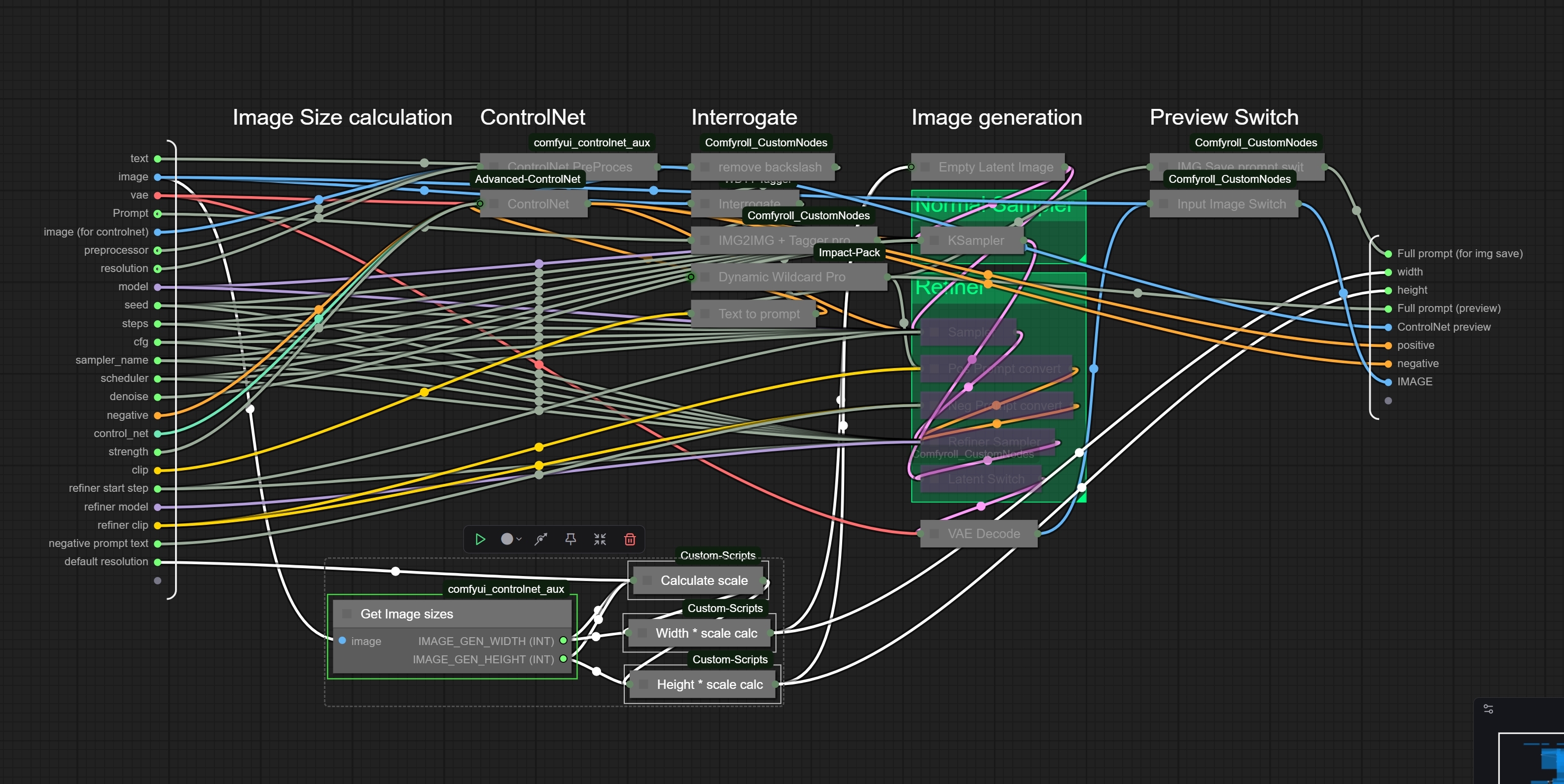
This sounds like your connection between the input image and the img2img transfer is broken :o
You should be able to go into the subgraph in the bottom of the workflow that's called img2img and see if there's no input connection to the pre-processor. If you want to you can save your workflow the way it is right now and upload it to googledrive or mediafire or something and i can check what happened.
Do you have your comfyui and your custom nodes updated to the newest possible version?
You might also have an outdated comfy/frontend, what versions are you running? You can check in settings>about
many thanks for the quick reply 👍
I've 'updated all;' through the Comfyui Manager and have updated all the customs nodes again through the manager.
Vers numbers shown on bootup are:
Total VRAM 24564 MB, total RAM 65238 MB
pytorch version: 2.8.0+cu129
Set vram state to: NORMAL_VRAM
Device: cuda:0 NVIDIA GeForce RTX 4090 : cudaMallocAsync
Using sage attention
Python version: 3.13.6 (tags/v3.13.6:4e66535, Aug 6 2025, 14:36:00) [MSC v.1944 64 bit (AMD64)]
ComfyUI version: 0.3.51
ComfyUI frontend version: 1.25.9
Your workflow I am using is here:
https://drive.google.com/file/d/1rX5ImG1DpDg8g3L4NEBN3GrAhvlDahbL/view?usp=drive_link
I had a look at the IMG2IMG subgraph and I can't seem to see anything at fault....but being a noob/amateur I don't want to pull things apart 😏😊
@PixelBlitterBoy hmmm the versions are looking fine, i get an access denied for the file :D can you change the restrictions so everyone with the link can access it?
@vslinx Sorry I thought I had giving access to all...it should be set now 😊
hey @PixelBlitterBoy,
i downloaded your workflow and all i did was switch the controlnet model(had mine in a different folder), change the checkpoint and switched sage attention back to disabled and was able to generate without any issues :/
Can you in your instance go down to the IMG2IMG Transer Sub-Node, open the subgraph with the button in the top right corner and check if you have the image connected to the "Get Image sizes"-Node? (Screenshot here)
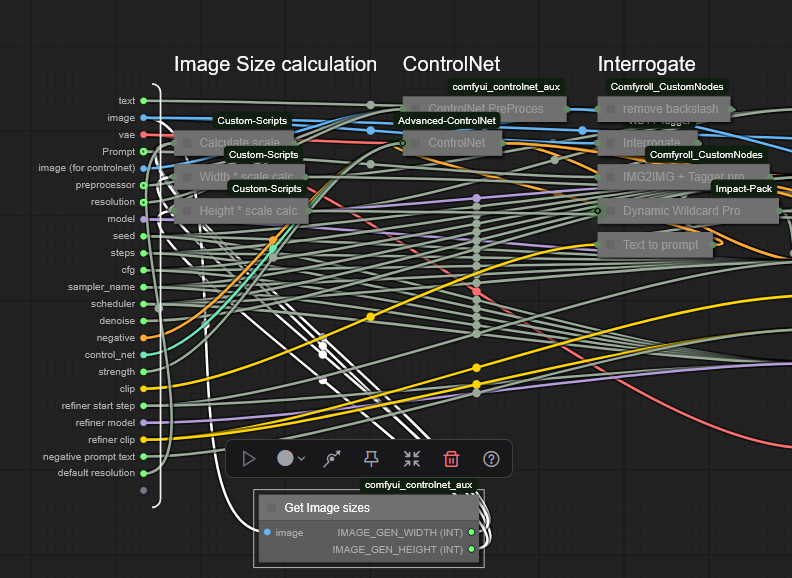
If you have that, what file format is the image you're trying to load? Can you try loading a different image to see if maybe the image itself is the problem if the node has a connection to the img?
@vslinx Thanks again for replying and your time. I had a look at the sub-graph and yes it is still connected https://i.gyazo.com/e2b1d9157c69848047156c6b06639c37.jpg, I've avoided tampering bcos being a noob at comfyui 😅
I've tried several different file formates (JPG, PNG, even BMP) and various images sizes...definitely a mystery.
The full error syntax in the dos box is:
!!! Exception during processing !!! ImageGenResolutionFromImage.execute() missing 1 required positional argument: 'image'
Traceback (most recent call last):
File "E:\!Comfy\INT\ComfyUI_windows_portable\ComfyUI\execution.py", line 496, in execute
output_data, output_ui, has_subgraph, has_pending_tasks = await get_output_data(prompt_id, unique_id, obj, input_data_all, execution_block_cb=execution_block_cb, pre_execute_cb=pre_execute_cb, hidden_inputs=hidden_inputs)
^^^^^^^^^^^^^^^^^^^^^^^^^^^^^^^^^^^^^^^^^^^^^^^^^^^^^^^^^^^^^^^^^^^^^^^^^^^^^^^^^^^^^^^^^^^^^^^^^^^^^^^^^^^^^^^^^^^^^^^^^^^^^^^^^^^^^^^^^^^^^^^^^^^^^^^^^^^^^^^^^^^
File "E:\!Comfy\INT\ComfyUI_windows_portable\ComfyUI\execution.py", line 315, in get_output_data
return_values = await asyncmap_node_over_list(prompt_id, unique_id, obj, input_data_all, obj.FUNCTION, allow_interrupt=True, execution_block_cb=execution_block_cb, pre_execute_cb=pre_execute_cb, hidden_inputs=hidden_inputs)
^^^^^^^^^^^^^^^^^^^^^^^^^^^^^^^^^^^^^^^^^^^^^^^^^^^^^^^^^^^^^^^^^^^^^^^^^^^^^^^^^^^^^^^^^^^^^^^^^^^^^^^^^^^^^^^^^^^^^^^^^^^^^^^^^^^^^^^^^^^^^^^^^^^^^^^^^^^^^^^^^^^^^^^^^^^^^^^^^^^^^^^^^^^^^^^^^^^^^^^^^^^^^^^^^
File "E:\!Comfy\INT\ComfyUI_windows_portable\ComfyUI\custom_nodes\comfyui-lora-manager\py\metadata_collector\metadata_hook.py", line 165, in async_map_node_over_list_with_metadata
results = await original_map_node_over_list(
^^^^^^^^^^^^^^^^^^^^^^^^^^^^^^^^^^
...<2 lines>...
)
^
File "E:\!Comfy\INT\ComfyUI_windows_portable\ComfyUI\execution.py", line 285, in asyncmap_node_over_list
await process_inputs({})
File "E:\!Comfy\INT\ComfyUI_windows_portable\ComfyUI\execution.py", line 277, in process_inputs
result = f(**inputs)
TypeError: ImageGenResolutionFromImage.execute() missing 1 required positional argument: 'image'
Prompt executed in 0.18 seconds.
-----
If this is an anomaly then I'll leave it at that and not bother you anymore....honestly it is fine, and I appreciate your help in trying 👌
@PixelBlitterBoy this definitely is a new error that i haven't seen anyone have before :D
But if you don't mind i'd be fine with debugging it, the more fails i know that happen on peoples machines the better and stable i can make the workflow for everyone in the future 🫡♥️
This definitely appears because of the controlnet_controlnet_aux node, you could try deleting that in your custom_nodes folder and git clone'ing this repo into it again:
https://github.com/Fannovel16/comfyui_controlnet_aux
if you have "comfyui_controlnet_preprocessors" as a custom_node make sure to delete that, it's a 2 year old deprecated repo that has known conflicts with the controlnet_aux repo.
If that is not the issue can you check if there is an image wired into the IMAGE connection of the subgraph itself? if that is also the case my last bet would be that the issue could come from the "!" of the foldername from your Comfy in:
"E:\!Comfy\INT\ComfyUI_windows_portable\ComfyUI\"
Windows is not very good with special letters in file/folder names and it can propagate "!"-letters into the python environment making it think that it's now expecting special venv arguments instead of a filepath. So it might have issues resolving the filename because of the "!" and therefore thinks that it's not a valid filepath. You could check if that is the case by simply removing the "!" from the foldername and starting comfy again.
@vslinx I have removed said controlnet custom node and reinstalled via your link, also moved the Comfyui directory to the root without using any exclamation marked structure.
Sadly it is exactly the same (madness).
Error:
got prompt
!!! Exception during processing !!! ImageGenResolutionFromImage.execute() missing 1 required positional argument: 'image'
Traceback (most recent call last):
File "E:\INT\ComfyUI_windows_portable\ComfyUI\execution.py", line 496, in execute
output_data, output_ui, has_subgraph, has_pending_tasks = await get_output_data(prompt_id, unique_id, obj, input_data_all, execution_block_cb=execution_block_cb, pre_execute_cb=pre_execute_cb, hidden_inputs=hidden_inputs)
^^^^^^^^^^^^^^^^^^^^^^^^^^^^^^^^^^^^^^^^^^^^^^^^^^^^^^^^^^^^^^^^^^^^^^^^^^^^^^^^^^^^^^^^^^^^^^^^^^^^^^^^^^^^^^^^^^^^^^^^^^^^^^^^^^^^^^^^^^^^^^^^^^^^^^^^^^^^^^^^^^^
File "E:\INT\ComfyUI_windows_portable\ComfyUI\execution.py", line 315, in get_output_data
return_values = await asyncmap_node_over_list(prompt_id, unique_id, obj, input_data_all, obj.FUNCTION, allow_interrupt=True, execution_block_cb=execution_block_cb, pre_execute_cb=pre_execute_cb, hidden_inputs=hidden_inputs)
^^^^^^^^^^^^^^^^^^^^^^^^^^^^^^^^^^^^^^^^^^^^^^^^^^^^^^^^^^^^^^^^^^^^^^^^^^^^^^^^^^^^^^^^^^^^^^^^^^^^^^^^^^^^^^^^^^^^^^^^^^^^^^^^^^^^^^^^^^^^^^^^^^^^^^^^^^^^^^^^^^^^^^^^^^^^^^^^^^^^^^^^^^^^^^^^^^^^^^^^^^^^^^^^^
File "E:\INT\ComfyUI_windows_portable\ComfyUI\custom_nodes\comfyui-lora-manager\py\metadata_collector\metadata_hook.py", line 165, in async_map_node_over_list_with_metadata
results = await original_map_node_over_list(
^^^^^^^^^^^^^^^^^^^^^^^^^^^^^^^^^^
...<2 lines>...
)
^
File "E:\INT\ComfyUI_windows_portable\ComfyUI\execution.py", line 285, in asyncmap_node_over_list
await process_inputs({})
File "E:\INT\ComfyUI_windows_portable\ComfyUI\execution.py", line 277, in process_inputs
result = f(**inputs)
TypeError: ImageGenResolutionFromImage.execute() missing 1 required positional argument: 'image'
Prompt executed in 0.12 seconds
It's certainly frustrating, especially since your T2I workflow works without any hitch....clearly something at play with the I2I section as you have pointed out....
@PixelBlitterBoy that's really weird.
Now there's really only 2 remaining things that could be happening here:
Either you have another custom_node installed that has a incompatibility with any of the used nodes OR the portable version of comfy has issues with one of the custom_nodes you're using :/
IF you don't mind "re-installing" comfy (aka just using the normal branch instead of the portable version) you could use my install script that i wrote to set up all of my test-instances before releasing new workflows :D
You can read through the code to make sure there's nothing harmful but all it does is check if you have python installed and then pull the newest version of comfy + the frontend & all nodes required for the workflow + the workflow. At the end it asks you if you want to also download the controlnet models but you can just say no and copy your stuff over from your old instance.
I have seen a few people run into issues with the portable version so far, so i can only recommend switching to the full version of comfyUI.
https://huggingface.co/vslinx/ComfyUIDetailerWorkflow-vslinx/blob/main/windows-nvidia.bat
The Script pulls into whichever folder you start it in and then generates a folder called ComfyUI, so you can just execute it on your hard drive (won't work if there's already a folder called comfyui)
Otherwise you can also just replace the get image sizes node and replace it via the core comfy one. I have changed the workflow you sent me accordingly and uploaded it here for you:
https://www.mediafire.com/file/j9al0n4xjyhpe85/IMG2IMG-ADetailer-v4.4-vslinx.json/file
If that works you can just keep on using that, maybe i'll replace the get image size node in the next version then if i remember ^^ otherwise i'd still always recommend getting the basic comfy over the portable one.
@vslinx ....so I've used you 'windows-nvidia.bat' file (many thanks for that), ran the whole installation process (uninstalled my python prior/reboot). Ran the static comfyui from the fresh install, downloaded a fresh I2I v4.4 workflow.....and got the same error:
got prompt
!!! Exception during processing !!! ImageGenResolutionFromImage.execute() missing 1 required positional argument: 'image'
Traceback (most recent call last):
File "E:\VSLINK\ComfyUI\execution.py", line 496, in execute
output_data, output_ui, has_subgraph, has_pending_tasks = await get_output_data(prompt_id, unique_id, obj, input_data_all, execution_block_cb=execution_block_cb, pre_execute_cb=pre_execute_cb, hidden_inputs=hidden_inputs)
^^^^^^^^^^^^^^^^^^^^^^^^^^^^^^^^^^^^^^^^^^^^^^^^^^^^^^^^^^^^^^^^^^^^^^^^^^^^^^^^^^^^^^^^^^^^^^^^^^^^^^^^^^^^^^^^^^^^^^^^^^^^^^^^^^^^^^^^^^^^^^^^^^^^^^^^^^^^^^^^^^^
File "E:\VSLINK\ComfyUI\execution.py", line 315, in get_output_data
return_values = await asyncmap_node_over_list(prompt_id, unique_id, obj, input_data_all, obj.FUNCTION, allow_interrupt=True, execution_block_cb=execution_block_cb, pre_execute_cb=pre_execute_cb, hidden_inputs=hidden_inputs)
^^^^^^^^^^^^^^^^^^^^^^^^^^^^^^^^^^^^^^^^^^^^^^^^^^^^^^^^^^^^^^^^^^^^^^^^^^^^^^^^^^^^^^^^^^^^^^^^^^^^^^^^^^^^^^^^^^^^^^^^^^^^^^^^^^^^^^^^^^^^^^^^^^^^^^^^^^^^^^^^^^^^^^^^^^^^^^^^^^^^^^^^^^^^^^^^^^^^^^^^^^^^^^^^^
File "E:\VSLINK\ComfyUI\execution.py", line 285, in asyncmap_node_over_list
await process_inputs({})
File "E:\VSLINK\ComfyUI\execution.py", line 277, in process_inputs
result = f(**inputs)
^^^^^^^^^^^
TypeError: ImageGenResolutionFromImage.execute() missing 1 required positional argument: 'image'
Prompt executed in 0.10 seconds
----
Then I ran your modified version of the I2I v4.4 workflow that you also attached (via Mediafire)...and I got this error:
got prompt
!!! Exception during processing !!! list index out of range
Traceback (most recent call last):
File "E:\VSLINK\ComfyUI\execution.py", line 496, in execute
output_data, output_ui, has_subgraph, has_pending_tasks = await get_output_data(prompt_id, unique_id, obj, input_data_all, execution_block_cb=execution_block_cb, pre_execute_cb=pre_execute_cb, hidden_inputs=hidden_inputs)
^^^^^^^^^^^^^^^^^^^^^^^^^^^^^^^^^^^^^^^^^^^^^^^^^^^^^^^^^^^^^^^^^^^^^^^^^^^^^^^^^^^^^^^^^^^^^^^^^^^^^^^^^^^^^^^^^^^^^^^^^^^^^^^^^^^^^^^^^^^^^^^^^^^^^^^^^^^^^^^^^^^
File "E:\VSLINK\ComfyUI\execution.py", line 315, in get_output_data
return_values = await asyncmap_node_over_list(prompt_id, unique_id, obj, input_data_all, obj.FUNCTION, allow_interrupt=True, execution_block_cb=execution_block_cb, pre_execute_cb=pre_execute_cb, hidden_inputs=hidden_inputs)
^^^^^^^^^^^^^^^^^^^^^^^^^^^^^^^^^^^^^^^^^^^^^^^^^^^^^^^^^^^^^^^^^^^^^^^^^^^^^^^^^^^^^^^^^^^^^^^^^^^^^^^^^^^^^^^^^^^^^^^^^^^^^^^^^^^^^^^^^^^^^^^^^^^^^^^^^^^^^^^^^^^^^^^^^^^^^^^^^^^^^^^^^^^^^^^^^^^^^^^^^^^^^^^^^
File "E:\VSLINK\ComfyUI\execution.py", line 288, in asyncmap_node_over_list
input_dict = slice_dict(input_data_all, i)
^^^^^^^^^^^^^^^^^^^^^^^^^^^^^
File "E:\VSLINK\ComfyUI\execution.py", line 228, in slice_dict
return {k: v[i if len(v) > i else -1] for k, v in d.items()}
~^^^^^^^^^^^^^^^^^^^^^^^^^
IndexError: list index out of range
Prompt executed in 0.12 seconds
---
It's a different error statement, but I assume it is referencing the same section?
---
I am going to stop bothering you with this now, bcos I have taking far to much of your time with it - However I really do appreciate all the time and efforts you've put in to fixing my issue. I am reverting back to an older Illust. I2I I have working and using you top T2I workflow v4.4 alongside it 😊👌
Again sincere thanks for all the assist 🙏
@PixelBlitterBoy wow that is so weird! oO
i have never seen anything like this 😂
Yeah it's still coming from the same node. I have seen that some comfy nodes might have problems with python 3.13 and it's usually recommended to run it(comfy, see here) on python 3.12, but other than that i would have no idea what else could cause this issue now.
Have you tried to use the edited workflow? I have replaced the get image size node with the comfy core one here : https://www.mediafire.com/file/j9al0n4xjyhpe85/IMG2IMG-ADetailer-v4.4-vslinx.json/file
You can let me know if this works - if it does i'll replace the node in future updates to make sure that it works for 3.13 python too :) (also set sage attention to disabled instead of auto to check if sage attention might mess with the workflow)
@vslinx I have installed Python 3.12.3 (this is the .exe your install.bat file d/l for me). The mod. workflow via mediafire link you sent, yes I tried that as well that is the different error statement but similar fault....so weird!
However I did try your I2I v4.3 and that worked fine..😅
@PixelBlitterBoy when starting the comfy installed through my script does it also say in the console that you started it with 3.12 in the python version?
Depending on what your system has as a default it might still start with the 3.13 ^^
Aaaaah the new error is with the new workflow... that's really weird, guess the default comfy is calling the same method as the custom_node was.
The only difference between the 4.3 and the 4.4 is the subgraphs and the new image loading node (made by me), at least regarding the . So it's really weird it's not working.
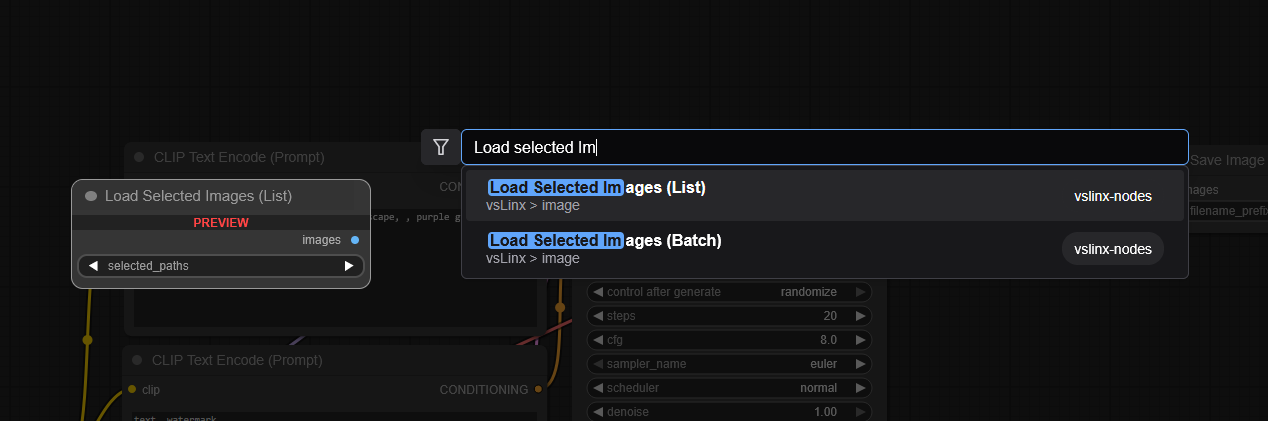
Could you do me one last favor and see if the error comes from the node i developed?
Would the 4.3 still work if you replace the load image node with this one?
https://i.gyazo.com/1b744f68aecb00667f8d831e57b62696.png
@PixelBlitterBoy btw thank you for all the testing! and sorry if that's annoying for you haha 😂
@vslinx Definintely Python 3.12.3 (ran a CMD prompt with the command Python --version).
Regarding the change in node. I loaded up I2I v4.3 and replaced the original 'input image' node with the 'load selected images (list)' node) linking all image output from this instead and got the error:
Error (PreviewImage - list index out of range)
[Backend - Image Saver group / Image Saver Node [width and height are red]
got prompt
Failed to validate prompt for output 457:
* (prompt):
- Return type mismatch between linked nodes: height, received_type(IMAGE) mismatch input_type(INT)
- Return type mismatch between linked nodes: width, received_type(IMAGE) mismatch input_type(INT)
* Image Saver 457:
- Return type mismatch between linked nodes: height, received_type(IMAGE) mismatch input_type(INT)
- Return type mismatch between linked nodes: width, received_type(IMAGE) mismatch input_type(INT)
Output will be ignored
!!! Exception during processing !!! list index out of range
Traceback (most recent call last):
File "E:\VSLINK\ComfyUI\execution.py", line 496, in execute
output_data, output_ui, has_subgraph, has_pending_tasks = await get_output_data(prompt_id, unique_id, obj, input_data_all, execution_block_cb=execution_block_cb, pre_execute_cb=pre_execute_cb, hidden_inputs=hidden_inputs)
^^^^^^^^^^^^^^^^^^^^^^^^^^^^^^^^^^^^^^^^^^^^^^^^^^^^^^^^^^^^^^^^^^^^^^^^^^^^^^^^^^^^^^^^^^^^^^^^^^^^^^^^^^^^^^^^^^^^^^^^^^^^^^^^^^^^^^^^^^^^^^^^^^^^^^^^^^^^^^^^^^^
File "E:\VSLINK\ComfyUI\execution.py", line 315, in get_output_data
return_values = await asyncmap_node_over_list(prompt_id, unique_id, obj, input_data_all, obj.FUNCTION, allow_interrupt=True, execution_block_cb=execution_block_cb, pre_execute_cb=pre_execute_cb, hidden_inputs=hidden_inputs)
^^^^^^^^^^^^^^^^^^^^^^^^^^^^^^^^^^^^^^^^^^^^^^^^^^^^^^^^^^^^^^^^^^^^^^^^^^^^^^^^^^^^^^^^^^^^^^^^^^^^^^^^^^^^^^^^^^^^^^^^^^^^^^^^^^^^^^^^^^^^^^^^^^^^^^^^^^^^^^^^^^^^^^^^^^^^^^^^^^^^^^^^^^^^^^^^^^^^^^^^^^^^^^^^^
File "E:\VSLINK\ComfyUI\execution.py", line 288, in asyncmap_node_over_list
input_dict = slice_dict(input_data_all, i)
^^^^^^^^^^^^^^^^^^^^^^^^^^^^^
File "E:\VSLINK\ComfyUI\execution.py", line 228, in slice_dict
return {k: v[i if len(v) > i else -1] for k, v in d.items()}
~^^^^^^^^^^^^^^^^^^^^^^^^^
IndexError: list index out of range
Prompt executed in 0.05 seconds
---
https://i.gyazo.com/569dd8b93a384ad53750c889b006aa9e.png
https://i.gyazo.com/cab6820030c90685af46d6d3a4fdee82.png
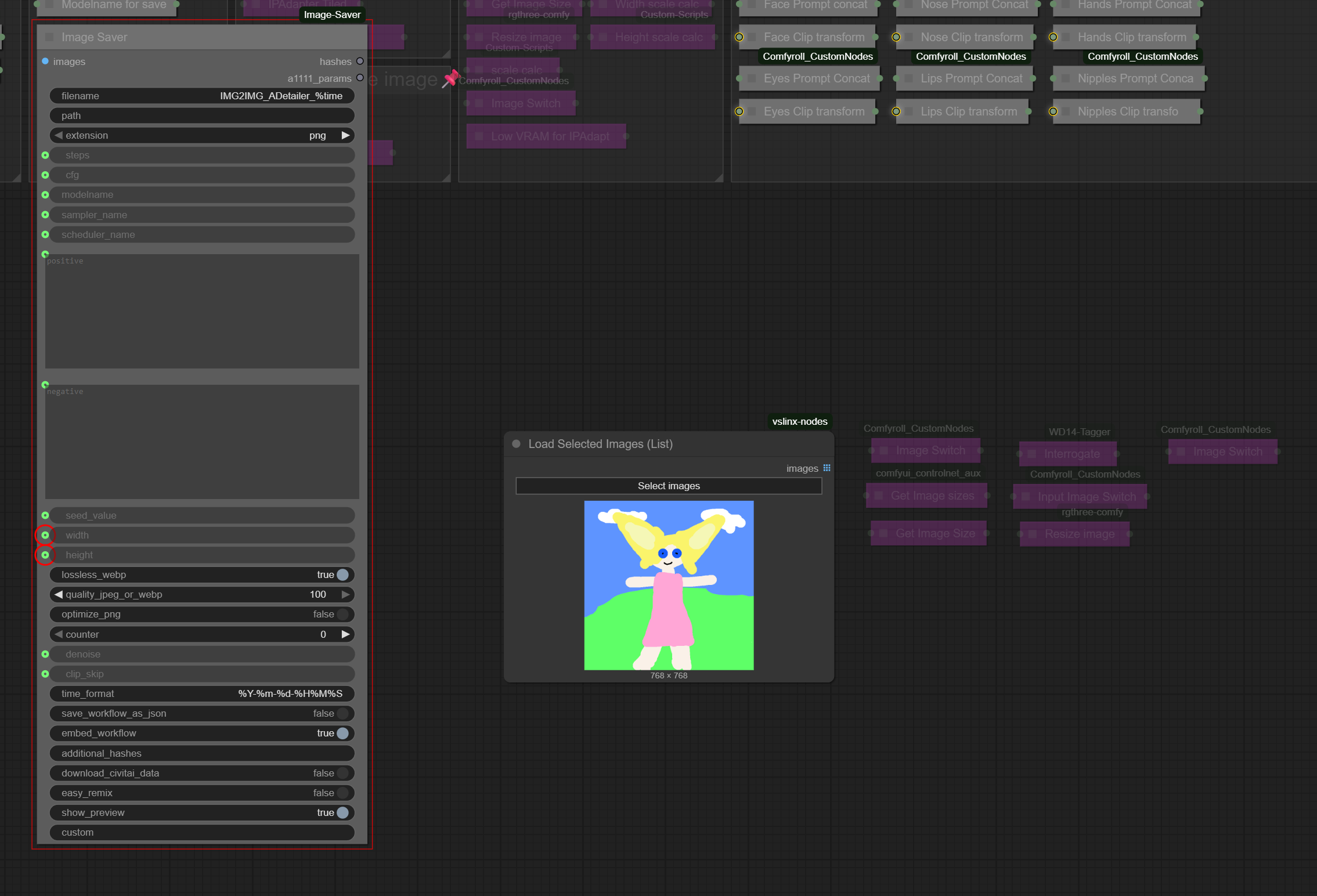
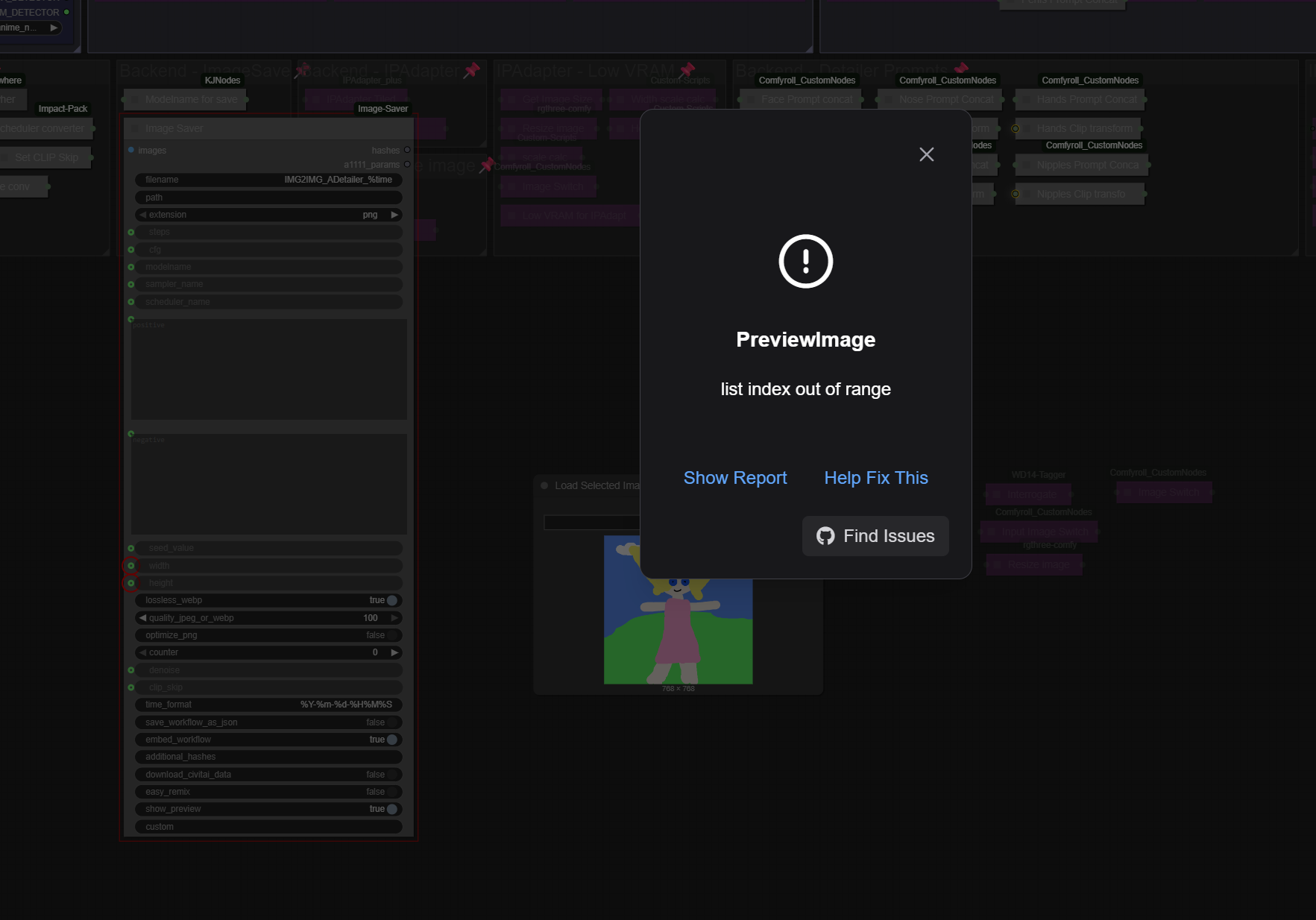
@PixelBlitterBoy oh wow okay, but that seems to be more of an issue with bypassed nodes.
I think the image probably is still being generated but the image just isnt saved right?
So it looks more like a wiring error (you can just disconnect the width and height as they're not rlly important for the saving process except metadata). Can you check if it works if you disconnect them? then its at least not my node :D
I'll keep an eye on that and see if more people pop up with this issue but so far you're sadly a unique case in the worst sense possible 🥲
@vslinx is that on v4.4 or v4.3 - they're so many connections I can't see the forest for the trees...😂 Any chance you can modify what you are suggesting on whichever version and then send me that file again....then I can test. 😊👍
@PixelBlitterBoy i wish i could reduce it but sadly even get/set nodes don't work anymore now within subgraphs 😂 so even if i wanted to, i wouldnt be able to make it cleaner haha
I meant that you can try to simply disconnect the width/height connections from the image saver node to see if that works. That'd mean that my image loader node is at least not the root of the problem ^^
@PixelBlitterBoy i have researched a bit and might have one last thing you can try.
You could just take the 4.4, remove the load image node and replace it with the default comfy core load image load. It‘s only able to load a single image but the problem might come from the load node.
One of the errors seem like it‘s trying to push an empty list through the workflow which doesnt work because some of the nodes (like calculating height and width) cant work with an empty array. Could you also check if the images you‘re loading are appearing in the ComfyUI/input folder?
If my load image node really is the issue i might be able to replicate this issue and write a fix for it :D
@vslinx Eureka!!! That was the problem - replaced the Image Loader node (didn't even realize it was a batch loader haha), with the standard Comfyui Image Loader and it worked flawless without any issue. I even ran the workflow through my 'portable' setup and no problem at all....😊👌
The harder the challenges are always the greatest rewards.... kudos for your problem solving and time - very much appreciated 🙏
@PixelBlitterBoy glad it works now :D
Still weird that it doesnt work with the list loader! i assume one of the images might not be recognized by comfy and therefore it puts and empty element into the array which causes that issue :/
Well now you‘ll be able to use it! Even if it‘s only with 1 image at a time! 😂
I‘ll see what the issue is and try to fix it! 🥲
thank you for all the testing! 🥰
@PixelBlitterBoy i was able to reproduce the error now by loading an image, going manually into the input folder inside comfyui and delete the image there - restarting comfyui and starting the process without the corresponding image in the comfy folder 😂
My best guess is that for some reason your custom_nodes folder has less rights assigned than it's parent and therefore it was not allowed to copy images into it's parent folder. I'll see if that's even something i can fix or if that's just a limitation of comfyui. But thanks a lot for helping me debug this issue! ♥️I'll write a fix as soon as i can for my node and then you should get an update through the Comfy Manager and be able to also use the normal version :D
Huh.
Some nodes require a newer version of ComfyUI (current: 0.3.56). Please update to use all nodes.
Requires ComfyUI 0.3.51:
0941940b-e86a-427a-bd29-51cf47d05345, 2a07f710-6ca0-41f6-8510-f4e8adbdb404, 67a0508f-aa7b-4ba2-8265-d3fae6da4226, 6c2eee0d-5bd7-4029-9333-7f1b0ed688f2, 9726ad71-5451-4f61-8889-dbbd630619dc, c0330ef1-4c81-486f-99aa-b2f3e41be549, d63f9638-9bde-4613-a8dc-faa6238b912b, dd15cf75-15d9-42b1-8ee0-fd4bae8e8c33, f8d9af42-d1b5-4ef5-a349-267ed8b6186e
Almost all of those have something to do with IPAdapter
Hey @ChinuaTheRageBear, i could not reproduce this error with ComfyUI 0.3.56 and frontend version 1.26.7, can you check what frontend version you have and if you're able to update any custom_nodes through the Comfy Manager?
These codes also don't look like anything i could think of, does the console output more/different errors?
@vslinx i have the same issue on the versions you have listed there, and i also have updated all packages through the manager
Ok, figured it out.
checked ComfyUI_windows_portable\ComfyUI\requirements.txt
Frontend wasn't updating but updates weren't failing or showing errors so I had to do it manually.
For others: cd your ComfyUI_windows_portable\python_embeded folder.
paste
python.exe -m pip install --upgrade comfyui-frontend-package to update it manually.
@ChinuaTheRageBear this is how i updated my frontend as well, but it didnt fix my issues
and now it's working for you @ChinuaTheRageBear ? :)
@cookiesmonster are you also using the portable version?
I'd always recommend switching to the normal comfy branch as the portable version often seems to have issues with dependencies not updating etc.
Can you check and tell me what Comfy and Frontend Versions you have by opening your comfyui, going into settings and then clicking on about? The versions should be listed at the top.
You can also update the frontend by appending this to the start script where you call "python main.py" by adding "--front-end-version Comfy-Org/ComfyUI_frontend@latest"
So in total the command would be "python main.py --front-end-version Comfy-Org/ComfyUI_frontend@latest" to update to the newest nightly release of the frontend.
@vslinx Yes, it's working now and I am using portable. I'm currently using ComfyUI 0.3.56 and frontend version 1.26.7. I'll add that to my start script, thanks man.
@vslinx i am also using portable. according to the settings, i am using ComfyUI 0.3.56 ComfyUI_frontend v1.26.7 Discord ComfyOrg EasyUse v1.3.3 rgthree-comfy v1.0.2508241658 ComfyUI-Manager V3.36. i want to avoid using non-portable unfortunately, but i can try it too i suppose
@cookiesmonster this sadly definitely looks like an issue with an outdated part of your installation. It could also be an outdated plugin, so if you can try to update every plugin you have installed. I haven‘t seen any error messages with these types of id‘s - so if you have a more detailed error message in your logs let me know!
Also make 100% sure to refresh your browser page once after updating comfy and/or plugins
For the most part with what has worked i really like it, but for some reason when using any of the recommended detailers except for the eyes, it will either have a red box around the node which i assume is some error. or for specifically the vagina one, the output of the detector will just be a black box. for the black box issue i've tried adjusting the threshold and changing the image size in case it was a VRAM issue, I've made sure all the right ultralytic models are selected, reset comfy, tried a different model and nothing seems to change it. I'm using the newest version of the TXT2IMG, i know it's a mouthful but do you have any ideas what the issue might be?
Hey @Krow_Taxes,
If any box ever has a red border it marks that something went wrong with the node.
Is it the detailer that has the red box or the ultralytics model load node?
If it's the model load node it'd mean that the file has not been found. If it's the detailer it should say in the console what exactly happened. So if you have some error statements in your console that'd help to figure out what the problem is.
If you have a detailer activated but it's block stays black it always means that the model has not found whatever it's trained on. So it could be that the model was not well trained on whatever you're trying to find or the style of what it was trained on was too different from what your picture is showing. The two parameters that you can play around(lower them) to lower the threshhold of when the object gets detected would be bbox_threshhold/sam_threshhold(depending on if it's a bbox or segm model) and max_size if the object in question is very large. It can also help to increase the bbox_crop_factor/sam_bbox_expansion.
This way you can try to see if the model might be able to recognize what it was trained on with a lower confidence. If after lowering the threshhold it's still not being recognized it'd sadly mean that the model can't detect it. The two i have linked in my recommended resources have worked for me so far for illustrious anime checkpoints.
@vslinx Ok I should have thought about looking in the console so I feel a bit silly. The problem turned out to be that the prompts for all the detailers minus the eyes were turned off. since the detailer control and the detail prompt control switches were separated I assumed that the prompt control being on was optional. but that's what was causing the error. Thanks for the help.
@Krow_Taxes no problem :D sometimes it's easy to miss the most obvious things.
The prompt for each individual detailer should be optional!
If the positive prompt for a body part is bypassed it should not lead to any errors.
So if you want to use the detailer without the additional prompt it should not be a problem.
I have just updated my cg-use-everywhere node and you're right - the update of the node actually broke it so that the detailers do not work if the positive prompt is bypassed, that's wild!
I'll release a fix for this tomorrow, even if it's most likely an unintended bug from the custom_node. Thanks for reporting this!