


Welcome to epiCPhotoGasm
This Model is highly tuned for Photorealism with the tiniest amount of exessive prompting needed to shine.
All Showcase images are generated without Negatives (V1) to show what is possible on the bare prompt.
Whats special?
The model has highly knowledge of what a photo is, so if u promt u can avoid using photo. If the prompt tends to be fantasy like the model will turn away from photo and u have to tweak by prompting and/or negatives.
The model can do various ethnicities well, so try them out.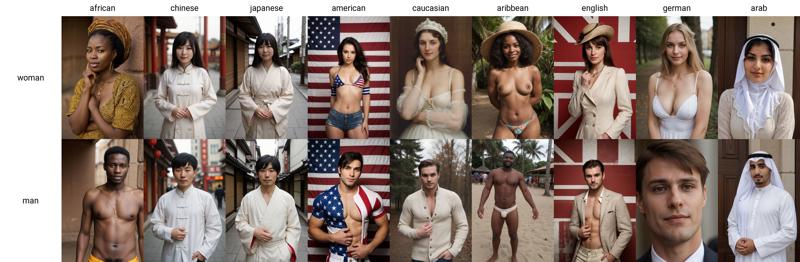
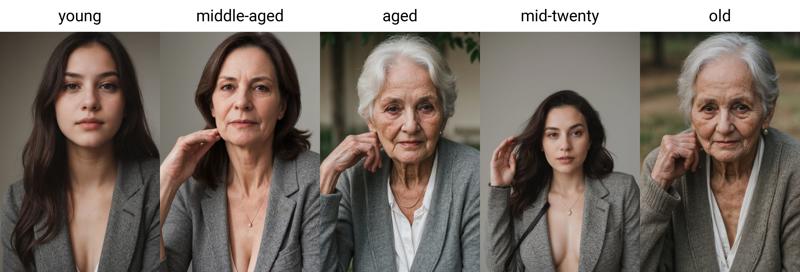
Age is also well trained and known by the model, so try them out too.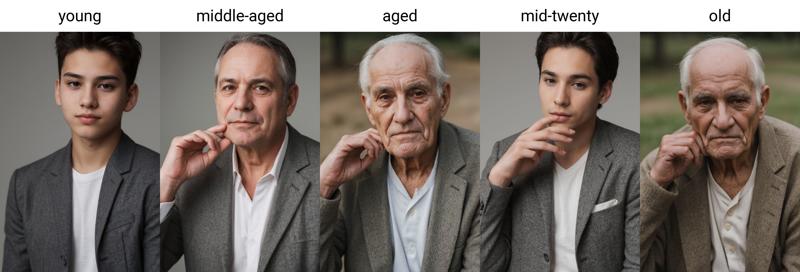
How to use
use simple prompts without "fake" enhancers like "masterpiece, photorealistic, 4k, 8k, super realistic, realism" etc.
don't use a ton of negative embeddings, focus on few tokens or single embeddings
you can still use atmospheric enhances like "cinematic, dark, moody light" etc.
start sampling at 20 Steps
no extra noise-offset needed
Additional Ressources
Style Negatives: colorful Photo | soft Photo
Useful Extensions
!After Detailer | ControlNet | Agent Scheduler | Ultimate SD Upscale
⭐ Feel free to leave Reviews and Samples - and always have fun creating ❤
Description
Improved Amateur Photo Style
FAQ
Comments (23)
I see Epi notification, I download Epi model, simple as.
I hope I don‘t disappoint 🙈
Same here... great model again!
So this one has the Impant as well?
Awesome model thanks for all the effort you put into this. I'm still learning to train my own checkpoint. At the moment I'm using sdscripts finetune for training (1000+ images), but my results are far from good. Would you mind to disclose how you curate the pictures in your dataset and what approach you have for captioning? I appreciate every hint :)
Start with low dataset ~ 100 images, use images that have good contrast and describe what u see in your images, add upon that with words you would use to generate that image. Don’t use words that describe the person in detail like Nose, eyes, skin detail and so on. Just use basic description as middle-aged American woman with long hair. Another effort could be to train small Loras and merge them into the checkpoint, so u can weight the training a bit better.
@epinikion Thanks for your advice. I have cleaned and reduced my dataset and also updated my captions. For initial captioning I'm now using BLIP2+COCO which gives good results. After that I did some fine-tuning of the captions. I also changed the optimizer to DAdaptAdam and lowered the batch size to 4. Still not sure if I should crop the images and how to best describe poses, clothing or viewing direction, ... but at least the result looks way better now. Will also try your advice about merging smaller Loras into the checkpoint.
@epinikion this new version omg!! i don't think you can top it, this is incredible this is like SDXL on steroids yet it's a 1.5 model that performs beyond beautifully even performance wise!! This is incredibly good so so good i feel obligated to throw you a donation if you take them? My god it works with everything now and with your lora/embedding it's so so perfect im simply mind blown. I bow down to you this is by far the most ultimate god tier must have model on civitai right now i don't know how you did it but it's incredible please be proud of yourself this is a massive accomplishment♥♥
I love that you call out the BS of "masterpiece, 8k, super realism, 43k, super ultra happy realistic"
Those tags are utterly pointless. I have written a blog on civitai with evidence proving as such.
The worst offender is people using the tag "Film grain" just because it sounds professional and unique. It literally is a term that adds a grainy quality to an image. WHY??
I use these tags and get pretty much exactly what I have in mind... What's the problem?
because its funny, like a modern fashion car in old photo
"film grain" can sometimes help a photo look more realistic like if its an amateur photo on a low-quality camera but overall yeah those prompts are wack
@Nobodybutmyself no problem, just think its silly to add all those words because you could get the same results if you just said "Detailed, photo," with weights and what ever descriptors your using. Very few models actually get trained to recognize "bad artist" or "best quality".
I experimented with adding Masterpiece to a prompt, the size of the file goes down consistently when that word was added.
@akti88 I have no doubt that it can add to an image. If your specifically looking for that kind of image, but when people put "high detail, super sharp, Fine detail face," and then add film grain. It kind of defeats the purpose IMO.
@CaptainKokomo I can see your point. I will try and take words out. I honestly just plug and play and learn by myself I don't really read all that many guides. Usually only on installation stuff. I haven't noticed personally about quality problems with words all that much, but I inpaint a ton on the images I do keep during generation though, so I honestly don't have that many problems getting what I want, and the quality seems fine for the most part.
This is the most epic checkpoint I've ever worked with for photographic shots. You are a wizard and without a doubt a true master of dataset creation and training. Epic by name. Epic by nature. Seriously well done with v4.
Thank you for your kind words ❤️
Nahh bro cooked with the latest version. This is too good wtf
I've manically tested every realism base to their limits since SD first dropped and this is without a doubt the best, not even by an increment but by a mile.
Does 4 beat 3.1? I see some messed up hands on the samples for 4 and 3 and 3.1 look clean. I will try test myself as well but if you have beat them up already you probably already know.
I didn't think anything was going to top V2 for me, but this new V4 is incredible! Still love V2 for some things, but this is better in a lot of ways. Well done!
Details
Files
Available On (1 platform)
Same model published on other platforms. May have additional downloads or version variants.