


Welcome to epiCPhotoGasm
This Model is highly tuned for Photorealism with the tiniest amount of exessive prompting needed to shine.
All Showcase images are generated without Negatives (V1) to show what is possible on the bare prompt.
Whats special?
The model has highly knowledge of what a photo is, so if u promt u can avoid using photo. If the prompt tends to be fantasy like the model will turn away from photo and u have to tweak by prompting and/or negatives.
The model can do various ethnicities well, so try them out.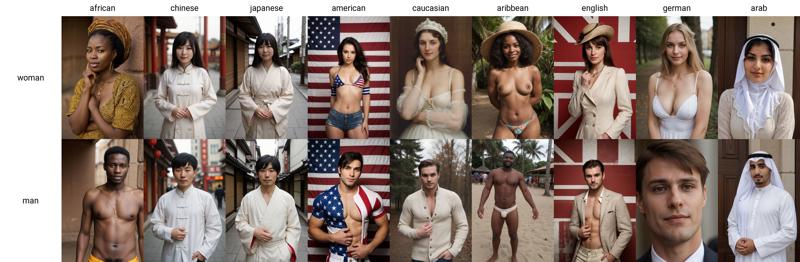
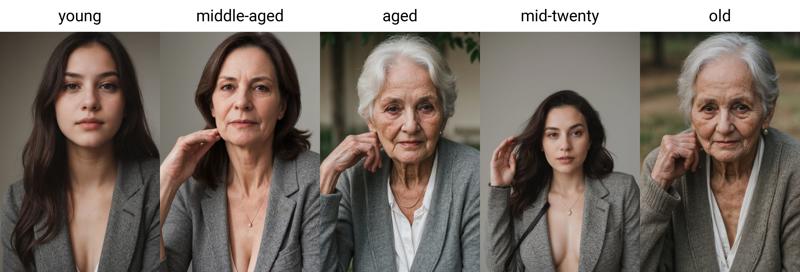
Age is also well trained and known by the model, so try them out too.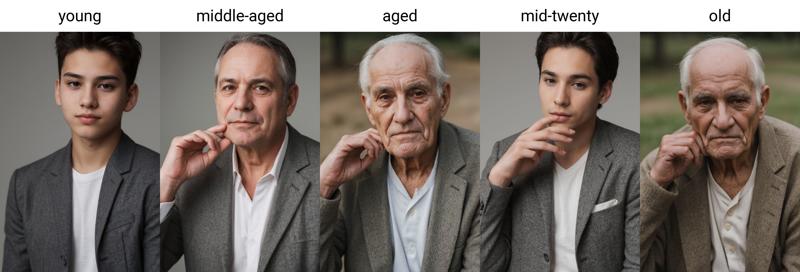
How to use
use simple prompts without "fake" enhancers like "masterpiece, photorealistic, 4k, 8k, super realistic, realism" etc.
don't use a ton of negative embeddings, focus on few tokens or single embeddings
you can still use atmospheric enhances like "cinematic, dark, moody light" etc.
start sampling at 20 Steps
no extra noise-offset needed
Additional Ressources
Style Negatives: colorful Photo | soft Photo
Useful Extensions
!After Detailer | ControlNet | Agent Scheduler | Ultimate SD Upscale
⭐ Feel free to leave Reviews and Samples - and always have fun creating ❤
Description
FAQ
Comments (5)
Fantastic model which really knows what you want from him.Especially when you rendering people with different ages model knows what body fit to any age and i dont know any other model that can do that so perfectly.
It can do everything,from scary realistic portraits to NSFW and it have knowledge about human anatomy like fingers,toes and other stuff.Great work and thank you for this powerhouse!
how can i make it work i put it in the checkpoints folder but it doesent start do i have to put it somewhere else ?
models/stable-diffusion/
i didnt really understtand , do i have to create that folder and move it there ?
@swabby the folder exists already: DRIVE:\\[path to your SD install folder]\models\Stable-diffusion
then hit the blue "reload" icon next to the upper left checkpoints box "Stable Diffusion checkpoint".
if it's in the right location, you'll see it in the dropdown list from that box. select it and continue.
ps: there is a way to define another location for your checkpoints, loras and embeds to make this easier, but it requires editing the webui-user.bat file that is run when you start SD.
https://github.com/AUTOMATIC1111/stable-diffusion-webui/discussions/5053
Details
Files
Available On (2 platforms)
Same model published on other platforms. May have additional downloads or version variants.