


Since CivitAI is going down THE DRAIN
I won't be updating this workflow here anymore, and I won't post any more models from now on.
I hope to find interest from people to keep updating this. Thanks everyone!
Keep following this workflow development and more on my new Discord server: https://discord.gg/EwKE8KBDqD
Get new releases from GitHub: https://github.com/diodiogod/Comfy-Inpainting-Works
Now there is a "simple/compact" version that I will update together with the normal one.
Read "about this model" on the right panel please!! I recommend reading v6.0, v5.0, v5.1 as well.
This is a proper inpainting with alimama control-net + Flux Fill + Flux Tools (Depth an Canny) support from V7 and above.
I try my best to avoid hiding the workflow flow, while balancing keeping it clean and user-friendly.
This workflow will make sure your image is composited in the end to prevent VAE degradation AND from v5 will make sure your image is a multiple of 8 (so it doesn't get resized by ksampler) at the same time it avoids resizing at all (unless you want to) since resizing will degrade the original image as well.
For inpainting that leaves a face and changes the whole background and character, Alimama works way better. Alimama also works better for LoRas. Alimama is terrible at outpainting and Flux Fill is amazing. You should test both. My comfyUI OOM or crashes when switching from one to the other IF my system memory page file is not large enough. With a pagefile of 50GB I can freely switch from Flux Fill to normal Flux Dev now.
It does use a lot of custom nodes to make life easier and workflow cleaner. Use manager to install the missing ones.
Supports loading of an external mask (need to match the image size) or doing the inpainting within the right-click "Open MaskEditor" on the image itself.
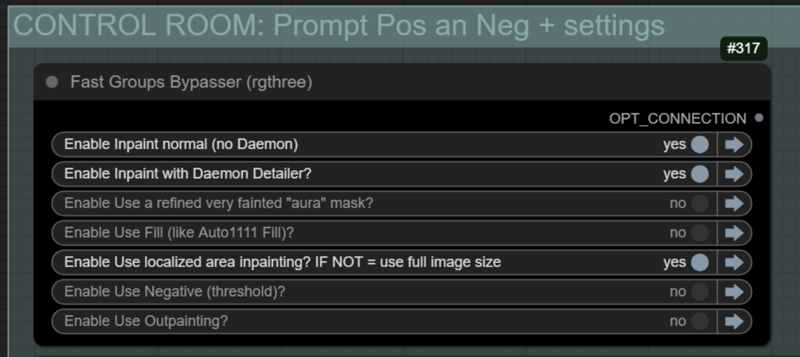
Supports FILL -the normal fill, like Auto1111- (use FastBypasser - black node)
Supports area inpaiting x full image inpaiting (use FastBypasser - black node)
Supports variable denoise (Change denoise on the CONTROL ROOM)
Supports Negative (use FastBypasser - black node)
Proper composite so no VAE degradation
Support for Flux Tools (Depth an Canny) with Alimama
I added LoRa support and Daemon Detailer support (both are optional)
Description
Again another version. I fixed the negative conditioning that was connected wrong in one of the nodes.
I added the denoise control to the CONTROL ROOM.
I fixed the "very fainted aura mask". It should be controllable now, you can make it very fainted or very bright. This is different from just using a "grow" and blur mask node.
FAQ
Comments (4)
StingListToCombo node missing. Any Fixes? I cant find that anywhere
This is so weird. It's the same problem @eloidor had. It's from Logic Utils. I use them a lot: https://github.com/aria1th/ComfyUI-LogicUtils
The manager should find it, but apparently people are needing to reinstall it.
Maybe I should consider using another set of nodes for this function...
@diogod Just a heads up, I had the same issue. I wouldn't worry about it too much though, might be useful to call it out in the post (if it isn't already). Thanks for the workflow + support.
I updated v 2.1 to 2.15 but did not make a new release. I simple re-uploaded the workflow with some small details changed.
Now the load image nodes should have the default example.png image there, so it won't complain of being empty.
Also, the Lora Stacker is by default empty, it should not complain because you users don't have my specific LoRA.
And finally, I used a relay on the kasampler X daemon Ksampler to never allow disabling both. You can enable both but one of them needs to be turned ON or else, obviously, the workflow won't run. So this is now impossible to do on the Control Room bypasser.