


Since CivitAI is going down THE DRAIN
I won't be updating this workflow here anymore, and I won't post any more models from now on.
I hope to find interest from people to keep updating this. Thanks everyone!
Keep following this workflow development and more on my new Discord server: https://discord.gg/EwKE8KBDqD
Get new releases from GitHub: https://github.com/diodiogod/Comfy-Inpainting-Works
Now there is a "simple/compact" version that I will update together with the normal one.
Read "about this model" on the right panel please!! I recommend reading v6.0, v5.0, v5.1 as well.
This is a proper inpainting with alimama control-net + Flux Fill + Flux Tools (Depth an Canny) support from V7 and above.
I try my best to avoid hiding the workflow flow, while balancing keeping it clean and user-friendly.
This workflow will make sure your image is composited in the end to prevent VAE degradation AND from v5 will make sure your image is a multiple of 8 (so it doesn't get resized by ksampler) at the same time it avoids resizing at all (unless you want to) since resizing will degrade the original image as well.
For inpainting that leaves a face and changes the whole background and character, Alimama works way better. Alimama also works better for LoRas. Alimama is terrible at outpainting and Flux Fill is amazing. You should test both. My comfyUI OOM or crashes when switching from one to the other IF my system memory page file is not large enough. With a pagefile of 50GB I can freely switch from Flux Fill to normal Flux Dev now.
It does use a lot of custom nodes to make life easier and workflow cleaner. Use manager to install the missing ones.
Supports loading of an external mask (need to match the image size) or doing the inpainting within the right-click "Open MaskEditor" on the image itself.
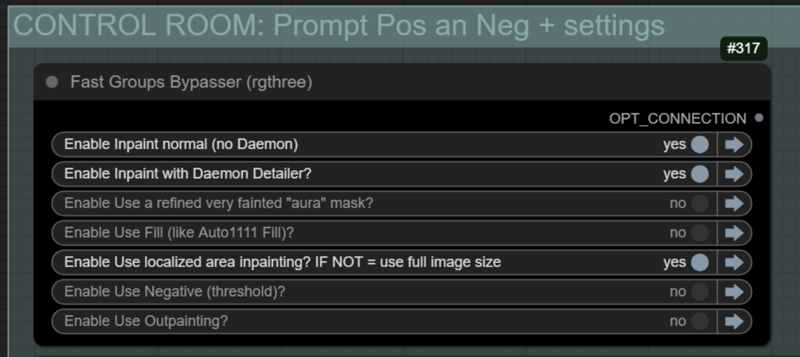
Supports FILL -the normal fill, like Auto1111- (use FastBypasser - black node)
Supports area inpaiting x full image inpaiting (use FastBypasser - black node)
Supports variable denoise (Change denoise on the CONTROL ROOM)
Supports Negative (use FastBypasser - black node)
Proper composite so no VAE degradation
Support for Flux Tools (Depth an Canny) with Alimama
I added LoRa support and Daemon Detailer support (both are optional)
Description
TLDR: Better blending for Outpainting. Thanks to @fabstyle to point that out!
Changes on 6.5:
Outpainting mask now has a default grow of 5 pixels which helps the fast "Automatic1111" fill to fill it more seamless which then helps immensely to blend an outpainting with low denoise.
Outpainting group now has two options that needs setting by the user: feathering and blur_radius. Increase them if you are having trouble with blending plain colored backgrounds. This will inpainting some of the original image borders to help with blending. Read the note on the workflow. This fixes bad blended outpaintings like blue skies even with proper composite. (NOT adjustable on COMPACT. Compact has a ON or OFF option for hard to blend).
Fixed fast "automatic1111" fill not showing on the comparer correctly when outpainting without the fast-fill option ON.
Fixed negatives on metadata: it will only save negatives when using thresholding. When not, it will be blank.
All "Grow Mask With Blur" now use tapered_corners, I think it looks better.
For COMPACT (previously called SIMPLE) workflow:
Automatically getting the original values (prompt, neg, seed, cfg, loras, etc) from the loaded image is inconsistent. If you are not getting your image prompt and metadata automatically, now you can upload a reference image on the group "Manual Up Reference When Auto get Fails". This is just to have it's metadata as reference. You can of course also turn all this off, so you end up with your inpainting prompt.
FAQ
Comments (20)
6.5 improves Oupainting blending, adding more options to use on hard to blend images. Thanks to @fabstyle for pointing that out.
"Simple" workflow was renamed to "Compact"
"Feathering" integer input was disconnected on the outpainting group on the normal workflow. I re-uploaded the file. 6.52 (if anyone have downloaded 6.51, please download again)
And an outpainting tip: if your image resolution is really large, please resize. Even if your GPU can handle and using a high feather and blur, outpainting will not blend well.
I also left a comment on YouTube. This workflow does not do anything for me. I am trying to inpaint. I have selected every model. I get seven images in the browser after the queue completes. Two of the seven images are masks. One looks like the one I drew, and the other it looks like the mask was feathered. One of the images looks like the crop that would have been used for the context mask. In the end, my starting and ending images are the same. In the Control Room, I have enabled the first inpainting option, and also the localized inpainting option.
Hi! When you say you get seven images in the browser, do you mean in the comfyui page? It's probably from the previews. I know some custom nodes show you a gallery of any image you preview or save. Maybe that is what you are seeing. Anyway, you should look into your comyUI "output" folder. It should only have one saved image there (or more if you selected a batch of more than 1). Do you see your image there?
Sounds strange what you are reporting. Your options are correct, enabling the first inpaint + the localized inpainting should work correctly.
On the "Composite and Comparison" group it should have 3 nodes: 1 "Preview Image" that should show your inpainted image + 2 other "Image Comparer" where if you move your mouse it should show you the difference.
Can you send me a print screen of your comfyui screen? Maybe with that I could try to figure it out for you.
I don't know how to attach images here?? It does not matter, as I updated ComfyUI and now it does not even execute the workflow.
Right below the Seed Everything node is a small "Float" node. It looks like it is mad because nothing is connected to its input.
The following error is being thrown:
Failed to validate prompt for output 1101:
* Float-🔬 528:
- Required input is missing: value
Output will be ignored
Failed to validate prompt for output 489:
Output will be ignored
WARNING: PlaySound.IS_CHANGED() missing 1 required positional argument: 'self'
!!! Exception during processing !!! Float.execute() missing 1 required positional argument: 'value'
Traceback (most recent call last):
File "/workspace/ComfyUI/execution.py", line 327, in execute
output_data, output_ui, has_subgraph = get_output_data(obj, input_data_all, execution_block_cb=execution_block_cb, pre_execute_cb=pre_execute_cb)
^^^^^^^^^^^^^^^^^^^^^^^^^^^^^^^^^^^^^^^^^^^^^^^^^^^^^^^^^^^^^^^^^^^^^^^^^^^^^^^^^^^^^^^^^^^^^^^^^^^^^^^^^^
File "/workspace/ComfyUI/execution.py", line 202, in get_output_data
return_values = mapnode_over_list(obj, input_data_all, obj.FUNCTION, allow_interrupt=True, execution_block_cb=execution_block_cb, pre_execute_cb=pre_execute_cb)
^^^^^^^^^^^^^^^^^^^^^^^^^^^^^^^^^^^^^^^^^^^^^^^^^^^^^^^^^^^^^^^^^^^^^^^^^^^^^^^^^^^^^^^^^^^^^^^^^^^^^^^^^^^^^^^^^^^^^^^^^^^^^^^^^^^^^^^^^^^^^^^^^^
File "/workspace/ComfyUI/execution.py", line 170, in mapnode_over_list
process_inputs({})
File "/workspace/ComfyUI/execution.py", line 163, in process_inputs
results.append(getattr(obj, func)(**inputs))
^^^^^^^^^^^^^^^^^^^^^^^^^^^^
TypeError: Float.execute() missing 1 required positional argument: 'value'
@GemneyeII That float, the #528 should have it's input from the denoise slider. I'll try donwloading my workflow to see if it is disconnected, but I doubt. It's probably some error in your comfyui installaiton. Maybe try uninstalling and installing again the mxtoolkit because it should not be disconnecting like that
Yeah, I've just checked and it is not disconnected.
Try updating your comfyui dependencies. Are you using ComfyUI portable?
Also you can't attach a screenshot, but you can simply upload it here in the gallery (you may or may not delete them later)
Ok. I think I kind of got it working. The first try was not very good, but it at least did something. Now I can go back and tweak the masks, prompts, and other settings, and really take this workflow for a spin. Thank You.
@GemneyeII I'm glad it worked! You can also try the compact version as well, although the full is way more flexible, have more options, and you might actually understand what it is doing.
There is a small bug with Version 6.5 full (this is correct on the compact version): The grow mask 5 pixels for outpainting. It should be connected like this: https://civitai.com/images/69068480
this matters because it makes the fast-fill more seamless, which helps with low denoise outpointing jobs. look: https://civitai.com/images/69069305
I'll fix this in the next version. I'll also update the "(OLD 💀, use the new ✂️ Inpaint Crop node)" to the new version.
thanks, great workflow. I spent lots of hours together with 6.4, lets upgrade. could you be so kind to explain at which circumstances cfgs should be changed- flux, guidance, neg. what are set range. Cant figure them out myself. thank you again.
I'm preparing a really big update for v7 which will integrate Flux Tools (lora for Depth and Canny control)! It's almost ready.
CFG should only be changed if you are using negatives. For Thresholding which is the negative hack I'm using here, you should use between 3.0 to 4.5 or else it will start to look too oversaturated.
For guidance this is the one you normally change the most on Flux dev. For a more realistic look you coul go from 2.2 to 3.15. Also for more artistic media like drawing you could test low values. The standard is 3.5. People complain about it being plastic for skins. Above that it's quite unexplored for me. Even high guidance works... it's really different from the real CFG from the SDXL and SD15 era.
Now, Flux Fill uses 30 CFG guidance as it's recommended value, and that will be added automatically by the workflow if you use Flux Fill. But you can play with the value as well. In my experience, it's better to leave at 30.
And the standard generation CFG (when you don't use negatives) should always be 1.
@diogod Hi. Could you help me to fix this. Whatever resolution I resize image, it expects a bit more and returns error:
InpaintCropImproved
Mask dimensions do not match image dimensions. Expected torch.Size([1768, 2000]), got torch.Size([1536, 1536])
Thank You.
@kristijonas83 What workflow are you using. I had that bug as well, but I thought I corrected it. Could you tell me what workflow (compact, or expanded) and what options are you using?
@diogod your latest full workflow, not simplified. Trying to outpaint. Selecting full picture mask kind of works, but when I select to use mask, error comes. Inpainting without outpaint works.
@kristijonas83 I'll check it out tomorrow and I get back to you here!
@kristijonas83 I could not reproduce your error. Could you export your workflow and send it to me so I can check all the options you are using?
I've tried outpainting alone (with no masks) with localized area option. Tried outpainting + inpainting with mask and localized area option. All of these worked.
Are you using an external mask? Make sure to always enter the image on the three load images with the same resolution size.
@kristijonas83 I think I found the problem. On the new updated node from kjnodes, the node #871 on the "Make sure it's devisible by 8" group became "Resize Image (deprecated)". And by doing so the reference image to resize the mask was disconnected.
I'll change the node to the new version and repair this in a new version. Thanks for bringing this up!
@kristijonas83 try v7.1 see if everything is working now for you!