


Since CivitAI is going down THE DRAIN
I won't be updating this workflow here anymore, and I won't post any more models from now on.
I hope to find interest from people to keep updating this. Thanks everyone!
Keep following this workflow development and more on my new Discord server: https://discord.gg/EwKE8KBDqD
Get new releases from GitHub: https://github.com/diodiogod/Comfy-Inpainting-Works
Now there is a "simple/compact" version that I will update together with the normal one.
Read "about this model" on the right panel please!! I recommend reading v6.0, v5.0, v5.1 as well.
This is a proper inpainting with alimama control-net + Flux Fill + Flux Tools (Depth an Canny) support from V7 and above.
I try my best to avoid hiding the workflow flow, while balancing keeping it clean and user-friendly.
This workflow will make sure your image is composited in the end to prevent VAE degradation AND from v5 will make sure your image is a multiple of 8 (so it doesn't get resized by ksampler) at the same time it avoids resizing at all (unless you want to) since resizing will degrade the original image as well.
For inpainting that leaves a face and changes the whole background and character, Alimama works way better. Alimama also works better for LoRas. Alimama is terrible at outpainting and Flux Fill is amazing. You should test both. My comfyUI OOM or crashes when switching from one to the other IF my system memory page file is not large enough. With a pagefile of 50GB I can freely switch from Flux Fill to normal Flux Dev now.
It does use a lot of custom nodes to make life easier and workflow cleaner. Use manager to install the missing ones.
Supports loading of an external mask (need to match the image size) or doing the inpainting within the right-click "Open MaskEditor" on the image itself.
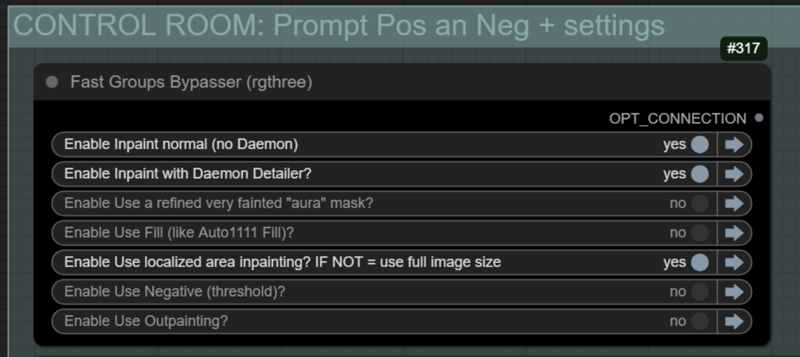
Supports FILL -the normal fill, like Auto1111- (use FastBypasser - black node)
Supports area inpaiting x full image inpaiting (use FastBypasser - black node)
Supports variable denoise (Change denoise on the CONTROL ROOM)
Supports Negative (use FastBypasser - black node)
Proper composite so no VAE degradation
Support for Flux Tools (Depth an Canny) with Alimama
I added LoRa support and Daemon Detailer support (both are optional)
Description
Fixed the lack of "ModelSamplingFlux" node on the model pipeline. Doesn't change much, but some people like to tinker with these values.
I finally made a video about the workflow, it's big, sorry. Use the chapters: https://youtu.be/2p-zIbSZAvA?si=8uzArovR0Eu4IOCA
FAQ
Comments (25)
Video is published explaining the workflow usage. Sorry for the quality and length... I'm not very good at this, but I hope it can help someone.
cant get the logic and image saver nodes installed. have tried multiple ways.
had to git clone directly and cmd line everything into custom nodes folder + req. installing from manager didnt work
@aiartlord995 oh sorry to hear that. Sometimes that happens with some custom nodes. Image-saver is a node that have shifted official maintainers a little bit. Right now, the current maintainer is Alexopus (https://github.com/alexopus/ComfyUI-Image-Saver). Perhaps you had a different fork installed, either an old one, or a different one?
About the logic node, I don't know. But I'm glad you made it work.
@diogod great workflow! Sadly it was working only till i made a fresh install of comfy portable 2 weeks ago, now i have same issue as aiartlord995: Image Saver (by alexopus) and Logic installed via manager are still flagged as missing. And Prompt Reader has a flag "import failed" in manager.
Perhaps it's about python versions? Mine is 3.12.8, i often see that some nodes still need 3.10
@arkkotangens I don't think this is a problem with python. I think mine is 3.12.6 for example. My recommendation would be to 1: update comfyui and its dependencies. You should go into the portable folder where you can update comfyui and requirements. I don't have a portable installation anymore, but you have a folder with a script that serves that purpose. Then 2- Go into comfyui custom_nodes folder and delete all those custom nodes you found a rpoblem with, and try reinstalling them. Either manually with a CMD with "pip clone 'url of each custom node github'" or by the manager.
Just remember to install "image saver" by alexopus, not the very outdated original repo
Logic is from this github: GitHub - theUpsider/ComfyUI-Logic: Logic nodes to perform conditional renders based on an input or comparision
And prompt reader: GitHub - receyuki/comfyui-prompt-reader-node: The ultimate solution for managing image metadata and multi-tool compatibility. ComfyUI node version of the SD Prompt Reader
And check if you are using my workflow v 6.3
I downloaded this workflow cause it looks really pro, but at least for me it was imposible to use :(
Why?? You're not helping me help you. =P
You need to tell me what errors you are getting or what part you are not understanding.
I really don't know what else I could do. The workflow is full of notes explaining each section, and I just recorded a 1h video explaining how to use it...
@diogod I don't think you need to do anything else, what you've already done is more than enough for the majority of users. You've put enough information och explanations out there, in multiple formats (text, video, etc).
It's just that it's a monster workflow, with multiple modules and multiple junctions, so it's not really easy to figure out the basic flow, or which parts need to be setup and when. Regardless of how many notes and descriptive input and output names you use, it's way too complex.
Which is fine, it's just the way it is with Comfy workflows. Some will be super simple and intuitive, others will be modular behemoths and will require effort from the user's side (e.g. studying the workflow, checking the video descriptions, etc).
Not all people will want to put in the effort, and it's fine, but you shouldn't be seeing it like you're not doing enough. Especially with comments such as this, where there isn't some specific issue people want help with, I suspect it's "I got lost after following the 9th node's junction when false, and now I'm in some other dimension".
@jtabox You are right. Thanks for the comment. Indeed, ComfyUI can get us completely lost, specially using another person's workflow. I'm glad if it can be useful, either directly or by inspiring other people workflow to be better. 🥰
Wow, this workflow is large, but it gets the job done. The results are pretty decent.
Thanks! I'm glad you liked it!
Hi! I tried using your Workflow v6.3 for inpainting, but my results are always super pixelated compared to a basic inpainting workflow with a composite node. I attached a simple comparison (link).

I watched your 1.5h tutorial but might have missed something in the settings. I’ve also attached a PNG of my workflow (link) —could you take a look and help me achieve results like yours?

Hello! Check the reddit responses I gave you, see if that was the problem 😅
@diogod thanks for your fast response! I dm'ed you on reddit!
This is fixed on 6.4! Thanks for calling attention to it and helping me debug it.
What's 'Proper' about this?
Nodes missing..How to fix?
ApplyFBCacheOnModel
Evaluate Integers
SDPromptReader
Civitai Hash Fetcher (Image Saver)
What I call "proper" here is because unlike most if not all workflows out there, mine will make sure your original image is not degraded https://www.youtube.com/watch?v=2p-zIbSZAvA&t=2540s (see the sections about VAE degradation and Divisible by 8)
About the missing nodes, I recommend you:
1- You probably already did this, but using the manager > Install missing nodes
2- If that failed. Take note on these nodes and remove them to install again. You can go on your custom_nodes folder and delete those nodes manually.
3- Then install one by one, either by the manager or by going inside your custom_node, open a cmd there (hold shift+right click and open a PowerShell command OR type "cmd" on the windows explorer url/path), got a "git clone 'URL of each of the following nodes'"
ApplyFBCacheOnModel is https://github.com/chengzeyi/Comfy-WaveSpeed
Evaluate Integers is https://github.com/jags111/efficiency-nodes-comfyui
SDPromptReader is https://github.com/receyuki/comfyui-prompt-reader-node
Civitai Hash Fetcher (Image Saver) is from (make sure is this maintained updated fork, not the original abandoned one) https://github.com/alexopus/ComfyUI-Image-Saver
all of these nodes are from very famous custom nodes, you shouldn't be having a problem with them. Please let me know if it worked for you.
@diogod I managed to fix the SDpromptreader node with:
"git clone --recurse-submodules https://github.com/receyuki/comfyui-prompt-reader-node.git"
because it also needs the "stable_diffusion_prompt_reader."
@dxjaymz Oh I didn't know that. Thanks!! I have never done a clean installation. I might add a note about it on the main page.
Hi, first of all that for all the enormous time and effort in creating this Beast of a workflow. I really want to try it but I managed to reduced the missing nodes to 1: ComfyUI Image Saver. And I cannot make it work, Tried different versions on the manager, uninstalling it and manually installing it. Still no chance. Should I go back to the older versions? 1.20 or 1.21? Haven't done that
Hi, thanks for trying this!
What version have you installed? You can test one last thing for me? Test my forked version here,
https://github.com/diodiogod/ComfyUI-Image-Saver
just so we can see if it will work... maybe I forgot to change my version back to the original alexopus version. If that is the case, I might have to update the workflow again.
@jonvaruk797 That is probably not it. I've just made a clean install, deleted manually the image-saver node on my custom_nodes comfyUI installations and installed with "git clone" the alexopus version and it loaded normally. So you should not need my fork as I suggested. (I think both work, my fork or alexopus, because they are the same node). There might be something wrong with how you are installing image-saver.
You are probably doing it through the manager, right? Make sure it is the alexopus version, not giriss version, since the one from giriss have not been updated for 2 years now
I'll do some testing by installing it through the manager
@jonvaruk797 OK, so I've tested installing trough the manager and it also worked... The only thing I can think of is that your ComfyUi installation might have a security level bigger than mine and it isn't downloading the latest version from Image-saver. I've seen that happen before. If it is installing an older version, some nodes won't show up.
I recommend:
1- Go to your comfyUI installation and go on \custom_nodes and find any folder with image-saver, delete them. Make sure there are not two image saver folder, for example: "comfyui-image-saver" and "image-saver". In this case delete both.
2- Open either a CMD or a PowerShell terminal (on windows hold shift + right click on a empty space inside the "custom_nodes" folder).
3- write and click enter: git clone https://github.com/alexopus/ComfyUI-Image-Saver
It should work now.