
Since CivitAI is going down THE DRAIN
I won't be updating this workflow here anymore, and I won't post any more models from now on.
I hope to find interest from people to keep updating this. Thanks everyone!
Keep following this workflow development and more on my new Discord server: https://discord.gg/EwKE8KBDqD
Get new releases from GitHub: https://github.com/diodiogod/Comfy-Inpainting-Works
Now there is a "simple/compact" version that I will update together with the normal one.
Read "about this model" on the right panel please!! I recommend reading v6.0, v5.0, v5.1 as well.
This is a proper inpainting with alimama control-net + Flux Fill + Flux Tools (Depth an Canny) support from V7 and above.
I try my best to avoid hiding the workflow flow, while balancing keeping it clean and user-friendly.
This workflow will make sure your image is composited in the end to prevent VAE degradation AND from v5 will make sure your image is a multiple of 8 (so it doesn't get resized by ksampler) at the same time it avoids resizing at all (unless you want to) since resizing will degrade the original image as well.
For inpainting that leaves a face and changes the whole background and character, Alimama works way better. Alimama also works better for LoRas. Alimama is terrible at outpainting and Flux Fill is amazing. You should test both. My comfyUI OOM or crashes when switching from one to the other IF my system memory page file is not large enough. With a pagefile of 50GB I can freely switch from Flux Fill to normal Flux Dev now.
It does use a lot of custom nodes to make life easier and workflow cleaner. Use manager to install the missing ones.
Supports loading of an external mask (need to match the image size) or doing the inpainting within the right-click "Open MaskEditor" on the image itself.
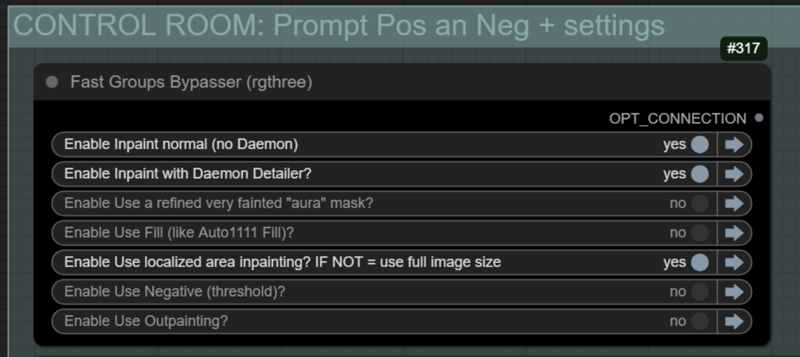
Supports FILL -the normal fill, like Auto1111- (use FastBypasser - black node)
Supports area inpaiting x full image inpaiting (use FastBypasser - black node)
Supports variable denoise (Change denoise on the CONTROL ROOM)
Supports Negative (use FastBypasser - black node)
Proper composite so no VAE degradation
Support for Flux Tools (Depth an Canny) with Alimama
I added LoRa support and Daemon Detailer support (both are optional)
Description
v7.2 - 09/05/25 - Bug fixes + Aura direction
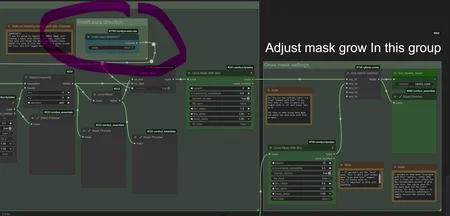
1. ❗ New: Option to invert aura direction. Useful when inpainting the whole background leaving a small area to not change, in this cases the aura grows OUT of the not painted area, not inside it. Another way to put it: a black aura grows inside the inpainted area when this is ON.
Use case: if you want to inpaint the BG and leave the charcater, but want the Ksampler to understand the boundaries of said character, using a very fainted "black" aura makes the ksampler to keep the surrounding area in the beggining while slowly painting it over the denoising process since it is a gray area. (turn on ksampler preview so you can see this happening).
Recommended settings: Low visibility (30) with a small grow (5).
2. ❗ Anything Everywhere refactoring:
Change AE to Get and Set:
for Choice:
on "Auto Preprocessor for Canny OR Depth" group
on "control room" group
on "Conditioning Index Switch" after controlnet
on "Get Unet Chechpoint Name for Metadata" group
on Alimama ControlNet Hash "Switch (Any)" on save group
for lora_stacker:
on 💊 CR Apply LoRA Stack (directly connected)
on L"oRA Stack to String converter" on "Get LoRAs names..." group
for ALIMAMA_ControlNet on "ControlNetInpaintingAliMamaApply"
for VAE
on ControlNetInpaintingAliMamaApply and InpaintModelCon FOR Dev FILL
on "InstructPixToPixConditioning"
on VAE encode and 2 decodes
For CLIP on CLIP Text Encode (Prompt pos and neg)
For Model on Detailer Daemon Samples and Normal Ksampler
For EvalNeg
on "Using negative? switch"
on control room group
on "Inpaint with Detail Daemon?" group
For PositiveP on "Text Concatenate" for metadata
For Guidance for Flux Guidance
For Sampler and Sheduler on samplers and on save node
For Steps, Seed, CFG, Denoise...
3. Fixed: "Resize Mask" to "CropMask". Resize would mismatch the mask but would stretch it by some pixels if the image was not devisable by 8.
4. Some refactoring on the "Adjust mask grow group" order and some notes to clarify it.
5. Fixed "clean_lora_names" group nodes that was not working correctly to clean the lora names. Also removed "logic" multiline to "was".
6. Manual original Seed input "int" was limited changed the node to a Core seed node. Also changed all the "logic" nodes on this part of the workflow to easyuse nodes.
7. Positive and Neg Logic multilne node > Was
FAQ
Comments (6)
V7.2 Many Bugs Fixed. Completely removed Anything Everywhere. I introduced some new things like invert Aura direction. Everything should be working, at least for now...
Let's see for how long since every time ComfyUI Frontend updates something breaks...
Compact version will be coming a lot later since I need to update a lot of things there now and it takes time.
I came back here for AURA solution and you already made the changes, kudos ! thanks for your efforts.
@noorhamadani You are welcome, I'm glad to know other people find it useful as well!
@diogod found an issue: when resize is active it results in the manual mask being offset from the image
@tazztone you are completely right. I decided to use crop instead of resizing, but it wouldn't work with resize. I need to resize AND crop... I'll work on a fix right away. Thanks for letting me know.
@tazztone fixed on 7.3!