Since CivitAI is going down THE DRAIN
I won't be updating this workflow here anymore, and I won't post any more models from now on.
I hope to find interest from people to keep updating this. Thanks everyone!
Keep following this workflow development and more on my new Discord server: https://discord.gg/EwKE8KBDqD
Get new releases from GitHub: https://github.com/diodiogod/Comfy-Inpainting-Works
Now there is a "simple/compact" version that I will update together with the normal one.
Read "about this model" on the right panel please!! I recommend reading v6.0, v5.0, v5.1 as well.
This is a proper inpainting with alimama control-net + Flux Fill + Flux Tools (Depth an Canny) support from V7 and above.
I try my best to avoid hiding the workflow flow, while balancing keeping it clean and user-friendly.
This workflow will make sure your image is composited in the end to prevent VAE degradation AND from v5 will make sure your image is a multiple of 8 (so it doesn't get resized by ksampler) at the same time it avoids resizing at all (unless you want to) since resizing will degrade the original image as well.
For inpainting that leaves a face and changes the whole background and character, Alimama works way better. Alimama also works better for LoRas. Alimama is terrible at outpainting and Flux Fill is amazing. You should test both. My comfyUI OOM or crashes when switching from one to the other IF my system memory page file is not large enough. With a pagefile of 50GB I can freely switch from Flux Fill to normal Flux Dev now.
It does use a lot of custom nodes to make life easier and workflow cleaner. Use manager to install the missing ones.
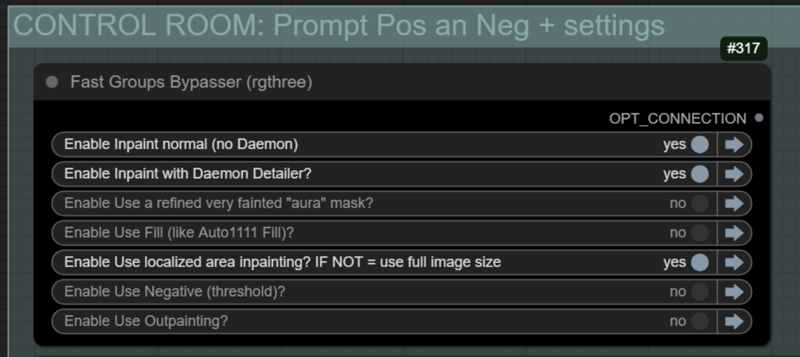
Supports loading of an external mask (need to match the image size) or doing the inpainting within the right-click "Open MaskEditor" on the image itself.
Supports FILL -the normal fill, like Auto1111- (use FastBypasser - black node)
Supports area inpaiting x full image inpaiting (use FastBypasser - black node)
Supports variable denoise (Change denoise on the CONTROL ROOM)
Supports Negative (use FastBypasser - black node)
Proper composite so no VAE degradation
Support for Flux Tools (Depth an Canny) with Alimama
I added LoRa support and Daemon Detailer support (both are optional)
Description
v7.1 - 30/04/25 - Bug fixes for the new ComfyUI frontend
1. ❗ Fixed: Mask was being resized by "resize image" by KJNodes that was updated and got disconnecter. I changed it to "🔧 Image Crop".
2. ❗ Refactoring AE: New comyUI update broke "Anything Everywhere". When something was connected OF a bypassed group that could not bypass the content, it disconnects the noodle, so in a second run without bypass the workflow would be wrong. Because of that:
a. Removed AE from "inpmask" > using Set and Get "inpaint_mask" now
b. Removed AE after outpainted group. This means, "main mask" and main "image for inpaint" is now connected directly where they are needed.
c. Removed AE from "outpadimage" > using Set and Get "padded_outpainted_image"
FAQ
Comments (19)
V7.1 fixes bugs introduced by the new ComfyUI frontend updates. I don't know when I'll have time to refactor the Compact version. Soon I hope.
Doesnt work. Wasted almost an hour, updating everything. Probably broke my other workflows as well.
easy conditioningIndexSwitch
Node 1608 says it needs input cond9, but there is no input to that node at all
hate LoraManager nodes too. Really don't like to install redundant nodes.
hope it gets fixed soon.
Edit: It works as of v7.3
after fixing rgthree reroute i also came across this. would be great if @diogod could fix it, as i cant make sense of those easyuse "Conditioning Index Switch" settings after the controlnets
@hadeng I tried my best to no force redundant nodes. But every time comfyui frontend updates it tends to break things... @tazztone Hi! I'll check what is going on today. Conditioning index Switch is used to switch the conditioning depending on what setting and model you are using. For example, using Flux Fill normally sends "choice" 3 to all these switches so it uses the correct conditioning, without alimama. Anyway. I'll check it. Thanks for bringing attention to this.
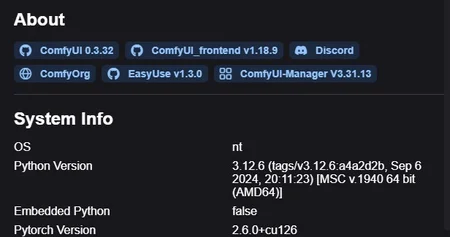
@hadeng @tazztone I could not reproduce your error at all on the new comfyUI version and the frontend version. Could you guys check for me what version are you running? Go on the settings (not the manager, comfyui itself, the cog one, right below the "toggle theme")>Click ComfyUI on the left panel>Scroll down to the bottom and post a screenshot for me, like this: https://civitai.com/images/74603594
Also check EasyUse version, since "conditioningIndexSwitch" is from that. It should have the index (int) input empty because it should receive the value from the "choice" of model you choose when you load your model.
@diogod versions: https://i.imgur.com/AShBPOl.png
failing node: https://i.imgur.com/3IWgxOd.png
## Error Details
- Node ID: 1608
- Node Type: easy conditioningIndexSwitch
- Exception Type: comfy_execution.graph.NodeInputError
- Exception Message: Node 1608 says it needs input cond9, but there is no input to that node at all
## Stack Trace
```
File "C:\_stability_matrix\Data\Packages\ComfyUI\execution.py", line 324, in execute
execution_list.make_input_strong_link(unique_id, i)
File "C:\_stability_matrix\Data\Packages\ComfyUI\comfy_execution\graph.py", line 112, in make_input_strong_link
raise NodeInputError(f"Node {to_node_id} says it needs input {to_input}, but there is no input to that node at all")
```


@diogod ye it seems the "Anything Everywhere?" after "CHOOSE your Model here" node is not transmitting the result correctly. i replaced it with a SET (&GET) node and it works now
@tazztone Thanks for the feedback! It should be working but as it is not for you guys, that was in my mind. I'll probably do that for the next version.
@tazztone could you try one last thing for me? Could you try to add an "int" node between the choose model and "Anything Everywhere?"? Like this: https://i.postimg.cc/TYWdwKTL/Captura-de-tela-2025-05-06-160738.jpg
it normally fixes this kind of problem, and it would be easier than changing all the workflow logic to use get and set.
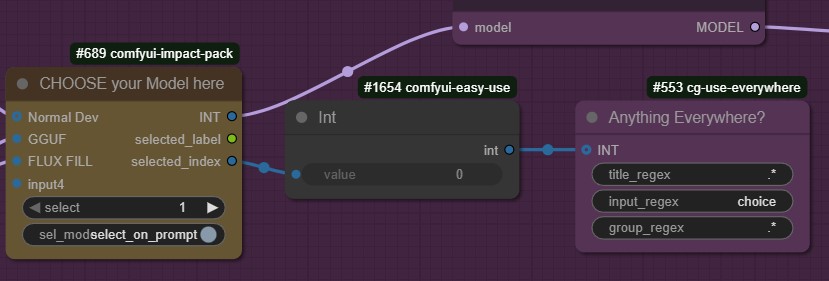
@diogod ye that didn't make a difference. it seems the index/int just doesn't arrive at the intended destination.
@tazztone That is a bummer... specially because it does work for me so it's hard to wrok around it. I might have to kill "Anything Everywhere" nodes as a whole in the next version. Thanks!
@diogod yeah that would be better. it easily breaks with comfyui updates
I am 95% positive this is broken because Anything Everywhere is broken in the latest ComfyUI in general. I ran into similar issues in a different workflow I was using and eventually was able to trace it back to that, so until that gets fixed or whatnot, using the get and set nodes is a better idea.
@ApathyJones Yes, I was just about done removing them, it was all ready, and then I ctrl+z and comfyUI has this horrible bug that sets back all changes you did to the workflow... including the saved workflow... But tonight I'll update it and completely remove AE.
@hadeng @tazztone @ApathyJones Please test V7.2 and see if everything is working now. Thanks.
@diogod works a charm after setting "Force/Set CLIP Device" to "cuda:0". THANKS
@tazztone I'm glad it worked. The "Force/Set CLIP Device" is for people like me who uses a secondary GPU, or you can use the CPU for the Clip as well, but it will be slow.
@diogod It works now thank you!
Something unrelated, when we do inpaint, is it possible to do hiRes fix, second pass or do upscale for better quality? I am trying to fix feet in a picture (flux is pretty bad at generating that), but quality is not great.
@hadeng Do you mean on the whole image or just the feet?
If you want to increase the feet quality only, not the whole image, then inpainting with a lower denoise (0.45 to 0.7, you need to test it) with "area inpainting" is the way to go. You should make a small mask on the feet only, and describe the feet only on the prompt (something like "extreme close-up feet, perfect toes, nails" etc).
With area inpainting it will inpaint the feet at 1024x1024 increasing it's details. Basically it acts like a manual Adetailer.