

Since CivitAI is going down THE DRAIN
I won't be updating this workflow here anymore, and I won't post any more models from now on.
I hope to find interest from people to keep updating this. Thanks everyone!
Keep following this workflow development and more on my new Discord server: https://discord.gg/EwKE8KBDqD
Get new releases from GitHub: https://github.com/diodiogod/Comfy-Inpainting-Works
Now there is a "simple/compact" version that I will update together with the normal one.
Read "about this model" on the right panel please!! I recommend reading v6.0, v5.0, v5.1 as well.
This is a proper inpainting with alimama control-net + Flux Fill + Flux Tools (Depth an Canny) support from V7 and above.
I try my best to avoid hiding the workflow flow, while balancing keeping it clean and user-friendly.
This workflow will make sure your image is composited in the end to prevent VAE degradation AND from v5 will make sure your image is a multiple of 8 (so it doesn't get resized by ksampler) at the same time it avoids resizing at all (unless you want to) since resizing will degrade the original image as well.
For inpainting that leaves a face and changes the whole background and character, Alimama works way better. Alimama also works better for LoRas. Alimama is terrible at outpainting and Flux Fill is amazing. You should test both. My comfyUI OOM or crashes when switching from one to the other IF my system memory page file is not large enough. With a pagefile of 50GB I can freely switch from Flux Fill to normal Flux Dev now.
It does use a lot of custom nodes to make life easier and workflow cleaner. Use manager to install the missing ones.
Supports loading of an external mask (need to match the image size) or doing the inpainting within the right-click "Open MaskEditor" on the image itself.
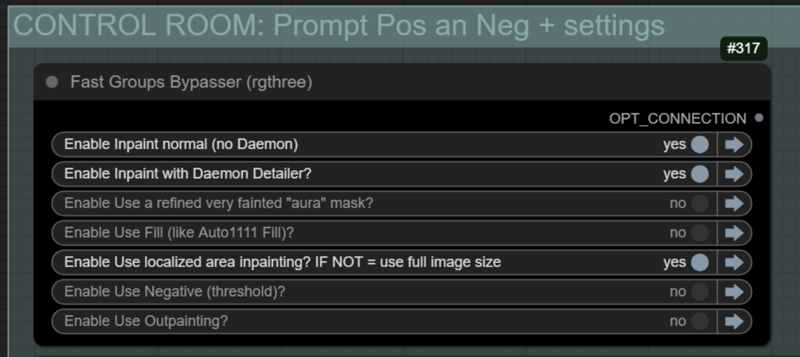
Supports FILL -the normal fill, like Auto1111- (use FastBypasser - black node)
Supports area inpaiting x full image inpaiting (use FastBypasser - black node)
Supports variable denoise (Change denoise on the CONTROL ROOM)
Supports Negative (use FastBypasser - black node)
Proper composite so no VAE degradation
Support for Flux Tools (Depth an Canny) with Alimama
I added LoRa support and Daemon Detailer support (both are optional)
Description
v7.3 - 12/05/25 - Quick Bug fix
1. ❗ Thanks to @tazztone who pointed this out. The External Loaded mask and Context Mask were mismatched when the image was resized. The workflow will now resize both masks before cropping (to ensure they are divisible by 8).
FAQ
Comments (22)
v7.31 > sorry if anyone downloaded a v7.30, please download again as I have made a mistake on v.7.30 trying to fix the mismatched mask. I removed 7.30 and 7.31 is there instead.
this workflow refuses to open for me, just nothing happens. what can I do?
Uncaught (in promise) Error: Error. Expected node to match patched data.
at nodeHasLinkId (linkFixer.ts:210:17)
at targetHasLink (linkFixer.ts:300:7)
at fixBadLinks (linkFixer.ts:341:9)
at Object.validateWorkflow (useWorkflowValidation.ts:47:30)
at async ComfyApp.loadGraphData (app.ts:985:9)
at async app.loadGraphData (components-manager.js:774:9)
at async reader.onload (app.ts:1344:11)
That's a bummer. But you will need to give me more than that to help you. Are you sure it's not just out of centralization? Sometimes that happens, try clicking on the square button "Fit View".
If that is not it, I would recommend updating comfyui and comfyui frontend.
You can paste here any error that shows up in the console when you try to load the json or a screenshot.
I have no idea about this error, but it looks like your comfyui is outdated.
I could not reproduce your error at all. Could you check for me what version are you running? Go on the settings (not the manager, comfyui itself, the cog one, right below the "toggle theme")>Click ComfyUI on the left panel>Scroll down to the bottom and post a screenshot for me, like this: https://civitai.com/images/74603594
@diogod
OS: nt
Python Version: 3.12.9 (tags/v3.12.9:fdb8142, Feb 4 2025, 15:27:58) [MSC v.1942 64 bit (AMD64)]
Embedded Python: true
Pytorch Version: 2.6.0+cu126
for reference, the newest workflow I can open is 7.0C.
The thing I posted initially is the only thing that I see in the console, when I try to open latest workflow
Okay, now it does open for whatever reason, but I have exactly the same problem as the next discussion: cannot read properties of undefined (reading 'type')
@traevelliath Try downgrading ComfyUI Frontend to v 1.18.10. I don't know why they keep doing these updates that breaks everything...
@diogod frontend 0.19.9 seems to be working, thank you.
I know this is a great workflow, but when I opened the file, the nodes were scattered and disorganized, making it unusable.
I am encountering the following error when running ComfyUI:
"Loading aborted due to error reloading workflow data.
TypeError: Cannot read properties of undefined (reading 'type')"
After this error occurs, all group nodes are missing, and the nodes overlap or become entangled. Additionally, some nodes are labeled as "unnamed," and various node connections are broken.
Also, the LOAD Canny Lora Here - Flux Tools node is highlighted in red, and I suspect it may be due to a missing custom node pack. Could you please tell me which custom node pack I need to install to resolve this?
I am using the latest version of ComfyUI, running it through the Stability Matrix. However, I don't believe the issue is related to Stability Matrix as it primarily functions as a launcher for ComfyUI.
Can I resolve this issue on my own? If so, could you please guide me through the process?
Hi thanks for the interest. First, could you send me a screenshot of your comfyui version, frontend version, and easyUse-nodes version, follow theses steps please (this helps me to check and try to recreate your environment):
Go on the settings (not the manager, comfyui itself, the cog one, right below the "toggle theme")>Click ComfyUI on the left panel>Scroll down to the bottom and post a screenshot for me, like this: https://civitai.com/images/74603594
About the "LOAD Canny Lora Here - Flux Tools" it's the stacker from the "lora manager" custom node, a great node that IMO is essential for anyone using ComfyUI: https://github.com/willmiao/ComfyUI-Lora-Manager
After conducting several tests on other computers, it seems that the newer the version, the more these issues occur. Additionally, further error windows have been reported, and I will provide an additional report as follows:
orted due to error reloading workflow data TypeError: Cannot read properties of undefined (reading 'type') TypeError: Cannot read properties of undefined (reading 'type') at http://127.0.0.1:8188/extensions/rgthree-comfy/reroute.js:301:87 at Array.map (<anonymous>) at RerouteNode.onConnectionsChange (http://127.0.0.1:8188/extensions/rgthree-comfy/reroute.js:301:57) at RerouteNode.configure (http://127.0.0.1:8188/assets/index-Hblmz8kc.js:82377:35) at RerouteNode.configure (http://127.0.0.1:8188/extensions/rgthree-comfy/base_node.js:75:15) at RerouteNode.configure (http://127.0.0.1:8188/extensions/rgthree-comfy/reroute.js:283:15) at LGraph2.configure (http://127.0.0.1:8188/assets/index-Hblmz8kc.js:91657:17) at LGraph$1.configure (http://127.0.0.1:8188/assets/index-Hblmz8kc.js:223992:26) at LGraph.configure (http://127.0.0.1:8188/extensions/comfyui-custom-scripts/js/reroutePrimitive.js:14:29) at ComfyApp.loadGraphData (http://127.0.0.1:8188/assets/index-Hblmz8kc.js:224234:18) This may be due to the following script:
/extensions/rgthree-comfy/reroute.js
he easyUse-nodes version is 1.3.0.
I tried downgrading to version 1.2.9, but the same issue persists.
The ComfyUI version is 0.3.34, and the ComfyUI_frontend version is 1.19.9.
This information was confirmed from the About tab in the Settings page.
I usually handle updates or version switches using the ComfyUI Manager or the Stability Matrix feature.
@diogod
https://imgur.com/peNroY7
I will upload it to Imgur and send it to you.
There might be a time limit for the upload.
@fruitpaster I tried upgrading to frontend 1.19.9 and I also get errors running ANY workflow, even the most basic SD 1.5 one.
Are you still getting the error you describe about the nodes loading all stacked together?
After going to comfyUI folder and changing the frontend requirements to 1.18.10 and reinstalling requirements (with venv activated) my workflow and any workflow works normally
It's the ComfyUI frontend breaking everything again. I'm actually very tired of this. Every time they upgrade they break something now. Just go back to 1.18.10 and it should work.
@diogod Oh, I see. You did a great job. Thanks for all your effort.
If I can get your workflow running by fixing the frontend version, that's good enough for me.
I'll try downgrading the frontend as well and let you know how it goes."
@diogod I opened the virtual environment in the ComfyUI folder
and entered:
pip install comfyui-frontend-package==1.18.10
to downgrade the frontend. However, the nodes are still loading in a completely messed-up state.
I might have made a mistake during the update process.
@fruitpaster you need to activate the venv folder outside, on the comfyui main folder.
1- Open the requirements.txt and edit the comfyUI front end to the one desired
2- Open a terminal/powershell/cmd on the main ComfyUI installation folder
3- Enter this commands:
.\venv\Scripts\activate
.\venv\Scripts\python.exe -m pip install -r requirements.txt
That is for a direct venv installation, I think Stable Matrix uses a venv like this. But there are other ways of installing Comfyui. I think the portable version is different and have a bat script to update more easily the requirements.
@fruitpaster What you ended up doing is installing the Comfyuifront end on your main windows not on the virtual environment, since you did not activate the venv first (even if you used the command inside the venv, it is not enough to activate it)
@diogod Oh, I see! Got it, I'll keep that in mind. Thanks for the info. But aside from that, I've already resolved the issue. I just came here to report it.
When I reached out to the frontend team, they identified the issue as being related to rgthree/rgthree-comfy. After further inquiries, the final recommendation was to reinstall ComfyUI. After several reinstallations using different methods, the issue was resolved. The prompt loader was the last to remain in the import failed state, but after searching the community, I found a compatible version and downloaded it using Git, which resolved the problem.
@fruitpaster I'm glad to know. It's a shame it was so hard to make it work, but that is how ComfyUI is... it's never really easy. I hope you can, at least, make good use of it now.
Congratulations. This is one of the most complex and large workflows I've ever seen. Let's hope that someday a model will be available that can easily modify images based on the prompt, including high precision and getting rid of a complex and heavy workflow.
Thanks. This is only complex because it has many features and I keep having new ideas 😅
There has been some models that does inpainting by prompt, like IceEdit. I've tested it, it does work, but resolution is not good because it needs to do a side-by-side in context inpainting,