Since CivitAI is going down THE DRAIN
I won't be updating this workflow here anymore, and I won't post any more models from now on.
I hope to find interest from people to keep updating this. Thanks everyone!
Keep following this workflow development and more on my new Discord server: https://discord.gg/EwKE8KBDqD
Get new releases from GitHub: https://github.com/diodiogod/Comfy-Inpainting-Works
Now there is a "simple/compact" version that I will update together with the normal one.
Read "about this model" on the right panel please!! I recommend reading v6.0, v5.0, v5.1 as well.
This is a proper inpainting with alimama control-net + Flux Fill + Flux Tools (Depth an Canny) support from V7 and above.
I try my best to avoid hiding the workflow flow, while balancing keeping it clean and user-friendly.
This workflow will make sure your image is composited in the end to prevent VAE degradation AND from v5 will make sure your image is a multiple of 8 (so it doesn't get resized by ksampler) at the same time it avoids resizing at all (unless you want to) since resizing will degrade the original image as well.
For inpainting that leaves a face and changes the whole background and character, Alimama works way better. Alimama also works better for LoRas. Alimama is terrible at outpainting and Flux Fill is amazing. You should test both. My comfyUI OOM or crashes when switching from one to the other IF my system memory page file is not large enough. With a pagefile of 50GB I can freely switch from Flux Fill to normal Flux Dev now.
It does use a lot of custom nodes to make life easier and workflow cleaner. Use manager to install the missing ones.
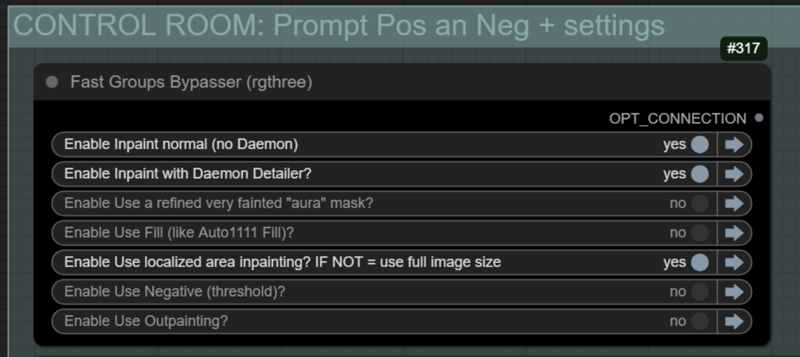
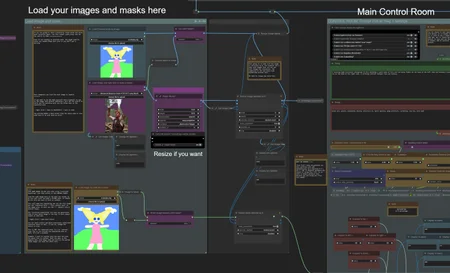
Supports loading of an external mask (need to match the image size) or doing the inpainting within the right-click "Open MaskEditor" on the image itself.
Supports FILL -the normal fill, like Auto1111- (use FastBypasser - black node)
Supports area inpaiting x full image inpaiting (use FastBypasser - black node)
Supports variable denoise (Change denoise on the CONTROL ROOM)
Supports Negative (use FastBypasser - black node)
Proper composite so no VAE degradation
Support for Flux Tools (Depth an Canny) with Alimama
I added LoRa support and Daemon Detailer support (both are optional)
Description
This is kind of a big important update.
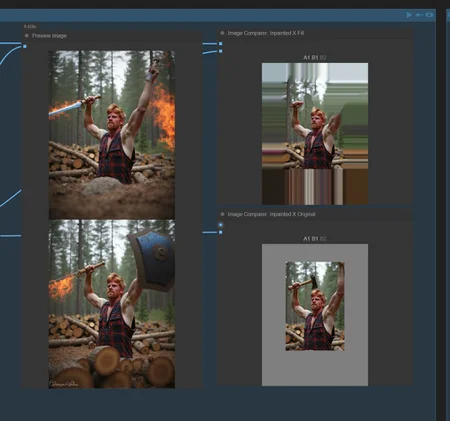
1- I decided to add "fill" (automatic1111 fill) to the outpainted area. It makes no sense to have it black or gray, specially because you might use a lower denoise.
2- I added "Differential Diffusion" to any model chosen. It is supposed to help any inpainting model, not only Flux Fill. Thanks to @cenor for pointing it out.
3- I Decided to change how the image is loaded to the workflow. It won't "allow" and will change any image that is not dividable by 8. Why? The ksampler/Vae Encoder would "fix" any image that is not dividable by 8 anyway, which in the end means that compositing would make it misalign/mismatched by some pixels. I don't like that, so it's better to fix the image in the beginning of the workflow. Keep in mind that this will probably change your original image resolution, but not by much, just the closest number divisible by 8. This is all automatic.
4- So I had to fix outpatining calculation so it will output a final image that is dividable by 8.
5- I added an option to resize the initial image if you want. Sometimes you want to inpaint an image that is of a HIGH resolution and prefer it resized to a more friendly resolution.
(!!!) Keep in mind that if you want to inpaint only a part of a giant res image, you CAN. Just DO NOT resize and click on the "localized area inpaitning" on the Control-room. This will make use of the "inpainting crop and stitch nodes".
6- I added the option to not composite in the end. Keep in mind this is not proper and it's not advisable at all! You should ALWAYS composite at the risk of degrading your whole image if you don't. BUT sometimes you don't care and the image blends does better without it, so here it's the option. It is not in the control-room, you need to do it on the red group.
7- Added labels and more notes to help understand the workflow
FAQ
Comments (13)
V.5.0 Read the "about this version". A bunch of small updates.
Do I need to add in some vram clears? 3090 24GB and I consistently get OOVRAM issues.
are you loading at full 16fp? I only use it at 8fp fast. I only have a problem if I first run dev-fill and then switch to normal alimama contrl-net, or the other way around. Comfy crashes. But if I choose one or the other and stick with it, I don't ever have a problem. I have a 4090
I apologize, but I don't understand where to choose either one or the other option? How do I do that?
@mikheys It' here, look: https://civitai.com/images/42761332
See if it works for you.
@diogod My apologies. I was loading an image that was like 4000x3000 lol. I just added a simple Resize By Longer Side after the image load. Out of the last 5 workflows Ive tried like this, yours is certainly the best. Works mostly out of the box, isnt overly complex and is highly editable.
@singularity42 I'm really glad you liked it! On the most recent version, I already added a node that does what you wat. It is by default bypassed, but you can turn it on to resize the inicial image. You should use that because it also takes that image resolution to resize the mask, so you don't have any problems with a mismatch of the mask size and image size.
Or, if you want to inpaint only a small area, you can load a super big image like 4000x3000 and turn on the "localized area inpaiting" option on the control room. With that option the workflow will use a 1024x1024 res on that area only and then stitch it back to the super big image. It will not use a lot of vram because the ksampler will use the 1024res. try this out as well! But it's not suitable for outpaiting.
At the second and subsequent starts the process hangs on VAE Encode under Control-net and latent mask, Video memory is completely filled. After about 3 minutes the process continues. I have a 4090 24GB
The problem is mostly observed when outpainting. VRAM is just constantly overflowing.
A 4090 (that I also have) is unfortunately not enough to run Alimama Control-net and the model at 16fp. Even at 8FP I have to load the Text Encoder to my secondary GPU to not have to worry about anything. The control-net is simply vram hungry. The only way around it is using the model with gguf, but IMO it's not worth it because it's too slow. At fp8 -fast it is quite ... fast.
@mikheys Also, outpainting makes the image bigger to the sampler, so it will naturally use more VRAM. You might want to rescale your original image to a smaller resolution first. There is a node, by the right side of the "load image" there so you can do this, if you want.
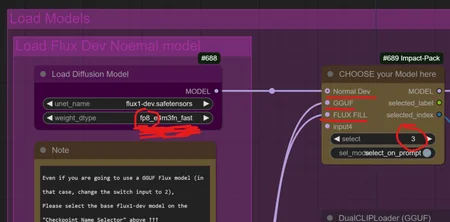
Where can I switch between dev-fill and alimama contrl-net?
@mikheys You do it on the first group, the magenta group, at the left called "Load your models here, choose...".
One of the nodes, is yellow, called "CHOOSE your model here".
Select 1 for dev alimama contol-net, 2 for dev gguf alimama control-net, and 3 for Dev-fill (no controlnet)