







Since CivitAI is going down THE DRAIN
I won't be updating this workflow here anymore, and I won't post any more models from now on.
I hope to find interest from people to keep updating this. Thanks everyone!
Keep following this workflow development and more on my new Discord server: https://discord.gg/EwKE8KBDqD
Get new releases from GitHub: https://github.com/diodiogod/Comfy-Inpainting-Works
Now there is a "simple/compact" version that I will update together with the normal one.
Read "about this model" on the right panel please!! I recommend reading v6.0, v5.0, v5.1 as well.
This is a proper inpainting with alimama control-net + Flux Fill + Flux Tools (Depth an Canny) support from V7 and above.
I try my best to avoid hiding the workflow flow, while balancing keeping it clean and user-friendly.
This workflow will make sure your image is composited in the end to prevent VAE degradation AND from v5 will make sure your image is a multiple of 8 (so it doesn't get resized by ksampler) at the same time it avoids resizing at all (unless you want to) since resizing will degrade the original image as well.
For inpainting that leaves a face and changes the whole background and character, Alimama works way better. Alimama also works better for LoRas. Alimama is terrible at outpainting and Flux Fill is amazing. You should test both. My comfyUI OOM or crashes when switching from one to the other IF my system memory page file is not large enough. With a pagefile of 50GB I can freely switch from Flux Fill to normal Flux Dev now.
It does use a lot of custom nodes to make life easier and workflow cleaner. Use manager to install the missing ones.
Supports loading of an external mask (need to match the image size) or doing the inpainting within the right-click "Open MaskEditor" on the image itself.
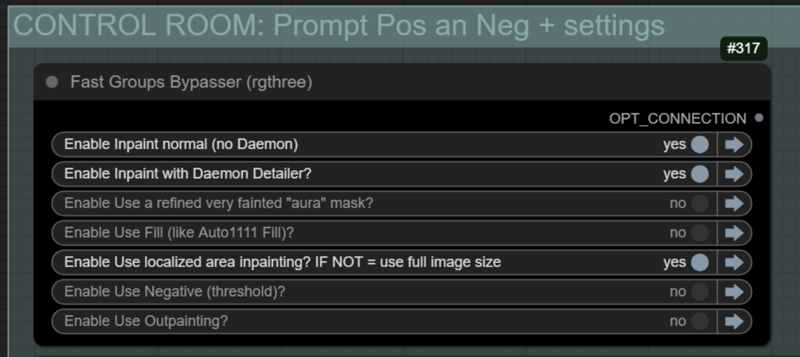
Supports FILL -the normal fill, like Auto1111- (use FastBypasser - black node)
Supports area inpaiting x full image inpaiting (use FastBypasser - black node)
Supports variable denoise (Change denoise on the CONTROL ROOM)
Supports Negative (use FastBypasser - black node)
Proper composite so no VAE degradation
Support for Flux Tools (Depth an Canny) with Alimama
I added LoRa support and Daemon Detailer support (both are optional)
Description
Small fixes. I messed up some details. Now I left the default example.png on the load image nodes and no LoRA on the LoRA stacker nodes, so no errors should happen.
Tried to explain better what is the purpose of the second mask (the context mask) on the notes.
Also, I forgot to explain that you can use keyboard shortcuts 1 or 2 to navigate to the control room or the comparison part of the workflow (you can customize this as you wish, is the bookmark node).
FAQ
Comments (8)
Hey, first time trying out workflows, when it comes to automatically downloading the missing custom nodes here, how can I guarantee that they're safe?
Oh man... thats a hard question and an important one. There is no real guarantee... it's always a risk for us who cant really audit a program's code. But one thing that I do is look at how many stars the repo of that extension have... If it is popular, the chance of someone spotting something is higher. Also try not downloading a extension that has complex interactions with the internet and other services API like Chatgpt and other LLMS. That is what I do.
@diogod thanks for the info! when it comes to your workflow in specific, do you know if the nodes are safe for sure? (ill check out the stars on them too soon)
@Vettroz I don't think I used any shady nodes. They are all from famous packs. All seam ok to me.
@diogod Personally I prefer not to use any component that connects to the internet, even for official updates, cuz as a general pattern, over the years, corporations push the bar further and further to what they can get away with legally speaking. As well, their methods get more devious, often utilizing loopholes to do things that they normally wouldn't be allowed to
Example: these days, they can get away with everything short of murder, legally, just by creating a program good enough that people will click 'OK' just to get past the mile long contract, the length of which renders it highly impractical for anyone to spend the time reading, especially when factoring in the number of tasks and installs which have them.
That said, if I were to fully sandbox comfy, I'd be severely limiting it's functionality and potential features. So, to prevent that scenario, I made a separate comfy install with the manager and such, and I run any ??? components I download for it into that for testing, and if it's deemed safe, I port it over to my main install.
As for 'audit[ing] a program' I think that's easier said than done unless maybe if you do so professionally(or are very well self-taught for a decade or more). I've tried digging through code in A1111, and SD Next just to figure out if there's anything that may be creating arbitrary logs, and/or connecting to corporate servers to share/store my data. And I followed quite a few potential red flags (for restrictions on image generations, to logging, internet connectivity, etc.) across multiple scripts..
But, long story short, I ended up hitting a brick wall, cuz it started eventually leading me to source files, which I couldn't just open up and look at. I could've probably found a way to open them(into a human-readable format), but that was the point that I said screw it, the headache wasn't worth avoiding a little extra work to use a much more modular program, and that's when I moved to comfyui.
PS: also, not being a coder, it's quite easy to see potential red flags that are nothing at all, like unet,and IP adapter. Weirdly, those two deffinitely sound like they connect to the inetnet, or modify your network card in some way, but they just jigger your images in comfy to add stuff, or look better(forgive me, it's 3am I think my IQ just dropped a few points, lol..).
It's funny though, when it comes to 'safety' everyone's afraid of big bad jonny-hackerguy in his basement. But people don't consider the big corps to be a threat, even after M$, Google, And Apple have all been found guilty of large scale privacy violations.
@Lazman Very sound points the Lazman! In the end, I also just say screw it, I'll risk it... It's very hard to be completely safe. But there are some precautions that could be taken, as you said.
"🔀 CR Model Input Switch" that I used to choose between dev or gguf is very dumb and load dev anyway on the memory. I'm thinking of another node or maybe a "mute" solution for next version
"Switch (Any)" from Impact-pack does the trick, it won't load the model you did not choose.