


Since CivitAI is going down THE DRAIN
I won't be updating this workflow here anymore, and I won't post any more models from now on.
I hope to find interest from people to keep updating this. Thanks everyone!
Keep following this workflow development and more on my new Discord server: https://discord.gg/EwKE8KBDqD
Get new releases from GitHub: https://github.com/diodiogod/Comfy-Inpainting-Works
Now there is a "simple/compact" version that I will update together with the normal one.
Read "about this model" on the right panel please!! I recommend reading v6.0, v5.0, v5.1 as well.
This is a proper inpainting with alimama control-net + Flux Fill + Flux Tools (Depth an Canny) support from V7 and above.
I try my best to avoid hiding the workflow flow, while balancing keeping it clean and user-friendly.
This workflow will make sure your image is composited in the end to prevent VAE degradation AND from v5 will make sure your image is a multiple of 8 (so it doesn't get resized by ksampler) at the same time it avoids resizing at all (unless you want to) since resizing will degrade the original image as well.
For inpainting that leaves a face and changes the whole background and character, Alimama works way better. Alimama also works better for LoRas. Alimama is terrible at outpainting and Flux Fill is amazing. You should test both. My comfyUI OOM or crashes when switching from one to the other IF my system memory page file is not large enough. With a pagefile of 50GB I can freely switch from Flux Fill to normal Flux Dev now.
It does use a lot of custom nodes to make life easier and workflow cleaner. Use manager to install the missing ones.
Supports loading of an external mask (need to match the image size) or doing the inpainting within the right-click "Open MaskEditor" on the image itself.
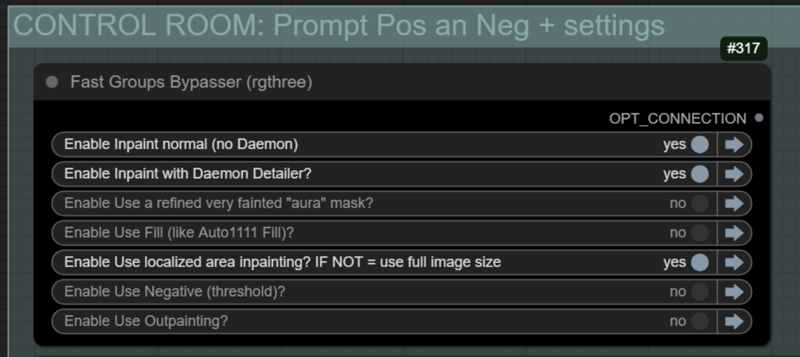
Supports FILL -the normal fill, like Auto1111- (use FastBypasser - black node)
Supports area inpaiting x full image inpaiting (use FastBypasser - black node)
Supports variable denoise (Change denoise on the CONTROL ROOM)
Supports Negative (use FastBypasser - black node)
Proper composite so no VAE degradation
Support for Flux Tools (Depth an Canny) with Alimama
I added LoRa support and Daemon Detailer support (both are optional)
Description
So I decided NOT to RESIZE by default the image to a divisible by 8 resolution because as pointed out by Jeffu here resizing brings quality loss as well. So a solution I came up with is to crop the sides of the image to a divisible by 8 and then, after inpainting, composite it back to restore those pixels so you get in the end the same image resolution you started with (of course, that is if you did not turn the resize node option).
This is not going to be the case for outpainting since outpainting will always result in a bigger image and the resolution will always be deviable by 8. I did not change that.
This final/second composite has a problem that if you inpaint the whole image, or the right side of the image, it will restore those cropped original pixels back to the right side or bottom side. That might look weird. Because of that, you can bypass the final composite if you want. In that case, you will end up with an image that is divisible by 8 (this is better anyway, but it's not the default)
Finally, another note, if anyone is reading. Flux does not like some resolutions, so a divisible by 32 or 64 should work better. Some images get a weird black bar on the corners that remain there no matter what seed you use. That is because of the uncommon resolution. But since it's not mandatory, I decided to stick with 8. But you can reflect on that when inpainting and outpainitng.
FAQ
Comments (7)
Sorry, there is a big mistake on my part on v5.1!
If you use the node to resize your image (for example a big 2k image to 1024), the mask and the context mask won't be resized. They need to be resized. I'll update the workflow today.
Goddamnit. It takes A LOT OF TIME to understand your workflow! But it work awesome! The others workflows does the same mistake like the official workflow...
Thanks! At least you did understood it in the end =D
It's hard to balance "easy of use" with "not hiding the whole workflow" like some people do.
Flux fill working fine but as i am trying to add the person in the image (inpaint) the face and the clothes detail isn't that good, meanwhile Flux Full and GGUF just gives the masked image as the final image :( I am looking for a proper human (Inpaint) using flux fill or Flux full while add detailer and upscaler to retain the details of the image or how can I improve the flux fill human (Inpaint) quality?
Can you upload a image of what you want to inpaint in what? So I can give it a try? The GGUF or normal Dev should not be giving you the masked as result... Did you make sure to have the Alimama control-net loaded as well?
@diogod here https://imgur.com/a/3aI7L4g No, I haven’t experimented much with GGUF and Flux Dev because they were outputting the masked image as the final result. I was hoping for a better upscaler, as the original image resolution decreases during processing. To make the results more engaging, features like a face detailer and an upscaler should be integrated. I’m working on this myself, but I’m confident you could achieve even better results.
P.S. If this all-in-one approach doesn’t work with Flux Dev, could you at least add the initial nodes for Flux Dev and upload it with similar stitch back mask? I tried doing it myself but wasn’t successful.
@incpak I'm not completely sure I understand. You want to inpaint details right? I did not add a detailer second pass on this, but you can do it in the end if you want.
I've just tested and I don't get the error of getting only the masked image when using GGUF. It works as intended. I get the full image with the inpainted area. Did you use the purple node Load image to load your image and the right click to make the mask?
Upscaling is also not my objective here with this workflow, but you can add it in the end as well.
But if you just want to make small area inpainting to get more details, like a face, or eyes, this is totally possible in my workflow without an additional pass with detailer. You just need to select the option in the Control Room called "Use localized area inpainting? IF NOT = use full image size". With this on, you won't inpaint the whole image, but just the small masked part with 1024x1024, which should give you a lot of details. This is basically a manual detailer. This is the result when I did this only on the woman face (you can drop this image in the comfyui as well to see the workflow): https://civitai.com/images/44731108
If you want to fix other parts like the hand or the chest, just load the image again and inpaint those areas (change the prompt accordingly).