

✨ WAN2.1 — Image to video — Simple Workflow
A clean, all-in-one WAN image-to-video workflow built entirely with the UmeAiRT Toolkit for ComfyUI.
Only 12 nodes. No spaghetti wires. Just load your model, write your prompt, and hit generate.
⚠️ IMPORTANT — Nodes 2.0 Required
This workflow is built for the Nodes 2.0 (Vue) interface of ComfyUI. If you don't enable it, the workflow may have display problems.
How to activate Nodes 2.0:
Open ComfyUI
Go to Settings (⚙️ icon, bottom-left)
Find "Use Nodes V2 (Vue)" and toggle it ON
Refresh the page
Load the workflow
If you prefer the classic interface, check out my Legacy version of this workflow instead (link).
🎯 Features
Text-to-video generation
Automatic download of models in auto version
Built-in SeedVR2 upscaler — high-quality tiled upscaling (toggleable on/off) Slower than a classic upscaler, but significantly better quality
Full metadata embedding — your images are saved with all generation parameters, ready for online publishing and remixing
3 LoRA slots — with individual on/off toggles and strength control and you can connect as many other lora modules to each other for as many LoRA as you want.
📦 Custom Node Required
Only one custom node to install:
Install via ComfyUI Manager (search "UmeAiRT") or use the UmeAiRT Auto-Installer.
The Toolkit packages everything internally — upscaler, face detailer, metadata saver. No other custom nodes needed.
📂 Files you need (in manual version)
For base version
I2V Model : 480p or 720p
In models/diffusion_models
For GGUF version
I2V Quant Model :
- 720p : Q8, Q5, Q3
- 480p : Q8, Q5, Q3
In models/unet
Common files :
CLIP: umt5_xxl_fp8_e4m3fn_scaled.safetensors
in models/clip
CLIP-VISION: clip_vision_h.safetensors
in models/clip_vision
VAE: wan_2.1_vae.safetensors
in models/vae
Speed LoRA: 480p, 720p
in models/loras
ANY upscale model:
Realistic : RealESRGAN_x4plus.pth
Anime : RealESRGAN_x4plus_anime_6B.pth
in models/upscale_models
Description
Bugfix : upscaling node
Add : Change of execution order between interpolation and upscaling, really independent and better optimized.
FAQ
Comments (126)
v1.4 i2v workflow gives SamplerCustomAdvanced error (something about mat1 and mat2). But v1.3 works fine.
https://files.catbox.moe/scfekx.png
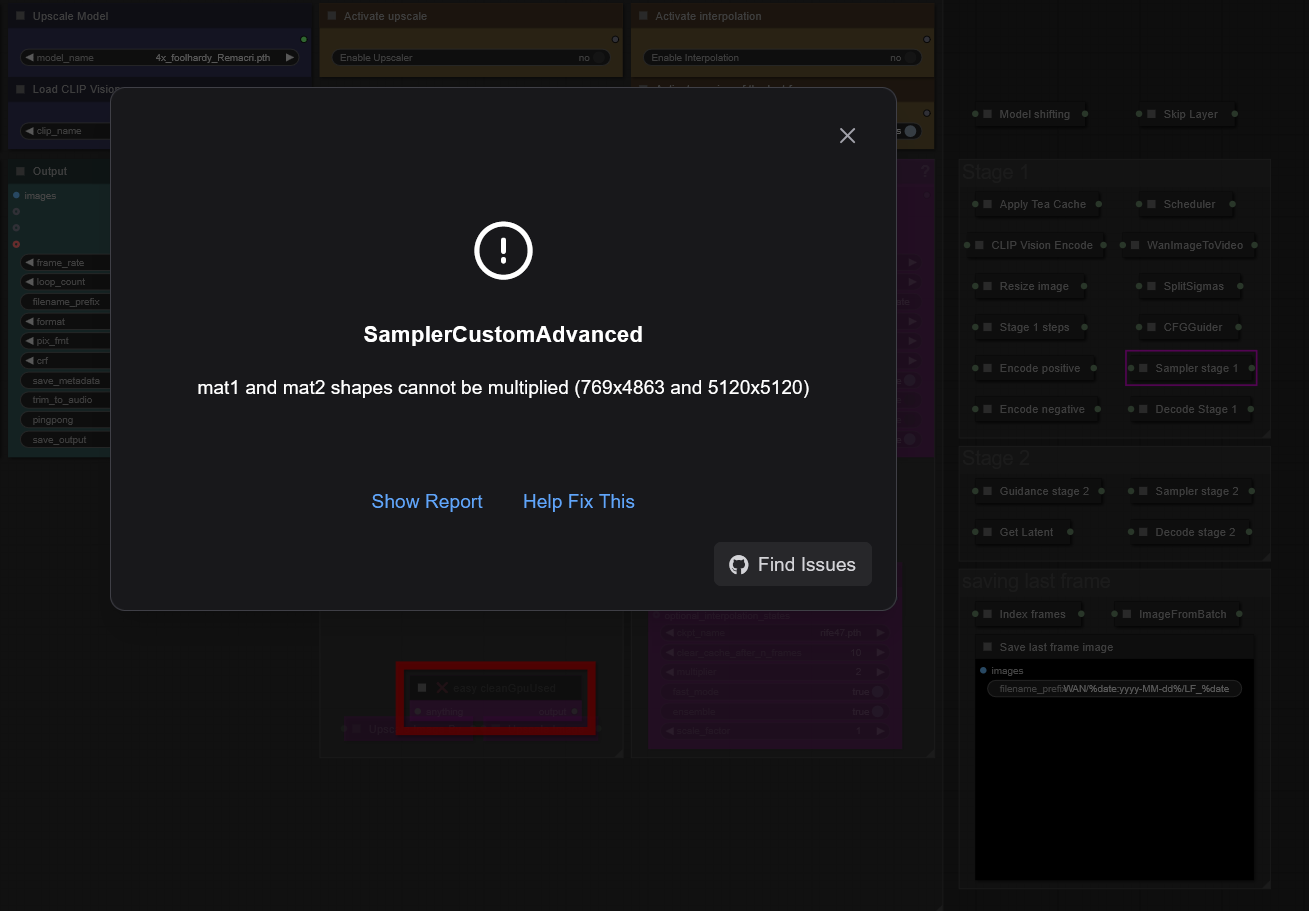
Let me know if you want a report.
Update: The error does not seem to occur in v1.5, thank you.
It seems you don't have all the custom nodes, or they are loaded incorrectly. Is your comfyui up to date?
Same issue here, but mine is talking about Transformer_options not being accessible and telling me I need ComfyUI nightly... which I have. No missing nodes.
Don't update ComfyUI in the workflow, Update in the file folder
Persistent error:
SamplerCustomAdvanced
mat1 and mat2 shapes cannot be multiplied (769x4863 and 5120x5120)
This error occurs immediately after TeaCache: Initialized in step 3
#MeToo
@UmeAiRT Yes, the missing custom node "easy cleanGpuUsed" (related to ComfyUI-Easy-Use) would not install for my life. Seems like I fixed that just now by upgrading my outdated Cuda Toolkit. So please ignore that from my screenshot.
The aforementioned issue with SamplerCustomAdvanced, now also reproduced by others in the comments, persists in workflow v1.4 however.
I get the same error when i try to use this. I have all the nodes installed and comfyui is up to date
@UmeAiRT Here's the report on v1.4: https://pastebin.pl/view/9a1883c5
To my knowledge, both comfy, nvidia drivers, cuda toolkit, and anything python-related is now updated. The error persists.
@mediabob Are you using ComfyUI portable, native or pinokio?
@UmeAiRT Comfy portable :)
Somehow it works when you use the workflow of synalon973
It's the same workflow, I haven't changed anything other than a model.
Great new update to the workflow as always ♥️🫡
Have you seen the new experimental start-end frame support in the Kijai'sWanVideoWrapper-Node?
Might be something you'd be interested in releasing as it's own workflow as it's really the next step for img2vid for wan ♥️
There's a preview of what it can do here and in the first comment from OP there's a links to the Node + an example workflow.
I have to work on it but without material and with a lot of demand I need a little time.
@UmeAiRT Yeah i get that, i haven't seen anyone do a Start-End frame workflow yet so i thought you could get some traffic by being the first to do so :D
if you need help having some test material with start and end frames you can let me know and i can provide you with some examples 🫡♥️ As always, thanks for your hard work and amazing workflows!
@vslinx I've just seen the link, I've already done some tests with this system and the biggest problem is that it's not GGUF compatible and only with the base models. This makes testing more complicated, especially without equipment at the moment.
@UmeAiRT Oh damn, i haven't tested it yet myself so i didn't see that it's not GGUF compatible, but yeah that sucks since it'll also take way longer and way more resources :/ Thanks for trying it out though!
@UmeAiRT btw i found your Ko-Fi and sent you two as a thank you for your amazing workflows.
I think it's already perfect and then you keep on releasing updates that blow my expectations further 😂
I hope you'll stay part of this community for a long time and deliver us more things like this!
@vslinx Thanks a lot, I'll be able to recharge my runpod a bit to do even more tests x)
@UmeAiRT Hahaha no problem my friend 😂 glad to support!
Hopefully the Start-End-Frame Node support soon gets gguf compatibility 😋
Since it's still just experimental i have some hope for Kijai :D
Same error that other people are getting. mat1 and mat2 shapes cannot be multiplied.
https://imgur.com/a/cFYdiay
Hmm? I just swtiched from V1.3 to V1.4, linked up my model locations and updated the Kijai node....and it worked. Is this MATx error due to the size/dimensions of the input image? I am still only testing 480x720 portrait since that is what I mostly output. Also, I don't use the frame interpolation and upscale, I turn those off since I use Topaz VideoAI for that work.
I am also getting the same error when i switch to an I2V model, The workflow works great using a T2V model. I will try using different size portraits then update all nodes.
@yajukun i'm only using the 480p model and i've tried different sizes thinking that was part of it. The error doesn't change when i change the size
Just downloaded the 33gb model wan2.1-i2v-14b-720p-F16.gguf
and it worked. So maybe the issue is with the model. Hope this helps.
I think I've understood the problem, I never said that if you're using a 720p model you need to change a parameter in the “Apply Tea Cache” node. Sorry for that.
@UmeAiRT This is not the case since i am using the 480p model that was linked in the guide you wrote. As i have said already.
I am trying it with the new 1.5 version and it still happens. Exact same error that i posted in the imgur gallery.
I'm unsure what i am doing wrong and telling me it has to do with 720p model is not useful, since that does not fit my case.
It started working when i used q4 instead of q3
1.4 seems to take significantly longer than other workflows I've used. ~150s/it versus typically 20-40s/it on other workflows with the same models, length, frames and resolution. RTX4080 16gb using 480 Q5 GGUF.
This version is adapted to the new comfyui version with python 3.12. Maybe the older versions don't work as well, but I haven't had that problem, and neither has my beta tester.
Can you try with a new installation of ComfyUI? You can use my script for Windows to do it in 3 clicks, which will help me a lot to know where the problem comes from. https://civitai.com/models/1309415/comfyui-auto-installer-wan21-or-gguf-or-upscale
On RTX3090Ti with TeaCache 0.12 up to 0.26 and SageAttention I get about ~24s/it with 480 Q8 GGUF.
I skip Upscaler and Interpolation in most cases.
Installed ComfyUI using auto install script (all other installations I have failed to use triton)
@maracon And is this speed good for you, or do you also experience slowness?
@UmeAiRT I think it is super fast comparing to what results other people have. I think 3090 is from 5 years ago, so I feel it is great speed!
Also just snatched to use that workflow of yours with UNET Loader (Advanced) + torch.compile, which now gives me ~14s/it for the same fixed parameters.
See reddit post, so you could try it, just change models loader node with those 2 and set "compile_transformer_blocks_only" = true
https://www.reddit.com/r/StableDiffusion/comments/1iyod51/torchcompile_works_on_gguf_now_20_speed/
@maracon Thank you for your feedback. I've been working all day on workflows so I'll see tomorrow to add this feature.
@maracon I've just read and tested it, and it necessarily require Triton. Many people still have trouble installing triton, so be careful. I don't know if I'm going to integrate it into the workflow by default or make a second one.
@UmeAiRT I totally agree, that Triton and SageAttention are not easy to setup, for me it took like week of evenings exercising in patience :-D Eventually had to use fresh "auto install script" with PyTorch 2.8 Nightly and Sage 2.
If I were you, I would keep that particular workflow just polished with time, and "not disrupted" by some comment like mine. Remember: "better is enemy of good"
Looking forward for new workflows and other creations👍You are doing great!
One of the best Workflows.
Thanks !
@UmeAiRT You are very hard working, and talented. keep it up. Your workflows for wan are amazing
If You have cuda memory overflow - try reconnect frames interpolation node before upscaler and make upscale after interpolation
Yes, there are problems with the way I upscale, I'll be updating soon.
really appreciate the work flow. only issue is, I want to be able to set the precise dimensions. how can i swap back to the original box where I can specify the exact dimensions I want?
Just double-click on the number you want to change.
@UmeAiRT Suggestion:
1. Rename output files to have "suffix" rather than prefix to allow better sorting by Name in Explorer. (e.g. WAN/%date:yyyy-MM-dd%/%date:hhmmss%_OG and WAN/%date:yyyy-MM-dd%/%date:hhmmss%_LF )
2. Add SystemNotification on RunFinished and EmptyQueue node after ImageFromBatch. It is from Comfyui-custom-scripts, which is installed anyway.
Thanks for your suggestions. For the first one I must confess I don't understand why a sufix would be better as it would cause a separation between the original and the upscaler version in the explorer and make it more difficult to compare the two videos. The notification is a good idea, I'll try to add it.
All workflow updated with "suffix" file name
@UmeAiRT my reasoning here is that when sorted by name "groups of same moment generation" are much better to identify then "groups of all files starting from OG or LF".
Example: When there are like 10+ generations, which means 30+ files (in case of just OG, LF and video) it becomes really hard to find match between let's say OG and video by looking into similar 6 digit numbers.
Example2: When files go one by one by timestamp it is easy to sport (identify) groups of 3 files (or even 5 files depending on what is being output)
Hope it helps.
Does anyone who what this means, Am a missing something or not enough RAM.
It's my fault because the upscaling was misconfigured before interpolation. This has been corrected in 1.5, but for the moment CIVITAI is blocking the upload.
Just will not work for me. Mat1 and mat2 shapes cannot be multiplied. I am using your own installation. Text to video works fine. setting the coefficients to 720 or 480 makes no difference. I'm using q8 gguf.
Q8 720 or 480?
@UmeAiRT either. Same error for both
@UmeAiRT either. Same error for both
@harp357100 It's really strange, some people don't have any problems at all. Even my overheated laptop can render with my installation script. Did you completely close the workflow and then reopen it after the last update? (Workflows that remain cached in the browser can cause problems).
same
I had the same issue and I didn't find a fix for it; however, I was able to get the workflow to run after I disabled Skip Layer in Backend - Model Preparation
actually i thought that it was related to the new tea cache node but, a new run give me same error, it seems it is just a kind of overflow, my VRAM was full at this moment, i try Q8 > Q5 and now it's seems ok..<
edit: did it again , it's just unstable for me
@Meandre66 Have you tried doing like @crtbrn , bypass "Skip Layer in Backend - Model Preparation" ?
same error here.
Raising my number of frames to above 24 seems to help, while still allowing me to leave SLG enabled. If I keep frames at 24 I get sporadic failures with SLG (the same mat1, mat2 error)
Try to choose this clip model (text_encoder): umt5_xxl_fp8_e4m3fn_scaled.safetensors
It helped me with the same error.
very goooooood workflows with gguf model. is there any solution to increase high frames like 200+ with low vram like 16gb?
You can double-click on the frame number to open an editor and enter the number of your choice.

@UmeAiRT no i mean, can i do that with limited vram 16gb. because, with high resolution like 768x1344 i cant generate more than 80 frames although i have 128gb system ram
@budemrra223 The solution I can see right now would be to make 80 frames and use the integrated save last frame module to make 80 frames again and then merge the videos.
@UmeAiRT ok... thx :)
@budemrra223 Do you already use teacache and sageattention2?
@UmeAiRT yep. teacache 0.26, 0.01~1.00 and sage attention with arg and node too.
@budemrra223 I don't have any other tips for the moment to optimize even more unfortunately, if I find one I'll get back to you.
@UmeAiRT thanks my god. anyway what value of teacache you use?
@budemrra223 I currently have no graphics card or credit on runpod but usually stay at 0.13
I've uploaded a small workflow to easily merge videos : https://civitai.com/models/1386640
Good!!! Excellent fantastic progress! All stages are done perfectly! The speed is very good, the choice of models is amazing. We are waiting for Lora)))
Does anybody know what the "optimal" resolution is for this workflow?
It works quite well for me but I've noticed that the gen times aren't completely dependent on size.
For example, a 480x720 video gens for me in about 240 seconds, but a 480x600 video gens in about 340.
I'm not changing the size ratio at all, just the pictures. This seems strange as you would think that reducing the video resolution would decrease gen times, but that doesn't seem to be the case
I answered my own question with the help of ChatGPT - apparently GPUs like to work in resolutions divisible by 8 or 16. While 600 is evenly divisible by 8, it is not by 16. Increasing the resolution from 480x600 to 480x608 cut 100 seconds off of the gen time 😂
This is really great, the only problem im having is I am unable to import comfyui-Easy-use
Has anyone else come across this and how did you get it to install ?
You can use ComfyUI manager to install or try to fix this node
This is perfect workflow, any chance implement there ComfyUI-WanVideoStartEndFrames ??
I tried it but it is not currently compatible with GGUF models. I don't see any implementation coming soon, I will still release it with the basic models.
@UmeAiRT i am run this workflow, with GGUF and with I2V-14B-480P_fp8_e4m3fn.safetensors, im just change model loader, just i am not good enough, to implement that StartEnd Frame.. i am working on A4000 GPu
@xxxtembel I don't understand what you're saying. Are you talking about my workflow or the one that comes with WanVideoStartEndFrames?
@UmeAiRT sorry, my english suck... i am asking you, if you can add WanVideoStartEndFrames to you workflow.. modify you workflow
@xxxtembel I have made an expérimental startendframe workflow : https://civitai.com/models/1389820
@UmeAiRT Thanx , will be nice... even with basic model.. Regards
@UmeAiRT Thanx, will test tomorrow
This is the neatest ComfyUI workflow I’ve ever seen! It’s also the first one that actually helped me run GGUF on my 4090 mobile version. The author wrote a super detailed tutorial, which is just awesome! (Honestly, I spent a ton of time on Civitai referencing and testing other so-called GGUF-supported workflows people posted, and they basically all failed—only this one worked for me.) I’m currently using version 1.5. One small suggestion: could you maybe consider adding support for a custom number of Loras? 2 might be a bit too few. Once again, thanks so much!
Great Workflow.
I like that you can see preview of the result. And can skip it if i dont like something.
But i saw something on video result. That there is colour flick in the middle of it. In my case it get dark for a half of a sec Then back to normal again. I looked at the others video here and i notced same effetct.
I try to understand why I lost so much in quality between preview and the first stage, I don't have this problem without lora
me too. often the previews are having better quality in terms of colour and contrast, than the final image. i have it mainly with the txt to image workflow though.
Hi, you are sharing very nice stuff. you image to video 1.4 is best, can you please integrate "mmaudio" to this workflow. that will be a full video package. thanks for wonderful work.
My process keeps hanging on "Attempting to release mmap (248)" how do i bypass this error?
Same trouble as in T2V
Are you sure what TeaCache working correctly in 1.5 Ver? Why I dont see Teacache message in terminal window? In 1.4 it send messages...
and it works slowly than 1.4 IMHO
Hi friend, your work is really wonderful, congratulations. Could you tell me how I can increase the video playback time?
Thank you in advance
You can increase the number of frames in the frames node, it's a small yellow node that is just underneath the negative prompt node. Adding more frames will slow down generation. Hypothetically you could also decrease the frame rate to get an even longer video without slowing down generation at the cost of choppier video. The frame rate settings are on all the teal output nodes, so make sure you lower those all according to your needs.
@Zignack thanks my brother
Great job on all the workflows you share, thank you very much!
Thanks !
Thank you for your workflow updates.
Is it possible to add the possibility to pause the workflow after the preview is generate.
It will allow to launch another preview if the generated result is not good. And if the preview is good, launch the other stage.
The problem is that some users want to queue up a lot of tasks and come back after seeing the results. I could put a stop button and disable it by default but that risks cluttering the interface and it's already easy to just stop the current task if you don't like the preview. So I'm thinking about it but I'm not sure I'll implement it.
Love your workflow. Thanks. Having some issues with this latest version, and running into the following:
RuntimeError: mat1 and mat2 shapes cannot be multiplied (769x4863 and 5120x5120)
I seem to be getting this inconsistently and I'm not sure why -- happens most, but not all of the time, which is odd. Any suggestions?
Which model do you use?
@UmeAiRT wan2.1-i2v-14b-480p-q8_0
I'm also experiencing this.
Can you try with the Q5_K_S ?
I get the same issue. I'm using 480 Q5 K S. From what I’ve read, the problem is with CLIP. After generating a video, the next one I try to generate gives me this error. So I do the following:
1-Change CLIP, for example, to lama_3
2-It still gives the 'mat1 and mat2' error
3-Switch CLIP back to 'umt5_xxl_fp8_e4m3fn_scaled'
4-Click 'Run,' and CLIP takes a few seconds to load
5-The video generates without issues
It seems like the problem lies there. I have to repeat this process every time a video finishes.
@EechiZero Have you tried the latest update I just released?
@UmeAiRT Yes, it was already fixed in the latest update, thanks!
I love your workflow! Idk if it's a limit of the model but if I go past 64 frames the result will always have some frames with color shifted, do you know if it's a known issue?
I have same issue with this
I also have the same problem. The configuration is (480p, gguf q4, 16fps, 160frames), and the color flashes approximately every 3 seconds
Superb work! Havent been able to find any workflow I could install before yours! Installation was a breeze, and it just works! Thank you! <3
Just a general question....
it seems like the video gets very "eventful" (which is a good thing for my scenario, when the duration of the video is low, but when I raise the frames count, it gets more and more static... What should I do here?
You can change the shift setting to speed up the model or change your prompt.
@UmeAiRT But wont that make the video shorter?
@jay_rich If you don't change the number of frames and the frame rate, the video should keep the same duration.
Loving this workflow :D I'm already using that for my animations :D (pfp)
Is there a possibility by any canche to have more than 2 Lora in a future version ?