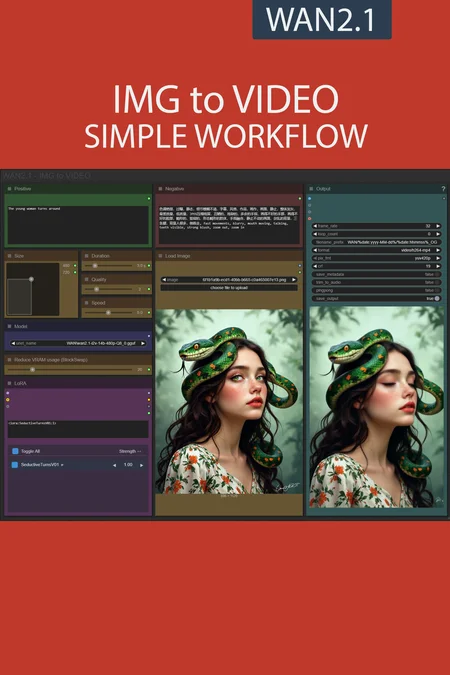
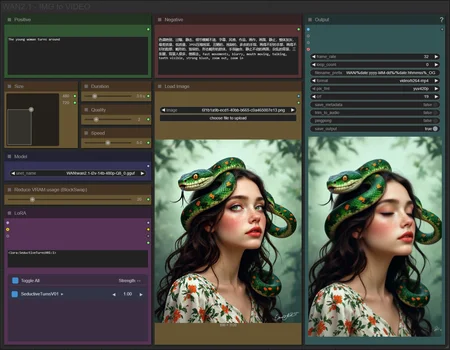
✨ WAN2.1 — Image to video — Simple Workflow
A clean, all-in-one WAN image-to-video workflow built entirely with the UmeAiRT Toolkit for ComfyUI.
Only 12 nodes. No spaghetti wires. Just load your model, write your prompt, and hit generate.
⚠️ IMPORTANT — Nodes 2.0 Required
This workflow is built for the Nodes 2.0 (Vue) interface of ComfyUI. If you don't enable it, the workflow may have display problems.
How to activate Nodes 2.0:
Open ComfyUI
Go to Settings (⚙️ icon, bottom-left)
Find "Use Nodes V2 (Vue)" and toggle it ON
Refresh the page
Load the workflow
If you prefer the classic interface, check out my Legacy version of this workflow instead (link).
🎯 Features
Text-to-video generation
Automatic download of models in auto version
Built-in SeedVR2 upscaler — high-quality tiled upscaling (toggleable on/off) Slower than a classic upscaler, but significantly better quality
Full metadata embedding — your images are saved with all generation parameters, ready for online publishing and remixing
3 LoRA slots — with individual on/off toggles and strength control and you can connect as many other lora modules to each other for as many LoRA as you want.
📦 Custom Node Required
Only one custom node to install:
Install via ComfyUI Manager (search "UmeAiRT") or use the UmeAiRT Auto-Installer.
The Toolkit packages everything internally — upscaler, face detailer, metadata saver. No other custom nodes needed.
📂 Files you need (in manual version)
For base version
I2V Model : 480p or 720p
In models/diffusion_models
For GGUF version
I2V Quant Model :
- 720p : Q8, Q5, Q3
- 480p : Q8, Q5, Q3
In models/unet
Common files :
CLIP: umt5_xxl_fp8_e4m3fn_scaled.safetensors
in models/clip
CLIP-VISION: clip_vision_h.safetensors
in models/clip_vision
VAE: wan_2.1_vae.safetensors
in models/vae
Speed LoRA: 480p, 720p
in models/loras
ANY upscale model:
Realistic : RealESRGAN_x4plus.pth
Anime : RealESRGAN_x4plus_anime_6B.pth
in models/upscale_models
Description
New BlockSwap for low-VRAM users,
Optimised autoprompt,
New LoRA manager.
FAQ
Comments (80)
Thanks for adding the Lora manager defo more streamlined.
Thanks for the Amazing Workflow, from every ones i've tested so far, its really the best and easy to use, the sliders and inputs are well made, the Upscale is great, the last frame saving so usefull, the reprompting with LLM, ratio selectio... its really an all rounded pretty and efficient Workflow !
Next step would be an integration of a Video to Video with a reference picture but i'm not sure if its yet possible in open source ? (Like how Kling does)
Thanks for your feedback ♥
I have made a Video to Video with a reference picture using WAN VACE model : https://civitai.com/models/1631077
how to use the new lora manager? no buttons, no nothing
The launch lora manager appears at the very top right after you install the missing nodes. Clicking opens your loras library. Click the add icon
I'm stuck in workflows and haven't had time to update the associated guides yet. I'll do my best to explain how to use the manager.
keep a look out for a "L" icon on the top! and clicking it brings you to another page. There, you should find all your LoRa, click on the one you want and right click, there should be an option to send to workflow!
Thereafter, you can find it under the "LoRa Manager"!
new lora manager sucks ass
in the previous manager I could view lora on civitai
the new manager gives me error, when pressing "view on civitai"
Error
{"success": false, "error": "'NoneType' object has no attribute 'get'"}
How to use new Lora manager, ? how to add Lora ??
Please dont tell we need type manually ? txt ?
The launch lora manager appears at the very top right after you install the missing nodes. Clicking opens your loras library. Click the add icon
@ApchXi thx but when i add any lora i have error:
Lora Loader (LoraManager)
asyncio.run() cannot be called from a running event loop
@CyberAImania also having this problem...
Hey guys, I was playing around and hopefully this helps you!
keep a look out for a "L" icon on the top! and clicking it brings you to another page. There, you should find all your LoRa, click on the one you want and right click, there should be an option to send to workflow!
Thereafter, you can find it under the "LoRa Manager"!
Unfortunately it gives me an error and I can't use it. It tells me I should install Triton, but I don't know what it is.
If you don't have triton, disable "compile model" optimization.
But Triton is a python module that would allow you to save time on video generation
@UmeAiRT Can you make a tutorial on how to install Triton? Since from what you said it would be very useful to have
@ApexThunder_Ai like this one ? Step-by-Step Guide Series: ComfyUI - Installing SageAttention 2 | Civitai
How can I change CFG/Steps on this workflow?
You have a "duration" slider for steps and CFG is only in the complete version
@UmeAiRT gotcha, ty
How can I extend the length of the video?-IMG TO VIDEO 2.1 SIMPLE
Thanks again for great work. I am using only your setups, since they are the only setups that actually delivers what you promise!
However, the past weeks (where i have used you I2V with sageattention), it has been impossible to start a new generation without restarting ComfyUI completely. it worked without this issue for weeks before that, but not anymore.
It is like it just stops progressing at about 6% of the "Patching comfy attection to use sageattn".
If start multiple generations at the same time, it has no problem continuing. It is only when waiting for one generation to finish, and then start a new one.
Tried using this last night (replacing 2.3), but it looks like one of the custom nodes you're using isn't supported? I could be wrong but their github repo has a note on it saying it's been retired. I'll tinker with it again tonight to try and figure out what the problem is.
I keep recieveing a
"TorchCompileModelWanVideo
Failed to compile model" Error
any idea why?
Desactivate "torchcompile" in optimisation menu
How do I use an upscale for this workflow? While I see it mentioned in the description, I can't find a corresponding node.
Upscaler is only in the "complete" version
hi. thank you for your workflow, it's great and helpful! I tried to do more frames instead of 16 since I don't want to use interpolation and find out that duration adjuster works correctly only with 16 frames. for example 24 frames and 5 seconds duration leads to 3 seconds video. so I had to set 7.5 second duration to get actually 5 second video. I used low vram workflow.
I know how to fix it. You need to edit a "calculFrames" node at the bottom bar called "backend". This node use 16 frames as default setting and it calculates how much frames need to be generated at total
thanks for this, but how do you install magcache? can't be downloaded from manager and it's not on your nodes auto installer.
If you are getting "type fp8e4nv not supported in this architecture. The supported fp8 dtypes are ('fp8e4b15', 'fp8e5')" from triton, try turning off "Enable Torch compile".
are frame rates between preview and final video should match, can I do less frames on preview without quality loss on final video?
its taking me 86 mins for 8 sec video rtx 4090
Takes me 16 minutes at 7.5 seconds on 3080 ti 12 gb;
Probably because I installed sageatten 2.0 and triton, you can find tutorials online https://github.com/Grey3016/ComfyAutoInstall
Otherwise, typically long run time its typically a low memory issue. Changing the model used to a lower ram version; or May have to increase blockswap, or reduce resolution of image; the lower the image resolution the longer it can be, due to less ram usage. another method is using the
also, just noticed the author of this workflow offers an installation tutorial here: https://civitai.com/articles/13389
In the newest version what does the quality setting do? I believe it's changing steps but I have no clue to what, why not just leave the steps picker as a default one?
"Sting Concatenate" Node error
text_a
text_b
It says that 2 are not connected.
Hi, i am new to AI art and using this workload. I can't use any lora. I aways get this error ("asyncio.run() cannot be called from a running event loop")
maybe you're already running an instance of run.bat, and have another one started? (possibly using same venv)
Same here
Previous versions work fine but sadly on V2.3 the LORAS are simply not having any effect. Don't get any error or anthing. They just don't do a thing
Hi. Is there an update expected for the complete version of workflow? Really like your workflows. Thanks in advance for your reply
Hello, i'm new in video generating and i hope that author or someone else can help me (my english can be bad, sorry for that): i don't know why but only with author workflows i have big problem with generation time. I tried changing size, turn on and turn off optimization block but nothing helps. When i use any another workflow from another authors - generation time takes 260-400 seconds. But with this workflow, time is 35 minutes +. I'm usign sage attention and installed triton (as i see it works in other worflows). I have msi 3090ti, tried use Q8 GGUF model and base safetensors model from author guide. These models works good in other workflows.
Q5 fine for 4070 super 12gb
Hello I am also new to this whole AI Art and Video Creation. First of all for that amazing workflow, its the only way i got to make animations to work.
But i have two questions. First, even though the pictures i use are in a good resolution, after they have been animated, it seems like they loose some of its resolution. I tried using negative prompts, and i use the gguf 720p version of the workflow, but the end product doesnt look as crystal clear and crisp as all the other animations uploaded on here.
My second question, maybe that has to do with using the right prompt. But i created anime girls, with purple lipstick but everytime i animate, this somehow gets lost and the lips morph into a straight line you always see in animes. It doesnt keep the original output of the image.
I am sorry for this lengthy comment, but i would be really thankfull if someone could help me on those issues.
If you notice the video colors are slightly different from the input image, you can swap KJ’s "Color Match" node for Color Match Image. Sometimes I don’t mind, but if I need accuracy to stitch multiple videos together, it helps a lot.
Mmmh, i have very bad faces with 480p Q3_K_S model, I wonder how people manage to get so clean videos, is there a way to add a facedetailer to upscale the faces ? Because sadly the upscaler feels like using the "extra" tab on A1111 but for videos. It just make the video bigger but doesn't refine anything.
You are using the worst model with the lowest resolution, there can't really be any magic unfortunately
I need: Img + Reference video = Video. Anyone know of a workflow like this? I can't find any gguf or low ram
look into something called control nets. It allows you to extract pose information from a video and transfer it onto a subject in a reference image
Stinler i know but i am looking for the whole work flow. its almost impossible to find
@lewds69 you ever find a good workflow for that man? I too am in search, and you're right- it ain't easy to locate.
OK, I think I've got all the right models/clip/clip_vision/vae and everything else. What I can't find is the node for the upscale.
Well I got a video, it's all black. The console had these errors:
Thread 83 error: Array must not contain infs or NaNs
Thread 84 error: Array must not contain infs or NaNs
Thread 87 error: Array must not contain infs or NaNs
Thread 88 error: Array must not contain infs or NaNs
Thread 86 error: Array must not contain infs or NaNs
E:\installer\ComfyUI\custom_nodes\ComfyUI-VideoHelperSuite\videohelpersuite\nodes.py:131: RuntimeWarning: invalid value encountered in cast
return tensor_to_int(tensor, 8).astype(np.uint8)
There were a lot of the thread errors.
Now I seem to have gone backwards. I reloaded the video helper suite from your link. And when restarting Comfyui, I get the error that the rgthree node is missing, when it's most definitely not, and didn't complain about it a moment before.
And now, I try to load the workflow from the zip fresh, I get the error: TypeError: helpDOM.addHelp is not a function.
And all the nodes are stacked on top of each other, like a singularity about to explode. This is SOOO frustrating.
I think I've finally found success.
One issue: I already had a custom node folder inside custom_nodes called ComfyUI-VideoHelperSuite. Yours has the -main on the end, and apparently those two cannot coexist. When they're both in there, I get this error when attempting to load a workflow using one of them: TypeError: helpDOM.addHelp is not a function. I removed the existing one in favor of yours, and was able to render a successful video. Now the question is, can I keep it working.
Can you add adaptive guidance optimisation?
Dunno if I posted this already but again thanks for adding Lora manger to the workflow. Am sure youve seen the news on FusionX and LightX, Self focus and Pusa. Will you be adding these to the next update?
I am getting 'Florence2ForConditionalGeneration' object has no attribute '_supports_sdpa'. How do I get around this?
this!
DefiTheNorm It's a python module problem. You have to downgrade transformers with "pip install --upgrade transformers==4.49.0"
I followed the step-by-step guide, but for some reason the LoRA node looks different. It does not have an "Add Lora" button. Does anyone know why does this happen? I tried using different versions of ComfyUI-Lora-Manager with no luck. Thank you in advance.
I had tried a new version of the LoRA loader. I will soon republish a version with the old loader following numerous negative feedbacks.
UmeAiRT Thank you for the quick reply! I'll be on the lookout for the other version.
UmeAiRT Hello man! thanks a lot for your effort teaching us! Any news regarding the LoRa loader? it seems it is what i am missing because if i try a character to remove their shirt or any piece of clothes, the "skin" showed unther the clothes looks like a weird white canvas...so i guess im missing a lora for reference.
Thanks again for all your help!!
Same issue, no Add Lora button still. Thanks in advance!
I know this is a dumb question.... where is the folder for the ESRGAN files?
I want to use it via run pod, but I'm having trouble adding loras... Is it possible?
This is by far the best workflow I've tried, and I've tried many. Thank you for sharing your hard work!
I also encountered the problem of black screen output. After spending the whole afternoon dealing with various error messages, I really wanted it to work.
I HAVE TO COME BACK AND SAY THIS: I AM A DUMB SHIFT. I PUT THE MODEL IN THE WRONG FOLDER.....IT FIXED.....
What workflow should I use to make the video high-definition and smooth
This repository was archived by the owner on Jun 2, 2025. It is now read-only.
Thanks, I will check the associated nodes and replace them to avoid future compatibility problems.