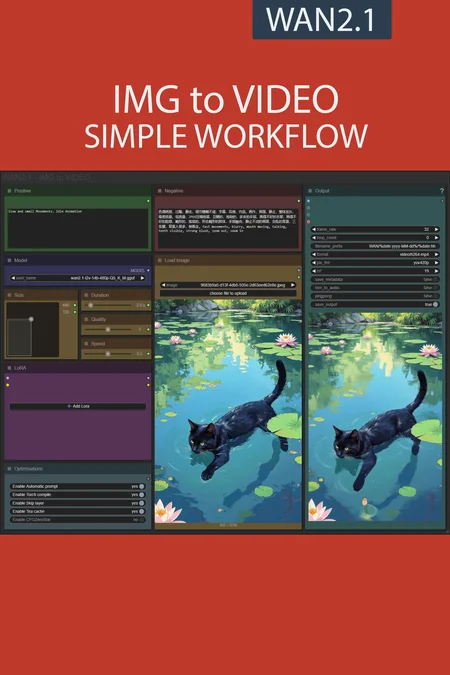
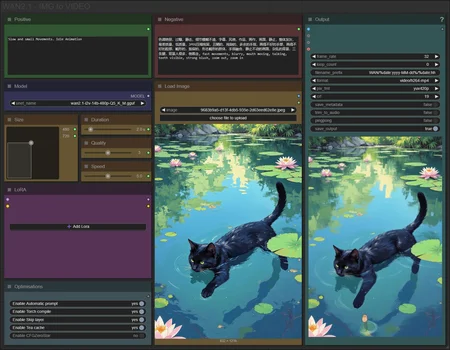
✨ WAN2.1 — Image to video — Simple Workflow
A clean, all-in-one WAN image-to-video workflow built entirely with the UmeAiRT Toolkit for ComfyUI.
Only 12 nodes. No spaghetti wires. Just load your model, write your prompt, and hit generate.
⚠️ IMPORTANT — Nodes 2.0 Required
This workflow is built for the Nodes 2.0 (Vue) interface of ComfyUI. If you don't enable it, the workflow may have display problems.
How to activate Nodes 2.0:
Open ComfyUI
Go to Settings (⚙️ icon, bottom-left)
Find "Use Nodes V2 (Vue)" and toggle it ON
Refresh the page
Load the workflow
If you prefer the classic interface, check out my Legacy version of this workflow instead (link).
🎯 Features
Text-to-video generation
Automatic download of models in auto version
Built-in SeedVR2 upscaler — high-quality tiled upscaling (toggleable on/off) Slower than a classic upscaler, but significantly better quality
Full metadata embedding — your images are saved with all generation parameters, ready for online publishing and remixing
3 LoRA slots — with individual on/off toggles and strength control and you can connect as many other lora modules to each other for as many LoRA as you want.
📦 Custom Node Required
Only one custom node to install:
Install via ComfyUI Manager (search "UmeAiRT") or use the UmeAiRT Auto-Installer.
The Toolkit packages everything internally — upscaler, face detailer, metadata saver. No other custom nodes needed.
📂 Files you need (in manual version)
For base version
I2V Model : 480p or 720p
In models/diffusion_models
For GGUF version
I2V Quant Model :
- 720p : Q8, Q5, Q3
- 480p : Q8, Q5, Q3
In models/unet
Common files :
CLIP: umt5_xxl_fp8_e4m3fn_scaled.safetensors
in models/clip
CLIP-VISION: clip_vision_h.safetensors
in models/clip_vision
VAE: wan_2.1_vae.safetensors
in models/vae
Speed LoRA: 480p, 720p
in models/loras
ANY upscale model:
Realistic : RealESRGAN_x4plus.pth
Anime : RealESRGAN_x4plus_anime_6B.pth
in models/upscale_models
Description
Simple version of 2.1 workflow.
A balance between functionality and ease of use.
FAQ
Comments (30)
I wonder where can i connect ReActor in this workflow? I usually add it after VAE decode. Thanks!
great job! but I had a problem, after updating ComfyUI, I switched from 1.7 to version 2.1. Everything works, but as a result I get only a black picture.. Does anyone know what's wrong and how to fix
it?
That's probably the 0.3.29 update with the frontend update that broke everything.
man...just keep trying to update all nodes and comfy. I know....but it works after a few tries I guess
Thank you for this workflow and it works very well! However, when I attempt to run the model with skip layer, I receive the following error: transformer_options not found in extra_args, currently SkipLayerGuidanceWanVideo only works with TeaCacheKJ. Please help!
to anyone having florence "davit" issues just add NYJY/joycaption pass instead.. florence I have a feeling works for people still but may have broken for others, not an issue with this workflow just something to keep in mind
hi,error with 2.1 simple V: Prompt execution failed
Cannot execute because a node is missing the class_type property.: Node ID '#262'
Strange you have last version of ComfyUI and ComfyUI frontend?
Could you make it that if you choose the florence2 automatic captions it adds the manual positive prompt to the end?
nevermind, it was an issue with the positive prompt text node, adding a simple text node fixed it.
I see that the second pass sometimes screws up a few things (and a few Loras). Is there an easy way to disable it? I tried a few things but they usually error out.
oh, workflow is great, btw. I use an older version with a few modifications that my tiny brain was able to do
This is amazing tbh, great work. Btw, do you know if it's possible to make the video longer?
Fantastic workflow, it is always been my go to. For some reason today the base version, it only produce black videos, the gguf one is fine, I can't understand why. No errors in console.
I updated alla also to the last front end version. I tried swith also to nightly and stable version of comfy but nothing seems to work. Help pls!
tried to reimport the base workflow still nothig, but I changed the model loader on the gguf one with the base loader and it works... I still can't undertand why
Is this workflow upscalable? I don't see the upscale node.
Upscaler is included only in complete version
Cannot find a working triton installation. Either the package is not installed or it is too old. More information on installing Triton can be found at: https://github.com/triton-lang/triton Set TORCHDYNAMO_VERBOSE=1 for the internal stack trace (please do this especially if you're reporting a bug to PyTorch). For even more developer context, set TORCH_LOGS="+dynamo"
https://github.com/woct0rdho/triton-windows/releases use this. if you use pytorch 2.7/2.8 get triton 3.3. if you use pytorch 2.6 or under get triton 3.2.
@Sirkura I've installed it, (I have torch 2.5.1, so I used the 3.2) but I still get the same error.
Weird thing tho:
I have the portable version, so to instal it I opened the terminal on the python_embeded folder and typed
python.exe -m pip install -U 'triton-windows<3.3'
and yet it installed triton under AppData\Local\Programs\Python
I thought it was going to get installed into the embed folder.
I've got this same issue. Triton does seem to be installed. I've got pytorch 2.7 and triton 3.3 but still encountering this same failure when running the workflow.
Strange, i have the same problem as you before, but now it suddenly runs correctly. I have no idea whats going on .
MathExpression|pysssss
Compex types (LATENT/IMAGE) need to reference their width/height, e.g. a.width
CalledProcessError: Command '['E:\\ComfyUI_windows_portable\\python_embeded\\Lib\\site-packages\\triton\\runtime\\tcc\\tcc.exe', 'E:\\Temp\\tmpmakjzmba\\__triton_launcher.c', '-O3', '-shared', '-Wno-psabi', '-o', 'E:\\Temp\\tmpmakjzmba\\__triton_launcher.cp312-win_amd64.pyd', '-fPIC', '-lcuda', '-lpython3', '-LE:\\ComfyUI_windows_portable\\python_embeded\\Lib\\site-packages\\triton\\backends\\nvidia\\lib', '-LC:\\Program Files\\NVIDIA GPU Computing Toolkit\\CUDA\\v12.6\\lib\\x64', '-IE:\\ComfyUI_windows_portable\\python_embeded\\Lib\\site-packages\\triton\\backends\\nvidia\\include', '-IC:\\Program Files\\NVIDIA GPU Computing Toolkit\\CUDA\\v12.6\\include', '-IE:\\Temp\\tmpmakjzmba', '-IE:\\ComfyUI_windows_portable\\python_embeded\\Include']' returned non-zero exit status 1. Set TORCHDYNAMO_VERBOSE=1 for the internal stack trace (please do this especially if you're reporting a bug to PyTorch). For even more developer context, set TORCH_LOGS="+dynamo"
same error, did you find a fix?
How can we support you?
Here Buy UmeAiRT a Coffee
@UmeAiRT I bought you a coffee...thank you for all your workflows.
@yajukun Thanks!